



Top 10 Best Document Management Systems In Google In 2022 – Inventiva
Friday, 02 September 2022
A document management system (DMS) is a software programme that creates, saves, manages, and tracks electronic documents as well as images of paper-based documents. A document management system (DMS) can capture, distribute, and track records. It’s also helpful in managing channel processes, output systems, and information retrieval systems.
About Document Management System (DMS)
A document management system (DMS) is a software-based system for creating, storing, managing and tracking electronic documents and images of paper-based documents. DMS began as a method of converting paper papers to digital copies. As a result, DMS is also known as an electronic filing cabinet. A DMS can have a big impact on how your business operates. It frees up your time to focus on the most critical aspects of your organization by making document capture, digitization and labelling quick and straightforward.
As a result, while determining which DMS service is best for you, consider both the capabilities you require today and those you may need as your organization grows.
The Advantages of Using an Electronic Document Management System
Converting enormous mountains of paper documents to digital may appear to be a difficult task. Businesses who invest in an electronic document management system, on the other hand, give themselves the basis to assist expedite workflows and scale business-critical procedures. Here are the main benefits of establishing an electronic document management system for your organization, in addition to increasing business productivity.
The cost of commercial real estate is rising, as is storing paper documents. A software-based DMS that can eliminate the need for file cabinets, boxes, and storage bins is a great asset to any business, freeing up valuable office space. Documents that must be retained in hard copy can frequently be held in less expensive locations, such as an offsite warehouse or vault.
Document security is crucial for enterprises of all sizes to protect sensitive data. DMS allows for more control over critical data, and access to documents can be restricted at the folder level for different groups of people. A DMS also keeps track of who had viewed a record, when it was accessed, and how it was edited. The managed documents are highly traceable and can be labelled to enable automated warnings.
Certain documents’ compliance requirements can be rather complex. Noncompliance can result in fines, licence revocation, and, in some situations, criminal charges. Sarbanes Oxley and HIPAA, for example, are federal and state regulatory rules that require tight security and privacy guidelines.
Document management solutions lower the likelihood of noncompliance. Records retention schedules, for example, can be automated, and new records can be categorized and stored more readily.
Searching for and retrieving papers might take a long time – and we all know that time is money. The average worker spends 30 to 40% of their day looking for printed documents. At the same time, businesses pay an average of $20 in labour to file a copy, $120 to find a misfiled record and $220 in work to reproduce a lost document. These wasteful document management expenditures limit an organization’s budget, impede productivity, and limit its growth potential.
A document management system can be a handy and time-saving tool. DEPENDING ON THE SOLUTION USED, a DMS can retrieve files based on a word or phrase in a document. An easier connection with corporate applications facilitates access to essential information. Records can also be accessed remotely with DMS. Documents can be accessed from anywhere at any time as long as there is an internet connection.
An advanced document management system substantially simplifies accessing content and collaborating swiftly. Documents acquired from various sources can be accessible from a variety of locations. Electronic imaging enables document sharing over a network via email or the Internet. DMS increases the visibility of business processes and allows for improved workflow monitoring. External users with authorization can be granted and monitored access.
Every document management solution should include a data backup and disaster recovery plan. Paper documents are preserved from the fire, flood, and other disasters with digital archiving as a backup. Documents in a DMS are highly traceable and can be traced using various criteria. Document tracking capabilities lessen the possibility of records being misfiled or lost after reading.
Time is valuable, and saving time is a clear advantage of DMS, which translates directly into higher production. Document retrieval that is faster and more efficient can raise employee morale and increase client satisfaction. Document management solutions are also scalable, allowing them to adapt to the changing needs of any organization.
Document Management Software Must-Have Features
While each company’s document management needs vary, there are some essential aspects that every document management system should have.
a. Access limitations that can be customized as part of the security features
The ability to adjust access rights is an essential component of protecting your data with any DMS. Controlling access gives you more flexibility in cooperating and using your DMS. You can provide different employees, departments, teams, event vendors, and customers access specific files.
Without this flexibility, your DMS will be far more limited and may not be of much use beyond a few small corporate use cases. Nonetheless, access rights can be used by enterprises of all sizes and industries. As a result, access limitation is a must-have feature for any DMS.
b. Capability to store a variety of file kinds
Businesses utilize a wide range of files; therefore, document management solutions must be adaptable enough to store a wide range of file formats. Suppose your DMS only supports a limited number of file types. In that case, you may require more than one DMS, thereby increasing the workload on your team and duplicating your business information systems. In general, the more a single system can do, the better – that flexibility can be used to optimize your operation.
c. Search functions for rapid access to and location of critical files
Your DMS is designed to make it easier to utilize and access documents. You may not be able to access essential papers if you cannot search your files. Different document management systems provide various search options. The DMS you use may determine which search features are most advantageous for your individual use case.
d. Maintain a history of documents for auditing and tracking purposes.
By tracking and auditing document alterations, you may more efficiently manage your documents and guarantee that only changes are made to your files. This aids in document compliance because your internal or regulatory rules demand you to audit thoroughly. As a result, a DMS with auditing and tracking capabilities is required.
e. Document version control and backup storage
Your DMS should give you a paper trail via tracked modifications, allowing you to return to prior versions and see who has made changes to these files overtime at a glance. A backup copy should be available in the case of data loss or significant disruption.
f. Ease of use
Finally, your DMS must be simple enough to rely on and train your staff to utilize. If your system is overly complex, you risk the DMS not being adopted adequately by your organization.
Check out the list of Top 10 Best Document Management System in Google in 2022:
 1. DocuWare
DocuWare, founded in 1988, is a leading provider of document and content management software (as of 2021). It’s available in 16 languages and is used by large corporations like IKEA and Sony.
DocuWare is a company that offers digital document management and automated workflow solutions. It is appropriate for businesses of any size and in all major industries, ranging from manufacturing and retail to healthcare and government.
Key features include
Pros: The user interface is simple, intuitive, and easy to use. Thanks to the tool’s significant drag and drop feature, users may do numerous activities in multiple documents without leaving the central console.
DocuWare provides a free trial period. Its essential subscription includes 20GB of storage for four users for $300 per month.
 2. Dropbox Business
Dropbox is a cloud-based file storage and collaboration tool built for the modern workplace to decrease busy work and allow you to focus on what is essential. Dropbox Business enables your organisation to expand without boundaries while maintaining complete control over critical company information and user activities. Dropbox Business is best suited for cooperation among a group of users.
Key characteristics include:
Pros: Dropbox Business offers a large quantity of storage space for a business. It is an excellent tool for our team’s collaboration. Working on shared projects, updating documents, and creating system backups are simple tasks.
Price: There is a free trial available. The Standard plan is $12.50 per month (starting at five users). Purchase the Advanced plan for $20 per month per user to gain full access to more sophisticated features and limitless storage.
 3. eFileCabinet
EFileCabinet provides enterprises with intelligent organization, workflow automation, secure file-sharing, and eSignature requests on a single platform. This solution is intended for the content management of enterprises of all sizes in accounting, construction, real estate, manufacturing, and healthcare.
Key features include
Pros: Provides on-premise and cloud choices, allowing clients to select the optimal package for their needs.
Price: There are three subscription packages available from eFileCabinet:

4. Google Drive
Google Drive is a cloud-based DMS that anybody with a Google account can access. It can effortlessly store, sync, and share files. This tool is best suited for collaborative teams working on real-time projects. Google Drive’s shareability and real-time editing capabilities elevate professional collaboration to a new level.
Key characteristics include
Pros: Because of its user-friendly interface, Google Drive is the clear winner in terms of usability. Its powerful built-in search engine is a standout feature, allowing users to search files by type and owner.
Price: Free, single users, get 15GB of storage, and upgrade to more storage for a fee (billed by month). For those wishing to deploy GSuite in a corporate setting, the Basic Plan includes 30GB for $6 per user per month. Business’s most popular option provides unlimited cloud storage for $12 per user each month. Google’s website has a detailed list of pricing alternatives.

5. Laserfiche
Laserfiche offers intelligent document management and business process automation. It removes manual processes and automates repetitive operations, hence speeding up company processes through powerful workflows, electronic forms, document management, and analytics. The Laserfiche platform is appropriate for the content management of enterprises of all sizes in accounting, construction, education, real estate, manufacturing, and healthcare.
Key features include
Pros: With automation, Laserfiche improves efficiency by improving the application process, simplifying case management, and minimizing paperwork for employee onboarding. Because all the information is in one location, Laserfiche makes it simple to produce, store, and transmit digital documents inside the business, speeding up a correspondence and making data-driven choices.
Price: The product is available on a monthly subscription for $50.
 6. LogicalDOC
By focusing on fast document retrieval and business process automation, LogicalDOC promises to assist enterprises to acquire control over document management. LogicalDOC’s adaptability allows it to meet a wide range of requirements. It is best suited for small, medium, and big companies like banks, healthcare, mechanical industries, and medium-sized towns.
Key features include:
Pros: LogicalDOC is an easy-to-use application for project planning, execution, and management.
Price: LogicalDOC Community is open-source software that is free to use. Larger packages, including consultation, are available. More information can be found on LogicalDOC’s website.
 7. M-Files
M-Files is a next-generation intelligent information management platform that boosts corporate performance by making it easier for people to access and use information. Unlike traditional ECM systems or content services platforms, M-Files unites systems, data, and content across the organization without disrupting existing systems and processes or necessitating data migration.
M-Files is appropriate for small to medium-sized organizations that rely primarily on paper-based operations. Their packaging is distinctive. Customers may select whatever features they want and decline others, making them versatile and cost-effective.
Key features:
Pros: M-Files is exceptionally secure and provides enough cloud storage. It is simple to access material across devices. It makes it simple to find articles by using the search tool. Furthermore, exchanging files across the team is simple, especially while working on the same project.
N-files provides a free trial. As M-Files is focused on providing you with the same capabilities you require, the cost after the free trial is determined by the features you need and the number of users.
 8. OnlyOffice
Ascensio Systems SIA created OnlyOffice, a software office suite and DMS. This app, which provides a 3-in-1 editing suite, has been dubbed “The SwissArmy App for the Microsoft Universe” by critics. OnlyOffice offers a document management platform that is ideal for various educational organizations (schools, higher education institutes), small and medium-sized businesses, industries, and government agencies.
Basic features:
Price: They are presently offering a 180-day free trial of their cloud-based solution. The cost varies depending on the edition. When purchased as a three-year subscription, the Cloud-based Edition can cost as little as $3 per month per user. Enterprise, Integration, and Developer editions are also available.
 9. Microsoft SharePoint
Microsoft’s document management solution was first introduced in 2003. Microsoft’s other products were better integrated with each upgrade, making SharePoint one of the most extensively used DMS.
SharePoint is ideally suited for large enterprises to segment their access policies and controls due to its capacity for lists and Integration across the whole Microsoft ecosystem of products.
Basic features:
Pros: The solution is simple to use, set up, and deploy, and it assures data security and role-based access to SharePoint sites.
SharePoint does not provide a free trial, although SharePoint Online Plan One begins at $5 per user per month. The most expensive package, Office 365 E3, costs $20 per month per user. Check the company’s website for complete pricing information.
 10. VIENNA Advantage
VIENNA Advantage, founded in Germany in 2005, takes pride in being the first DMS to be securely linked with enterprise resource planning (ERP) and customer relationship management (CRM) solutions. VIENNA Advantage is an excellent solution for medium and large-sized businesses searching for a dependable, scalable, cost-effective, and well-supported DMS with ERP and CRM connection.
Key aspects include:
Pros: The tool combines enterprise resource planning, document management, and customer relationship management.
The community edition is open source and completely free. With a meeting with a VIENNA Advantage representative, larger packages are available.
- Published in Uncategorized
No Comments
IRIScan Desk 6 Pro Scanner Review
Friday, 02 September 2022
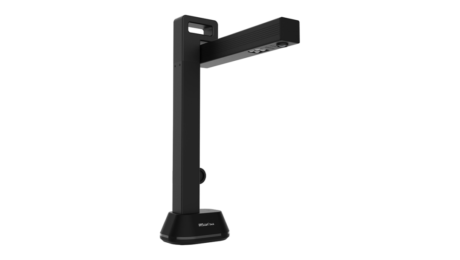
Scanning from above is just the start
I focus on printer and scanner technology and reviews. I have been writing about computer technology since well before the advent of the internet. I have authored or co-authored 20 books—including titles in the popular Bible, Secrets, and For Dummies series—on digital design and desktop publishing software applications. My published expertise in those areas includes Adobe Acrobat, Adobe Photoshop, and QuarkXPress, as well as prepress imaging technology. (Over my long career, though, I have covered many aspects of IT.)
The IRIScan 6 Pro, more than just an overhead book scanner, packs several handy features that facilitate teaching, presenting, and online meetings.
We just hung an Editors’ Choice award ribbon on the IRIScan Desk 6 Business as our new favorite overhead or book scanner. The company’s Desk 6 Pro is a step down from that device, and its $349 price is $100 less. But it’s still a lot more scanner than the Desk 5 Pro we praised in 2019. Its lower-resolution lens and less robust feature list keep the Desk 6 Pro from challenging its sibling for top honors, but it’s a more-than-capable aide for teachers, presenters, and videoconference chairs.
As we noted in our Desk 6 Business review, IRIScan’s sixth-generation overhead-scanner family includes three models, up from the previous lineup’s two—the Desk 6, Desk 6 Pro, and Desk 6 Business, in ascending order. Each step up brings a $100 price increase and enhanced hardware. The Desk 6 Pro, for instance, employs a 21-megapixel camera illuminated by four LEDs, compared to the Business model’s 32 megapixels and six LEDs. (The base Desk 6 model has a 12-megapixel sensor.)
Both the Pro and Business scanners support pages up to A3 (tabloid) size or 11 by 17 inches. Both come with a desktop button that lets you execute scans from the scanner itself as an alternative to using a PC with IRIScan software. The Pro lacks the Business model’s foot pedal that frees both hands for arranging content on the scanning base or turning book or magazine pages.
The Desk 6 Pro measures 5.5 by 4.7 by 11.1 inches (HWD) and weighs 2.5 pounds. That’s slightly smaller and lighter than the Desk 6 Business and significantly smaller and almost a pound lighter than its immediate competitor the CZUR ET16 Plus (a February 2018 PCMag favorite).
Overhead scanners work more like cameras, snapping a picture of content on the scanning base instead of passing a page over the scanner’s sensors as a sheet-fed document scanner does (or passing the sensors over the content as a handheld scanner does).
Not only is the Desk 6 Pro’s 21-megapixel CMOS sensor capable of snapping stills of your content, but it can also capture video at up to 30 frames per second with audio via a built-in microphone. This lets you use the scanner as an overhead projector for presentations, online learning, and Zoom meetings and other videoconferences.
Feature- and capacity-wise, the Desk 6 Pro and Desk 6 Business are fairly similar. Both offer auto focus, bar code scanning, and business card scanning via the company’s Cardiris software. (More on the software bundle in a moment.)
Like the Business model, the Pro unit offers a self-timer that automatically shoots at predefined intervals, giving you a chance to, say, turn the page or swap out the medium. The scanner provides automatic document detection and automatic de-skewing and cropping, along with what IRIS calls artificial intelligence features such as page-turn detection, flattening the curve of a book image, erasing fingers that intrude into the image, front and back cover detection, and automatic edge filling of damaged documents.
Connectivity and power come via a USB 2.0 cable. (The Business model adds an AC adapter.) The scanner’s two USB ports (the second for scanning to flash drives) are located at the base of the upright beam as shown below.
Finally, like the Desk 6 Business, the Desk 6 Pro has a recommended daily duty cycle of up to 5,000 pages (10 times as many as its predecessor). Its resolution of 300 dots per inch (dpi) tops the CZUR scanner’s 220dpi (though we expect an upgrade to the latter any day now).
Most scanners require some type of interface and document management software to convert scanned pages to searchable or editable text. The Desk 6 Pro uses IRIScan Desk to scan, convert, and save scanned text in the format you desire. Supported output formats include image, text, and searchable PDF; Microsoft Word and Excel; EPUB for ebooks; plain text; JPG; MP3; and WAV.
The software’s automatic edge detection straightens the content after scanning, so you don’t have to be precise when placing a book or magazine on the scanning base. You can use the Desk 6 Pro with your webcam to create multi-camera videos: Video and sound from both the scanner and the webcam record simultaneously and are combined in one video file played back on a single screen.
Although the Desk 6 Pro ships with the company’s Cardiris in addition to IRIScan Desk, if business card scanning and contact archiving is your primary application, you’d probably be better off with a less costly handheld or wand scanner like the IRIScan Book 5 Wi-Fi.
For more sophisticated applications, such as capturing MRZ codes and exporting metadata to XLS or structured XML files, you can add IRISPowerscan. Another software package, Readiris Corporate, saves your videos in high-definition AVI, MP4, FLV, and WMV video formats. However, the two apps together cost over $1,000, and there’s considerable feature overlap between them and IRIScan Desk.
IRIS rates the Desk 6 Pro’s scanning speed at 1 page per second or 60 pages per minute (ppm). While it does indeed snap a picture in less than a second, that doesn’t include the time you spend moving content on and off the scanning base and turning book or magazine pages, nor the software’s converting the text to desired formats and saving files.
As with the Business model, I never got close to 60ppm of throughput in my tests. Using the IRIScan Desk software on our Intel Core i5-based Windows 10 Pro testbed with a USB connection, I was able to digitize pages in about 3 seconds apiece, or 20ppm. When scanning to searchable PDF rather than image PDF format, the scanner itself doesn’t really work any harder, but the software does. IRIScan Desk managed to produce and save searchable PDF files at a rate of about 18ppm, not much slower than its image PDF performance.
As for accuracy, the Desk 6 Pro tied its Business sibling at font sizes down to 6 points error-free with both Arial and Times New Roman. Nowadays, that score is about average. The CZUR EZ16 Plus managed 6 points with Arial and a ho-hum 10 points with Times New Roman, but even 10 points without mistakes is more than adequate for most office applications.
I also scanned a bunch of business cards into Cardiris. As usual, the software worked fine, as long as I stuck to plain white or lightly colored cards with common serif and sans-serif typefaces. For fancily designed or dark business cards, you’ll probably want to type in the data yourself.
The biggest attraction of the IRIScan Desk 6 Pro scanner is that it costs $100 less than the Desk 6 Business model. To be sure, the Business flagship’s higher-resolution camera and few extra convenience features, especially its foot pedal, are attractive, but the Pro model is more than enough machine for all but the most taxing applications. If your small office or workgroup doesn’t need the ultimate overhead scanner, the Desk 6 Pro is a first-class alternative.
The IRIScan 6 Pro, more than just an overhead book scanner, packs several handy features that facilitate teaching, presenting, and online meetings.
Sign up for Lab Report to get the latest reviews and top product advice delivered right to your inbox.
This newsletter may contain advertising, deals, or affiliate links. Subscribing to a newsletter indicates your consent to our Terms of Use and Privacy Policy. You may unsubscribe from the newsletters at any time.
Your subscription has been confirmed. Keep an eye on your inbox!
Advertisement
I focus on printer and scanner technology and reviews. I have been writing about computer technology since well before the advent of the internet. I have authored or co-authored 20 books—including titles in the popular Bible, Secrets, and For Dummies series—on digital design and desktop publishing software applications. My published expertise in those areas includes Adobe Acrobat, Adobe Photoshop, and QuarkXPress, as well as prepress imaging technology. (Over my long career, though, I have covered many aspects of IT.)
In addition to writing hundreds of articles for PCMag, over the years I have also written for many other computer and business publications, among them Computer Shopper, Digital Trends, MacUser, PC World, The Wirecutter, and Windows Magazine. I also served as the Printers and Scanners Expert at About.com (now Lifewire).
- Published in Uncategorized
Kyocera Document Solutions Inc. Selects Anaqua for Integrated IP Management
Friday, 02 September 2022

June 14, 2022 19:00 ET | Source: Anaqua Anaqua
Boston, Massachusetts, UNITED STATES
BOSTON, June 14, 2022 (GLOBE NEWSWIRE) — Anaqua, the leading provider of innovation and intellectual property management solutions, today announced that global document solutions provider Kyocera Document Solutions Inc. has selected Anaqua’s AQX platform for integrated management of the company’s extensive patent portfolio.
Headquartered in Osaka, Japan, Kyocera Document Solutions Inc. provides customers worldwide with a range of products, business applications, and consultative services to optimize and manage their document workflow, greatly enhancing operational efficiency.
Kyocera Document Solutions Inc. chose Anaqua’s AQX Corporate platform as its primary patent management system with patent annuity payments from Anaqua Services fully integrated to unify patent management and payment management. Through this integrated functionality of the AQX Corporate platform and the availability of detailed, up-to-the-minute data visualization dashboards, Kyocera Document Solutions Inc. will be able to better manage, maintain and optimize the value of its portfolio.
“We were looking for an integrated approach that would enable us to manage our patent portfolio more efficiently and holistically,” said General Manager of Legal and Intellectual Property Division, Seitaro Yoshida of Kyocera Document Solutions Inc. “AQX’s comprehensive intellectual property management platform enabled global IP management for us. During implementation, Anaqua and Kyocera Document Solutions Inc. worked closely together to build up a new workflow. Anaqua listened and were responsive to our needs, enabling us to achieve the best fit for our operations.”
“We are delighted to have been selected by Kyocera Document Solutions Inc. to help them manage their IP as the company continues in its goal of helping other organizations around the world put knowledge to work to drive change,” said Bob Romeo, CEO of Anaqua. “The agreement not only reflects our strength in the business solutions sector, but also our increasing role in the Japanese market, where more and more companies are entrusting Anaqua with their IP management.”
About Anaqua
Anaqua, Inc. is a premium provider of integrated intellectual property (IP) management technology solutions and services for corporations and law firms. Its IP management software solutions, AQX and PATTSY WAVE, both offer best practice workflows with big data analytics and tech-enabled services to create an intelligent environment designed to inform IP strategy, enable IP decision-making, and streamline IP operations, tailored to each segment’s need. Today, nearly half of the top 100 U.S. patent filers and global brands, as well as a growing number of law firms worldwide use Anaqua’s solutions. Over one million IP executives, attorneys, paralegals, administrators, and innovators use the platform for their IP management needs. The company’s global operations are headquartered in Boston, with offices across the U.S., Europe, and Asia. For additional information, please visit anaqua.com, or on LinkedIn.
About Kyocera Document Solutions Inc.
Kyocera Document Solutions Inc. is a global leading provider of total document solutions based in Osaka, Japan. The company’s portfolio includes reliable and eco-friendly MFPs and printers, as well as business applications and consultative services which enable customers to optimize and manage their document workflow, reaching new heights of efficiency. With professional expertise and a culture of empathetic partnership, the objective of the company is to help organisations put knowledge to work to drive change.
source
- Published in Uncategorized
The best apps to turn your iPhone into a document scanner
Friday, 02 September 2022

AppleInsider is supported by its audience and may earn commission as an Amazon Associate and affiliate partner on qualifying purchases. These affiliate partnerships do not influence our editorial content.
Even in the era of working from home, many people likely don’t have a traditional scanner in their home office. If you fall into that camp, these apps can probably save you from needing to buy one.
Scanners used to be an essential piece of office equipment — and scanning or digitizing documents is still an important task for many workers. Even if you don’t need to scan anything for work, saving a copy of receipts, legal forms, and other documents is a smart way to keep your life organized.
However, these days, smartphone-based scanner apps are good enough to take the place of scanners for the average user.
There are a variety of scanner apps available for iPhone with varying designs, scan qualities, and premium features. We’ve selected the very best scanner apps on the App Store for all of your document scanning needs.
One of the best apps to easily scan documents, add signatures, and perform other paper-related tasks is probably one you already have on your iPhone: Apple Notes.
Apple Notes has been steadily gaining a number of productivity features in recent years, and in 2020, Apple added the ability to scan documents using an iPhone’s built-in camera.
You can even use Continuity to scan notes from an iPhone or iPad to a Mac, or digitally sign a document using the Notes Markup feature. Best of all, Apple Notes is free and tightly integrates with Apple’s ecosystem.
It’s available from the App Store here.
If you’re just looking to digitize documents every now and then, Adobe Scan is a robust smartphone scanning app that can help you do that. It doesn’t pack the features of some of the others on this list, but it works well for those important paper documents.
Adobe Scan is simple and straightforward to use, and allows users to capture clear and clean PDF scans of documents. The app also features text recognition, meaning you can perform tasks like creating new contacts from business cards.
The app is free to download and use, but offers additional premium features for $9.99 a month — including the ability to take multiple scans and combine them into one document and export PDFs to Word or Powerpoint.
It’s available from the App Store here.
Scanner Pro is a well-reviewed scanning app that was chosen by the App Store editorial team as a top pick. It’s a robust tool for digitizing and organizing your physical documents.
You can scan an app in seconds and save digital copies with smart detection of borders, perspective, and shadows. From there, an optical text recognition feature lets you search through the text of your scans. All scans can also automatically synced via various cloud services.
The app is free to use, but you’ll need to purchase a subscription for $19.99 a year to remove watermarks, search text, or password protect your documents.
It’s available from the App Store here.
Users who rely on Microsoft’s suite of productivity software in their day-to-day lives will feel right at home with Microsoft Office Lens. It offers the tightest integration with Microsoft Office, making it a good choice for those who use the app suite frequently.
It offers a barebones scanning interface that prioritizes simple usage. However, there are easy export options that allow users to create PowerPoint or Word documents out of their scans. It also features top-tier text recognition.
Microsoft Lens is free to download and use, but you’ll need an Office 365 subscription to unlock some of the tighter integrations — including syncing and exporting to OneDrive options.
It’s available from the App Store here.
SwiftScan is one of the most powerful scanning apps available, featuring additional capabilities that you won’t find on Microsoft Lens or Adobe Scan.
It sports organization features like smart file naming, iCloud syncing, and custom folders. Scan quality is industry-leading, as is the best-in-class optical text recognition. If you scan a lot of physical documents, this is a solid choice.
To use the app’s full feature set, you’ll need to pay $5.99 a month or $34.99 a year for a premium subscription, which includes some of the aforementioned features alongside encryption and auto-syncing to a variety of cloud platforms.
It’s available from the App Store here.
Apple has reached a settlement with Kosta Eleftheriou, a developer who sued the company over scams in the App Store and copycat keyboards.
Withings has a new smart scale called Body Comp, which in conjunction with a new subscription service called Health+, fully integrates into Apple’s Health app.
Police from around the country have been using data culled from thousands of apps for suspect surveillance, often without search warrants.
MSI’s Creator Z17 notebook is billed as a productivity workhorse with a sleek design. On paper, it’s even capable of taking on Apple’s creative powerhouse, the 16-inch MacBook Pro. Here’s how they compare.
The iPad Pro and the MacBook Air are powerful and reasonably-priced ways to work. Here’s what to consider when trying to choose one over the other.
We have both M2 Macs here in our testing studio. We’re comparing the M2 MacBook Air against the M2 MacBook Pro to see how they stack up and how much of a difference the thermal limitations make.
Master & Dynamic’s MW75 are high-quality headphones offering ANC features, directly competing against Apple’s AirPods Max. Here’s how the premium personal audio accessories compare.
The new Surface Laptop Go 2 is a thin and light Windows notebook at a low cost, and has been positioned by Microsoft to be a competitor to Apple’s latest M2 MacBook Air. Here’s how the ultra-portable notebooks compare.
Deals: save up to $1,000 on LG OLED UltraFine monitors
Samsung mocks iPhone 14 in latest ad campaign
Razer Kishi V2 review: Contender for best iPhone game controller
Apple settles lawsuit with developer over App Store scam apps
USB4 Version 2.0 to offer up to 80 Gbps data transfer
Withings Body Comp scale has better metrics & Health app connectivity
A secret tool lets police conduct mass surveillance using app data
Razer unveils new Kishi gaming controller for iPhone
Apple has reached a settlement with Kosta Eleftheriou, a developer who sued the company over scams in the App Store and copycat keyboards.
Withings has a new smart scale called Body Comp, which in conjunction with a new subscription service called Health+, fully integrates into Apple’s Health app.
Police from around the country have been using data culled from thousands of apps for suspect surveillance, often without search warrants.
The second-generation Razer Kishi is here for iPhone users with a new design, better buttons, and a companion app. How does it stack up to the Backbone One?
The Marshall Emberton II is a stylish speaker that builds on the positive reputation of its processor. While there are cheaper speakers out there,
Almost as important as the Apple Watch itself, is the band that you choose to express yourself. Here are our picks for bands and straps to pair with Apple’s wearable device.
The Nikon Z 30 is the camera maker’s most affordable mirrorless shooter yet, and it’s designed with social media and video creators in mind.
Bring gaming on your iPhone or Apple TV closer to the console experience, by using one of these game controllers with your Apple devices.
With the SwitchEasy four-in-one MagPower multi-charger, you can power up all your gear with a single device — including your Apple Watch with an Apple-certified puck.
The Benks Grand Pro Headphone Stand for AirPods Max is a welcome upgrade over the original. However, it introduces complexity where there was none before — while also ignoring an obvious problem.
Keep tabs on the air quality of your home — including potentially deadly radon levels — with the Airthings View Plus.
Apple didn’t make a Magic Keyboard for iPad mini 6, and Lululook’s Magnetic Keyboard perhaps acts as a testament to why.
As a recent addition to the Serena Shades by Lutron lineup, the new architectural honeycomb shades are an essential part of any HomeKit smart home.
AppleInsider is one of the few truly independent online publications left. If you love what we do, please consider a small donation to help us keep the lights on.
If you love AppleInsider and want to support independent publications, please consider a small donation.
- Published in Uncategorized
Document Management Best Practices in 2022
Friday, 02 September 2022

Keeping on top of critical documents and managing business data are some of the most important things your company can do. If you have installed a document management system, we’ve got some tips to help you run it effectively.
Implementing a document management system (DMS) is a great first step to keeping your business documents organized. However, you’ll need to adhere to some document management best practices to maintain effective document management, and we’ll show you how.
The good news is that many of the leading document management software solutions make it easy to keep track of your documents and ensure your business is compliant with local legislation. That doesn’t mean there’s no effort on your part, and below are the top document management best practices to help you get started.
Document management system best practices include accurate indexing and filing of electronic documents, creating a document access hierarchy and carrying our regular audits.
The best business document management system is the one that’s easy to use and full of features to make your life easier. Such features include automations, file versioning, collaboration options and robust security for your files.
Some of the document management best practices featured below may seem obvious. Thankfully, that means they’re easy to understand and implement; you need only ensure you remain consistent with them to have a continuously robust document management system in place. Let’s go through them.
The first step your business needs to take is identifying which document management system is right for you. While many of the options are similar, they’re not the same, and choosing one that doesn’t meet your needs can be a waste of time and money.
If your business creates a lot of new documents that you need to collaborate on, then something like Microsoft SharePoint or Egnyte are good options, as both offer Office 365 integration. Alternatively, if you simply need a space to store and manage contracts, DocuWare is a terrific option that also allows you to digitally sign your documents.
To ensure your documents are easily accessible, it’s vital that you index each new document and folder accurately, thus creating a consistent file structure. Prior to creating your DMS, we recommend that you make clear folder structures and create a list of categories for each document type.
Clear indexing makes it much easier to find documents when searching, and far easier for different departments to manage documents within their section of the business. When using a document management solution like M-Files, you can also label documents with tags and other forms of metadata, ensuring each document is in its proper place within your DMS.
If you’re migrating from physical documents to electronic documents, it’s good practice to make digital copies of your paper documents. It may be a daunting task, but scanning documents and transferring them to an electronic digital management system ensures that sensitive documents remain safe and accessible.
Paper documents are much easier to lose, and a physical filing cabinet doesn’t have the same level of security that the best document management software provides. So moving everything over not only makes filing more efficient, it also gives far more robust protection for each document.
Not every person in your business needs to have access to every document that lives in your document management system. There will be sensitive documents — like employee contracts and performance records — that must remain confidential. Thankfully, with today’s document management software you can grant access permissions to users of your choice.
When setting up your document management system, take time to identify which senior members of staff and departments need to access specific documents. They’ll also be able to control access for their own team members, and choose which of them can access, edit and share documents.
Automations are something every business should add to their document management workflow. They make business life easier and also help you remain consistent in managing your documents and business processes.
Depending on the document management software you’re using, you can send automated notifications when a document is created or edited. You can also set automated document approval workflows for certain documents, as well as set up automated invoicing if your business works with external clients.
If you’re using an efficient document management system, you can expect to have more automation options available, and it’s a good idea to make use of them.
Assuming you want to move away from physical documents and filing cabinets, you have two options when it comes to using a document management system: on-premise and cloud storage.
On-premise document management software allows you to control your documents from a server within your business. Cloud storage means your documents exist on third-party servers — which some users don’t like.
However, cloud storage gives you an added layer of protection should your hardware get damaged or stolen, as you’re still able to access your documents in the cloud. Cloud-based software also makes it much easier to collaborate with different users, especially within remote teams, improving overall business efficiency.
If you’re looking for a space to manage documents as well as other file types, check out our top online cloud storage providers for documents.
If your business constantly updates documents, having effective version control in place is a must. File versioning means you can access previous versions of documents, and restore them if needed.
It also lets you give some users only the ability to view documents and other users the ability to view, comment and change the edited versions. Doing this means you can effectively collaborate on a document and ensure a document isn’t changed without the proper authorization.
Although it’s much easier to manage business documents with an electronic document management system, it’s still good practice to do regular audits of your documents to mitigate against potential process failures or breaches.
You can do audits internally and externally. For the former, it’s good to do audits every three to six months, while an external audit can be conducted annually.
Not only does auditing allow you to learn what documents you have in place, it also means you can understand if your business is being compliant with sector regulations. Many professional sectors will enforce an external audit, so it’s good to keep on top of everything, rather than panic when the time comes for your business to be put under the microscope.
It’s a good idea to learn what types of documents you need to keep in the document management system for a certain period of time. For example, in the financial industry, regulatory requirements state that certain documents must remain on record for a period of seven years. Before deleting a document, double-check to see if it’s against regulations to do so.
Sticking to these document management best practices will help you keep your document management system in the best shape possible. If you have signed up for a new document management system, it’s best to put the above tips in place as soon as possible, to ensure you can keep on top of your documents and business processes.
While all the above tips are important, we suggest you prioritize folder and file structure, version control and selective user permissions, as these are the core of efficient document management.
It’s also worth trying out different document management solutions before committing to one long term. This way your business can identify which solution is best for its needs and provides the best user experience, which is important considering you’ll likely be using it every (working) day.
While still at it, read our document management vs content management guide to understand which product better suits your needs.
What do you think the best practices are for efficient document management? Is there a business document management system you recommend? Which software do you currently use for managing documents? Let us know in the comments. Thanks for reading.
- Published in Uncategorized
M-Files Earns 2022 Top Rated Distinction for Enterprise Content Management Software & Document Management Software by TrustRadius
Friday, 02 September 2022

Metadata-Driven Document Management Platform Praised by Customers for ROI, Ease of Use & Workflow Automation
AUSTIN, Texas–(BUSINESS WIRE)–M-Files, a global leader in information management, today announced that the company has earned 2022 Top Rated awards for Enterprise Content Management Software and Document Management Software by TrustRadius. M-Files’ metadata-driven document management platform was praised by customers for its ability to simplify document-intensive tasks, minimize human error, and streamline processes. TrustRadius reviewers rated M-Files highest for product scalability (10), availability (9.1) and performance (9.1).
“As a global leader in information management, we are proud to once again be recognized by TrustRadius for our metadata-driven document management platform,” said Julian Cook, chief customer officer, M-Files. “Our mission is to help global enterprises manage and secure the ever-increasing amount of data brought on by digital transformation. Being recognized as a top-rated enterprise across content management and document management further signifies our commitment to delivering a best-in-class customer experience.”
M-Files seamlessly connects people with the content that they need, when they need it, regardless of where it is stored. The platform enables knowledge workers to quickly and easily find information, automate business processes, and enforce information control. With M-Files, businesses gain a leading edge by delivering better customer experiences and higher-quality work, with lower risk.
“M-Files has won two Top Rated awards in the Enterprise Content Management and Document Management software categories,” said Megan Headley, VP of research, TrustRadius. “These awards are based entirely on feedback from M-Files’ customers. Reviews on TrustRadius highlight improved data security, excellent availability and the ability to access their documents quickly.”
Since 2016, the TrustRadius Top Rated awards have become the B2B’s industry standard for unbiased recognition of technology products. As of May 11, 2022, M-Files reviews on TrustRadius include the below testimonials:
“M-Files delivers unmatched search and access management capabilities. M-Files is in my experience the absolute best document management system currently in existence. It allows for extreme flexibility to suit the needs of any organization, especially in access management. I have never seen a system other than M-Files that delivers the same functionality in document search and access management.” — Information & Technology Services Company [read the full review].
“M-Files as a metadata machine and efficiency producer. In our business, it is important to manage document access. In M-Files we may rather easily build processes around the engagement…and then store all the necessary documents under the engagement, and have the access and rights to be a heritage from the engagement level automatically.” — Management Consulting Company [read the full review].
“Measurable time savings enabled by document and information management with M-Files. MPS has been working with M-Files since 2012 and has realized significant improvements in information and document management. M-Files’ best-in-class document management functionalities have enabled more efficient work, freed up employees’ time to serve customers, and increased data security.” — MPS Enterprises [read the full review].
To learn more about the M-Files metadata-driven document management platform, visit www.m-files.com.
About M-Files
M-Files is a global leader in information management. The M-Files metadata-driven document management platform enables knowledge workers to instantly find the right information in any context, automate business processes, and enforce information control. This provides businesses with a competitive advantage and substantial ROI as they deliver better customer experiences and higher-quality work with lower risk. For more information, visit www.m-files.com.
Media:
Debra Dekelbaum, M-Files
debra.dekelbaum@m-files.com
+1 (972) 516-4210, ext. 272
Maryellen Sartori, fama PR
M-Files@famapr.com
Media:
Debra Dekelbaum, M-Files
debra.dekelbaum@m-files.com
+1 (972) 516-4210, ext. 272
Maryellen Sartori, fama PR
M-Files@famapr.com
- Published in Uncategorized
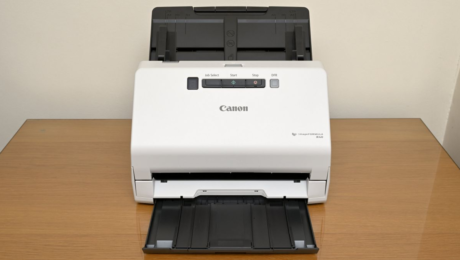
Canon imageFORMULA R40 document scanner review – Digital Camera World
Friday, 02 September 2022
- Published in Uncategorized
Ten Elements of Effective Document Control | 2020-01-01
Thursday, 01 September 2022

In the manufacturing realm, employees are often remotely located on a factory floor, a logistics or warehousing center, or in the field.
Document control is the cornerstone of quality, compliance, environmental health and safety (EHS) and process excellence. Quality process information, work instructions, job descriptions, and specifications must all be created, revised, distributed, tracked and “retired” with consistency and efficiency. While other elements of the corporation are working on various stages of automation and digital transformation, the quality department and the documents that fuel the organization remain mired in manual (or email-aided) processes.
This situation can be remedied with automation, too, but first it’s important to consider the backdrop of what makes effective document control and how it can drive operational excellence. Let’s look at ten elements to keep top of mind when considering deploying an automated document control system.
No two document types are alike, clearly. For instance, a job description has different review and approval process steps that involve different people and departments than does a work instruction or engineering specification.
A document control system designed around best practices will allow you to configure dedicated workflows for different document types and personalize the entire document cycle. A flexible solution lets you build the document control system around your processes, rather than having to adapt your processes to the requirements of a piece of software.
Another critical aspect of document control is the ability to segment metadata, or high-level information that describes each document. Examples of metadata include information on a document’s:
Metadata is important for tasks like categorizing, reporting, searching and filtering documents. A system that lets you include metadata based on document type allows you to create unique fields, categories, keywords and more. These configurable forms are essential to optimizing your document control system to meet your organization’s unique needs.
Word, Excel and PowerPoint are the standard for creating documents in most companies today. That’s why you want to look for a document control system that works well with Microsoft Office. When these systems are integrated, any changes you make in a document control form will sync with the associated Office file (and vice versa) while preserving metadata. This linkage ensures consistency between files which eliminates costly and time-consuming version control errors.
A good document control system does far more than serve as a gatekeeper for checking documents in or out of a virtual library. You also need a controlled process for review, approval and distribution according to the workflow you’ve configured for the specific document type.
Flexible routing options are a necessity, as are intelligent business rules that eliminate inefficiencies and bottlenecks in the process. What specifically should you look for?
Critical to any automated document control system is the ability to train your workforce on any changes to documents, such as procedures and specifications. During document creation and revision, you should be able to specify the type of training associated with the document and link new requirements to the employee training system.
A flexible document control system integrated with employee training lets you automatically:
Some companies put documents in a holding pattern before releasing them, allowing employees to undergo training while documents are awaiting release. This process ensures employees are knowledgeable about the new document when it goes live. Some systems even allow you to create tests to verify that people understand the updated documents.
A good document control system does far more than serve as a gatekeeper for checking documents in or out of a virtual library.
Given the inevitable document changes that are routinely required, change request and revision control both need their own customized workflows. These processes are all about driving consistency, efficiency and control to ensure:
If your organization has a tremendous number of documents and associated data within its system, you need flexible tools that help you visualize, streamline and share that data.
The ability to filter documents based on metadata—as noted previously—is only one important capability. Built-in reporting engines that let you create ad-hoc or scheduled reports on the health of the document control system are also important. Not only does this keep people on track with overdue documents, it simplifies administrative tasks like reporting and record-keeping, so that quality professionals can focus on the strategic priorities that matter most to their organization.
Data and document security are fundamental to compliance and process excellence. You need to make sure that only appropriate levels of personnel can access, approve, review and revise key documents.
Your document control system should make it easy to configure viewing, edit and approval permissions for individual users or groups. By making documents available on a need-to-know basis, you can be sure that your team is working efficiently, safely and securely, even in multi-site organizations.
With the increased prevalence of mobile devices in the workplace, many QMS applications now offer mobile document control capabilities. In the manufacturing realm, employees are often remotely located on a factory floor, a logistics or warehousing center or in the field. In situations like this, a document control system that works the same way on the mobile device as it does on a workstation brings a tremendous advantage.
Once approved, most documents should not be altered without going through the defined change request process. By converting attachments from Word or Excel to PDF, you can reduce the likelihood that users will download an editable attachment and modify it on their own. Your document control system should also keep the original, editable attachments hidden and secure for your subject matter experts to easily access as part of the change request process.
The document control system is a central hub for the information that drives your quality system. It is the foundation for compliance and continuous improvement and provides a single source of truth for the policies, practices and regulations that drive your QMS and EHS initiatives.
An effective document control system:
Backed by an integrated QMS, these capabilities deliver a powerful platform for process excellence, unleashing new opportunities to drive your business forward.
- Published in Uncategorized
vivo Y15C Debuts in Pakistan — Featuring Astounding Design, Massive 5000mAh Battery, and Side-Mounted Fingerprint Scanner
Thursday, 01 September 2022

vivo, the leading global smartphone brand, announces the launch of the newest member in the Y series, vivo Y15C in Pakistan. With the launch of the Y15C, vivo furthers its vision of catering to the youth with ‘feature-rich smartphones’ and delivering meaningful innovation across different price ranges.
Ensuring a seamless entertainment experience, the Y15C features a 6.51-inch Halo FullView™ Display with Eye Protection*. The all-new vivo Y15C has been designed to fit the lifestyles of the young consumers who are always ‘On the Go’ and want a powerful handset to keep them going throughout the day.
New Age Camera for Superior Clicks
The 13MP AI Dual Camera on the back, coupled with an f/2.2 large aperture, reveals minute details in the frame and ensures that the subject is always glowing up, thus delivering an elevated photography experience to users. It is supported by a wide range of features to capture any scenario in the full effect of clarity.
Y15C presents Face Beauty, Photo, Video, Live Photo, Time-Lapse, Panorama, Documents and Pro Mode to ease the everyday shooting experience. Additionally, it comes with a 2MP Super Macro Camera on the back that offers a 4cm focus, which helps to discover tiny and exciting worlds full of gems hidden from naked eyes.
Furthermore, for stunning selfies, the smartphone is equipped with an 8MP Front Camera.
vivo’s Y15C boasts a 5000mAh (TYP) battery that ensures plenty of life every day. A single full charge can provide up to 18.74 hours of online HD movie streaming, or 7.89 hours of intensive gameplay. It is also engineered to offer 5V/1A Reverse Charging, so your Y15C can be used to charge other devices, like a mobile power bank.
Immersive Display and Stylish Design
Y15C presents a 6.51-inch* Halo FullView™ Display with HD+ (1600×720) resolution to provide an immersive viewing experience to users while streaming videos, surfing the internet, and playing games. It is worth noting that the display’s brightness gets automatically adjusted based on the ambient conditions or surroundings. It does not stop there! Y15C also has a special Eye Protection Mode* that, when used, filters out harmful blue light to prevent eye strain for the user and keep the screen looking magnificent while remaining gentle on the eyes.
The impressive features are packed into a slender 8.28mm thin body with a 3D back cover. It is a lightweight handset offering a comfortable hold and smooth grip.
Dazzling Colours
vivo Y15C comes in two vivid hues to choose from: Mystic Blue and Wave Green.
Elevated Experience
Widely known for being a youth-centric brand, vivo has integrated several features to upgrade and enhance the youth’s experience and has customized the smartphone for the ‘On the Go’ generation.
Other Features:
The vivo Y15C runs on Funtouch OS 12 (Android 12) and comes with more special features that come in handy for day-to-day use:
Price and Availability
vivo Y15C is available for purchase across Pakistan at the price Rs. 31,999 only. vivo offers one-year warranty for vivo Y15C along with 15 days of free replacement and 6 months warranty for accessories. vivo Y15C is duly approved by Pakistan Telecommunications Authority and supports all mobile networks in Pakistan. Zong customers can also get 12GB Free Mobile Internet by using their 4G SIM card in Slot 1 (2GB Internet / month for 6 months).
- Published in Uncategorized
Strengthening digital infrastructure: A policy agenda for free and open source software – Brookings Institution
Thursday, 01 September 2022

Download
This is a Brookings Center on Regulation and Markets policy brief.
While there is little debate that digital forces are playing an increasingly crucial role in the economy, there is limited understanding of the importance of the digital infrastructure that underlies this role. Much of the discussion around digital infrastructure has focused on broadband availability (which is certainly important), but the role of free and open source software (FOSS or OSS) has gone underappreciated. FOSS—software whose source code is public, is often created by decentralized volunteers, and can be freely used and modified by anyone—has come to play a vital role in the modern economy. It is baked into technology we use every day (cars, phones, websites, etc.), as well as into various aspects of critical infrastructure including our finance and energy systems.
Like physical infrastructure, this digital infrastructure requires regular investment to further enable innovation, commerce, and a flourishing economy. However, also like physical infrastructure, there is a market failure in the private sector that leads to an underinvestment in digital infrastructure. Therefore, there is a clear need for government investment and regulation to ensure the future health, security, and growth of the FOSS ecosystem that has become indispensable to the modern economy.
In this article I lay out policy proposals based on my academic research and that of others, as well as policies that exist in other countries who are ahead of the United States on investing in this critical asset. I first discuss the overall challenge FOSS faces and the limits of existing policy in the U.S. (which are primarily focused on government usage of FOSS, not on investing in the FOSS ecosystem directly). Finally, I present 11 policy proposals separated into four domains of focus: creating an open source program office; measuring and understanding the FOSS ecosystem; enhancing the positive economic impact of FOSS; and securing the FOSS ecosystem. Although there is no silver bullet for guaranteeing the future health and growth of FOSS, these proposals will go a long way towards ensuring FOSS can continue to play its essential role in enabling the modern U.S. economy to grow and flourish.
At the highest level, the challenge related to FOSS is that despite its value to the modern economy, its decentralized and free nature leads to both an underappreciation of this value and an underinvestment in its growth and security.

Source: XKCD, https://xkcd.com/2347/, licensed under Creative Commons Attribution-NonCommercial 2.5 License
On the value side, although it has been estimated that up to 98% of codebases include FOSS, it can be difficult to measure its value. Traditional measures of the value of a product, such as multiplying the number of times a product is used times the price of the product and subtracting input costs, do not work. The price is zero, the labor is volunteered, and measuring the volume of usage is extremely difficult due to the distributed nature of FOSS and the fact that it can be copied and reused freely. Despite these challenges, there have been some recent efforts to value FOSS by myself and others. For example, our early efforts to measure the value of just one piece of FOSS—the widely used Apache web server—found that in 2013, it added up to $12 billion to the U.S. economy, despite not showing up directly in any GDP statistics. More recently, a European Commission sponsored report found that in 2018, EU companies invested roughly €1 billion into FOSS creation, which resulted in up to a €95 billion benefit for FOSS users in the EU. Similar estimates for the U.S. investment in FOSS were $33 billion in 2019. However, despite these attempts, we have only scratched the surface of truly understanding the value FOSS provides to the economy and modern life. This is even more so the case when considering the value created in the context of digital autonomy, as an increased reliance on FOSS can limit the occurrence of single points of failure where a company or country is beholden to a particular company that provides proprietary software or owns a patent (especially in the context of communications standards, like 5G).
Related Content


On the investment side, the challenge is twofold. First, despite increasing evidence for a high rate of return to public and private investment in FOSS that can enhance competitiveness and innovation, the U.S. has yet to make a concerted effort to directly invest in it—beyond just supporting its use in federal agencies. The U.S.’s investments in the Global Positioning System (GPS) is an example of the success such investments can have—U.S. investments in GPS, which is made freely available to users, have enabled $1.4 trillion of economic gains for U.S. companies (which the government receives tax revenue on). Likewise, our work on Apache showed that government investments in FOSS can lead to a rate of return of at least 17%, more than double the U.S. government’s commonly used baseline of 7% representing a good investment opportunity. Broader analysis in the European Commission report revealed a cost-benefit ratio of roughly 1:4 for FOSS investments by private companies, and my own work on government support of FOSS in France showed a variety of positive outcomes, including as much as an 18% increase in the founding of French IT-related startups and as much as a 14% increase in the number of French workers employed in IT-related jobs. Even for companies, my research has shown that not only does using FOSS lead to productivity gains but investment in FOSS can pay dividends as companies that contribute to FOSS obtain up to 100% more productive value from using FOSS than their free-riding peers.
Second, an underinvestment in FOSS can result in security concerns that have economy-wide consequences. The most recent evidence of this was the 2021 discovery of the Log4Shell vulnerability in the FOSS logging package log4j. Deployed across a vast range of digital applications, the vulnerability was originally introduced in the code in 2013 and exposed tens of millions of devices to a devastating security vulnerability and illustrated the urgent need to improve security in open source software. Jen Easterly, the director of the United States Department of Homeland Security (DHS) Cybersecurity and Infrastructure Security Agency (CISA) called Log4Shell “the most serious vulnerability I’ve seen in my decades-long career,” and well before most organizations could patch the vulnerability, there were over 800,000 attacks using it in a 72-hour period, including some by Chinese and Iranian government-sponsored actors. Government policy can help identify and address these vulnerabilities in a timelier fashion.
The biggest limit to existing U.S. policies related to FOSS is that they are nearly all focused on the federal government’s use of, creation of, and purchasing of technology for its own systems. No policies are targeted at measuring, investing in, or securing the FOSS ecosystem as a whole or in a direct manner. Although my prior research has shown that governmental policies favoring the usage of FOSS in technology procurement can have important positive spillovers to a country (as well as cost savings), this is more of a second-order impact rather than the first-order impact direct investment can have. There are numerous examples of such procurement policies. As early as 2004, agencies of the U.S. federal government started to clarify their stances towards FOSS. However, it was not until the Office of Management and Budget memorandum M-16-21 in 2016 that a clearer pro-FOSS stance was taken. M-16-21 required that all federal agencies should a) make all new custom code for any federal agency available for reuse across all federal agencies, and b) release at least 20 percent of new custom code as FOSS for anyone to use. These efforts were coordinated through the Code.gov website, originally developed under the Office of the Federal Chief Information Officer and now administered by the U.S. General Services Administration (although recently defunded and essentially static). To this day, M-16-21 is the primary guidance on how federal agencies should approach FOSS and is the primary authority cited within numerous agencies related to their FOSS stance (e.g., Department of Commerce and Department of Defense). These efforts were expanded upon with the May 2021 White House Executive Order 14028, which included a section requiring all federal government software purchases to include a software bill of materials (SBOM) that clearly stated what other software (including FOSS) was built into the purchased software.
Beyond M-16-21, a handful of other governmental efforts have been proposed but not passed. For example, the House version of the 2022 National Defense Authorization Act included funding for a FOSS security center within DHS, but the funding did not make it into the final bill. At the state level, New York has introduced a bill to give a tax credit for expenses related to developing FOSS in every legislative session since 2009, but the bill has never gotten out of committee. Even the much-praised bipartisan infrastructure package passed in late 2021 focused its digital infrastructure investments nearly exclusively on broadband availability and did not address investments in FOSS.
Most recently, in January 2022, in response to the aforementioned Log4Shell vulnerability, the White House National Security Council (NSC) held a meeting with companies like Google and Microsoft; open-source organizations including the Linux Foundation, the Apache Software Foundation, and the Open Source Security Foundation (OpenSSF); and numerous federal agencies and departments. The meeting focused on preventing, finding, and shortening response time to FOSS vulnerabilities and discussed various potential public-private partnerships. Although there were no concrete pledges from the meeting, the intent was to start a discussion, identify possible paths forward, and commit to future meetings that would yield specific commitments by the various stakeholders. In May of 2022, the first follow-up meeting was held and it identified 10 areas of focus to improve OSS security and provided specific plans of action and a call for $150 million in funding over two years. The intent was for this funding to come from private companies, not the government, and some large tech companies have already committed $30 million to assist in the effort.
Given the lack of federal policies directly supporting the FOSS ecosystem, I lay out 11 policy proposals that can help to support the FOSS ecosystem in critical ways (overviewed in Table 1). These policies are grouped into four domains. The first domain is to create a new office to oversee all FOSS related activity within the federal government. The second domain focuses on measuring and understanding the FOSS ecosystem, which is necessary given the distributed nature of FOSS, and the lack of a clear understanding of how pervasive it is in the modern economy. The third domain considers avenues for investing in FOSS to help enhance the economic competitiveness of the U.S. The fourth domain focuses on methods for securing existing and future FOSS to reduce the likelihood of some of the issues mentioned above. Some of the policy recommendations build upon the European Commission report mentioned above, for which I was an outside advisor, but consider how (and where) they could be applied in the U.S. Further, although all of these recommendations are focused on FOSS, they can be thought of to include free and open source hardware as well, which is a smaller space than FOSS but is rapidly growing and is increasingly important to the economy.
Table 1: Recommendations for Strengthening Digital Infrastructure

source
- Published in Uncategorized