


Data Engineer (AWS) (Product) (JHB & CPT) at Datafin Recruitment – IT-Online
Sep 2, 2022
ENVIRONMENT:
A fast-paced & innovative Financial Institution seeks the technical expertise of a Data Engineer with strong AWS whose core focus will be to empower data consumers. You will contribute to the design and development of new cloud workloads for Platform & Product teams while maintaining and managing the existing cloud data environments. The ideal candidate must possess a Bachelor’s Degree in IT or IT related field, have 3 – 5 years proven Computer Programming and Data Engineering experience and proven experience in AWS data stack (AWS Glue, AWS Redshift, AWS S3, AWS Lake Formation), Python, PySpark/Scala, operationalizing Batch and/or Realtime data pipelines, Git, CI/CD and any Infrastructure as Code tool such as Terraform.
DUTIES:
REQUIREMENTS:
Qualifications –
Experience/Skills –
Ideal to have –
ATTRIBUTES:
While we would really like to respond to every application, should you not be contacted for this position within 10 working days please consider your application unsuccessful.
COMMENTS:
When applying for jobs, ensure that you have the minimum job requirements. OnlySA Citizens will be considered for this role. If you are not in the mentioned location of any of the jobs, please note your relocation plans in all applications for jobs and correspondence. Please e-mail a word copy of your CV to [Email Address Removed] and mention the reference numbers of the jobs. We have a list of jobs on [URL Removed] Datafin IT Recruitment – Cape Town Jobs.
Desired Skills:
Learn more/Apply for this position
Designed by Elegant Themes | Powered by WordPress
- Published in Uncategorized
What is intelligent document processing? Why IDP matters in the enterprise – VentureBeat

Were you unable to attend Transform 2022? Check out all of the summit sessions in our on-demand library now! Watch here.
Paperwork is the lifeblood of many organizations. According to one source, 15% of a company’s revenue is spent creating, managing and distributing paper documents. But documents aren’t just costly — they’re time-wasting and error-prone. More than nine in 10 employees responding to a 2021 ABBY survey said that they waste up to eight hours each week looking through documents to find data, and using traditional method to create a new document takes on average three hours and incurs six errors in punctuation, spellings, omissions or printing.
Intelligent document processing (IDP) is touted as a solution to the problem of file management and orchestration. IDP combines technologies like computer vision, optical character recognition (OCR), machine learning and natural language processing to digitize paper and electronic documents and extract data from then — as well as analyze them. For example, IDP can validate information in files like invoices by cross-referencing them with databases, lexicons and other digital data sources. The technology can also sort documents into different storage buckets to keep them up to date and better organized.
Because of IDP’s potential to reduce costs and free up employees for more meaningful work, interest in it is on the rise. According to KBV research, the market for IDP solutions could reach $4.1 billion by 2027, rising at a compound annual growth rate of 29.2% from 2021.
Paper documents abound in every industry and every company, no matter how fervently the industry or company has embraced digitization. Whether because of compliance, governance, or organizational reasons, enterprises use files for things like order tracking, records, purchase orders, statements, maintenance logs, employee onboarding, claims, proof of delivery and more.
MetaBeat 2022
MetaBeat will bring together thought leaders to give guidance on how metaverse technology will transform the way all industries communicate and do business on October 4 in San Francisco, CA.
A 2016 Wakefield research study shows that 73% of the “owners and decision-makers” at companies with fewer than 500 employees print at least four times a day. As Randy Dazo, group director at InfoTrends, explained to CIO in a recent piece, employees use printing and scanning both for ad hoc businesses processes (for example, because it’s more “in the moment” to scan a receipt) and for “transactional” processes (such as part of a daily workflow in human resources, accounting and legal departments).
Adopting digitization alone can’t solve every processing bottleneck. In a 2021 study published by PandaDoc, over 90% of companies using digital files still found business proposals and HR documents difficult to create.
The answer — or at least part of the answer — lies in IDP. IDP automates processing data contained in documents, which entails understanding what the document is about and the information it contains, extracting that information and sending it to the right place.
IDP platforms begin with capturing data, often from several document types. The next step is recognition and classification of elements like fields in forms, the names of customers and businesses, phone numbers and signatures. Lastly, IDP platform validates and verifies the data — either through rules, humans in the loop or both — before integrating it into a target system, such as customer relationship management or enterprise resource planning software.
Two ways IDP recognize data in documents are OCR and handwritten-text recognition. Technologies that have been around for decades, OCR and handwritten text recognition attempt to capture major features in text, glyphs and images, like global features that describe the text as a whole and local features that describe individual parts of the text (like symmetry in the letters).
When it comes to recognizing images or the content within images, computer vision comes into play. Computer vision algorithms are “trained” to recognize patterns by “looking” at collections of data and learning, over time, the relationships between pieces of data. For example, a basic computer vision algorithm can learn to distinguish cats from dogs by ingesting large databases of cat and dog pictures captioned as “cat” and dog,” respectively.
OCR, handwritten text recognition, and computer vision aren’t flawless. In particular, computer vision is susceptible to biases that can affect its accuracy. But the relative predictability of documents (e.g., invoices and barcodes follow a certain format) enables them to perform well in IDP.
Other algorithms handle post-processing steps like brightening and removing artifacts such as ink blots and stains from files. As for text understanding, it typically falls under the purview of natural language processing (NLP). Like computer vision systems, NLP systems grow in their understanding of text by looking at many examples. Examples come in the form of documents within training datasets, which contain terabytes to petabytes of data scraped from social media, Wikipedia, books, software hosting platforms like GitHub and other sources on the public web.
NLP-driven document processing can let employees search for key text within documents, or highlight trends and changes in documents over time. Depending on how the technology is implemented, an IDP platform might cluster onboarding forms together in a folder or automatically paste salary information into relevant tax PDFs.
The final stages of IDP can involve robotic process automation (RPA), a technology that automates tasks traditionally done by a human using software robots that interact with enterprise systems. These AI-powered robots can handle a vast number of tasks, from moving files database-to-database to copying text from a document, pasting it into an email and sending the message.
With RPA, a company could, for example, automate report creation by having a software robot pull from different processed documents. Or they could eliminate duplicate entries in spreadsheets across various file formats and programs.
Lured by the enormous addressable market, an expanding number of vendors are offering IDP solutions. While not all take the same approach, they share the goal of abstracting away filing that’d otherwise be performed by a human.
For example, Rossum provides an IDP platform that extracts data while making corrections through what it calls “spatial OCR (optical character recognition).” The platform essentially learns to recognize different structures and patterns of different documents, such as the fact that an invoice number might be on the top left-hand side in one invoice but somewhere else in another.
Another IDP vendor, Zuva, focuses on contract and document review, offering trained models out of the box that can extract data points and present them in question-answer form. M-Files applies algorithms to the metadata of documents to create a structure, unifying categories and keywords used within a company. Meanwhile, Indico ingests documents and performs post-processing with models that can classify and compare text as well as detect sentiment and phrases.
Among the tech giants, Microsoft is using IDP to extract knowledge from paying organizations’ emails, messages and documents into a knowledge base. Amazon Web Services’ Textract service can recognize scans, PDFs, and photos and feed any extracted data into other systems. For its part, Google hosts DocAI, a collection of AI-powered document parsers and tools available via an API.
Forty-two percent of knowledge workers say that paper-based workflows make their daily tasks less efficient, costlier, and less productive, according to IDC. And Foxit Software reports that more than two-thirds of companies admit that their need for paperless office processes increased during the pandemic.
The benefits of IDP can’t be overstated. But implementing it isn’t always easy. As KPMG analysts point out in a report, companies run the risk of not defining a clear strategy or actionable business goal, failing to keep humans in the loop and misjudging the technological possibilities of IDP. Enterprises that operate in highly regulated industries might also have to take additional security steps or precautions when using IDP platforms.
Still, the technology promises to transform the way companies do business — importantly while saving money in the process. “Semistructured and unstructured documents can now be automated faster and with greater precision, leading to more satisfied customers,” Deloitte’s Lewis Walker writes. “As business leaders scale to gain competitive advantage in an automation-first era, they’ll need to unlock higher value opportunities by processing documents more efficiently, and turning that information into deeper insights faster than ever.”
VentureBeat’s mission is to be a digital town square for technical decision-makers to gain knowledge about transformative enterprise technology and transact. Discover our Briefings.
Join metaverse thought leaders in San Francisco on October 4 to learn how metaverse technology will transform the way all industries communicate and do business.
Did you miss a session from Transform 2022? Head over to the on-demand library for all of our featured sessions.
© 2022 VentureBeat. All rights reserved.
We may collect cookies and other personal information from your interaction with our website. For more information on the categories of personal information we collect and the purposes we use them for, please view our Notice at Collection.
- Published in Uncategorized
Mum's heartbroken warning after son found dead in room after trying viral 'TikTok' challenge – Nottinghamshire Live

He tried the same challenge which caused Archie Battersbee’s death
Guarantee you’ll never miss another big Notts story by signing up for our free email updates
We have more newsletters
A teenager who was found dead in his bedroom was taking part in a dangerous viral TikTok challenge, according to his heartbroken mum. Leon Brown, 14, was found unresponsive by his mother Lauryn Keating, 30, at their home in Dunbartonshire, Scotland on August 25.
As reported by the Daily Record, she later learned he had tried the same shocking challenge trend believed to have caused 12-year-old Archie Battersbee to suffer a fatal brain injury which later led to his death. Mum Lauryn has been left devastated by her son's passing and has issued an important warning to other families about the online game.
Lauryn said: "One of Leon's friends told me he had been doing the challenge on Facetime with them after seeing it on TikTok. My Leon thought he would be the one to try it first. Him and his friends probably thought it was a laugh and a joke.
Read more: Archie Battersbee, 12, dies as life support turned off after legal battle row
"One of the kids who he was on Facetime with told me what he had done. She said they thought they would wake up. But Leon didn't come back around. It went horribly wrong." Lauryn said she wanted other parents to be aware of the dangers of the challenge.
"I had heard of this challenge, because of what happened to Archie Battersbee," she said. "But you just don't expect your own child to do it. Please warn them, these online challenges aren't worth their lives. They aren't worth 'likes' or whatever they are doing it for."
A TikTok spokesman said the 'safety of our community is our priority' and any content of that nature 'would be removed if found'. Speaking of popular youngster Leon, who was a pupil at Our Lady's High School in Cumbernauld, Lauryn said: "He was the happiest, funniest wee boy ever.
"He was a bit of a class clown and he liked to make people laugh. Everything was always a joke and a carry on to Leon. He was just a wee cheeky boy. But he meant so much to me."
It is understood Leon and his friends had seen the challenge on TikTok. Lauryn added: "I went on TikTok and wrote out words similar to [the name of the challenge]. The amount of video results that came up on it is ridiculous."
The tragedy of Leon's death comes just weeks after Archie Battersbee died on August 6. Archie was also found unconscious by his mother Hollie Dance at his home in Essex in April this year. The young boy had suffered a "catastrophic" brain injury and was placed on life support.
He passed away after his family lost a long-running legal battle to continue the treatment that was keeping him alive. Ms Dance has publicly spoken out on her belief that Archie had participated in the same challenge.
TikTok told the Record it has measures in place to prevent users from sharing videos on the trend and searching the challenge in question takes users to a safety centre on the app. Users are also able to report any videos that contain graphic content.
TikTok also deletes videos of the challenge from the platform.
Leon's friends and loved ones gathered to release balloons in his memory last week. A Celtic strip, signed with moving messages from his pals, was also mounted on a railing at their local park.
Lauryn now hopes Hoops football fans will get behind a round of applause for Leon during the 14th minute of the Old Firm match on Saturday so her much-loved son can be "14 forever". Loved ones have now created a fundraiser to support Leon's family. To donate click here.
A TikTok spokesperson said: "Our deepest sympathies go out to Leon Brown's family during this incredibly difficult time. The safety of our community is our priority and we take any claim about a dangerous challenge very seriously. Content of this nature is prohibited on our platform and would be removed if found."
A Police Scotland spokesperson said: “We were made aware of the sudden death of a 14-year-old boy at Ochilview Court in Cumbernauld around 8am on Thursday, 25 August, 2022. There are no suspicious circumstances surrounding his death and a report will be submitted to the Procurator Fiscal.”
Read next:
Nottingham hospital denies claim newborn ‘left without food for 37 hours’
Nottingham millionaire pays heartfelt tribute to 'soulmate' brother who died in Spain
Fury in 'filthy' Nottingham estate where homes and cars 'covered in dust'
Sheffield United star Oli McBurnie denies alleged assault during Championship play-off semi-final
Read more Nottinghamshire news
- Published in Uncategorized
Best Document Management Software 2022 – Reviews on 583+ Tools

- Published in Uncategorized
vivo Y15C Debuts in Pakistan — Featuring Astounding Design, Massive 5000mAh Battery, and Side-Mounted Fingerprint Scanner – PhoneWorld Magazine

vivo, the leading global smartphone brand, announces the launch of the newest member in the Y series, vivo Y15C in Pakistan. With the launch of the Y15C, vivo furthers its vision of catering to the youth with ‘feature-rich smartphones’ and delivering meaningful innovation across different price ranges.
Ensuring a seamless entertainment experience, the Y15C features a 6.51-inch Halo FullView™ Display with Eye Protection*. The all-new vivo Y15C has been designed to fit the lifestyles of the young consumers who are always ‘On the Go’ and want a powerful handset to keep them going throughout the day.
New Age Camera for Superior Clicks
The 13MP AI Dual Camera on the back, coupled with an f/2.2 large aperture, reveals minute details in the frame and ensures that the subject is always glowing up, thus delivering an elevated photography experience to users. It is supported by a wide range of features to capture any scenario in the full effect of clarity.
Y15C presents Face Beauty, Photo, Video, Live Photo, Time-Lapse, Panorama, Documents and Pro Mode to ease the everyday shooting experience. Additionally, it comes with a 2MP Super Macro Camera on the back that offers a 4cm focus, which helps to discover tiny and exciting worlds full of gems hidden from naked eyes.
Furthermore, for stunning selfies, the smartphone is equipped with an 8MP Front Camera.
vivo’s Y15C boasts a 5000mAh (TYP) battery that ensures plenty of life every day. A single full charge can provide up to 18.74 hours of online HD movie streaming, or 7.89 hours of intensive gameplay. It is also engineered to offer 5V/1A Reverse Charging, so your Y15C can be used to charge other devices, like a mobile power bank.
Immersive Display and Stylish Design
Y15C presents a 6.51-inch* Halo FullView™ Display with HD+ (1600×720) resolution to provide an immersive viewing experience to users while streaming videos, surfing the internet, and playing games. It is worth noting that the display’s brightness gets automatically adjusted based on the ambient conditions or surroundings. It does not stop there! Y15C also has a special Eye Protection Mode* that, when used, filters out harmful blue light to prevent eye strain for the user and keep the screen looking magnificent while remaining gentle on the eyes.
The impressive features are packed into a slender 8.28mm thin body with a 3D back cover. It is a lightweight handset offering a comfortable hold and smooth grip.
Dazzling Colours
vivo Y15C comes in two vivid hues to choose from: Mystic Blue and Wave Green.
Elevated Experience
Widely known for being a youth-centric brand, vivo has integrated several features to upgrade and enhance the youth’s experience and has customized the smartphone for the ‘On the Go’ generation.
Other Features:
The vivo Y15C runs on Funtouch OS 12 (Android 12) and comes with more special features that come in handy for day-to-day use:
Price and Availability
vivo Y15C is available for purchase across Pakistan at the price Rs. 31,999 only. vivo offers one-year warranty for vivo Y15C along with 15 days of free replacement and 6 months warranty for accessories. vivo Y15C is duly approved by Pakistan Telecommunications Authority and supports all mobile networks in Pakistan. Zong customers can also get 12GB Free Mobile Internet by using their 4G SIM card in Slot 1 (2GB Internet / month for 6 months).
Also Read: vivo Y35 is Now Official with 44W FlashCharge Technology
Session expired
Please log in again. The login page will open in a new tab. After logging in you can close it and return to this page.
- Published in Uncategorized
Daavlin Strengthens Quality and Regulatory Processes with Electronic Document Management – IQVIA

Harness the power of automation to execute streamlined end-to-end safety solutions while reducing costs.
Meet the challenge of changing stakeholder demands and increasing cost constraints with IQVIA's integrated technology services and analytics-driven offerings.
We’re pleased to speak with you during our business hours.
U.S. Toll-Free only +1 866 267 4479
For international calls please refer to our toll-free list.
Get in touch today to discover the right solutions for you.
We are pleased to speak with you during our standard business hours.
U.S. Toll-Free only
+1 866 267 4479
For international call please find a number in our toll-free list.
- Published in Uncategorized
Dynamic Positioning Systems Market Size is valued at USD 2219.31 Mn by Forecast 2028 – EIN News

There were 1,412 press releases posted in the last 24 hours and 228,548 in the last 365 days.
Dynamic Positioning Systems Market
Dynamic Positioning Systems Market is segmented on the basis of type, equipment type, sub-systems, application and end user
PUNE, MAHARASHTRA, INDIA, September 1, 2022 /EINPresswire.com/ — The credible Dynamic Positioning Systems Market report offer actionable market insights with which businesses can make out sustainable and lucrative strategies. Not to mention, the report analyses the general market conditions such as product price, profit, capacity, production, supply, demand, and market growth rate which supports businesses on deciding upon several strategies. SWOT analysis has been performed while formulating this market document along with many other standard steps of researching, analyzing and collecting data. Additionally, key players, major collaborations, merger, acquisitions, trending innovation and business policies are also re-evaluated in Industrial Boilers report. It becomes easy to figure out brand awareness and insight about the brand and product among potential customers.
Dynamic positioning systems market size is valued at USD 2219.31 million by 2028 and is expected to grow at a compound annual growth rate of 3.60% over the forecast period of 2021 to 2028. Data Bridge Market Research report on dynamic positioning systems market provides analysis and insights regarding the various factors expected to be prevalent throughout the forecasted period while providing their impacts on the market’s growth.
The dynamic positioning systems are the type of computer driven system which mechanically maintain a vessel’s heading and position with the help of its own propellers and thrusters. It enables a vessel to involuntarily maintain its balance.
The dynamic positioning systems market has a huge potential and is expected grow over the forecast period of 2021 to 2028, owing to the rise in the seaborne trade across the globe. In addition, the rapid technological improvements in monitoring and dynamic positioning systems and rise in the operations in the offshore shipping industry are also largely influencing the growth of the dynamic positioning systems market.
Download Sample Copy of the Report @ https://www.databridgemarketresearch.com/request-a-sample/?dbmr=global-dynamic-positioning-systems-market
A reliable Dynamic Positioning Systems Market report has been structured after a thorough study of various key market segments like market size, latest trends, market threats and key drivers which drives the market. This market analysis report has been prepared with the use of in-depth qualitative analysis of the global market. The business report displays a fresh market research study that explores several significant facets related to this market covering industry environment, segmentation analysis, and competitive landscape. An international Dynamic Positioning Systems market research document is a proven source to gain valuable market insights and take better decisions about the important business strategies.
Segmentation : Global Dynamic Positioning Systems Market
Dynamic positioning systems market is segmented on the basis of type, equipment type, sub-systems, application and end user. The growth among segments helps you analyze niche pockets of growth and strategies to approach the market and determine your core application areas and the difference in your target markets.
Based on type, the dynamic positioning systems market is segmented into conventional and next-generation.
On the basis of equipment type, thedynamic positioning systems market is segmented into class 1, class 2 and class 3.
Based on sub-systems, thedynamic positioning systems market is segmented into position reference and tracking system, power systems, motors, and drives and DP control systems.
The application segment of the dynamic positioning systems market is segmented into commercial and military. Commercial has further been segmented into bulk carriers, gas tankers, tankers, cruise, passenger ferries, dry cargo ships, research vessels, dredgers, motorboats and others. Military has further been segmented into frigates, corvettes, destroyers, amphibious ships, minesweepers and others.
Based on end user, the dynamic positioning systems market is segmented into OEM and retrofit.
What benefits does DBM research study is going to provide?
Latest industry influencing trends and development scenario
Open up New Markets
To Seize powerful market opportunities
Key decision in planning and to further expand market share
Identify Key Business Segments, Market proposition & Gap Analysis
Assisting in allocating marketing investments
Access Full Report @ https://www.databridgemarketresearch.com/checkout/buy/enterprise/global-dynamic-positioning-systems-market
Major Market Competitors/Players
The major players covered in the dynamic positioning systems market report are Kongsberg Maritime, ABB, General Electric, Wärtsilä, Rolls-Royce plc, AB Volvo, Twin Disc, Incorporated, L3Harris Technologies, Inc., Navis Engineering, Royal IHC, Marine Technologies, LLC, Praxis Automation Technology B.V., Reygar Ltd, SONARDYNE, Alphatron Marine B.V., Undheim Systems AS, RH Marine, Raytheon Anschütz, XENTA Systems S.r.l., and VERIPOS and among other domestic and global players. Market share data is available for global, North America, Europe, Asia-Pacific (APAC), Middle East and Africa (MEA) and South America separately. DBMR analysts understand competitive strengths and provide competitive analysis for each competitor separately.
Attractions of The Dynamic Positioning Systems Market Report: –
Latest market dynamics, development trends and growth opportunities are presented along with industry barriers, developmental threats and risk factors
The forecast Dynamic Positioning Systems Market data will help in the feasibility analysis, market size estimation and development
The report serves as a complete guide which micro monitors all vital Dynamic Positioning Systems Market
A concise market view will provide ease of understanding.
Nut Oil Market Competitive market view will help the players in making a right move
Browse Full Report @ https://www.databridgemarketresearch.com/reports/global-dynamic-positioning-systems-market
Key Questions Answered
What impact does COVID-19 have made on Global Dynamic Positioning Systems Market Growth & Sizing?
Who are the Leading key players and what are their Key Business plans in the Global Dynamic Positioning Systems Market?
What are the key concerns of the five forces analysis of the Global Dynamic Positioning Systems Market?
What are different prospects and threats faced by the dealers in the Global Dynamic Positioning Systems Market?
What are the strengths and weaknesses of the key vendors?
Reasons to Purchase this Report:
Market segmentation analysis including qualitative and quantitative research incorporating the impact of economic and policy aspects
Regional and country level analysis integrating the demand and supply forces that are influencing the growth of the market.
Market value USD Million and volume Units Million data for each segment and sub-segment
Competitive landscape involving the market share of major players, along with the new projects and strategies adopted by players in the past five years
Comprehensive company profiles covering the product offerings, key financial information, recent developments, SWOT analysis, and strategies employed by the major market players
Table of Content:
Part 01: Executive Summary
Part 02: Scope of The Report
Part 03: Global Dynamic Positioning Systems Market Landscape
Part 04: Global Dynamic Positioning Systems Market Sizing
Part 05: Global Dynamic Positioning Systems Market Segmentation By Product
Part 06: Five Forces Analysis
Part 07: Customer Landscape
Part 08: Geographic Landscape
Part 09: Decision Framework
Part 10: Drivers and Challenges
Part 11: Market Trends
Part 12: Vendor Landscape
Part 13: Vendor Analysis
New Business Strategies, Challenges & Policies are mentioned in Table of Content, Request TOC @ https://www.databridgemarketresearch.com/toc/?dbmr=global-dynamic-positioning-systems-market
Trending Related Reports:
Electron Microscopy and Sample Preparation Market, By Product (Microscopes, Software, Others), Type (Scanning Electron Microscope, Transmission Electron Microscope), Application (Semiconductors, Life Sciences, Material Sciences, Others), End user (Industries, Academic and Research Institutes, Others)
https://www.databridgemarketresearch.com/reports/global-electron-microscopy-and-sample-preparation-market
Mobile Games Market, By Monetization Type (In-app Purchases, Paid Apps, Advertising), Platform (Android, iOS and Other Third Party Stores)
https://www.databridgemarketresearch.com/reports/global-mobile-games-market
Airborne Radars Market, By Component (Antenna, Transmitter, Duplexer, Receiver, Power Amplifier, Digital Signal Processor, Stabilization System, Graphical User Interface, Others), Technology (Software-defined Radar (SDR), Conventional RADAR, Quantum Radar), Platform (Commercial Aircraft, Military Aircraft, Business Jets, Helicopters, UAVs, UAM, Aerostats), Installation Type (New Installation, Upgradation), Waveform (Frequency Modulated Continuous Wave (FMCW), Doppler, Ultra-wideband Impluse (UWB))
https://www.databridgemarketresearch.com/reports/global-airborne-radars-market
Dark Fiber Market, By Type (Single Mode Fiber, Multimode Fiber), Network Type (Metro, Long Haul), Material (Glass, Plastic), End User (Internet Service Providers (ISPs) and Telecommunication Industry, BFSI Industry, IT Enabled Services, Military and Aerospace Industry, Oil and Gas Industry, Healthcare Industry, Railway Industry, Others)
https://www.databridgemarketresearch.com/reports/global-dark-fiber-market About Us:
An absolute way to forecast what future holds is to comprehend the trend today!
Data Bridge Market Research set forth itself as an unconventional and neoteric Market research and consulting firm with an unparalleled level of resilience and integrated approaches. We are determined to unearth the best market opportunities and foster efficient information for your business to thrive in the market.
Data Bridge Market Research provides appropriate solutions to complex business challenges and initiates an effortless decision-making process.
Sopan Gedam
Data Bridge Market Research
+1 888-387-2818
email us here
You just read:
EIN Presswire’s priority is source transparency. We do not allow opaque clients, and our editors try to be careful about weeding out false and misleading content. As a user, if you see something we have missed, please do bring it to our attention. Your help is welcome. EIN Presswire, Everyone’s Internet News Presswire™, tries to define some of the boundaries that are reasonable in today’s world. Please see our Editorial Guidelines for more information.
Follow EIN Presswire
© 1995-2022 Newsmatics Inc. dba EIN Presswire
All Right Reserved.
- Published in Uncategorized
enterprise document management (EDM) – TechTarget

Enterprise document management (EDM) is a strategy for overseeing an organization’s paper and electronic documents so they can be easily retrieved in the event of a compliance audit or subpoena. The term originally referred to electronic documents that were created on a computer or paper documents that were scanned into a digital format. The meaning has broadened to include email, images, internal-facing documents — such as company memos — and external documents — such as marketing or sales content.
In the context of regulatory compliance, enterprise document management must address the following:
EDM also stands for electronic document management, engineering data management and electrical discharge machine.
An enterprise document management strategy enables an organization to have a clear plan for its document management processes. An organization can use an EDM strategy to decide how to receive, process, review, store, retrieve and dispose of documents, as well as when the business should complete each step. The EDM strategy determines how the business should adjust the process to increase efficiency.
An organization can use a document management system (DMS) to create a single view of all an enterprise’s documents and provide workflow tools to monitor and control modifications. A DMS enables businesses to capture a document by either scanning the physical document or downloading the digital version.
After scanning or downloading the document, the user can tag and index the document with keywords and metadata to enable users to quickly find them by keyword or full text search. The DMS organizes and places the document into a folder which appropriate employees can access. These systems also help ensure compliance by placing permission restrictions on certain documents and providing extra security.
This article is part of
Download this entire guide for FREE now!
Organizations have vast amounts of content in both paper and digital formats which users may store in public or private networks, shared drives, email or filing cabinets. Storing physical files comes with risks, however.
An EDM system reduces the need — and associated expense — of physical storage space. Unforeseen circumstances such as a fire or flood could potentially damage or destroy physical files. EDM systems typically include a data backup and disaster recovery plan, which provides businesses with a digital backup.
Organizations with files in multiple locations may also struggle to find the information that they need — which is crucial for meeting legal requirements. EDM systems enable greater organization because all files are in one central location and users can easily find files using full-text search. By having all files in one digital location, users can access the files anywhere at any time.
EDM systems can integrate with various other applications including content management systems, Microsoft Office and Salesforce. Because users generally work in other tools within their workflow, it is important for the company’s EDM system to be able to integrate with other applications easily.
There are many moving parts within a company, and an EDM system can help decrease bottlenecks and maintain an organized workflow. Version control and security within the EDM system make it easy for users to see who has access to certain documents and what changes other users made, which also ensures an organized workflow.
EDM systems and enterprise content management (ECM) systems may sound similar, but they are not interchangeable terms. Businesses use an EDM system to organize paper and electronic documents and structured content; ECM systems enable organizations to capture, manage, store, preserve and deliver many additional types of content. ECM systems can organize paper and digital documents, but they can also handle other unstructured content such as audio and video files, social media, web pages, contracts, purchase orders, invoices and receipts.
EDM software aims to control the lifecycle of documents and ensure compliance. It focuses on more than storing files, but also on the tools and processes that businesses use throughout the lifecycle of content.
EDM is a subcategory of an ECM, and as a result, an ECM system may not function properly without an EDM system in place.
Document management systems are available as on-premises and cloud-based software.
An on-premises DMS enables businesses to use their own storage and perform their own maintenance. Businesses with an on-premises DMS are responsible for their own security. This type of DMS does not rely on the internet — if the internet connection goes down, the DMS users can still access all their documents. The downside of on-premises DMSes is the large upfront costs, plus yearly expenses for software updates. Files in an on-premises DMS do not automatically save to the cloud, so backing up frequently is important.
A cloud-based DMS is accessible to the business online. The cloud provider typically charges a monthly or an annual fee which includes maintenance and software updates. Unlike the on-premises option, a cloud-based DMS is not as expensive and there are no large upfront costs. Users of a cloud-based DMS do not need to back up their files because they automatically save in the cloud. Users can access the cloud-based system wherever there is internet, however, if the internet connection fails, the user won’t be able to access his or her files. Cloud-based DMSes depend entirely on the provider to keep the system up and running, while the on-premises system depends on the business’s own IT resources.
A DMS enables businesses to scan, store and retrieve business documents, but it has additional features that include:
A document management system can improve the way an organization runs and how it deals with compliance and collaboration processes. Here are some benefits of DMSes:
There are many DMSes to choose from with varying capabilities. Here are some top options to consider:
Microsoft SharePoint provides users with document management and collaboration capabilities. Businesses can create custom metadata fields that align with the organization’s needs.
Pros:
Cons:
M-Files is a document management system that provides businesses with many features to organize, digitize paper records and automate workflow processes. M-Files offers on-premises, cloud-based or hybrid systems.
Pros:
Cons:
DocuWare is a cloud-based option for document management and workflow automation that enables businesses to transfer their digital and paper-based documents to a unified platform.
Pros:
Cons:
Buying an ECM tool? Here’s what matters most
Should you invest in Oracle WebCenter Content?
Coming after the addition of natural language processing capabilities, the new embedded analytics tool strengthens the BI …
The startup aims to augment human decision-making with automation, and its new tools find and explain changes in data, analyze …
Self-service BI tools benefit organizations in four major ways, including improved decision-making, organizational efficiency, …
The Facebook parent company, along with multiple contributors, including Ahana, Voltron Data and Intel, are developing a new open…
The vendor launched the Alation Cloud Service for Snowflake designed to enable Snowflake users to more easily use Alation’s data …
The vendor raised new money to continue to grow its database technology as the applications for analytics databases have expanded…
Both RFID and barcodes are valuable in the supply chain, but each is more useful for particular scenarios. Learn what to consider…
Lack of communication between a company’s finance and IT departments can cause problems with organizational goals and decisions. …
Navrina Singh, CEO of Credo AI, discusses the limits of MLOps and algorithmic auditing in providing governance for responsible AI.
With its Cerner acquisition, Oracle sets its sights on creating a national, anonymized patient database — a road filled with …
Oracle plans to acquire Cerner in a deal valued at about $30B. The second-largest EHR vendor in the U.S. could inject new life …
The Supreme Court ruled 6-2 that Java APIs used in Android phones are not subject to American copyright law, ending a …
Over its 50-year history, SAP rode business and technology trends to the top of the ERP industry, but it now is at a crossroads …
Third-party support providers make a pitch that they can provide greater flexibility at a lower cost, but customers should think …
SAP’s Thomas Saueressig explains the future of multi-tenant cloud ERP for SAP customers and why it will take some large companies…
All Rights Reserved, Copyright 2011 – 2022, TechTarget
Privacy Policy
Cookie Preferences
Do Not Sell My Personal Info
- Published in Uncategorized
The Best Mobile Scanning Apps – The New York Times
We independently review everything we recommend. When you buy through our links, we may earn a commission. Learn more›
We’ve added Apple Notes as a pick for iOS users looking for quick and easy scans. Included with all iPhones and iPads, it produces great-looking scans and excellent OCR results.
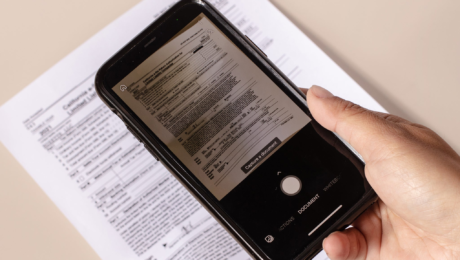
Smartphones are the Swiss Army knives of the digital world, and mobile scanning apps are one of the best examples of why. Using your phone’s camera, these apps can scan and extract text from virtually any document—plus whiteboards, books, and more—while automatically correcting for distortion and skew. After spending more than 50 hours researching 22 scanning apps and testing 13 of them, our favorite is the lean, efficient, and free-to-use Adobe Scan (for Android and iOS). It’s simple to use, capable of beautiful scan quality, and equipped with excellent text-recognition capabilities.
Free and refreshingly straightforward, Adobe Scan is the best app when all you need is clean PDFs and reliable text recognition.
Adobe Scan (for Android and iOS) is great at capturing the sort of documents life throws at you every once in a while—stuff like rebate forms, tax documents, and the occasional business card. It isn’t as complex or as powerful as our upgrade pick, SwiftScan, but it’s free, simple to use, and produces scans that look even better than those from other top scanning apps. It automatically stores every scan you capture on Adobe Document Cloud, which means your scans are accessible from any phone, tablet, or computer. And Adobe Scan’s useful dedicated scanning modes mean you can add new contacts from business cards and fill out forms right on your device. An optional Premium subscription at $10 per month offers extra storage, allows you to export scans to Word and Excel files, and adds the ability to extract text from even longer documents, but we think SwiftScan is a better paid option.
Advertisement
The paid versions of SwiftScan provide extra features and sharing options that make it a more versatile, powerful app than our other picks.
SwiftScan’s paid versions (SwiftScan Pro for Android and SwiftScan VIP for iOS) provide more features and customization than our other picks, including custom folders for better organization, smart file naming, iCloud syncing, and automatic uploading to your choice of more than a dozen cloud storage services. SwiftScan produces good-looking scans across a variety of document types, and it can perform optical character recognition (OCR) in dozens of languages without uploading your documents to the cloud. These text-recognition results are very accurate, if not quite best in class. However, given the subscription model—$5 per month or $25 per year for Android users and $8 per month or $40 per year for iPhone owners—we think it only makes sense for people who would use its extra features on a regular basis.
Lens is especially good if you use Microsoft’s Office suite, but it’s a solid option for anyone who wants free scanning with (mostly) properly formatted OCR results.
If you like the idea of Adobe Scan’s simplicity and zero-dollar price tag but spend a lot of time working in the Microsoft Office suite, then Microsoft Lens (for Android and iOS) is the way to go. Its user interface is similarly sparse, but the output options include Word documents and PowerPoint slides in addition to PDFs. Its scans don’t look as clean as what you can get from Adobe Scan, Apple Notes, or SwiftScan, and you may find its sharing options annoyingly limited. But its excellent text recognition and well-formatted output almost make up for those drawbacks.
Apple Notes isn’t just for celebrity apologies: It’s also great at capturing basic scans of documents, whiteboards, and more—and it produces some of the cleanest OCR results we’ve ever seen.
If you’re an iPhone user, you’re probably also an Apple Notes user. But you might not know that in addition to being a great place to jot down important info, it’s also a surprisingly powerful mobile scanning app. Like Adobe Scan, it automatically saves all of your scans to the cloud—in this case, iCloud—so you can access them on multiple devices, and it performs extremely accurate OCR by default. If you have an iPhone and are just scanning the occasional lunch receipt, business card, or homework assignment, you probably don’t need another app. But despite its pluses, Notes does have a few shortcomings: It can’t export searchable PDFs, it has a limited range of OCR languages, and it can only export PDFs and raw text.
Free and refreshingly straightforward, Adobe Scan is the best app when all you need is clean PDFs and reliable text recognition.
The paid versions of SwiftScan provide extra features and sharing options that make it a more versatile, powerful app than our other picks.
Lens is especially good if you use Microsoft’s Office suite, but it’s a solid option for anyone who wants free scanning with (mostly) properly formatted OCR results.
Apple Notes isn’t just for celebrity apologies: It’s also great at capturing basic scans of documents, whiteboards, and more—and it produces some of the cleanest OCR results we’ve ever seen.
I’ve been writing about imaging gear—including cameras, printers, and scanners—for more than a decade, and I’ve been using smartphone scanning apps for nearly as long. Wirecutter has been covering scanners since 2013, spending more than 190 total hours on research and testing to find the best of the best. The knowledge we’ve picked up along the way has informed our testing of these mobile scanning apps.
Virtually anyone can benefit from having a scanning app on their phone, and for most people it can completely replace a physical scanner. Don’t get us wrong—there are plenty of specific tasks for which it still makes sense to own a scanner. But if you need one, you almost certainly know already (hello, CPAs and tax lawyers). If you find yourself merely wondering whether you need one, the answer is almost certainly no.
That may come as a surprise, but thanks to rapidly improving smartphone cameras, today’s scanning apps are perfectly capable of handling once-in-a-while scanning needs: receipts, business cards, legal documents, or the occasional form. And because your phone can go almost anywhere you can, scanning apps have the freedom to go places physical scanners are unable to. You can, for instance, use an app to quickly scan receipts at a business lunch, to capture pages from rare books at a library, or even to send in bills of lading and trip reports from big rigs on long-haul routes.
Here’s a quick rundown of the major reasons why you might want a dedicated scanner, and which kind you need:
Otherwise, save yourself some money and give a scanning app a try. Many of the best options are totally free.
You can find dozens upon dozens of mobile scanning apps on the Google Play Store and Apple App Store, most of which have glowing reviews and attractive-sounding features. But, sadly, a lot of them are junk.
To narrow the field, we isolated the traits we think are most useful in a mobile scanning app:
Over the course of four years we’ve tested 14 contenders, including:
We downloaded each Android and iOS app using up-to-date Pixel and iPhone devices. Where freeware versions were available, we started out by taking stock of what functionality we were able to enjoy without upgrading to a “Pro” or “Premium” version. This step was especially important since we hoped to recommend a low- or no-cost option for each platform.
Next, we paid for the premium versions of the apps (where necessary) and got down to serious scanning. Using each app, we scanned two documents—a standard IRS 1099 tax form (PDF) and a simple text document with the same sentence repeated in descending font size from 12 to 4 points—three times each in order to test OCR accuracy and consistency. Where cloud-based OCR was available, we tried that feature to see if it offered a noticeable improvement over on-device text recognition. We scanned the 1099 form again to check out each app’s batch-scanning mode, taking note of any hitches in the process and how easy it was to reorder or recapture specific pages. Then we scanned a handwritten note, a whiteboard, a business card, a page from a book, and both glossy and matte photos to see how the apps handled different kinds of source material.
During all of this scanning, we kept detailed notes on the quality of each app’s edge detection, automatic cropping, and image filter performance. Once we had the scans in hand, we spent time playing with the annotation and editing options in order to see how extensively each app could manipulate the images it captured.
Finally, we spent significant time going through each app’s sharing options, looking for snags that might catch you out, such as an inability to directly share certain file types, a lack of automatic uploading, or a limited selection of sharing channels.
Free and refreshingly straightforward, Adobe Scan is the best app when all you need is clean PDFs and reliable text recognition.
If, like most people, you just need to occasionally create clean-looking PDFs of physical documents—and want to do it for free—we think there’s no better option than Adobe Scan (Android, iOS). Adobe Scan’s simple design and limited options may initially seem like a negative in comparison with the feature list of a more complex app like SwiftScan, but we’ve found that in practice the app’s simplicity makes it easier to get the results we want. Adobe Scan produced the cleanest-looking scans in our tests, from text docs to photos. It also has the ability to fill and sign scanned forms (with the help of other free apps in the Adobe ecosystem), provides excellent text recognition in 19 of the most common languages, and automatically stores all of your scans in Adobe’s cloud.
Adobe Scan’s layout is as simple as it gets. When you fire up the app, it opens right into the camera view so you can quickly capture the document in front of you. Here you’ll find dedicated modes for whiteboards, books, documents, and business cards (plus ID cards, in the Android version of the app). You can toggle auto-capture, choose from several flash options, and import documents or images that are already on your device for OCR.
The app can handily capture a single scan or dozens in a row; you tell it when to stop scanning and then proceed to add the finishing touches. This process differs slightly from that of other apps (like SwiftScan) that have a dedicated multipage mode, but in practice it makes little difference. When you do proceed to the editing screen, you can apply one of four filters to suit the kind of content you’ve captured, adjust the automatic crop, rotate the image, reorder multipage scans, or add more pages. The library view is simple, showing either a grid or a list of scans, sorted by name or date. You can also toggle between recent scans and a list of all scans, and you have to use this “View all scans” option to see any folders you’ve created in the app.
The 19 available OCR languages are fewer than you get from SwiftScan (102) or ABBYY FineReader (183), but they are sufficient for the needs of a huge percentage of the world’s population. OCR results were very accurate in our testing, matching Microsoft Lens and Apple Notes at typical font sizes with perfect results down to about 6 or 8 points, depending on the font. If OCR accuracy is extremely important to you, or you scan a lot of especially fine text, you’d likely be more satisfied with a hardware document scanner. But if you just want to produce searchable PDFs that work 99% of the time, Adobe Scan will do that.
Adobe’s auto-crop was reliably on point in our tests, with only occasional, minor adjustments required as long as we were scanning white pages on a darker surface. If you try to scan at crazy angles, or with a low-contrast background, you’ll need to adjust your crop lines. But Adobe helps you out there with a magnified view that makes it simple to pinpoint the corners of pages.
Adobe Scan’s Auto-color filter boosts saturation and contrast in a generally pleasing way while also brightening white areas and getting rid of the shadows caused by creases. In scans with mixed text and graphics, it did a better job than most other apps at balancing these elements. It performed similarly well on photos, though with glossy prints we had to work hard to avoid glare. We don’t recommend using a scanning app for photo reproduction, but it’s nice that this one works in a pinch.
We loved Adobe’s Fill & Sign feature, which lets you scan a form and send it to the (also free) Acrobat Reader app (Android, iOS) for checking boxes, filling in fields with typewritten text, and signing with your finger (or a saved image of your signature). It’s quick and intuitive, and when I filled out a scanned rebate form for a recently purchased PC power supply, the printed results looked startlingly similar to the original document. If you have a downloaded form, you can even import it directly—rather than printing it and scanning it—to make the ultimate image quality even better.
All scans you capture with Adobe Scan save as PDFs, and the app automatically uploads them to Adobe Document Cloud. You can also choose to share a copy of any PDF via the Android or iOS sharing menu, or send someone a link to download the file from Adobe Document Cloud. You can export any scan as a JPEG, too, in case you want to send it to someone via text message or upload to Instagram.
The optional Premium subscription for Adobe Scan costs $10 per month on both Android and iOS and adds a few features for power users. Namely, it allows you to combine scans into a single file, increases your Adobe Document Cloud storage limit (from 2GB to 20GB), raises the limit for the number of pages that can be OCR’d in a single document (from 25 to 100), compress and password-protect PDFs, and allows you to export OCR results in Word, Excel, and PowerPoint formats in addition to PDF and JPEG. All of these are nice to have, but not essential for casual scanners, and people who just want Microsoft Office-friendly output can get that from Microsoft Lens for free.
Adobe Scan is refreshingly simple and direct, but that simplicity means it’s lacking a few extras that we’d like to see in our ideal scanning app. The most obvious limitation is that since the app is made by Adobe, it’s extremely PDF-oriented, at least for free users. You can also export scans as JPEGs, but there’s no option for Word docs or PowerPoint slides unless you pony up for a Premium subscription. And the only cloud storage option is Adobe’s own Document Cloud. You can of course manually upload scans to your cloud storage service of choice, but we’d prefer it if Adobe let you set up automatic uploads to, say, Google Drive, Dropbox, OneDrive, and other popular options.
We’d also prefer it if those automatic cloud uploads were optional, since users who scan documents like financial records, legal documents, and business contracts may be uncomfortable with uploads that they can’t control. And while Adobe has the security resources you’d expect from a large corporation, its record isn’t spotless. If automatically uploading to a different cloud storage service (or your own FTP server) is important to you, consider SwiftScan.
File management in Adobe Scan is limited—though the app does allow you to create folders, even in the free version—and the search function indexes only the names of the scans (which you have to manually edit). Other, more powerful scanning apps (like SwiftScan) offer smart file naming, and can index the OCR-captured contents of each scan instead of just the title.
The free version of Adobe Scan can’t output formatted text—just searchable PDFs and raw, unformatted OCR results. If you need formatted text from a free app, we’d recommend using Microsoft Lens or (for iOS users) Apple Notes.
The paid versions of SwiftScan provide extra features and sharing options that make it a more versatile, powerful app than our other picks.
SwiftScan (Android, iOS) combines excellent scan quality and solid OCR results with a logical, easy-to-use layout. In its paid form (SwiftScan Pro for Android and SwiftScan VIP for iOS) it also offers more extras than our other picks—stuff like file organization, advanced file-naming templates, additional PDF-markup features, and automatic uploads to various cloud services. And security-conscious users will appreciate that it performs all image processing and OCR on your device, rather than transmitting data to the cloud. However, the free version of the app is extremely limited, so we really only recommend SwiftScan for users who scan enough to make the paid features worthwhile.
Most scanning apps have similar layouts, but SwiftScan’s is particularly well-designed, especially for an app with so many features. When you fire it up, it automatically opens the camera and captures the document in front of you. (If you prefer, you can choose to have it open to your library instead, and you can turn auto-capture off.) We also like its dedicated multipage scanning mode, its reminders to rotate the camera for landscape documents, and its prompts to square up your scans when there’s too much perspective distortion. However, it’s missing one thing we like in Adobe Scan and Microsoft Lens: dedicated modes for different content types. SwiftScan does have a unique feature called Actions that analyzes OCR results and extracts actionable elements such as URLs and email addresses, but we found that feature only marginally useful in practice.
The captured document goes to the editing screen, where you can apply an array of filters, adjust the automatic crop, rotate it, and name the scanned file. (You can also set up a custom naming template, if you don’t want to name your documents each time you scan.) The library view is straightforward, grouping your scans by capture date. From there, you can tap into each scan, view the recognized text, annotate the PDF, and share it. You can also create folders (and folders within folders) to better organize your scans—a feature few other scanning apps offer. You even have an option to make folders show up at the top of the library view. (Folders are available only in the iOS version of SwiftScan, however.)
SwiftScan’s paid apps perform automatic OCR on every scan, and can do so in 102 languages in the iOS app and 60 in the Android app (including options like Cherokee and Middle French). In our testing, the results were nowhere near as accurate as what you’d get from a hardware document scanner but still ranked near the top of the pack for scanning apps. Adobe Scan, Microsoft Lens, and Apple Notes all performed slightly better, but SwiftScan is fine for quick OCR work.
As with our other picks, SwiftScan’s auto-crop function typically produces clean edges and straight text. In the rare cases when it messes up, a magnified view helps you precisely place the corners. One small complaint: If you turn off auto-capture in the iOS app, your have to press “Detect” to have the app crop your manually triggered scans. In the Android app, this happens automatically.
SwiftScan’s two “Magic” image filters—Magic Color and Magic Text—do a good job of enhancing contrast and eliminating shadows and creases, leaving clean, white backgrounds and clear, readable text. Oddly, though, the Magic Color filter doesn’t do well with mixed-media documents that include a lot of color graphics; for those files you’re better off with the Color filter, which also does a better job with matte and glossy photos than most apps.
You can share scans via email with one touch (PDF only), or you can tap the Share button to bring up the familiar Android or iOS share menu (PDF or JPEG). You can also share OCR results as a TXT file or copy the text to your clipboard. In addition, you can configure SwiftScan to automatically upload all scans (again, PDF only) to one of 14 cloud services, including popular storage services such as Dropbox, Google Drive, and OneDrive; note-taking apps like OneNote and Evernote; and more esoteric options such as FTP servers and WebDAV. Finally, you can send your scans as a fax, but that costs extra—each page costs one “credit,” and you can buy credits individually or in packs of 10 ($7) to 100 ($36), with increasing volume discounts.
Unlike some competing apps, SwiftScan doesn’t send any of your data to its own servers or perform OCR in the cloud, so the app itself presents minimal security risks. (What you choose to do with your documents once they’ve been scanned is of course up to you.) If you’re an iOS user, it also offers PDF encryption, allowing you to password-protect your files.
A couple caveats: First, although we think SwiftScan is great on both iOS and Android, the Android version lacks several perks that iOS users enjoy. In addition to PDF encryption, other iOS-exclusive features include passcode and fingerprint app locks and in-app folders. SwiftScan’s owners, Maple Media, told us in 2020 that they are working to bring feature parity to the Android app, but the gap remains. Second, even the paid versions of SwiftScan include permanent menu ads for other Maple Media apps, which we found slightly annoying.
If you prefer, you can get SwiftScan as a yearly subscription or a one-time purchase rather than paying by the month. Paying up front for a year costs $25 for Android users (saving $35 over the month-to-month cost) or $40 for iOS users (saving $56). A one-time purchase Business Access license costs $100 for Android users and $200 for iOS. People who buy this lifetime license still get access to new features that are added in the future, so if you expect to use the app for more than four or five years, this purchase may be the more cost-effective route. However, gambling on whether an app will still be around (or the available best option) in five years’ time is always a risk.
Lens is especially good if you use Microsoft’s Office suite, but it’s a solid option for anyone who wants free scanning with (mostly) properly formatted OCR results.
While Adobe Scan is focused almost entirely on PDFs, Microsoft Lens (available for Android and iOS) is unsurprisingly geared toward working with Microsoft’s Office suite. The app generates excellent OCR results and can export them as fully formatted Word or RTF files in addition to the usual searchable PDFs. When you’re scanning business cards, it can recognize and export the contact info to OneNote, and its whiteboard mode can generate PowerPoint slides. Its image filters aren’t as effective as Adobe Scan’s, though, and it lacks a form-filling feature like the handy Fill & Sign, so unless you really need the Office-specific output formats, we think Adobe Scan is a better choice.
Lens’s layout is straightforward, with few distractions. It opens directly to the camera and offers a quartet of scanning modes along the bottom of the screen—Whiteboard, Document, Business Card, and Photo—plus a series of Actions (more on that later). The app automatically recognizes documents and outlines them with an orange box, but it has no auto-capture functionality; you have to hit the shutter button yourself. After you capture the scan, the app auto-crops it and gives you the option to manually adjust the crop and rotation, and add filters, text overlays, or annotations.
Lens performs OCR automatically on Word and PDF exports. The results we got in DOCX format were excellent: well-formatted and accurate down to about 6-point font, putting Lens’s accuracy in the same ballpark as Adobe Scan and Apple Notes (and maybe just a hair better). Lens also performs surprisingly accurate OCR on English handwriting, a feat no other app we tested could match.
The only catch with the OCR in Lens is that you have to install Word (it’s free for both Android and iOS) to access the DOCX output on your mobile device. (Alternatively, you can use the PDF output and open it with your default PDF reader, but in that case you’re better off with Adobe Scan.) Once you’ve opened your file in Word, you can share it through any app you like. (Note that you need to sign in to Word with a free Microsoft account in order to edit and save your OCR files.)
Those Actions we mentioned earlier are interesting, using Lens’s scanning prowess to accomplish more focused tasks. “Text” extracts text from an image without actually capturing a scanned image. “Table” does the same for data in … well, a table. “Read” captures text from a document and then reads it back to you in a synthesized voice. “Contact” captures a business card and populates the relevant info directly into an Android or iOS contact card. And of course “QR Code” recognizes and opens QR code links.
While they’re certainly good enough for most uses, the scans we got from Lens didn’t look quite as clean as those from rival scanning apps. Whites weren’t as bright, the filters weren’t very good at getting rid of shadows, and the auto-crop tended to leave slivers of the background around the piece of paper. (It occasionally whiffed entirely, as well, including a huge swath of desktop.) You can adjust the crop, so this is only a minor irritant in most cases, but it becomes a real chore when you’re scanning a long document.
Like Adobe Scan, Lens is laser-focused on its particular ecosystem, and is thus short on extras. File management is pretty much nonexistent, it offers no option to password-protect files, and it has no way to automatically upload scans to other cloud storage services.
Apple Notes isn’t just for celebrity apologies: It’s also great at capturing basic scans of documents, whiteboards, and more—and it produces some of the cleanest OCR results we’ve ever seen.
For iPhone and iPad users looking for ultra-simple scans—especially for personal use—it’s tough to beat Apple Notes. It’s totally free and preinstalled on all iOS devices, and scans made with the mobile version of Notes sync to the desktop app on any Mac computers using the same iCloud ID. The scanning interface and options are fairly basic, and like Adobe Scan and Microsoft Lens, Notes is deeply invested in its own specific ecosystem. But as in those cases, the simplicity is a strength: Notes scanning is fast, images look great, the OCR results are among the best we’ve found, and they allow you to quickly search for any scan via keywords. The downside is that Notes can’t export searchable PDFs, so cutting and pasting raw text into a new note (or another app) is your only option if you need to share it.
To scan a document with Notes, simply create a new note (or open an existing one), click on the camera icon at the bottom of the screen, and choose Scan Documents. From this point, the scanning process is much like that on any other app: You can toggle between automatic and manual capture, change flash settings, and select one of four image filters. The app shades and outlines pages it detects in orange, and you can adjust the crop after you scan. There aren’t any format-specific scanning modes (such as for books or whiteboards), and there’s no dedicated multipage mode either.
We found that Apple’s filters did a great job of cleaning up stains, wrinkles, shadows, and other blemishes, and it was just as effective as our other picks at correcting for distortion. However, while some other scanning apps allow you to redact text, add additional text overlays, or annotate scans with a pen tool, Notes sticks to just these basics. And if you’ve scanned multiple pages for a single note, you need to apply filters to each page individually.
The OCR feature in Apple Notes is automatic, instantaneous, and very accurate. It also provides the best overall text formatting of any scanning app we’ve tested aside from Microsoft Lens, generally nailing paragraph breaks and even bulleted or numbered lists. The OCR results can be cut and pasted as raw text, and you can search all of your scanned notes using keywords in the Notes search bar. These scans can also be sent as PDFs, but the downside here is that these files do not include searchable text. And as with most other scanning apps, you can’t export the OCR results as formatted Word or RTF files, either. One workaround is to send a copy of the note, rather than a PDF, though obviously this only works if you want to share with other iPhone users.
The Notes app has rudimentary file management in the form of folders, but unlike with more advanced apps like SwiftScan, you can’t create subfolders. If you’d like to keep your scans separate from your other notes, we’d recommend creating a Scans folder and collecting them there. And while especially security-conscious users may not like the fact that Notes automatically syncs scans across devices linked by the same Apple ID via iCloud, for most people we think this will be a plus.
If you need the widest range of OCR languages you can get: ABBYY FineReader (Android, iOS) can recognize 183 human languages, eight formal languages (including programming languages and chemistry notation), and four constructed languages (like Esperanto). The next-most versatile app we tested, SwiftScan, claims 102 languages. In our testing, FineReader produced very good OCR results with decent formatting, though it had more errors than Adobe Scan, Microsoft Lens, and Apple Notes. Despite being a paid app ($5 per month for the Android version or $6 per month for iOS), it has a very simple interface and limited feature set, as well. Ultimately, we only recommend it if it offers a language you need that you can’t get from one of our picks. A full list of the supported languages can be found at ABBYY’s website.
If you scan a lot of books: vFlat Scan (Android, iOS) might be the scanning app for you. It’s explicitly designed for scanning books and magazines, and in our tests it did the best job of automatically correcting for the distortion caused by curved page surfaces. The app is totally free on both Android and iOS, and while it’s relatively short on features, it has a clean, simple user interface that makes it very easy to use. There are a few quirks, though. For instance, in the iOS version of the app, you can’t adjust the crop or rotate scans after they’ve been captured. In the Android version, meanwhile, you are able to crop and rotate, but the scan quality is noticeably worse for full-color images. And while OCR results were very good in English, it’s also unclear how many languages vFlat supports.
- Published in Uncategorized
Automated document management system tools transform workflows – TechTarget

AI, robotic process automation, the cloud and digital workflows, improvements in electronic signature processes, and the effects of the COVID-19 pandemic are hastening acceptability and powering escalation of automated document management system deployments.
“The improving technologies and efficient execution of the DMS are expected to gradually eliminate the traditional concept of paper files,” Mordor Intelligence reported in 2020. Mordor estimated the global DMS market will grow 13% annually and approach $11.5 billion by 2026. One major catalyst is the widening use of e-signatures, which Brandessence Market Research and Consulting predicted will grow a whopping 33% annually and surpass $17 billion by 2025.
Yet many businesses are still saddled with paper-driven document processes that can hamstring their operations, productivity and bottom-line profits. Xerox reported that “46% of small-to-medium businesses confirm that they waste time every day on paper-intensive processes.”
A well-designed DMS can manage, store and organize all documents within an enterprise. Businesses considering the daunting yet inevitable task of transitioning to automated document management system tools should follow three basic steps, according to business technology consultancy Gordon Flesch Company:
This handbook more closely examines the components of a viable DMS and the technologies influencing its broader acceptance, how e-signatures are powering DMS implementations, the differences between electronic and digital signatures, and the role of automated document management system tools in ensuring continuity for the new hybrid workforce.
With numerous options to choose from, picking the right document management system for your organization depends on a careful examination of its tools and features.
Companies in the throes of digital transformation find the e-signature process to be a major catalyst in automating their document management systems and smoothing workflows.
Document management plays a key role in aiding hybrid workforces, so organizations must ensure their document management strategies enable safe and accessible hybrid collaboration.
E-Handbook: Automated document management system tools transform workflows
Up Next
Advanced technologies, e-signature proliferation and COVID-19’s impact are speeding the transformation from paper-based to automated document management processes.
With numerous options to choose from, picking the right document management system for your organization depends on a careful examination of its tools and features.
Companies in the throes of digital transformation find the e-signature process to be a major catalyst in automating their document management systems and smoothing workflows.
Document management plays a key role in aiding hybrid workforces, so organizations must ensure their document management strategies enable safe and accessible hybrid collaboration.
Coming after the addition of natural language processing capabilities, the new embedded analytics tool strengthens the BI …
The startup aims to augment human decision-making with automation, and its new tools find and explain changes in data, analyze …
Self-service BI tools benefit organizations in four major ways, including improved decision-making, organizational efficiency, …
The Facebook parent company, along with multiple contributors, including Ahana, Voltron Data and Intel, are developing a new open…
The vendor launched the Alation Cloud Service for Snowflake designed to enable Snowflake users to more easily use Alation’s data …
The vendor raised new money to continue to grow its database technology as the applications for analytics databases have expanded…
Both RFID and barcodes are valuable in the supply chain, but each is more useful for particular scenarios. Learn what to consider…
Lack of communication between a company’s finance and IT departments can cause problems with organizational goals and decisions. …
Navrina Singh, CEO of Credo AI, discusses the limits of MLOps and algorithmic auditing in providing governance for responsible AI.
With its Cerner acquisition, Oracle sets its sights on creating a national, anonymized patient database — a road filled with …
Oracle plans to acquire Cerner in a deal valued at about $30B. The second-largest EHR vendor in the U.S. could inject new life …
The Supreme Court ruled 6-2 that Java APIs used in Android phones are not subject to American copyright law, ending a …
Over its 50-year history, SAP rode business and technology trends to the top of the ERP industry, but it now is at a crossroads …
Third-party support providers make a pitch that they can provide greater flexibility at a lower cost, but customers should think …
SAP’s Thomas Saueressig explains the future of multi-tenant cloud ERP for SAP customers and why it will take some large companies…
All Rights Reserved, Copyright 2011 – 2022, TechTarget
Privacy Policy
Cookie Preferences
Do Not Sell My Personal Info
- Published in Uncategorized