


Meet LINK: The Easy Way To Handle All Your Document Workflows On Your Mobile Device In A Single App – Above the Law

Subscribe and get breaking news, commentary, and opinions on law firms, lawyers, law schools, lawsuits, judges, and more.
When was the last time you went to work (or anywhere, really) without some kind of mobile device with you? Since the adoption of mobile devices, the answer is probably never. When was the last time you felt you could adequately handle all your work on that mobile device? If you’re like most lawyers, the answer is, again, probably never.
The legal profession today is a mobile one, with attorneys practicing anywhere and everywhere with the help of smartphones and tablets. As ubiquitous as they are, though, most lawyers would say they can’t handle all the meaningful work they need to handle on those devices, due to poor document workflows, security concerns, and usability.
What if I told you that you really could handle all your work in one app on your mobile device? It might sound too good to be true, but it’s possible with the LINK app from Mobile Helix.
LINK is finally making it possible to handle documents in a meaningful way on all your devices. LINK combines convenient workflows, document management, search, review, annotation, comparison, editing capabilities, and email management in one app that you can actually use from your phone or tablet.
Do Everything, Everywhere With LINK
When you think about the tools you use most in your day-to-day work, your document management system (DMS) and Outlook are probably at the top of the list. Working in both on your mobile device, though, has historically been a huge struggle, if not impossible. LINK brings them together in a single, secure, easy-to-use app.
LINK is designed to support the workflows attorneys use all day, every day. The app works with today’s most popular mobile devices – iPhones, iPads, and Android phones and tablets – and supports the three leading document management systems, iManage Work®, NetDocuments, and eDocs by OpenText.
LINK is solving the pervasive problem of lawyers being unable to adequately work on their mobile devices. With LINK, lawyers can fully access their documents, compare them, mark them up, edit them, email them, and more, as easily and securely as they can on a computer.
LINK’s Top Features for Simpler Workflows
Lawyers have long asked for a way to be able to work with their critical documents on their mobile devices, only to be disappointed – until now. LINK is a game-changer when it comes to on-the-go document workflows.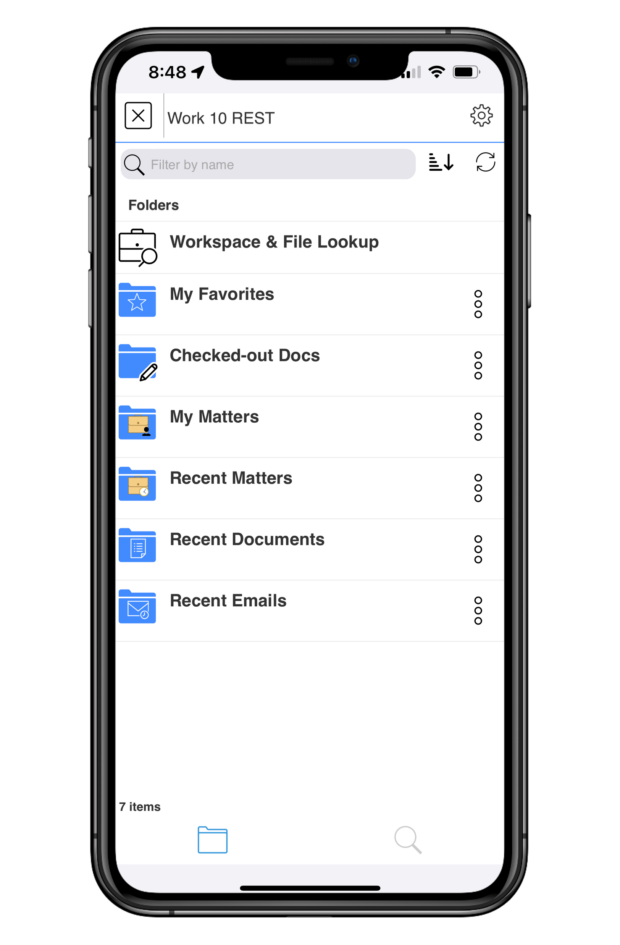
Through LINK, lawyers can not only securely access all documents in their DMS, but also do all the work they need to do directly in those documents, even if they’re on a mobile device far from the office.
Access Full DMS Functionality
When you launch your DMS from within the LINK app, you’ll see everything you’re used to seeing – documents, folders, matters, and more. LINK makes it possible to navigate your DMS from the palm of your hand, just as you always have.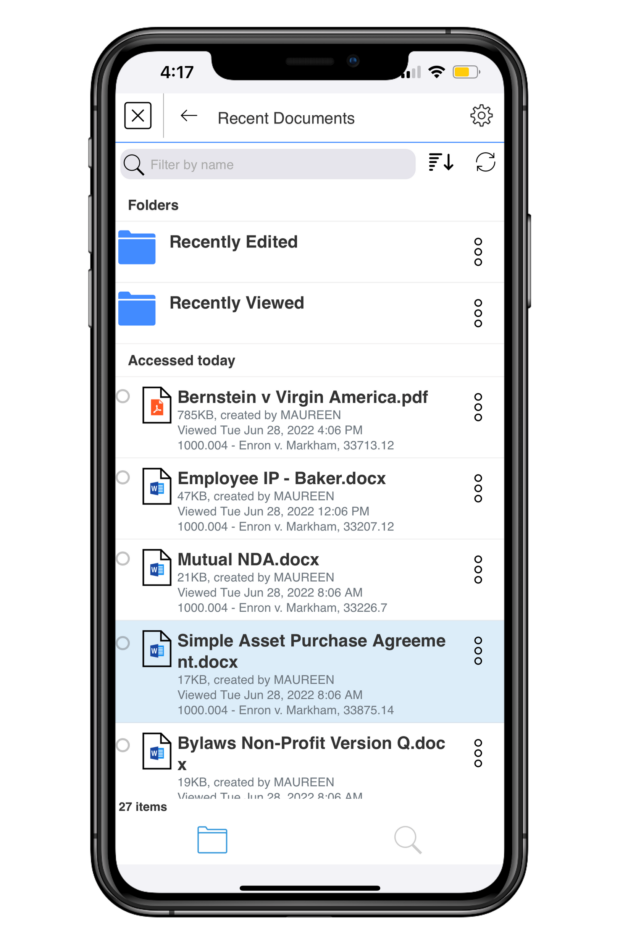
Locate the document you want to work on by finding it in your organized folders or search for it using LINK’s simple yet robust search functionality or Quick Lookup feature.
Once you’re in the document, LINK gives you the tools you need to meaningfully work on it from your mobile device. On tablets, LINK offers a useful split-screen mode, so you can have multiple documents or applications open on your screen at the same time, with multiple live tabs on each screen.
You can choose to open a document in the Microsoft Word app with LINK and edit your documents directly. Just check them out of your DMS with LINK, edit with Word, and then check them back in when you’re done. Any editing you do via LINK will automatically be saved and will be there when you access the document again in your DMS on your computer or via LINK on your mobile device.
When you’re done working on a document and want to share it with others, you can email it directly from your open document. You can also choose to AirPrint the document directly from the app.
LINK prepares the email for you, and you simply click send. Documents are sent in either their original file formats, as PDFs, or as proprietary links from your DMS that keep them secure. These links can’t be accessed via ordinary email systems, which has long been a limitation on mobile document work. LINK decodes those links, giving you full, secure access to your documents.
Finally, LINK offers encrypted document storage through My Files. You can find your latest work in your Recently Viewed folder and even access those documents when you’re offline. LINK automatically saves your work for you, so you never lose anything important when you’re on the go.
Document Annotation
LINK allows you to annotate documents directly in the app, without having to switch apps in order to mark up your document. Just tap the paper and pencil icon to get started.
LINK offers several annotation features. You can write on your document with an Apple Pencil, highlight portions (in the color and opacity of your choice), outline specific text, strike through text, bookmark your page, add text notations on the document, sign a document, and add stamps for time or date. When viewing the document, you can adjust its appearance, including a dark mode option, how large your margins are, how you want the pages to scroll, and more.
Once again, when you’re done annotating, you can AirPrint your document, upload it to your DMS, or email your markup. LINK gives you the full ability to annotate your document right from your mobile device, wherever you may be.
Document Comparison
Having the ability to compare two documents or two versions of the same document is critical, but it has long caused headaches and required jumping between different apps. With LINK, it’s simple. Right in the app, you can compare two versions of the same Doc ID or any two documents in your DMS. LINK takes its document comparison capabilities even further by letting you compare documents attached to emails to any documents in your DMS or Outlook.
Email Management
LINK not only helps with document workflows, but with email management as well. Directly through the LINK app, you can search for emails in Outlook and file your emails to your DMS.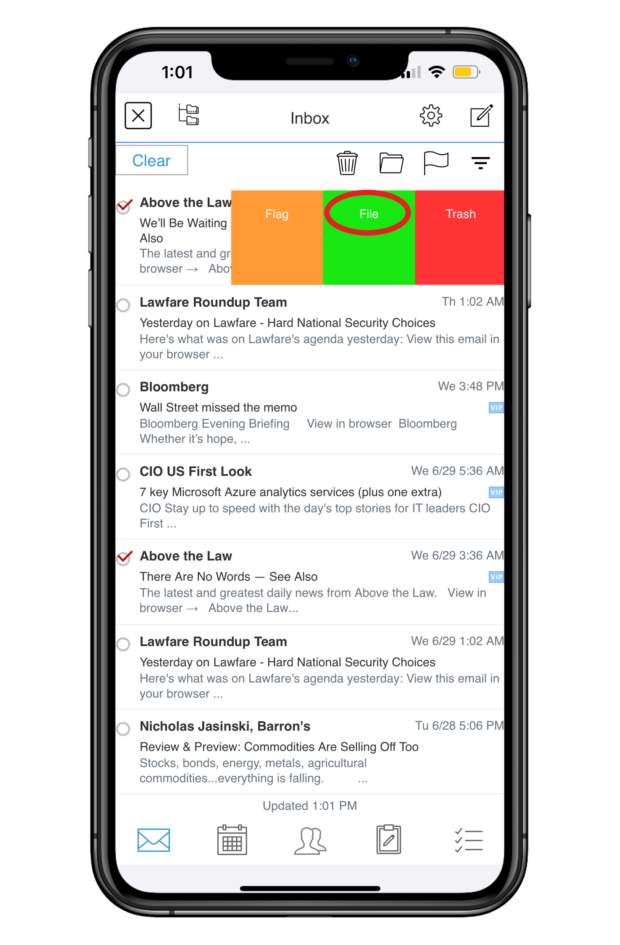
You can file multiple emails at once, and LINK offers predictive filing by recommending folders. Filing attachments to your DMS is just as easy. LINK syncs with your Outlook email, calendars, contacts, notes, and tasks, making for seamless workflows.
Security
On top of everything else, LINK incorporates all the security features you need for the peace of mind that you’re working with and sending your documents safely. Its robust security features include Face ID authentication, a secure container app, and encryption, to name just a few.
Put simply, LINK’s security has been vetted by Am Law 100 firms and has been penetration-tested by an outside consulting firm, so you can use it without worrying that you’re compromising any sensitive or confidential information.
LINK: The Future of Better Work
Your mobile devices go everywhere you go, and they should work the way you work. With LINK, they do.
Gone are the days when documents threw a wrench in your ability to work on the go. LINK offers the single-app workflows you need to fully work on your documents and manage your email from your mobile devices, anytime and anywhere.
If you want document workflows that really work on your phone or tablet, you need LINK.
Apps in Law, Legal Services, Legal Technology, LINK, Software, Sponsored Content, Stephanie Wilkins, Technology
We will never sell or share your information without your consent. See our privacy policy.
Our Sites
© 2022 Breaking Media, Inc. All rights reserved. Registration or use of this site constitutes acceptance of our Terms of Service and Privacy Policy.
Privacy Center | Do not sell my information

- Published in Uncategorized
What Is Data Management, and How Do Businesses Use It? – business.com – Business.com

business.com receives compensation from some of the companies listed on this page. Advertising Disclosure
Most modern businesses recognize the value of data, and for small businesses, this often means relying on reports generated within the individual software platforms they use for daily operations. However, there comes a time when unifying this data in a central, standardized source is desirable. To effectively organize and secure this data requires a process known as data management.
Data management is the process by which businesses gather, store, access and secure data from various business software solutions. Employing data management enables more efficient access to data analytics that offer insights that are needed to improve business operations and identify opportunities for improvement. By establishing a better framework to access the wide swaths of data that every business generates, companies can make more informed decisions and improve their ability to deliver valuable products and services to their customers.
“Data management involves multiple disparate functions and systems working together to move, organize, and secure data such that it is accurate, precise, accessible and protected,” said Christopher Risher, senior program manager of application management services at Onepath.
In a modern business environment, virtually every piece of software collects data. These include accounting software, customer relationship management (CRM) software, point of sale software, credit card processing software and more. These systems feed a wide variety of data into the business, including customer data, financial data and more.
“Nowadays every company has data, from the multinational giants of IT to the small local breweries. Some data are sensitive, some are history, some can be used for future predictions, some for auditing, and so on,” said Rosaria Silipo, principal data scientist at KNIME. “With so much data and so many different properties and usages, a different set of rules and competences is required to handle each subset of data. You can see then that data management can quickly become a quite complex and tricky task, which can bring further prosperity or further problems to the company.”
As the number of business software platforms proliferate, so too does a business’s ability to gather data and employ data analytics to derive key insights from it. However, organizing that data in a centralized system can sometimes be challenging. Developing a data management strategy is a must for businesses that want to maintain a competitive advantage and improve both customer-facing and internal elements of business operations.
To begin implementing a data management policy, businesses need to understand the tools available to them to do so.
“Managing data typically begins with a project that’ll get started in one of the knowledge areas and iterate through the other knowledge areas,” Risher said. “Utilizing cloud-enabled tools can assist in the rapid development of a data management platform. These cloud tools can empower an organization regardless of the location of their data.”
In addition, data management should serve to standardized data in a way that makes it effective for business purposes. Not every software platform will collect data in the same way, or even collect the same types of data. Data management serves to unify these data silos so they become useful when combined.
“Organizations are dealing with more data from more sources than ever before (known as big data). They have come to realize that all this data can provide a wealth of new insights into customer buying behavior and the dynamics of their industry – but only if this data is managed and trusted,” said Todd Wright, head of data management solutions at SAS.
How data is managed directly relates to data quality, which must be unassailable if any data analytics efforts are to bear fruit. Decisions made based on faulty data will in turn be faulty decisions, so data quality should be of the utmost importance to any business relying on this information.
Data management systems make the process of data management more manageable, automating some of the most arduous aspects of unifying and reviewing key data. These systems incorporate databases and analytics tools that allow businesses to not only store and organize important data but also query the system as needed. The best systems consolidate data into useful reports that include visualizations that provide the ability to contextualize data at a glance. Some even incorporate automated decision-making recommendations empowered by machine learning, helping key stakeholders make more informed, effective choices about how to govern the business’s operations.
Some examples of data management systems include:
“The goal of data management is to give an organization reliable and quickly accessible data through which decisive action can be taken in a secure manner,” Risher said.
These data management systems are crucial tools to achieve that goal, especially as the amount of data collected by businesses becomes too vast for any human to contextualize manually. Data management systems are required to make sense of the overwhelming amount of data most businesses generate.
When developing a data management strategy, you should start by understanding your key business objectives. Make a list of these objectives and then identify what data you are already collecting that is relevant to each objective, noting any overlap between objectives or gaps in the data you already maintain. Once you have established a comprehensive list, ask yourself what is the best way in which to organize and secure this data for later retrieval.
“From a strategy perspective, data management and its underlying knowledge areas provide a construct to give analytical data models what is needed to receive reliable insights,” Risher said. “Without proper implementation of data management controls, some level of the pipeline that feeds an analytical data model can be rendered unreliable. If we are basing strategic, forward-thinking decisions off poorly gathered data, then we are likely impacting the business by making incorrect decisions.”
To better structure the vast troves of data generated by a company on any given day, it is important to tie that data to your specific business objectives. Not only will these objectives guide the collection and organization of data, it also makes clear who should be able to access that data, and when and why.
“When we take ownership of the data in the company, we need to make sure we understand their position in the bigger strategy. Based on their role and features, we need to define a sub-strategy for protection, storage, and usage,” Silipo said. “A successful data management strategy allocates a place, a task, and a policy to each subset of the data, in terms of privacy, storage, and usage.”
A data management strategy must incorporate multiple goals, including the ability to audit business operations, monitor progress toward organizational goals, and gain insight into what is working and what is not. Each of these goals requires a different approach to data management, meaning your systems and policies must be flexible enough to address each while being standardized enough to offer suitable levels of security and restrict access to key stakeholders who need to access the data most.
“Depending on the goal, you need a different tool to manage a different subset of data: from classic databases to highly secure data repositories, from data visualization tools to more advanced data analysis tools,” Silipo said.
These data management best practices can improve your organization’s relationship with the data it collects and stores, making it easily accessible for use in improving business processes, as well as ensuring collection and usage comply with laws and regulations and up to current security standards.
Data management is a vast and complex area of business operations. That means it requires a knowledgeable and dedicated team of data management professionals to manage it correctly. Few small business owners are capable of giving data management processes the time and attention they deserve, even if they have a background in data themselves. Hiring a data management professional team with the depth and breadth of knowledge to do so is an absolute must.
“First of all, you need to have a global vision of the data strategy in your company, to make sure that all pieces of information are recorded and all are exploited to generate more insights into the company process and business,” Silipo said.
An experienced and skilled team with advanced data management skills is crucial to developing and refining a global approach to data management. Rely on your team, whether in-house or outsourced, to act not just as managers but consultants when it comes to connecting your business’s data to its wider operations.
This team should be equipped with user-friendly tools to monitor, access, and organize data, both while it is stored and as it is collected. Employing some of the data management systems mentioned above should be a top priority alongside hiring the right team.
As data privacy laws become increasingly common – such as the EU’s GDPR or California’s CCPA – data privacy compliance is critical. Not only should your data management plan be useful for your business operations, it must also be auditable in a way that easily demonstrates compliance to regulators and business partners.
“You need to know how each subset of data must be protected, stored, and analyzed depending on its nature and on its strategic importance,” Silipo said. “Here a number of skills are joined together: legal skills to design the rules, IT skills to see the implementation of the rules, programming skills to retrieve the data, and some statistics and data analysis to understand how these data can become useful.”
As any cybersecurity professional will tell you, the threat landscape is constantly changing, and malicious actors are becoming more sophisticated in the way they infiltrate systems. Small businesses are prime targets, because hackers know they are typically less protected than large enterprises. As a result, small business owners must regularly revisit their security policies and revise them to meet the threats of the day. This includes giving your IT team the ability to monitor for and respond to new threats as they emerge, taking a proactive approach to the protection of your centralized data.
“Security is always top of mind. So, having access to a security professional, such as a CISO to validate the security parameters is extremely valuable,” Risher said.
megaflopp / Getty Images
- Published in Uncategorized
How To Create E-Learning Modules That Boost Training Retention – Software Advice

For free software advice, call us now! 855-998-8505
By: Sierra Rogers on September 28, 2022
In early 2022, Software Advice polled nearly 300 HR leaders for the Toxic Culture Survey[*] and found that nearly half (49%) are spending more than they have previously on upskilling employees in 2022. However, despite the increase in resources devoted to training initiatives, organizations are struggling to create engaging, effective training modules.
At least, that’s what employees are saying: Recent research from Gartner revealed that more than 40% of employees report that the compliance and ethics training they received in the past 12 months did not help them perform their job better[1].
Obviously, this is not the outcome that employees that are responsible for developing training programs are hoping for. But the reality is that if you want to create more memorable training programs, you’re going to need to go beyond the basics and start incorporating advanced e-learning elements into your training modules.
So, if you’re a corporate trainer or team manager who’s taken on the task of leveling up your current training modules, say goodbye to hastily slapped together slide decks, because we’ve laid out a step-by-step process for creating effective e-learning training modules.
Follow the five steps outlined below to start building e-learning modules that improve training retention.
Before you begin the process of creating training content, you need to determine what it is you want your employees to take away from the module you’re building. Is it a concept, a set of best practices, or a new process they’ll be learning? Depending on the answer, how you format your training module will be different.
According to Ebbinghaus’s Forgetting Curve, people forget an average of 50% of new information they’re presented with within an hour and 90% within a week[2]. Knowing this, we suggest keeping your training modules short and focused (rather than trying to provide as much information as possible on a topic). This may mean breaking down a larger training objective into smaller milestones.
For example, let’s say that you’re working on creating an e-learning module that will help prepare a new sales representative for their first call with a lead.
In this scenario, the goal of your module could be for the rep to master the sales script your organization follows. Or, the goal could be to teach the rep how to research the lead they’re calling and tailor their pitch to their background.
Either way, the idea is to be specific about the training objective your module is targeting and to not cram too much information into one e-learning module.
One benefit of using an e-learning tool or learning management system to create training modules is that there’s a whole wide world of content formats available to you. With that level of possibility at your fingertips, knowing which content formats to use (and when) to get a point across is essential in order to boost your employees’ knowledge retention.
Below, we’ve provided you with a cheat sheet that gives an overview of seven common types of e-learning content formats and what they’re best used for.
Use this table to determine what content format(s) your module should include, and to avoid overloading trainees, stick to two or three content formats per module.
Continuing with our example from the first step, if your goal is to help a new hire master your company’s sales script, you could first show a video of two employees running through the script, then have new hires reinforce what they’ve learned through roleplay (social learning) with another employee or through an e-learning simulation.

A roleplay scenario used to train customer service representatives in Day One[3]
Once you’ve determined what your content will cover and how you will present it, it’s time to start creating your e-learning modules.

A dropdown menu shows content format options in TalentLMS (Source)
Building modules is a responsibility that should be divided between HR professionals and team managers. For instance, if the module is a compliance training, a corporate trainer should be the one to develop it, but if it’s team-specific (such as introducing a new project workflow), then a leader from that team should take the reins. All this to say, make sure that your course authoring tool of choice allows for multiple individuals to be assigned an admin role so that the task of creating training is easy to manage.
Lastly, before you begin, have a quick brainstorming session, and map out the contents of your module in a data management tool, such as a Microsoft Word document or a spreadsheet. Keep this step simple: Write down the information you plan to share with the learner and the content formats you’ll use to accomplish that. That way, you’ll have a reference you can turn to when you begin building your module in your course authoring tool.
Now that you’ve built your module, all that’s left to do is follow a few steps to ensure that employees know how to access it and by what date they’re expected to complete it. Follow the four tips below for a successful training rollout to your workforce or team:

A manager dashboard shows completion and participation rates in 360Learning (Source)
Lastly, in order to prevent the concepts or practices presented in your training module from becoming long forgotten, you need to provide a chance for your employees to use what they’ve learned. Without doing so, the new information they’ve taken in will fade away, and the work you put into building the training will have been a waste of effort.
For example, if you watch a YouTube tutorial on how to bake a soufflé, but then you never pull out a ramekin or beat an egg white, the chances are low that you’ll remember the specific set of instructions you’re supposed to follow.
So what does this look like in a professional setting? The truth is that it will be different depending on the subject of your training, but here are a few examples of how this step could play out:
As someone who’s in charge of developing training programs for your organization, think about how the contents of each module you create will be applied in the workplace. Then, once a training module has been developed, look ahead a few weeks and plan an opportunity for employees to apply what they’ve learned.
In this guide, we’ve covered five steps for creating engaging, retainable employee training modules:

Following these steps will ensure that the content in your e-learning modules is focused and engaging, and that your training strategy is built with knowledge retention as a top priority.
Our final piece of advice is this: Adjust your training as necessary based on your employees’ performance and feedback.
As we mentioned in the fourth step of this process (plan for a successful deployment), most learning management systems have reporting functions. Use this feature to track your employees’ engagement with training modules, and ultimately, determine if your e-learning strategy is successful.

A reporting dashboard in Looop shows learners’ activity time and resource views over the course of a year (Source)
As far as acquiring employees’ feedback goes, you have a few options. You can encourage managers to request feedback from their team members in one-on-ones, send a survey out via a survey tool, or take advantage of your LMS’s assessment feature by incorporating an optional feedback form at the end of each module you develop. Whatever method you choose, look for patterns in the feedback from employees and adjust your e-learning strategy as necessary.
The majority (86%) of businesses that increased their L&D budget for 2022 say they plan to spend more on learning and training technology[*]. Join your peers; connect with an advisor to find a learning management system that works for your organization today.
Sources
Survey methodology
*Software Advice’s 2022 Toxic Culture Survey was conducted in January 2022 among 294 HR leaders at U.S. companies. An HR leader is defined as any HR employee with the role of HR manager or higher at their organization. The goal of this survey was to learn how the transition to hybrid and remote work impacted toxic employee behaviors.
Note: The applications mentioned in this article are examples to show a feature in context and are not intended as endorsements or recommendations. They have been obtained from sources believed to be reliable at the time of publication.
5 Ways LMSs Can Improve Employee Knowledge Retention
5 Best E-learning Content Authoring Tools for Corporate Trainers
Filling the 5 Biggest Gaps in Your LMS Business Case
© 2006-2022 Software Advice, Inc. TermsPrivacy PolicyCommunity GuidelinesGeneral Vendor TermsGDM Content PolicyGDM Content Policy FAQs
- Published in Uncategorized
Microsoft: Watch out for password spray attacks – especially you, Basic Auth – The Register
- Published in Uncategorized
Applications for artificial intelligence in Department of Defense cyber missions – Microsoft On the Issues – Microsoft

May 3, 2022 Microsoft Corporate Blogs
Editor’s note: On May 3 Eric Horvitz, Chief Scientific Officer, testified before the U.S. Senate Armed Services Committee Subcommittee on Cybersecurity for a hearing on the use of AI in Department of Defense cyber missions. Read Eric Horvitz’s written testimony below and watch the hearing here.
Chairman Manchin, Ranking Member Rounds, and Members of the Subcommittee, thank you for the opportunity to share insights about the impact of artificial intelligence (AI) on cybersecurity. I applaud the Subcommittee for its foresight and leadership in holding a hearing on this critically important topic. Microsoft is committed to working collaboratively with you to help ensure new advances in AI and cybersecurity benefit our country and society more broadly.
My perspective is grounded in my experiences working across industry, academia, scientific agencies, and government. As Microsoft’s Chief Scientific Officer, I provide leadership and perspectives on scientific advances and trends at the frontiers of our understandings, and on issues and opportunities rising at the intersection of technology, people, and society. I have been pursuing and managing research on principles and applications of AI technologies for several decades, starting with my doctoral work at Stanford University. I served as a Commissioner on the National Security Commission on AI (NSCAI), was president of the Association for the Advancement of Artificial Intelligence (AAAI), chaired the Section on Computing, Information, and Communication of the American Association for the Advancement of Science (AAAS). I am a member of the National Academy of Engineering (NAE) and the American Academy of Arts and Sciences. I currently serve on the President’s Council of Advisors on Science and Technology (PCAST) and on the Computer Science and Telecommunications Board (CSTB) of the National Academies of Sciences.
I will cover in my testimony four key areas of attention at the intersection of AI and cybersecurity that warrant deeper understanding and thoughtful action:
Before covering these topics, I will provide brief updates on the cybersecurity landscape and on recent progress in AI. I’ll conclude my testimony with reflections about directions.
1. Cybersecurity’s changing landscape
Attacks on computing systems and infrastructure continue to grow in complexity, speed, frequency, and scale. We have seen new attack techniques and the exploitation of new attack surfaces aimed at disrupting critical infrastructure and accessing confidential data.[1] In 2021 alone, the Microsoft 365 Defender suite, supported by AI techniques, blocked more than 9.6 billion malware threats, 35.7 billion phishing and malicious emails, and 25.6 billion attempts to hijack customer accounts targeting both enterprise and consumer devices.[2],[3] Multiple independent reports have characterized the nature and status of different forms of cyberattack.[4] As detailed in Microsoft’s recent Digital Defense Report,[5] cyber criminals and nation-state actors continue to adapt their techniques to exploit new vulnerabilities and counter cyber defenses.
To help mitigate these concerning trends, the U.S. government has taken significant steps forward to secure our cyber ecosystem. Congress enacted several recommendations that came out of the Cyberspace Solarium Commission, such as creating the Office of the National Cyber Director and enacting cyber incident reporting legislation. Almost a year ago, the Administration issued Executive Order (E.O.) 14028, Improving the Nation’s Cybersecurity, which directs agencies to develop and implement a variety of initiatives to raise the bar on cybersecurity across areas, such as supply chain security, and requiring agencies to adopt a zero-trust model. Microsoft has worked diligently to meet deadlines specified in the E.O. on cybersecurity and we support these efforts to encourage a cohesive response to evolving cyber threats.
We expect to face continuing efforts by creative and tireless state and non-state actors who will attempt to attack computing systems with the latest available technologies. We need to continue to work proactively and reactively to address threats and to note changes in systems, technologies, and patterns of usage. On the latter, cybersecurity challenges have been exacerbated by the increasing fluidity between online work and personal activities as daily routines have become more intertwined.[6] The large-scale shift to a paradigm of hybrid work coming with the COVID-19 pandemic has moved workers further away from traditional, controlled environments. Cybersecurity solutions must enable people to work productively and securely across various devices from a variety of non-traditional locations.
2. Advancements in Artificial Intelligence
Artificial intelligence is an area of computer science focused on developing principles and mechanisms to solve tasks that are typically associated with human cognition, such as perception, reasoning, language, and learning. Numerous milestones have been achieved in AI theory and applications over the 67 years since the phrase “artificial intelligence” was first used in a funding proposal that laid out a surprisingly modern vision for the field.[7]
Particularly stunning progress has been made over the last decade, spanning advances in machine vision (e.g., object recognition), natural language understanding, speech recognition, automated diagnosis, reasoning, robotics, and machine learning—procedures for learning from data. Many impressive gains across subdisciplines of AI are attributed to a machine learning methodology named deep neural networks (DNNs). DNNs have delivered unprecedented accuracy when fueled by large amounts of data and computational resources.
Breakthroughs in accuracy include performances that exceed human baselines for a number of specific benchmarks, including sets of skills across vision and language subtasks. While AI scientists remain mystified by the powers of human intellect, the rate of progress has surprised even seasoned experts.
Jumps in core AI capabilities have led to impressive demonstrations and real-world applications, including systems designed to advise decision makers, generate textual and visual content, and to provide new forms of automation, such as the control of autonomous and semi-autonomous vehicles.
AI technologies can be harnessed to inject new efficiencies and efficacies into existing workflows and processes. The methods also can be used to introduce fundamentally new approaches to standing challenges. When deployed in a responsible and insightful manner, AI technologies can enhance the quality of the lives of our citizenry and add to the vibrancy of our nation and world. For example, AI technologies show great promise in enhancing healthcare via providing physicians with assistance on diagnostic challenges, guidance on optimizing therapies, and inferences about the structure and interaction of proteins that lead to new medications.
AI advances have important implications for the Department of Defense, our intelligence community, and our national security more broadly. Like any technology, the rising capabilities of AI are available to friends and foes alike. Thus, in addition to harnessing AI for making valuable contributions to people and society, we must continue to work to understand and address the possibilities that the technologies can be used by malevolent actors and adversaries to disrupt, interfere, and destroy. AI has important implications for cybersecurity as the technologies can provide both new powers for defending against cyberattacks and new capabilities to adversaries.
3. Advancing Cybersecurity with AI
The value of harnessing AI in cybersecurity applications is becoming increasingly clear. Amongst many capabilities, AI technologies can provide automated interpretation of signals generated during attacks, effective threat incident prioritization, and adaptive responses to address the speed and scale of adversarial actions. The methods show great promise for swiftly analyzing and correlating patterns across billions of data points to track down a wide variety of cyber threats of the order of seconds. Additionally, AI can continually learn and adapt to new attack patterns—drawing insights from past observations to detect similar attacks that occur in the future.
3.1 Assisting and Complementing Workforce
The power of automation and large-scale detection, prioritization, and response made possible by AI technologies can not only relieve the burden on cybersecurity professionals but also help with the growing workforce gap. On the challenges to current cyber workforce: the U.S. Bureau of Labor Statistics estimates cybersecurity job opportunities will grow 33% from 2020 to 2030—more than six times the national average.[8] However, the number of people entering the field is not keeping pace. There is a global shortage of 2.72 million cybersecurity professionals, according to the 2021 (ISC)2 Cybersecurity Workforce Study released in October 2021.[9]
Organizations that prioritize cybersecurity run security operations teams 24/7. Still, there are often far more alerts to analyze than there are analysts to triage them, resulting in missed alerts that evolve into breaches. Trend Micro released a survey in May 2021 of security operations center decision makers that showed that 51% feel their team is overwhelmed with the overall volume of alerts, 55% are not confident in their ability to efficiently prioritize and respond to alerts, and that 27% of their time is spent dealing with false positives.[10]
AI technologies enable defenders to effectively scale their protection capabilities, orchestrate and automate time-consuming, repetitive, and complicated response actions. These methods can enable cybersecurity teams to handle large volumes of classical threats in more relevant time frames with less human intervention and better results. Such support with scaling on the essentials can free cybersecurity professionals to focus and prioritize on those attacks that require specialized expertise, critical thinking, and creative problem solving. However, additional attention should also be given to general cybersecurity training, security awareness, secure development lifecycle practices, and simulated training modules, including using AI to run intelligent and personalized simulations.
3.2 AI at Multiple Stages of Security
Today, AI methods are being harnessed across all stages of security including prevention, detection, investigation and remediation, discovery and classification, threat intelligence, and security training and simulations. I will discuss each of these applications in turn.
Prevention. Prevention encompasses efforts to reduce the vulnerability of software to attack, including user identities and data, computing system endpoints, and cloud applications. AI methods are currently used in commercially available technologies to detect and block both known and previously unknown threats before they can cause harm. In 2021, AV-Test Institute observed over 125 million new malware threats.[11] The ability of machine learning techniques to generalize from past patterns to catch new malware variants is key to being able to protect users at scale.
As an example, last year Microsoft 365 Defender successfully blocked a file that would later be confirmed as a variant of the GoldMax malware. Defender had never seen the new variant of GoldMax. The malware was caught and blocked leveraging the power of an AI pattern recognizer working together with a technology known as “fuzzy hashing”—a means for taking a fingerprint of malware.[12] It is important to note that GoldMax is malware that persists on networks, feigning to be a “scheduled task” by impersonating the activities of systems management software. Such hiding out as a scheduled task is part of the tools, tactics, and procedures of NOBELIUM, the Russian state actor behind the attacks against SolarWinds in December 2020 and which the U.S. government and others have identified as being part of Russia’s foreign intelligence service known as the SVR.
In other work, we have found that AI methods can improve our ability to detect sophisticated phishing attacks. Phishing attacks center on social engineering, where an attacker creates a fake webpage or sends a fraudulent message designed to trick a person into revealing sensitive data to the attacker or to deploy malicious software on the victim’s device, such as ransomware. To help protect people from harmful URLs, AI pattern recognizers have been deployed in browsers and other applications as part of their security services. AI methods can improve detection while lowering false positive rates, which can frustrate end users.[13]
Detection. Detection involves identifying and alerting suspicious behaviors as they happen. The goal is to quickly respond to attacks, including identifying the scale and scope of an attack, closing the attacker’s entry, and remediating footholds that the attacker may have established. The key challenge with detecting suspicious activity is to find the right balance between providing enough coverage via seeking high rates of accurate security alerts versus false alarms. AI methods are being leveraged in detection to (1) triage attention to alerts about potential attacks, (2) identify multiple attempts at breaches over time that are part of larger and lengthier attack campaigns, (3) detecting fingerprints of the activities of malware as it operates within a computer or on a network, (4) identifying the flow of malware through an organization,[14] and (5) guiding automated approaches to mitigation when a response needs to be fast to stop an attack from propagating. For example, an automated system can shut down network connectivity and contain a device if a sequence of alerts is detected that is known to be associated with ransomware activity like the way a bank might decline a credit card transaction that appears fraudulent.
There are several technologies available today to help detect attacks. I will use Microsoft 365 Defender capabilities as an example. A set of neural network models are used to detect a potential attack underway by fusing multiple signals about activities within a computing system, including processes being started and stopped, files being changed and renamed, and suspicious network communication.[15], [16] In addition, probabilistic algorithms are used to detect high likelihoods of “lateral movement” on a network.[17] Lateral movement refers to malware, such as ransomware, moving from machine to machine as it infects an organization. The goal is to detect signals of concerning patterns of spread and to shut down the infection by isolating potentially infected machines and alerting security experts to investigate. As numerous legitimate operations can appear like lateral movement of malware, simplistic approaches can have high false-positive rates. AI systems can help to raise the rate of capture and block these spreading infections, while reducing false positives.[18]
As a recent example, in March 2022, Microsoft leveraged its AI models to identify an attack attributed to a Russian actor that Microsoft tracks as Iridium, also referred to as Sandworm. The US government has attributed Iridium activity to a group allegedly based at GRU Unit 74455 of the Main Directorate of the General Staff of the Armed Forces of the Russian Federation. The actor deployed wiper malware at a Ukrainian shipping company based in Lviv. Wiper malware erases data and programs on the computers that it infects. The first documented encounter of this malware was on a system running Microsoft Defender with Cloud Protection enabled. The ensemble of machine learning models in Defender, combined with signals across client and cloud, allowed Microsoft to block this malware at first sight.
Investigation and remediation. Investigation and remediation are methods used following a breach to provide customers with a holistic understanding of the security incident, including the extent of the breach, which devices and data were impacted, how the attack propagated through the customer environment, and to seek attribution for the threat.[19] Gathering and doing synthesis from telemetry sources is tedious. Efforts to date include multiple tools to collect telemetry from within and across organizations. The use of AI for investigation and remediation is a promising and open area of research.[20],[21]
Threat intelligence. Threat intelligence enables security researchers to stay on top of the current threat landscape by tracking active malicious actors, at times deliberately engaging with them and studying their behavior. Today, Microsoft actively tracks 40+ active nation-state actors and 140+ threat groups across 20 countries.[22],[23] AI methods help to identify and tag entities from multiple feeds and intelligence sharing across agencies. AI models show promise with their ability to learn and make inferences about high-level relationships and interactions by identifying similarities across different campaigns for enhancing threat attribution.[24],[25]
Recommendations: Advance development and application of AI methods to defend against cyberattacks
4. AI-powered cyberattacks
While AI is improving our ability to detect cybersecurity threats, organizations and consumers will face new challenges as cybersecurity attacks increase in sophistication. To date, adversaries have commonly employed software tools in a manual manner to reach their objectives. They have been successful in exfiltrating sensitive data about American citizens, interfering with elections, and distributing propaganda on social media without the sophisticated use of AI technologies. [26],[27],[28] While there is scarce information to date on the active use of AI in cyberattacks, it is widely accepted that AI technologies can be used to scale cyberattacks via various forms of probing and automation. Multiple research and gaming efforts within cybersecurity communities have demonstrated the power using AI methods to attack computing systems. This area of work is referred to as offensive AI.[29],[30]
4.1 Approaches to offensive AI
Offensive AI methods will likely be taken up as tools of the trade for powering and scaling cyberattacks. We must prepare ourselves for adversaries who will exploit AI methods to increase the coverage of attacks, the speed of attacks, and the likelihood of successful outcomes. We expect that uses of AI in cyberattacks will start with sophisticated actors but will rapidly expand to the broader ecosystem via increasing levels of cooperation and commercialization of their tools.[31]
Basic automation. Just as defenders use AI to automate their processes, so too can adversaries introduce efficiencies and efficacies for their own benefit. Automating attacks using basic pre-programmed logic is not new in cybersecurity. Many malware and ransomware variants over the last five years have used relatively simple sets of logical rules to recognize and adapt to operating environments. For example, it appears that attacking software has checked time zones to adapt to local working hours and customized behavior in a variety of ways to avoid detection or take tailored actions to adapt to the target computing environment.[32],[33] On another front, automated bots have begun to proliferate on social media platforms.[34] These are all rudimentary forms of AI that encode and harness an attacker’s expert knowledge. However, substantial improvements in AI technology make plausible malicious software that is much more adaptive, stealthy, and intrusive.[35]
Authentication-based attacks. AI methods can be employed in authentication-based attacks, where, for example, recently developed AI methods can be used to generate synthetic voiceprints to gain access through an authentication system. Compelling demonstrations of voice impersonations to fool an authentication system were presented during the Capture the Flag (CTF) cybersecurity competition at the 2018 DEF CON meeting.[36]
AI-powered social engineering. Human perception and psychology are weak links in cyber-defense. AI can be used to exploit this persistent vulnerability. We have seen the rise of uses of AI for social engineering, aiming the power of machine learning at influencing the actions of people to perform tasks that are not in their interest. As an example, AI methods can be used to generate ultra-personalized phishing attacks capable of fooling even the most security conscious users. A striking 2018 study demonstrated how AI methods could be used to significantly raise the probability that end users would click on malevolent links in social media posts. The AI system learned from publicly available data including online profiles, connections, content of posts, and online activity of targeted individuals. Machine-learning was used to optimize the timing and content of messages with a goal of maximizing clickthrough rates—with significant results.[37] A 2021 study demonstrated that the language of emails could be crafted automatically with large-scale neural language models and that the AI-generated messages were more successful than the human-written messages by a significant margin.[38] In a related direction, Microsoft has tracked groups that use AI to craft convincing but fake social media profiles as lures.
4.2 AI-powered cyberattacks on the frontier
The need to prepare for more sophisticated offensive AI was highlighted in presentations at a National Academies of Sciences workshop on offensive AI that I co-organized in 2019. The workshop, sponsored by the Office of the Director of National Intelligence, led to a report available from the Academies.[39] The report includes discussion of the applications of AI methods across the cyber kill-chain, including the use of AI methods in social engineering, discovery of vulnerabilities, exploiting development and targeting, and malware adaptation, as well as in methods and tools that can be used to target vulnerabilities in Al-enabled systems, such as autonomous systems and controls used in civilian and military applications.
The cybersecurity research community has demonstrated the power of AI and other sophisticated computational methods in cyberattacks. Adversaries can harness AI to efficiently guess passwords, to attack industrial control systems without raising suspicions, and to create malware that evades detection or prevents inspection[40],[41],[42],[43],[44],[45] AI-enabled bots can also automate network attacks and make it difficult to extinguish the attacker’s command and control channels.[46] In another direction, a competitor demonstrated at a DARPA Cyber Grand Challenge exercise in 2016 [47] how machine learning could be used to learn how to generate “chaff” traffic, decoy patterns of online activity that resemble the distribution of events seen in real attacks for distraction and cover-up of actual attack strategies.[48]
It is safe to assume that AI will improve the success, impact, and scope of the full breadth of threats present today. AI will also introduce new challenges, including special cyber vulnerabilities introduced with general uses of AI components and applications, which create new apertures for adversaries to exploit.
Recommendations: Prepare for malicious uses of AI to perform cyberattacks
5. Special vulnerabilities of AI systems
The power and growing reliance on AI generates a perfect storm for a new type of cyber-vulnerability: attacks targeted directly at AI systems and components. With attention focused on developing and integrating AI capabilities into applications and workflows, the security of AI systems themselves is often overlooked. However, adversaries see the rise of new AI attack surfaces growing in diversity and ubiquity and will no doubt be pursuing vulnerabilities. Attacks on AI systems can come in the form of traditional vulnerabilities, via basic manipulations and probes, and via a new, troubling category: adversarial AI.
5.1 Attacks on AI Supply Chains
AI systems can be attacked via targeting traditional security weaknesses and software flaws, including attacks on the supply chain of AI systems, where malevolent actors gain access and manipulate insecure AI code and data. As an example, in 2021, a popular software platform used to build neural networks was found to have 201 traditional security vulnerabilities, such as memory corruption and code execution.[50] Researchers have demonstrated how adversaries could use existing cyberattack toolkits to attack core infrastructure of the software running AI systems.[51] Multiple components of AI systems in the supply chain of AI systems can be modified or corrupted via traditional cyberattacks. As an example, data sets used to train AI systems are rarely under version control in the same way that source code is. Researchers from NYU found that most AI frameworks downloaded from a popular algorithm repository do not check the integrity of AI models, in contrast to the standards of practice with traditional software, where cryptographic verification of executables/libraries has been standard practice for well over a decade.[52]
5.2 Adversarial AI
Adversarial AI or adversarial machine learning methods harness more sophisticated AI techniques to attack AI systems. Several classes of adversarial AI have been identified, including adversarial examples, the use of basic policies or more sophisticated machine learning methods to fool AI systems with inputs that cause the systems to fail to function properly. A second type of attack is called data poisoning, where data used to train AI systems are “poisoned” with streams of data that inject erroneous or biased training data into data sets, changing the behavior or degrading the performance of AI systems.[53] A third type of attack, called model stealing, seeks to learn details about the underlying AI model used in an AI system.[54] A fourth category of attack, called model inversion, seeks to reconstruct the underlying private data that is used to train the target system.[55]
With adversarial examples, basic manipulations or more sophisticated application of AI methods are used to generate inputs that are custom-tailored to cause failures in targeted AI systems. Goals of these attacks include disruptive failures of automated message classifiers, perceptions of machine vision systems, and recognitions of the words in utterances by speech recognition systems.
As an example of basic manipulations of inputs, a group, alleged to be within the Chinese government, attempted to amplify propaganda on Uyghurs by bypassing Twitter’s anti-spam algorithm via appending random characters at the end of tweets.[56] The approach was viewed as an attempt to mislead the algorithm into thinking each tweet was unique and legitimate. In another example, researchers from Skylight appended benign code from a gaming database to Wannacry ransomware to cause the machine-learning-based antivirus filter to classify the modified ransomware as benign.[57] In related work on the fragility of AI systems, researchers showed that simply rotating a scan of a skin lesion confuses a computer recognition system to classify the image as malignant.[58]
In uses of AI to generate adversarial examples, researchers have demonstrated stunning examples of failures. In one approach, adversarial methods are used to inject patterns of pixels into images to change what an AI system sees. While the changes with AI inferences are dramatic, the changes to the original images are not detectable by humans. Sample demonstrations include the modification of a photo of a panda leading an AI system to misclassify the panda as a gibbon and changes to a stop sign to misclassify it as a yield sign.[59],[60] Similar demonstrations have been done in the realm of speech recognition, with the injection of hidden acoustical patterns in speech that changes what a listening system hears.[61] Attacks leading to such misclassifications and malfunctions can be extremely costly, particularly in high-stakes domains like defense, transportation, healthcare, and industrial processes.
Challenges of adversarial AI and a set of recommendations are called out in the final report of the National Security Commission on AI (NSCAI).[62] I chaired the lines of effort on directions with developing and fielding trustworthy, responsible, and ethical AI applications, leading to chapters 7 and 8 of the report and the appendix on NSCAI’s recommendations on key considerations for fielding AI systems that align with democratic values, civil liberties, and human rights.[63],[64],[65] Chapter 7 of the report covers rising concerns with adversarial AI, including the assessment that, “The threat is not hypothetical: adversarial attacks are happening and already impacting commercial ML systems.” In support of this statement, over the last five years, the Microsoft cybersecurity team has seen an uptick in adversarial AI attacks.[66] I believe the trend will continue.
5.3 Efforts to Mitigate Adversarial AI
Pursuit of resistant systems. Computer science R&D has been underway on methods for making AI systems more resistant to adversarial machine learning attacks. One area of work centers on raising the level of robustness of systems to attacks with adversarial inputs as described above.[67],[68] Approaches include special training procedures to include adversarial examples, validation of inputs to identify specific properties that can reveal signs of an attack and making changes to the overall approach to building models, and modifying the objective functions used in optimization procedures used to create the models so that more robust models are created. While the latter techniques and research directions behind them are promising, the challenges of adversarial examples persist, per the large space of inputs to machine learning procedures. Thus, it is important to continue to invest in R&D on adversarial AI, to perform ongoing studies with red-teaming exercises, and to remain vigilant.
5.4 Tracking, Awareness, and Resources
Front-line awareness. Despite the opportunities that adversarial AI methods will provide to state and non-state actors for manipulating and disrupting critical AI systems and rising evidence of real-world attacks with adversarial AI, the idea of protecting AI systems from these attacks has been largely an afterthought. There is an urgency to be aware and to be ready to respond to adversarial AI threats, especially those used in critical areas such as defense. A Microsoft survey of 28 organizations in 2020 showed, despite the rise in attacks on AI systems, companies are still unaware of these kinds of intentional failures to AI systems and are massively underinvested in tools and processes to secure AI systems. Ryan Fedasiuk, a noted researcher at Georgetown’s Center for Security of Emerging Technology specializing in China’s AI operations, notes that Chinese military officers have explicitly called out that the U.S. defenses are susceptible to data poisoning, and even so far as calling data integrity as “the Achilles’ heel” of the U.S. joint all-domain command and control strategy.[69]
Resources and Engagement. Microsoft, along with MITRE and 16 other organizations created the Adversarial ML Threat Matrix to catalog threats to AI systems.[70] The content includes documentation of case studies where attacks have been made on commercial AI systems. For engineers and policymakers, Microsoft, in collaboration with Berkman Klein Center at Harvard University, released a taxonomy of machine learning failure modes.[71] For security professionals, Microsoft has open-sourced Counterfit, its own tool for assessing the posture of AI systems.[72] For the broader community of cybersecurity practitioners interested in AI and security, Microsoft hosts the annual Machine Learning Evasion Competition as a venue to exercise their muscle in attacking and securing AI systems.[73] Within the Federal government, the DoD has listed safety and security of AI systems in its core AI principles.[74] And there is encouraging activity by NIST on an AI Risk Assessment Framework to address multiple dimensions of AI systems, including robustness and security.[75]
Recommendations: Raise awareness and address vulnerabilities of AI systems
6. AI in Malign Information Operations
Advances in machine learning and graphics have boosted the abilities of state and non-state actors to fabricate and distribute high-fidelity audiovisual content, referred to as synthetic media and deepfakes. AI technologies for generating deepfakes can now fabricate content that is indistinguishable from real-world people, scenes, and events, threatening national security. Advances that could only be found with the walls of computer science laboratories or in demonstrations that surprised attendees at academic AI conferences several years ago are now widely available in tools that create audio and audiovisual content that can be used to drive disinformation campaigns.
6.1 Challenges of Synthetic Media
Advances in the capabilities of generative AI methods to synthesize a variety of signals, including high-fidelity audiovisual imagery, have significance for cybersecurity. When personalized, the use of AI to generate deepfakes can raise the effectiveness of social-engineering operations (discussed above) in persuading end-users to provide adversaries with access to systems and information.
On a larger scale, the generative power of AI methods and synthetic media have important implications for defense and national security. The methods can be used by adversaries to generate believable statements from world leaders and commanders, to fabricate persuasive false-flag operations, and to generate fake news events. A recent demonstration includes the multiple examples of manipulated and more sophisticated deepfakes that have come to the fore over the course of the Russian attack on Ukraine. This includes a video of President Volodymyr Zelenskyy appearing to call for surrender.[76]
The proliferation of synthetic media has had another concerning effect: malevolent actors have labeled real events as “fake,” taking advantage of new forms of deniability coming with the loss of credibility in the deepfake era. Video and photo evidence, such as imagery of atrocities, are being called fake. Known as the “liar’s dividend”, the proliferation of synthetic media emboldens people to claim real media as “fake,” and creates plausible deniability for their actions.[77]
We can expect synthetic media and its deployment to continue grow in sophistication over time, including the persuasive interleaving of deepfakes with unfolding events in the world and real-time synthesis of deepfakes. Real-time generations could be employed to create compelling, interactive imposters (e.g., appearing in teleconferences and guided by a human controller) that appear to have natural head pose, facial expressions, and utterances. Looking further out, we may have to face the challenge of synthetic fabrications of people that can engage autonomously in persuasive real-time conversations over audio and visual channels.
6.2 Direction: Digital Content Provenance
A promising approach to countering the threat of synthetic media can be found in a recent advance, named digital content provenance technology. Digital content provenance leverages cryptography and database technologies to certify the source and history of edits (the provenance) of any digital media. This can provide “glass-to-glass” certification of content, from the photons hitting the light-sensitive surfaces of cameras to the light emitted from the pixels of displays, for secure workloads. We pursued an early vision and technical methods for enabling end-to-end tamper-proof certification of media provenance in a cross-team effort at Microsoft.[78],[79] The aspirational project was motivated by our assessment that, in the long-term, neither humans nor AI methods would be able to reliably distinguish fact from AI-generated fictions—and that we must prepare with urgency for the expected trajectory of increasingly realistic and persuasive deepfakes.
After taking the vision to reality with technical details and the implementation of prototype technologies for certifying the provenance of audiovisual content, we worked to build and contribute to cross-industry partnerships, including Project Origin, the Content Authenticity Initiative (CAI), and the Coalition for Content Provenance and Authenticity (C2PA), a multistakeholder coalition of industry and civil society organizations. [80],[81],[82],[83] In January 2022, C2PA released a specification of a standard that enables the interoperability of digital content provenance systems.[84],[85] Commercial production tools are now becoming available in accordance with the C2PA standard that enable authors and broadcasters to assure viewers about the originating source and history of edits to photo and audiovisual media.
The final report of the NSCAI recommends that digital content provenance technologies should be pursued to mitigate the rising challenge of synthetic media. In Congress, the bipartisan Deepfake Task Force Act (S. 2559) proposes the establishment of the National Deepfake and Digital Provenance Task Force.[86] Microsoft and its media provenance collaborators encourage Congress to move forward with standing-up a task force to help identify and address the challenges of synthetic media and we would welcome the opportunity to provide assistance and input into the work.
Recommendations: Defend against malign information operations
Summary
I have covered in my testimony status, trends, examples, and directions ahead with rising opportunities and challenges at the intersection of AI and cybersecurity. AI technologies will continue to be critically important for enhancing cybersecurity in military and civilian applications. AI methods are already qualitatively changing the game in cyber defense. Technical advances in AI have helped in numerous ways, spanning our core abilities to prevent, detect, and respond to attacks—including attacks that have never been seen before. AI innovations are amplifying and extending the capabilities of security teams across the country.
On the other side, state and non-state actors are beginning to leverage AI in numerous ways. They will draw new powers from fast-paced advances in AI and will continue to add new tools to their armamentarium. We need to double down with our attention and investments on threats and opportunities at the convergence of AI and cybersecurity. Significant investments in workforce training, monitoring, engineering, and core R&D will be needed to understand, develop, and operationalize defenses for the breadth of risks we can expect with AI-powered cyberattacks. The threats include new kinds of attacks, including those aimed squarely at AI systems. The DoD, federal and state agencies, and the nation need to stay vigilant and stay ahead of malevolent adversaries. This will take more investment and commitment to fundamental research and engineering on AI and cybersecurity, and in building and nurturing our cybersecurity workforce so our teams can be more effective today—and well-prepared for the future.
Thank you for the opportunity to testify. I look forward to answering your questions.
[1] https://www.microsoft.com/security/blog/2021/12/15/the-final-report-on-nobeliums-unprecedented-nation-state-attack/
[2] https://news.microsoft.com/wp-content/uploads/prod/sites/626/2022/02/Cyber-Signals-E-1-218.pdf, page 3
[3] https://www.microsoft.com/en-us/research/group/m365-defender-research/
[4] 2018-Webroot-Threat-Report_US-ONLINE.pdf
[5] Microsoft Digital Defense Report, October 2021
[6] https://www.microsoft.com/security/blog/2021/05/12/securing-a-new-world-of-hybrid-work-what-to-know-and-what-to-do/
[7] J. McCarthy, J., M.L. Minsky, N. Rochester, N., C.E. Shannon, C.E. A Proposal for the Dartmouth Summer Project on Artificial Intelligence, Dartmouth University, May 1955. http://www-formal.stanford.edu/jmc/history/dartmouth/dartmouth.html
[8] https://www.bls.gov/ooh/computer-and-information-technology/information-security-analysts.htm
[9] https://www.isc2.org/News-and-Events/Press-Room/Posts/2021/10/26/ISC2-Cybersecurity-Workforce-Study-Sheds-New-Light-on-Global-Talent-Demand
[10] https://newsroom.trendmicro.com/2021-05-25-70-Of-SOC-Teams-Emotionally-Overwhelmed-By-Security-Alert-Volume
[11] https://www.av-test.org/en/statistics/malware/
[12] https://www.microsoft.com/security/blog/2021/07/27/combing-through-the-fuzz-using-fuzzy-hashing-and-deep-learning-to-counter-malware-detection-evasion-techniques
[13] https://www.microsoft.com/en-us/research/publication/urltran-improving-phishing-url-detection-using-transformers/
[14] https://dl.acm.org/doi/10.1145/3471621.3471858
[15] https://www.microsoft.com/security/blog/2020/07/23/seeing-the-big-picture-deep-learning-based-fusion-of-behavior-signals-for-threat-detection/
[16] https://www.microsoft.com/security/blog/2020/08/27/stopping-active-directory-attacks-and-other-post-exploitation-behavior-with-amsi-and-machine-learning/
[17] https://www.microsoft.com/security/blog/2019/12/18/data-science-for-cybersecurity-a-probabilistic-time-series-model-for-detecting-rdp-inbound-brute-force-attacks/
[18] https://www.microsoft.com/security/blog/2020/06/10/the-science-behind-microsoft-threat-protection-attack-modeling-for-finding-and-stopping-evasive-ransomware/
[19] https://www.microsoft.com/security/blog/2021/12/02/structured-threat-hunting-one-way-microsoft-threat-experts-prioritizes-customer-defense/
[20] https://www.microsoft.com/security/blog/2020/07/09/inside-microsoft-threat-protection-correlating-and-consolidating-attacks-into-incidents/
[21] https://www.microsoft.com/security/blog/2020/07/29/inside-microsoft-threat-protection-solving-cross-domain-security-incidents-through-the-power-of-correlation-analytics/
[22] https://www.microsoft.com/security/blog/2022/02/03/cyber-signals-defending-against-cyber-threats-with-the-latest-research-insights-and-trends/
[23] https://www.microsoft.com/security/blog/2021/05/12/securing-a-new-world-of-hybrid-work-what-to-know-and-what-to-do/
[24] https://www.microsoft.com/security/blog/2021/04/01/automating-threat-actor-tracking-understanding-attacker-behavior-for-intelligence-and-contextual-alerting/
[25] https://dl.acm.org/doi/pdf/10.1145/3448016.3452745
[26] Cybersecurity Incidents (opm.gov)
[27] Russian Interference in 2016 U.S. Elections – FBI
[28] Characterizing networks of propaganda on twitter: a case study
[29] https://arxiv.org/pdf/2106.15764.pdf
[30] B. Buchanan, J. Bansemer, D. Cary, et al., Automating Cyber Attacks: Hype and Reality, Center for Security and Emerging Technology, November 2020. https://cset.georgetown.edu/wp-content/uploads/CSET-Automating-Cyber-Attacks.pdf
[31] How cyberattacks are changing according to new Microsoft Digital Defense Report
[32] Intelligence, FireEye Threat. “HAMMERTOSS: Stealthy tactics define a Russian cyber threat group.” FireEye, Milpitas, CA (2015).
[33] Virtualization/Sandbox Evasion, Technique T1497 – Enterprise | MITRE ATT&CK®
[34] https://www.jmir.org/2021/5/e26933/
[35] See for example, see documentation of Deep Exploit, tools and demonstration showing the use of reinforcement learning to drive cyberattacks: https://github.com/13o-bbr-bbq/machine_learning_security/tree/master/DeepExploit
[36] https://www.defcon.org/
[37] J. Seymour and P. Tully, Generative Models for Spear Phishing Posts on Social Media, 31st Conference on Neural Information Processing Systems, Long Beach, CA, USA, 2017. https://arxiv.org/abs/1802.05196
[38] https://www.wired.com/story/ai-phishing-emails/amp
[39] Implications of Artificial Intelligence for Cybersecurity: A Workshop, National Academy of Sciences, 2019. https://www.nationalacademies.org/our-work/implications-of-artificial-intelligence-for-cybersecurity-a-workshop
[40] Hey, My Malware Knows Physics! Attacking PLCs with Physical Model Aware Rootkit – NDSS Symposium (ndss-symposium.org)
[41] B. Hitaj, P. Gasti, G. Ateniese, F. Perez-Cruz, PassGAN: A Deep Learning Approach for Password Guessing, NeurIPS 2018 Workshop on Security in Machine Learning (SecML’18), December 2018. https://github.com/secml2018/secml2018.github.io/raw/master/PASSGAN_SECML2018.pdf
[42] S. Datta, DeepObfusCode: Source Code Obfuscation through Sequence-to-Sequence Networks In: Arai, K. (eds) Intelligent Computing. Lecture Notes in Networks and Systems, vol 284. Springer, Cham. https://doi.org/10.1007/978-3-030-80126-7_45, July 2021.
[43] J. Li, L. Zhou, H. Li, L. Yan and H. Zhu, “Dynamic Traffic Feature Camouflaging via Generative Adversarial Networks,” 2019 IEEE Conference on Communications and Network Security (CNS), 2019, pp. 268-276, doi: 10.1109/CNS.2019.8802772. https://ieeexplore.ieee.org/abstract/document/8802772
[44] C. Novo, R. Morla, Flow-Based Detection and Proxy-Based Evasion of Encrypted Malware C2 Traffic, Proceedings of the 13th ACM Workshop on Artificial Intelligence and Security 2020, https://doi.org/10.1145/3411508.3421379.
[45] D. Han et al., “Evaluating and Improving Adversarial Robustness of Machine Learning-Based Network Intrusion Detectors,” in IEEE Journal on Selected Areas in Communications, vol. 39, no. 8, pp. 2632-2647, Aug. 2021, https://ieeexplore.ieee.org/abstract/document/9448103
[46] A botnet-based command and control approach relying on swarm intelligence – ScienceDirect
[47] https://www.darpa.mil/program/cyber-grand-challenge
[48] R. Rivest, Chaffing and Winnowing: Confidentiality Without Encryption,” CryptoBytes, 4(1):12-17, https://pdfs.semanticscholar.org/aaf3/7e0afa43f5b6168074dae 2bc0e695a9d1d1b.pdf
[49] https://www.nscai.gov/wp-content/uploads/2021/03/Full-Report-Digital-1.pdf. page 279.
[50] https://www.cvedetails.com/product/53738/Google-Tensorflow.html
[51] Xiao, Qixue, et al. “Security risks in deep learning implementations.” 2018 IEEE Security and privacy workshops (SPW). IEEE, 2018.
[52] Gu, Tianyu, Brendan Dolan-Gavitt, and Siddharth Garg. “Badnets: Identifying vulnerabilities in the machine learning model supply chain.” arXiv preprint arXiv:1708.06733 (2017).
[53] Jagielski, Matthew, et al. “Manipulating machine learning: Poisoning attacks and countermeasures for regression learning.” 2018 IEEE Symposium on Security and Privacy (SP). IEEE, 2018.
[54] Yu, Honggang, et al. “CloudLeak: Large-Scale Deep Learning Models Stealing Through Adversarial Examples.” NDSS. 2020.
[55] Ziqi Yang, Ee-Chien Chang, Zhenkai Liang, Adversarial Neural Network Inversion via Auxiliary Knowledge Alignment, 2019
[56] https://www.nytimes.com/interactive/2021/06/22/technology/xinjiang-uyghurs-china-propaganda.html
[57] https://skylightcyber.com/2019/07/18/cylance-i-kill-you/
[58] Finlayson, Samuel G., et al. “Adversarial attacks on medical machine learning.” Science 363.6433 (2019): 1287-1289.
[59] I.J. Goodfellow, J. Shlens, C. Szegedy, Explaining and Harnessing Adversarial Examples, ICLR 2015. https://arxiv.org/pdf/1412.6572.pdf
[60]N. Papernot, P. McDaniel, I. Goodfellow, et al., Practical Black-Box Attacks against Machine Learning, ASIA CCS ’17, April 2017. https://dl.acm.org/doi/pdf/10.1145/3052973.3053009
[61] M. Alzantot, B. Balaji, M. Srivastava, Did you hear that? Adversarial Examples Against Automatic Speech Recognition, Conference on Neural Information Processing Systems, December 2017. https://arxiv.org/pdf/1801.00554.pdf
[62] https://www.nscai.gov/
[63] “Upholding Democratic Values: Privacy, Civil Liberties, and Civil Rights in Uses of AI for National Security,” Chapter 8, Report of the National Security Commission on AI, March 2021. https://reports.nscai.gov/final-report/chapter-8/
[64] “Establishing Justified Confidence in AI Systems,” Chapter 8, Report of the National Security Commission on AI, March 2021. https://reports.nscai.gov/final-report/chapter-7/
[65] E. Horvitz J. Young, R.G. Elluru, C. Howell, Key Considerations for the Responsible Development and Fielding of Artificial Intelligence, National Security Commission on AI, April 2021. https://arxiv.org/ftp/arxiv/papers/2108/2108.12289.pdf
[66]Kumar, Ram Shankar Siva, et al. Adversarial machine learning-industry perspectives. 2020 IEEE Security and Privacy Workshops (SPW). IEEE, 2020.
[67] https://cacm.acm.org/magazines/2018/7/229030-making-machine-learning-robust-against-adversarial-inputs/fulltext
[68] A. Madry, A. Makelov, L. Schmidt, et al. Towards deep learning models resistant to adversarial attacks, ICLR 2018. https://arxiv.org/pdf/1706.06083.pdf
[69] https://breakingdefense.com/2021/11/china-invests-in-artificial-intelligence-to-counter-us-joint-warfighting-concept-records/
[70] https://atlas.mitre.org/
[71] https://docs.microsoft.com/en-us/security/engineering/failure-modes-in-machine-learning
[72] https://github.com/Azure/counterfit/
[73] https://mlsec.io/
[74] https://www.defense.gov/News/Releases/Release/Article/2091996/dod-adopts-ethical-principles-for-artificial-intelligence/
[75] https://www.nist.gov/itl/ai-risk-management-framework
[76] See: https://www.youtube.com/watch?v=X17yrEV5sl4
[77] The Liar’s Dividend: The Impact of Deepfakes and Fake News on Politician Support and Trust in Media | GVU Center (gatech.edu)
[78] P. England, H.S. Malvar, E. Horvitz, et al. AMP: Authentication of Media via Provenance, ACM Multimedia Systems 2021. https://dl.acm.org/doi/abs/10.1145/3458305.3459599
[79]E. Horvitz, A promising step forward on disinformation, Microsoft on the Issues, February 2021. https://blogs.microsoft.com/on-the-issues/2021/02/22/deepfakes-disinformation-c2pa-origin-cai/
[80] Project Origin, https://www.originproject.info/about
[81] J. Aythora, et al. Multi-stakeholder Media Provenance Management to Counter Synthetic Media Risks in News Publishing, International Broadcasting Convention 2020 (IBC 2020), Amsterdam, NL 2020 https://www.ibc.org/download?ac=14528
[82] Content Authenticity Initiative, https://contentauthenticity.org/
[83] Coalition for Content Provenance and Authenticity (C2PA), https://c2pa.org/
[84]C2PA Releases Specification of World’s First Industry Standard for Content Provenance, Coalition for Content Provenance and Authenticity, January 26, 2022, https://c2pa.org/post/release_1_pr/
[85] https://erichorvitz.com/A_Milestone_Reached_Content_Provenance.htm
[86] Deepfake Task Force Act, S. 2559, 117th Congress, https://www.congress.gov/bill/117th-congress/senate-bill/2559/text
Tags: artificial intelligence, cyberattacks, department of defence, US government
Have the latest posts sent right to your inbox. Enter your email below.
By providing your email address, you will receive email updates from the Microsoft on the Issues blog.
Follow us:
- Published in Uncategorized
Microsoft 365 launches new Records Management Solution – IDM.net.au
Microsoft has announced the general availability of Records Management in Microsoft 365 (formerly known as Office365) for “Eligible Microsoft 365 E5 customers”, a new tool to help businesses protect and manage sensitive data. E5 is the top tier and highest priced enterprise level of Microsoft 365
While all Microsoft 365 users will see the Records management tool in the Microsoft 365 compliance center, this will change according to release notes.
“At this time any customer will be able to see the solution even if you’re not licensed for it, although not all functionality will work as expected. In the near future, this will change, and you won’t be able to see records management options if you’re not appropriately licensed.”
The new Records Management solution differs from SharePoint’s in-place records management or records center.
“This solution is our next evolution in providing Microsoft 365 customers with records management scenarios. It uses a different underlying technology than our legacy functionality in SharePoint, and also goes across Microsoft 365 beyond just SharePoint. This new solution is where our future investments in records management will be made and we recommend any SharePoint Online customers using SharePoint’s in-place records management, content organizer, or the SharePoint records center to evaluate migrating to this new way of managing your records,” Microsoft states.
The new tool promises the ability to:
A new Harvard Business Review research report, commissioned by Microsoft, found 77% of organizations believe an effective security, risk, and compliance strategy is essential, but 61% face challenges in creating one. More than half (53%) have not developed a strong, business-wide data governance approach. The majority (82%) say protecting information has grown increasingly difficult due to new risks and complexities brought on by digital transformation.
“With many employees working remotely right now, one of the things we hear is security and risk management are arguably more important than ever,” says Alym Rayani, senior director at Microsoft 365. The HBR survey was conducted before the coronavirus pandemic, he notes, but its data is just as important at a time when businesses are relying on remote employees.
A higher volume of information, transmitted through and stored in multiple collaboration systems, drives complexity for managing records with cost and risk implications. Companies facing increasing regulations often move data into different systems of record to comply. This can increase the risk of missing records or not properly declaring them, he says in a blog post.
The records-management solution supports the following elements:
According to one local records management expert, there may be some challenges in adapting the solution for conditions in Australia and New Zealand.
“The design will be based on the US vision for records management – i.e. applying a file plan classification (label) to a records in place, and not place the records in context. The UK/AUS approach to records management is to collect the records together so it makes up a story – i.e. the evidence of a business transaction is clearly understood because you can see the context of the story. The US method usually leaves the document/record where it is, which makes it hard to find in the Office 365 information maze.
“As an example, one Australian Federal Government department tried many years ago to re-configure an American document management system to manage records by collecting the records into a file to ensure they showed context. But it broke the system and it was eventually recommended that the system be replaced.”
Office 365 and SharePoint specialist Andrew Warland, who blogs at andrewwarland.wordpress.com, notes that the concept of ‘declaring’ a record is an American concept that isn’t used here.
“I’m very familiar with the information governance aspects of Microsoft Office 365 and have been critical of some of the things like auto-classification (for E5 only) as, while it is well-intentioned and would probably work well for some organisations, there are some potential risks in doing things this way as opposed to a good combination of retention policies applied to the different workloads across the environment,” said Warland.
“What I am not clear about, yet, is the extent to which some of these functions will be limited to E5 customers or will remain with the more common E3 licence. For example, the creation of ‘explicit’ retention labels (published as retention policies) or ‘implicit’ (invisible to users) retention policies, which can be applied to almost all of the ecosystem, are still visible in my E3 tenant. I’ve seen some people say that these will be removed, only accessible by E3 licence holders, but I’m not sure about that. Certainly, other features such as auto-classification, or more granular event-based policies, may require the E5 licence.
“When it comes to auto-classification I am curious why Microsoft made this sound like new technology. Products like Recommind (now owned by Open Text) have been doing that for close to 20 years.
“I agree with Microsoft that there is now so much digital content you cannot realistically expect to manage retention manually. However, the ability to create and apply both ‘implicit’ and ‘explicit’ (label based) policies cover almost all the content fairly well. I’m not sure what value things like auto-classification brings to the market and I’m a bit sceptical with the use cases suggested for event-based retention policies – for example, things like contract expiry dates or the date when employees leave an organisation can both be impacted by factors out of an organisation’s control (litigation, investigations). I wouldn’t want to see critical records vanish without a trace in this way.”
- Published in Uncategorized
Poll: Less than half of Americans think U.S. health care is handled well – Medical Economics

© 2022 MJH Life Sciences and Medical Economics. All rights reserved.
© 2022 MJH Life Sciences™ and Medical Economics. All rights reserved.
Care for older adults is poorly rated by vast majority
A new poll from The Associated Press-NORC Center for Public Affairs Research shows that the general public is not very satisfied with health care in the U.S., with fewer than half of those surveys saying it is generally handled well. Only 12% rate it as handled extremely or very well.
Care for older adults ranks even lower. Looking at prescription drug costs, nursing home care quality, and mental health, only 6% at most ranked those services as done very well.
Care access is a major concern, with nearly 80% of those surveyed indicating they are at least moderately concerned about getting access to quality health care when they need it. Minority patients express great concern about health care access, with six in 10 saying they are very or extremely concerned about getting good care, compared to less than half (44%) of Whites. Women (53%) are more concerned than men (42%) on the same issue.
Despite agreement on the health system needing improvement, those surveyed differ on what the solutions are. About two-thirds say it is the federal government’s responsibility for health care coverage, with adults under 50 more likely than those over to hold that view. The overall percentage of people who believe health care is a government responsibility has increased from 62% in 2017.
When it comes to single-payer health that would require Americans to get their health insurance from the government, support comes in around four in 10, while 58% favor a government health insurance plan that anyone can purchase. There is also broad support for assistance paying for long-term care.
Drug prices are always an area of concern, and 80% of those surveyed said they support the federal government negotiating the price of prescription drugs for programs like Medicare.
Related Content:
- Published in Uncategorized
How AI Technology is Transforming Scanning and Document Storage – Analytics Insight
- Published in Uncategorized
How to cut your company's software costs, according to the experts – TechRadar
- Published in Uncategorized
Document Management System Market 2022 Insights by Business Development, Rising Demand, New Opportunities, Product Analysis, and Application by 2028 | Atlassian, OpenText Corporation, Xerox Corporation, IBM Corporation – Digital Journal
Hi, what are you looking for?
By
Published

Coherent Market Insights recently released a study report titled Global Document Management System Market from 2022 to 2028, which is a brilliant blend of industry expertise, innovative ideas, solutions, and cutting-edge technology to provide a better experience. This intelligence report provides studies based on current events, historical records, and projections for the future. Different market projections are included in the study, including market size, revenue, production, CAGR, consumption, gross margin, diagrams, graphs, pie charts, price, and other significant elements. The research includes a comprehensive analysis of the market’s future trends and developments, as well as an emphasis on the market’s key driving and restraining forces. It also highlights the role of the industry’s top market players, including their business overviews, financial summaries, and SWOT analysis. It gives a complete picture of the industry’s competitive landscape. The Document Management System Market is growing rapidly, and the CAGR is predicted to improve over time.
𝗥𝗲𝗾𝘂𝗲𝘀𝘁 𝗮 𝘀𝗮𝗺𝗽𝗹𝗲 𝘁𝗼 𝗼𝗯𝘁𝗮𝗶𝗻 𝗮𝘂𝘁𝗵𝗲𝗻𝘁𝗶𝗰 𝗮𝗻𝗮𝗹𝘆𝘀𝗶𝘀 𝗮𝗻𝗱 𝗰𝗼𝗺𝗽𝗿𝗲𝗵𝗲𝗻𝘀𝗶𝘃𝗲 𝗺𝗮𝗿𝗸𝗲𝘁 𝗶𝗻𝘀𝗶𝗴𝗵𝘁𝘀 𝗮𝘁-
https://www.coherentmarketinsights.com/insight/request-sample/3115
The Global Document Management System Market report examines the sector’s key market dynamics. The report provides a comprehensive assessment of the global Document Management System market for the forecasted period. The global Document Management System market report includes various marketing components as well as future trends that are important in the Document Management System industry. The growth of the Document Management System market will be influenced by factors such as drivers, opportunities, challenges, and restraints around the world. Furthermore, the report provides a detailed analysis of the Document Management System market’s implementation in terms of revenue over the forecast period.
𝗧𝗼𝗽 𝗖𝗼𝗺𝗽𝗮𝗻𝗶𝗲𝘀 𝗜𝗻𝗰𝗹𝘂𝗱𝗲: Atlassian, OpenText Corporation, Xerox Corporation, IBM Corporation, eFileCabinet Inc., SpringCM, Oracle Corporation, Hyland Software Inc., Ricoh USA, Inc., Open Document Management System S.L., Microsoft Corporation, Synergis Technologies, R2 Technologies Limited, and Zoho Corporation.
𝗗𝗲𝘁𝗮𝗶𝗹𝗲𝗱 𝗦𝗲𝗴𝗺𝗲𝗻𝘁𝗮𝘁𝗶𝗼𝗻:
𝗥𝗲𝗴𝗶𝗼𝗻𝗮𝗹 𝗔𝗻𝗮𝗹𝘆𝘀𝗶𝘀:
» North America: United States, Canada, and Mexico
» South & Central America: Argentina, Chile, Brazil and Others
» Middle East & Africa: Saudi Arabia, UAE, Israel, Turkey, Egypt, South Africa & Rest of MEA.
» Europe: UK, France, Italy, Germany, Spain, BeNeLux, Russia, NORDIC Nations and Rest of Europe.
» Asia-Pacific: India, China, Japan, South Korea, Indonesia, Thailand, Singapore, Australia and Rest of APAC.
𝗚𝗲𝘁 𝗣𝗗𝗙 𝗕𝗿𝗼𝗰𝗵𝘂𝗿𝗲 𝗗𝗶𝘀𝗰𝗼𝘃𝗲𝗿 𝗺𝗼𝗿𝗲 𝗮𝗯𝗼𝘂𝘁 𝗿𝗲𝗽𝗼𝗿𝘁 𝗮𝗻𝗮𝗹𝘆𝘀𝗶𝘀 𝘄𝗶𝘁𝗵 𝗳𝗶𝗴𝘂𝗿𝗲𝘀 𝗮𝗻𝗱 𝗱𝗮𝘁𝗮 𝘁𝗮𝗯𝗹𝗲𝘀, 𝗮𝗹𝗼𝗻𝗴 𝘄𝗶𝘁𝗵 𝘁𝗵𝗲 𝘁𝗮𝗯𝗹𝗲 𝗼𝗳 𝗰𝗼𝗻𝘁𝗲𝗻𝘁𝘀: https://www.coherentmarketinsights.com/insight/request-pdf/3115
Research Methodology:
In the Document Management System market analysis, numerous marketing techniques were used, including Porter’s Five Forces Analysis, player positioning analysis, SWOT analysis, market share analysis, and value chain analysis. Porter’s Five Forces analysis examines market dynamics and factors such as the threat of Document Management System substitutes, new entrants into the Document Management System market, buyer bargaining power, and internal rivalry among Document Management System providers to provide the report’s readers with a detailed view of current market dynamics.
Competitive Outlook:
The Document Management System market report covers topics such as product portfolio, business overview, governance, financials, business strategies, manufacturing locations and production facilities, company sale, recent developments and strategic collaborations & partnerships, new product launch, company segments, and application diversification, and company strength and weakness analysis.
Goals and objectives of the Document Management System Market Study:
• Determining market highlights, as well as important regions and countries participating in market growth, requires an understanding of the opportunities and progress of Document Management System.
• Research the various segments of the Document Management System industry as well as the market dynamics.
• Identify Document Management System segments with high growth potential and assess the market for futuristic segments.
• To examine the most crucial trends in the many categories that help in deciphering and persuading the Document Management System market.
• To confirm the Document Management System market’s regional growth and development.
• Recognize the key stakeholders in the Document Management System industry and the importance of the market leaders’ competitive image.
• Research major plans, objectives, and strategies for the Document Management System market’s growth.
𝗚𝗲𝘁 𝟮𝟬𝟬𝟬 𝗨𝗦𝗗 𝗗𝗶𝘀𝗰𝗼𝘂𝗻𝘁 𝗼𝗻 𝗕𝘂𝘆𝗶𝗻𝗴 𝘁𝗵𝗶𝘀 𝗥𝗲𝗽𝗼𝗿𝘁:
https://www.coherentmarketinsights.com/promo/buynow/3115
FAQ’S:
➣ What will the size and growth rate of the Document Management System Market be in 2028?
➣ What are the main drivers of the Document Management System Market’s growth?
➣ What are the major market trends that have an impact on the Document Management System Market’s valuation?
➣ What are the obstacles to market expansion?
➣ Who are the major players in the Document Management System Industry?
➣ Which companies are the most important contributors to Document Management System valuation?
➣ What would be each region’s market share during the forecast period?
➣ What is the Document Management System market’s expected growth rate and valuation during the forecast period?
➣ What will be the Document Management System market’s CAGR and size during the projected period?
Table Of Content:
1. Market Overview
1.1. Market Snapshot
1.2. Global & Segmental Market Estimates & Forecasts, 2018-2028 (USD Billion)
1.2.1. Document Management System Market, by Region, 2018-2028 (USD Billion)
1.2.2. Document Management System Market, by Type, 2018-2028 (USD Billion)
1.2.3. Document Management System Market, by Application, 2018-2028 (USD Billion)
1.2.4. Document Management System Market, by Verticles, 2018-2028 (USD Billion)
1.3. Key Trends
1.4. Estimation Methodology
1.5. Research Assumption
2. COVID-19 Impact
3. Global Market
3.1 Global Document Management System Market by Value
3.2 Global Document Management System Market Forecast by Value
3.3 Global Document Management System Market by Type
3.4 Global Document Management System Market by Application
3.5 Global Document Management System Market by Regions
4. Regional Document Management System Market Analysis
4.1 Asia-Pacific
4.1.1 Asia-Pacific Document Management System Market Value
4.1.2 Asia-Pacific Document Management System Market Value Forecast
4.1.3 Asia-Pacific Document Management System Market Value by Segments
4.1.4 Asia-Pacific Document Management System Market Value
4.1.5 Asia-Pacific Document Management System Market Value Forecast
4.1.6 Asia-Pacific Document Management System Market Value
4.1.7 Asia-Pacific Document Management System Market Value Forecast
4.1.8 Asia-Pacific Document Management System Market Value by Country
4.1.9 China Document Management System Market Value
4.1.10 China Document Management System Market Value Forecast
4.1.11 Japan Document Management System Market Value
4.1.12 Japan Document Management System Market Value Forecast
4.2 Europe
4.2.1 Europe Document Management System Market Value
4.2.2 Europe Document Management System Market Value Forecast
4.2.3 Europe Document Management System Market Value by Segments
4.2.4 Europe Document Management System Market Value
4.2.5 Europe Document Management System Market Value Forecast
4.2.6 Europe Document Management System Market Value
4.2.7 Europe Document Management System Market Value Forecast
4.2.8 Europe Document Management System Market Value by Country
4.2.9 Germany Document Management System Market Value
4.2.10 Germany Document Management System Market Value Forecast
4.2.11 The U.K. Document Management System Market Value
4.2.12 The U.K. Document Management System Market Value Forecast
4.2.13 France Document Management System Market Value
4.2.14 France Document Management System Market Value Forecast
4.3 North America
4.3.1 North America Document Management System Market Value
4.3.2 North America Document Management System Market Value Forecast
4.3.3 North America Document Management System Market Value by Segments
4.3.4 North America Document Management System Market Value
4.3.5 North America Document Management System Market Value Forecast
4.3.6 North America Document Management System Market Value
4.3.7 North America Document Management System Market Value Forecast
4.3.8 North America Document Management System Market Value by Country
4.3.9 The U.S. Document Management System Market Value
4.3.10 The U.S. Document Management System Market Value Forecast
4.3.11 Canada Document Management System Market Value
4.3.12 Canada Document Management System Market Value Forecast
5. Market Dynamics
5.1 Growth Drivers
5.2 Key Trends & Developments
5.3 Challenges
6. Competitive Landscape
6.1 Global Market
6.1.1 Key Players – Revenue Comparison
6.1.2 Key Players – Market Capitalization Comparison
7. Company Profiles
✦ Atlassian
Company Overview
Product Portfolio
Financial Performance
Key Strategies
Recent Developments/Updates
✦ OpenText Corporation
Company Overview
Product Portfolio
Financial Performance
Key Strategies
Recent Developments/Updates
✦ IBM Corporation
Company Overview
Product Portfolio
Financial Performance
Key Strategies
Recent Developments/Updates
✦ Microsoft Corporation
Company Overview
Product Portfolio
Financial Performance
Key Strategies
Recent Developments/Updates
…
About Coherent Market Insights:
Coherent Market Insights is a global market intelligence and consulting organization that provides syndicated research reports, customized research reports, and consulting services. We are known for our actionable insights and authentic reports in various domains including aerospace and defense, agriculture, food and beverages, automotive, chemicals and materials, and virtually all domains and an exhaustive list of sub-domains under the sun. We create value for clients through our highly reliable and accurate reports. We are also committed in playing a leading role in offering insights in various sectors post-COVID-19 and continue to deliver measurable, sustainable results for our clients.
Contact Us:-
Mr. Shah
Coherent Market Insights
1001 4th Ave, #3200
Seattle, WA 98154
Phone: US +12067016702 / UK +4402081334027
Email: [email protected]
The post Document Management System Market 2022 Insights by Business Development, Rising Demand, New Opportunities, Product Analysis, and Application by 2028 | Atlassian, OpenText Corporation, Xerox Corporation, IBM Corporation appeared first on Gatorledger.
The biggest software upgrade of crypto has fulfilled its promise to wipe out more than 99 percent of the electricity.
This year’s physics Nobel prize was awarded Tuesday to three men for their work on a phenomenon called quantum entanglement.
Twitter on Monday said a feature to edit tweets is being rolled out to those subscribing to its Blue service.
Cybersecurity tip: identify vulnerabilities and stop threats across the breadth of the network.
COPYRIGHT © 1998 – 2022 DIGITAL JOURNAL INC. Sitemaps: XML / News . Digital Journal is not responsible for the content of external sites. Read more about our external linking.
- Published in Uncategorized