The Best Robotic Process Automation Certifications Online for 2022
…


IT ZONE PAKISTAN – Secure Document Scanning, DMS Retrieval, Shredding Services & IT Recycling
T (31) 44 166 777
Email: sales@itzonepakistan.com
IT Zone Pakistan
II Chundriger Road Uni Plaza Karachi-Pakistan

Enter your email address to instantly generate a PDF of this article.
It’s a well-known fact that organizational change never comes easy. Change management is a vast topic that encompasses a lot, so it’s easy to get lost when rolling out new changes. For example, workflow changes will have different needs than an IT change (such as switching to another system or implementing new software).
As such, you need a diverse array of change management tools to help you meet the needs of each type of change. More often than not, those tools include software. These tools and programs will help provide order to the often chaotic change management process.
The best change management tools will help you with:
Employee engagement
IT service management
Speeding up processes through automation
New employee training programs
New technology
Avoiding disruptions and eliminating resistance
As you can see, the right tools can help you implement changes with ease. But where can you find the most reliable change management software?
That’s the question that we’re going to answer today. Stay tuned to discover the highest-rated and most effective change management tools for 2022.
If you’ve never spearheaded major changes at a company before, you may not know why you need tools in the first place. After all, isn’t creating a robust change management plan and sticking to it enough to get the job done?
While a plan is undoubtedly necessary, implementing the changes included in the plan is far easier said than done. Consider this statistic — while nearly every company goes through changes these days — over half of all change management initiatives fail. In fact, only 34% report clear success, with 16% showing mixed results.
Organizational change is so difficult to pull off due to the nature of change itself. As humans, we’re naturally averse to change, especially if we’re used to things going a certain way for so long. For example, it’s almost always the case that some employees will resist change and want to maintain the status quo. It can be incredibly challenging to implement a change and sustain it into the future. That’s especially true whenever a change is highly urgent and necessary for the organization’s survival.
Luckily, specific software tools make managing change far easier. They can help you stay on track with your deadlines by using checklists and other helpful templates. These tools can assist with decision-making, project management, change control, etc. They can also help you engage with your employees to get them excited about the change instead of dreading it.
Let’s consider a brief example of software assisting with successful change management.
Say that a company has floundering returns and decides to reinvent itself with a brand-new focus. In doing so, their salespeople will have to sell completely new products. They’ll also need to learn how to use tablets and a new software program so they can pitch to clients on the go.
It’s a steep challenge that can go south without the proper plan and tools in place. The organization needs to fully support its employees as they go about redefining their roles and what it means to work for the company. To help, they use software to aid with employee engagement and training. They use the program to track changes and see which department needs help — such as a particular team struggling to grasp the selling points of the new product.
On the IT side, they use a program to create an interactive guide on how to use the new technology they’re rolling out (the tablets and software). The guide is user-friendly and contains PDFs, videos, and infographics — so the staff has no problem learning how to use their new gadgets.
Because of these tools, employees receive the proper training and support they need for a seamless change. That’s a simple example of how you can use software tools to make organizational change management more manageable and less chaotic.
By now, you should understand why tools are necessary for the change management process. Like anything else, not all change management software is created equal. That’s why you’ll want to use these criteria when evaluating a new tool:
It should have an attractive and logical user interface (UI).
There should be ample training and support available for the program.
The tool should have helpful metrics that you can use to measure your success.
There should be visualization tools like flowcharts and process maps.
Integrations are often useful and help you combine the functionality of two tools into one.
The pricing should be fair and include a lot of features for the money.
Without further ado, let’s look at the most effective change management tools out there today.
Best for: Employee onboarding and adopting new software.
Organization size: All sizes.
Most desirable feature: Intuitive step-by-step walkthroughs for adopting changes.
First, we have WhatFix, a platform best used for adopting new technology. It has a flexible pricing structure, and there is a free trial available, which is a plus. You can easily create workflows that serve as interactive guides for your employees. In other words, you can create customizable training programs for your staff on new software and more.
If you’re rolling out a new application at your company, WhatFix is a great tool to have by your side. You can seamlessly create contextual pop-ups and guided widgets to make instruction a breeze. Its dashboards also provide you with real-time updates on your change activity.
You’ll get to view:
How many queries you’ve served
How many times employees have played your workflows
Your most popular workflows
You can also track user progress to see how your employees are doing. That will enable you to discover who’s struggling with the changes the most so you can provide them with assistance.
Do you have zero experience with coding? That’s not a problem when you use WhatFix. You can create guides and workflows without writing a single line of code. That comes in handy for project managers that want to create instructional guides but aren’t familiar with code.
Additionally, if you have disabled employees at your organization, WhatFix, has built-in accessible technology that meets the compliance requirements of section 508 of the US Rehabilitation Act.
The walkthroughs you create with WhatFix can appear in several different formats, including:
Videos
PDFs
Slideshows
Screenshots
This versatility comes in handy, as it grants you the freedom to select the best format for each guide. For example, you may find that your employees respond better to videos showing them what to do instead of PDFs with plain text. You can easily insert each guide into any help desk or LMS (learning management system).
Best for: Collaborating with teams.
Organization size: All sizes.
Most desirable feature: 400+ native integrations with popular applications.
Do multiple teams in your organization need to coordinate as part of your change management plan? If so, you’ll benefit from using Wrike. It’s a fantastic team collaboration software with over 400 integrations with other apps.
It’s also incredibly intuitive, so your staff can get started using it straight away — no training required. Users can effortlessly navigate dashboards, messages, reports, notifications, etc. That makes interdepartmental communication more accessible than ever. Managers can communicate and coordinate as well as stakeholders and executives.
Wrike comes with plenty of visualization tools as well, such as:
Business continuity templates
One-click Gantt charts
Kanban boards
Flowcharts
You also have the option to start using Wrike completely free — regardless of the size of your organization. If you’re interested in their premium version, you can enjoy a 14-day free trial, and plans start at $9.80 a month per user.
Clear, concise communication is one of the core components of any successful change management plan. Poor communication is one of the leading causes of resistance and disruptions. That’s why a tool like Wrike is so helpful. It makes it extremely easy for departments to coordinate and communicate at all times. Due to its many integrations, employees can use Wrike in conjunction with apps like Salesforce, Dropbox, and offerings from Microsoft and Google.
Should a team member have an essential question for staff from another department, they can simply leave them a message on Wrike.
Lastly, Wrike has fantastic customer support in place at all times for its users. Should you hit a snag with the program, there’s a bustling support community online ready to help you. Wrike also has interactive training guides and videos to use whenever you’re getting started.
Best for: Controlling IT changes
Organization size: Large
Most desirable feature: Dedicated ITIL (information technology infrastructure library) processes
If your large organization is rolling out IT changes, Giva eChangeManager is a must-have tool to have by your side.
It’s fantastic for tracking and navigating:
Server upgrades
System patches
Software implementation
Application changes
Compliance audits
You can use Giva not only to roll out change but also to plan it. There are detailed analytics in place that will help you measure KPIs with ease. It’s also one of the few programs with processes designed explicitly for ITIL. These speed up approval times and make document management effortless.
For larger organizations, it can be challenging to keep track of their IT changes due to moving at such a rapid pace. Luckily, Giva has an extensive reporting system in place. It keeps detailed records of all IT changes for long-term visibility. That means you’ll have an easier time keeping track of everything you’ve done so far in your IT department. As such, you’re far less likely to hit a snag or become confused by a new change.
Giva’s interface is highly customizable — so you’ll be able to tweak it to your heart’s content. You can customize fields, screens, business rules engines, and options to align with your needs. There are also workflow processes for routing new IT changes. That will help your staff keep all their ducks in a row when tweaking servers and networks.
Give enables you to send out notifications to your staff through several different methods, including:
Pager
Email
Cell phone
PDA
That way, you can always keep your staff informed with status updates and messages. Give eChangeManager has a 30-day free trial, and monthly plans start at $29 a month per user.
Best for: IT service management
Organization size: Medium to large
Most desirable feature: Documenting, monitoring, and coordinating change management requests
When rolling out a change, you’ll want to make sure your IT department is ready to handle all your process requests. A perfect tool to assist with that is BMC Ready Change Management 9, an ITSM (IT service management) tool from BMC software. It’s also an ITIL compliant process and has a customizable dashboard that’s easy to navigate.
IT staff can monitor change requests, create change plans, and manage new releases in one convenient location with this tool. Its automated notifications will go out to stakeholders to help streamline communication. The program also works on desktop or mobile phones, thanks to its cloud capabilities (it works on-premise too). That’s a valuable feature for managing change from any location, such as a hotel room or from home.
Other useful features include its automated collision detection and impact analytics. A collision occurs whenever you have two change requests with overlapping implementation schedules. As you can imagine, that will drastically affect the success of your change management plan. If a collision goes unnoticed, it can cause serious timeline problems for your strategy. BMC Ready Change Management 9 will automatically detect collisions, so you’ll never have to worry about them throwing a wrench in your plans.
The program’s impact analytics will help you identify key stakeholders in a change and assess the overall impact on your organization as a whole. That is invaluable information to have when creating a change management plan.
There are free trials available, and you can find information about pricing on their website.
Best for: ITIL and DevOps
Organization size: Enterprise
Most desirable feature: SLA (service level agreements) management
ChangeGear Change Manager was specifically designed to serve three roles: IT, DevOps, and business.
Change Manager has many valuable features, from PCI compliance to limiting bottlenecks in DevOps. In fact, it has built-in change model workflows for all three of its roles. The program also makes heavy use of automation to streamline changes and improve communication. The dashboard features visual reporting, key metrics, and KPIs that are easy to understand.
If you’re attempting to manage a significant change at an enterprise-level organization, ChangeGear Change Manager is the perfect tool. With it, you’ll have a central hub for all the changes that occur throughout the organization. That makes it easier to stay on track with your timelines and measure your success so far.
If you’re interested in ChangeGear, you can sign up to take a free test drive.
Best for: Managing changes for employees and customers
Organization size: Any
Most desirable feature: Error-preventing guidance tools
Do you need employee onboarding for Salesforce? If so, WalkMe is a tool you can use to simplify the process. That’s because the program has built-in guidance tools and onboarding for Salesforce, Jira, NetSuite, and many others. There are also guidance tools that can help you encourage desired behaviors from employees and customers.
For this reason, WalkMe is an essential tool for companies eager to make changes with their employees and their customer base. The tool also comes in handy for resource planning during changes via the way it simplifies back-office functions.
WalkMe has:
Effortless HelpDesk access
Custom desktop notifications
Insights into employee and customer behavior
Error-preventing tools
WalkMe has a free demo and starts at $7,500 a year. They also have custom pricing plans based on many factors.
Since effective change management never comes easy – it’s best to use every tool at your disposal to simplify the process. All the tools on this list will help streamline the change process and assist with essential tasks for IT, HR, sales, and DevOps.
No matter the size of your organization, software tools are often necessary for analyzing metrics, measuring success, and managing timelines.
Instantly access free expert advice, management strategies and real-life examples of workplace success.



The editors at Solutions Review have compiled this list to spotlight some of the best free and open-source RPA tools worth considering.
Searching for Robotic Process Automation (RPA) software can be a daunting (and expensive) process requiring long hours of research and deep pockets. RPA systems are popular for a reason, but they may provide more features than a non-enterprise organization needs. Thankfully, there are several free and open-source RPA solutions out there.
With that in mind, the editors at Solutions Review compiled the following list to highlight some of the top-rated free and/or open-source RPA tools in the marketplace.
Some of these solutions are offered by vendors looking to sell you on their enterprise product eventually. Others are maintained and operated by a community of developers looking to democratize robotic process automation.
Free RPA platforms refer to products offered commercially free by the solution provider. These offerings are usually trimmed-down versions of the expert or enterprise editions, offering basic functionality that enables users to back up their data.
Commercially free RPA tools typically offer less functionality than their open-source counterparts but are often a great way to gain more than a free trial if it’s a product you were already considering.
Searching for Robotic Process Automation (RPA) software can be a daunting (and expensive) process requiring long hours of research and deep pockets. RPA systems are popular for a reason, but they may provide more features than a non-enterprise organization needs. Thankfully, there are several free and open-source RPA solutions out there.
With that in mind, the editors at Solutions Review compiled the following list to highlight some of the top-rated free and/or open-source RPA tools in the marketplace.
Some of these solutions are offered by vendors looking to sell you on their enterprise product eventually. Others are maintained and operated by a community of developers looking to democratize robotic process automation.
Free RPA platforms refer to products offered commercially free by the solution provider. These offerings are usually trimmed-down versions of the expert or enterprise editions, offering basic functionality that enables users to back up their data.
Commercially free RPA tools typically offer less functionality than their open-source counterparts but are often a great way to gain more than a free trial if it’s a product you were already considering.
…

Open-source RPA software is software with a source code that anyone can inspect, modify, or enhance. These tools are publicly accessible and are commonly managed and maintained by organizations with a specific mission in mind.
It’s important to remember that some of the open-source offers included in this list require some development skills, which may make them less than ideal for your use case. We recommend reading each tool’s FAQ to see how much coding is required to take advantage of the software. The open-source tools usually do a good job of explaining the requirements for use on the download pages.
Description: Automai RPA streamlines business processes and reduces errors. The Robotic Automation Platform allows users to utilize the same automation scenarios for the lifecycle of all the applications used for their business processes. The tool is code-free, offering an intuitive scenario builder using recorder and user actions. With Automai, users have access to a single platform to serve the automation needs of their organization, development, and operations teams. While not an open-source solution, Automai offers a free trial that companies can use to start improving their processes.





 By Jon Gold
Senior Writer, Computerworld |
Adobe is bringing broader integration of its document management, tracking and validation services into Microsoft’s product ecosystem, including tighter connections to Teams and the Purview information protection framework.
At Microsoft’s annual Build software conference, Adobe announced a new single sign-on option for Acrobat for Teams, integration with Purview from directly within the desktop version of Acrobat, and Microsoft Power Automation functionality that will allow users to make repetitive tasks with Acrobat Sign easier, among other features.
Adobe also announced unified installation technology for all of the newly released features, meaning that IT staff can deploy them across their organizations with relative simplicity, as well as the achievement of FedRAMP Moderate (a government security standard) certification and Sign Graph connectivity, meaning that checking on signature status for things like sales contracts and onboarding is now faster.
Adobe also shared a tech preview version of Live Share from recent acquisition Frame.io, also in combination with Microsoft Teams. This feature, if and when it enters production, could allow groups of workers to collaborate live on a document, discussing it via Teams and reviewing it interactively.
The new feature sets are, in large part, a response to the pandemic-prompted spike in remote work, according to Adobe.
“Our new hybrid work reality has turbocharged the shift from paper to digital, and no one can afford to be left behind,” the company said in a statement.
IDC research manager Steve Charbonnier said that hybrid working models demand different methods of handling important documents — remote employees, after all, can’t simply walk down the hallway to HR to get a new copy of a crucial form.
“The reason they’re looking at this is … is that it gives the users lots of flexibility in terms of how they automate their sign-in processes,” he said. “It’s all managed, it has the correct audit trail attached to it.”
According to Charbonnier, the most important part of today’s Adobe announcements is probably the Power Automate integration with Acrobat Sign — automating the auditing of electronic signatures across the organization is a potentially powerful new piece of functionality.
“On the whole, it’s a lot of nice steps kind of across the board,” he said. “Even the Sign Graph connectors where they’re reducing the time to check on status, that’s a nice feature to include. But the Power Automate [feature] gives them much more robust capabilities.”
Jon Gold covers IoT and wireless networking for Network World.
Copyright © 2022 IDG Communications, Inc.
Copyright © 2022 IDG Communications, Inc.

WHAT: On September 30, 2022, President Biden signed the SBIR and STTR Extension Act of 2022, reauthorizing the SBIR/STTR programs to continue through fiscal year 2025. The SBIR/SSTR programs were set to expire on the day President Biden signed the Act, the result of lengthy negotiations over how to revamp the programs following recent high-profile SBIR fraud cases with ties to China. The changes to the programs, to include enhanced disclosure requirements and claw-back provisions, are illustrative of the federal government’s renewed emphasis on ensuring China does not use the SBIR/STTR programs as an additional avenue to appropriate the United States’ emerging technological advances.
WHAT DOES IT MEAN FOR INDUSTRY: The Small Business Innovation Research (SBIR) and Small Business Technology Transfer (STTR) programs provide an avenue for small businesses to engage with the federal government to jointly address the country’s unique science and technology needs. Small businesses compete for federal research funds in the form of federal contracts or grants to support their innovative projects, with the potential to commercialize their resulting products and services in the federal marketplace.
The SBIR/STTR programs are structured in three phases. In Phase I, the government evaluates the technical merit, feasibility, and commercial potential of the small business’ R&D efforts to determine whether further funding should be provided. Phase I awards are typically in the $50,000 to $250,000 range and extend for either six months (for SBIR awards) or one year (for STTR awards). In Phase II, the government awards small businesses around $750,000 to invest two more years into R&D. If based on the R&D efforts there appears to be commercial value in the resulting products or services, the small business may obtain further funding or production contracts directly from federal agencies in Phase III.
To participate in the SBIR/STTR programs, small businesses must be for-profit businesses located in the United States, be majority owned and controlled by U.S. citizens or permanent legal residents (or owned by another small business concern majority owned and controlled by U.S. citizens or permanent legal residents), and have no more than 500 employees (including any affiliates). For the STTR program, small businesses must partner with a nonprofit college or university located in the United States, a domestic nonprofit research organization, or a federally funded R&D center.
The recent reauthorization imposed a number of new reporting requirements on agencies to ensure proper management of the SBIR/STTR programs. It also made the following changes which directly impact small business participants:
The new due diligence requirements demonstrate the federal government’s emphasis on protecting against foreign influence and interference in domestic science and technological advancements. The due diligence programs are required to assess the small business’s cybersecurity practices, employee composition, patents, and any foreign ownership or financial ties to determine whether any “foreign country of concern” may be surreptitiously behind the small business venture. This is further explored in the new disclosure requirements for any small business with ties to a “foreign country of concern.” What constitutes a relationship with a “foreign country of concern” is quite expansive, including having any owners who are a party to a foreign talent recruitment program, any foreign joint ventures or subsidiaries, any foreign contractual or financial obligations, any foreign technology licensing or intellectual property sales in the five-year period preceding submission of the proposal, and any foreign institutional investments.
These ties will disqualify the small business if they present concerns about conflicts of interests, pose a risk to national security, or were not timely disclosed to the head of the awarding agency. If it is later determined that the small business did not promptly notify the agency head of these potential issues, or if such issues arise during the performance of the award but were not promptly brought to the agency head’s attention, the small business will be required to repay the award.
While the reauthorization is good news for small businesses in the science and technology sectors, it is important that small businesses interested in participating in the SBIR/STTR programs take a close look at any foreign ties their business may have and ensure compete and accurate disclosure of those ties, as required by the new rules. The federal government is continuing its hard stance on protecting against foreign interference, especially from the People’s Republic of China, and companies would be ill-advised to get caught in the crosshairs.
By using this site, you agree to our updated Privacy Policy, Terms & Conditions, and Cookies Policy.

Register for your free TechRepublic membership or if you are already a member, sign in using your preferred method below.
We recently updated our Terms and Conditions for TechRepublic Premium. By clicking continue, you agree to these updated terms.
Invalid email/username and password combination supplied.
An email has been sent to you with instructions on how to reset your password.
By registering, you agree to the Terms of Use and acknowledge the data practices outlined in the Privacy Policy.
You will also receive a complimentary subscription to TechRepublic’s News and Special Offers newsletter and the Top Story of the Day newsletter. You may unsubscribe from these newsletters at any time.
All fields are required. Username must be unique. Password must be a minimum of 6 characters and have any 3 of the 4 items: a number (0 through 9), a special character (such as !, $, #, %), an uppercase character (A through Z) or a lowercase (a through z) character (no spaces).
How to create a custom list style in a Microsoft Word document
Your email has been sent
Adding a numbered list to a Microsoft Word document is usually simple and quick, but it might not look the same on someone else’s system. Learn how to ensure that the list you create is the same viewers see.
Have you ever sent a document with numbered lists to your home account or to a co-worker and noticed that the lists don’t look the same on another system? That’s because Microsoft Word’s numbered list feature stores properties locally. That means you can’t control how Word renders numbered lists on other systems. In many cases, it won’t matter, but occasionally, the differences will cause flow errors that you can’t resolve.
In this tutorial, I’ll show you a way around this problem by creating a custom list style. Then you can access this custom list style from Word’s Multilevel List dropdown in the Paragraph group as you would a pre-built list style. A custom list style goes with the document, so the list(s) will look exactly the way you want when opened elsewhere.
SEE: Windows, Linux, and Mac commands everyone needs to know (free PDF) (TechRepublic)
I’m using Microsoft 365 desktop on a Windows 10 64-bit system, but you can use older versions. You can’t create custom list styles in Word for the web. However, a custom list style will show up in the library if the document has one. There’s no demonstration file: You won’t need one.
Microsoft Word comes with several pre-built list styles out of the box. Most of us use these lists a lot — I know that I do. Figure A shows the gallery of pre-built choices. When working with a single document that you don’t plan to distribute electronically, these lists are adequate.
Figure A
If you’re going to distribute the document electronically, meaning other viewers will open it on their own systems, consider creating a list style and applying it. Word stores list properties locally and the default list on a viewer’s system is likely to be different than yours. Sometimes the difference will be subtle and won’t matter. On the other hand, the viewer’s system could seriously distort a list.
Another problem is that Word’s pre-built lists are notorious for breaking, especially in long documents. You might never see it, but when it happens, you rarely can fix it. Everything happens behind the scenes, and you don’t have access to what Word is doing. My best advice is to start over.
A custom list is one that you design yourself. You control how many levels the lists support (up to nine), the font, the font size, the color, indentions and much more. After creating your custom list, it will be available in the Numbering gallery and free from pre-built lists problems.
Before we move on, notice the circle in Figure A in the top-right corner — List Library. This dropdown filters the lists available in the gallery. If you build a custom list and it doesn’t show up in the gallery, check this filtering option to make sure the filter allows custom lists.
You might be wondering about the two options at the bottom of the dropdown: Define New Multilevel List and Define New List Style. The truth is, there is little difference between the results when you apply either. However, a style is a bit superior because you can name it, share it, modify it and even delete it.
It’s important to remember that lists are a paragraph format, and the paragraph marks determine the beginning and ending of a paragraph. That means that each item in your numbered list is a paragraph. In a nutshell, numbering is a paragraph formatting, but paragraphs are in lists because a list comprises multiple paragraphs — the list items.
We’re going to create a custom list style because it’s easier to control. If you create a new list format, that list will be available in the List Library, but you can’t do anything to it once it’s in play. If it doesn’t work out, you must start over. You can, however, remove it from the List Library.
A custom list is easy to build and access once you’re done. If you’re building a template, users will have no idea they’re not using a pre-built list. Let’s build a two-level custom list, with the following properties:
It’s a simple list on purpose so we can focus on the steps rather than aesthetics. Now, let’s build the list style as follows:
Figure B
Figure C
Now that you’ve added a custom list style, let’s use it.
Word automatically adds your custom list style to the numbering list interface. To access it, click the Multilevel List dropdown. If you don’t see it, remember the filtering dropdown that we discussed earlier and change it. However, a custom list style should always be visible.
Figure D shows NumberListTwoLevels in the dropdown. Click it and start entering data. Figure E shows the custom list style applied.
Figure D
Figure E
The first thing you might notice is that all the formatting applies to only the numbers. Remember, we create a custom numbered list style, so the style formats only the numbers. This is consistent with Word’s pre-built list styles.
Are you surprised to see a third level? Word supports nine levels, and we only formatted the first two. If you add more levels to the actual list, Word applies the default formatting for those levels. But what if you want to change something?
One of the huge benefits of using a list style is that you can modify it. However, in the case of custom list styles, you can’t access it through Word’s Styles pane. For better or worse, when you apply the new list style, the Styles pane will default to the default Paragraph List when the custom list style is in use. However, you can apply it using the Apply Styles pane:
Either way displays the Apply Styles pane shown in Figure F.
Figure F
As you can see, it still displays Paragraph List as the style. Click the dropdown and you’ll see the new custom list style, NumberListTwoLevels. Click it and you’ll notice that there’s no change to the list. However, you can’t modify the style this way.
In the Styles pane, click Manage Styles at the bottom. In the resulting dialog box, choose Alphabetical as the sort order and thumb down until you find NumberListTwoLevels, as shown in Figure G. Click Modify and Word will display the earlier dialog (Figure B).
Now you can format the third or any other level. After making changes, every instance of NumberListTwoLevels will update accordingly.
Figure G
Save the custom list style technique for complex numbered lists and templates and documents that you share with others. Using a custom list style is the only way to ensure that the list formatting doesn’t change a bit from one system to another.
If you’re numbering section headings, don’t use a custom list style. In a future article, I’ll show you how to create a custom paragraph style with numbering.
Be your company’s Microsoft insider by reading these Windows and Office tips, tricks, and cheat sheets.
How to create a custom list style in a Microsoft Word document
Your email has been sent
Your message has been sent
TechRepublic Premium content helps you solve your toughest IT issues and jump-start your career or next project.
Windows 11 gets an annual update on September 20 plus monthly extra features. In enterprises, IT can choose when to roll those out.
Edge AI offers opportunities for multiple applications. See what organizations are doing to incorporate it today and going forward.
This is a complete guide for Apple’s iPadOS. Find out more about iPadOS 16, supported devices, release dates and key features with our cheat sheet.
Discover data intelligence solutions for big data processing and automation. Read more to explore your options.
Whether you are a Microsoft Excel beginner or an advanced user, you’ll benefit from these step-by-step tutorials.
This document helps make sure that you address data governance practices for an efficient, comprehensive approach to data management. This checklist from TechRepublic Premium includes: an introduction to data governance, a data governance checklist and how to manage a data governance checklist. From this checklist’s introduction: Data governance is the process by which an organization …
Recruiting a Scrum Master with the right combination of technical expertise and experience will require a comprehensive screening process. This hiring kit provides a customizable framework your business can use to find, recruit and ultimately hire the right person for the job. This hiring kit from TechRepublic Premium includes a job description, sample interview questions …
Knowing the terminology associated with Web 3.0 is going to be vital to every IT administrator, developer, network engineer, manager and decision maker in business. This quick glossary will introduce and explain concepts and terms vital to understanding Web 3.0 and the technology that drives and supports it.
While the perfect color palette or the most sublime button shading or myriad of other design features play an important role in any product’s success, user interface design is not enough. Customer engagement and retention requires a strategic plan that attempts to measure, quantify and ultimately create a complete satisfying user experience on both an …
Hi, what are you looking for?
By
Published
Global File Sharing and Document Management Software market research study provides a basic summary of the industry such as definitions, applications, classifications, and industry chain structure. The Global File Sharing and Document Management Software market analysis is offered for the global markets such as competitive landscape analysis, development trends, and major regions growth status.
Global File Sharing and Document Management Software Market research report presents an In-Depth overview of the current market situation and forecast till 2029. The study perhaps a perfect mixture of qualitative and quantitative information highlighting key market developments, challenges, competition industry analysis and new opportunities available and trend within the File Sharing and Document Management Software Market. Further, this report gives File Sharing and Document Management Software Market size, recent trends, growth, share, development status, market dynamics, cost structure, and competitive landscape. The research report also includes the present market and its growth potentials in the given period of forecast. An exhaustive and professional study of the global File Sharing and Document Management Software market report has been completed by industry professionals and presented in the most particular manner to present only the details that matter the most. The report mainly focuses on the most dynamic information of the global market.
Get a sample PDF of the report –https://www.marketreportsworld.com/enquiry/request-sample/21809030
About File Sharing and Document Management Software Market:-
The File Sharing and Document Management Software market has witnessed a growth from USD million to USD million from 2017 to 2022. With a CAGR, this market is estimated to reach USD million in 2029.
The report focuses on the File Sharing and Document Management Software market size, segment size (mainly covering product type, application, and geography), competitor landscape, recent status, and development trends. Furthermore, the report provides strategies for companies to overcome threats posed by COVID-19.
Technological innovation and advancement will further optimize the performance of the product, enabling it to acquire a wider range of applications in the downstream market. Moreover, customer preference analysis, market dynamics (drivers, restraints, opportunities), new product release, impact of COVID-19, regional conflicts and carbon neutrality provide crucial information for us to take a deep dive into the File Sharing and Document Management Software market.
The global File Sharing and Document Management Software market size is segmented on the basis of application, end user, and region, with focus on manufacturers in different regions. The study has detailed the analysis of different factors that increase the industries growth. This study also provides the scope of different segments and applications that can potentially influence the industry in the future. Pricing analysis is covered in this report according to each type, manufacturer, regional analysis, price. File Sharing and Document Management Software Market Share report provides overview of market value structure, cost drivers, various driving factors and analyze industry atmosphere, then studies global outline of industry size, demand, application, revenue, product, region and segments. In addition, this report introduces market competition situation among the distributers and manufacturers profile, besides, market value analysis and cost chain structure are covered in this report.
Get a Sample Copy of the File Sharing and Document Management Software Market Report 2022
TOP Manufactures in File Sharing and Document Management Software Market are: –
File Sharing and Document Management Software Market Forecast by regions, type and application, with sales and revenue, from 2021 to 2029. File Sharing and Document Management Software Market Share, distributors, major suppliers, changing price patterns and the supply chain of raw materials is highlighted in the report.File Sharing and Document Management Software Market Size report provides important information regarding the total valuation that this industry holds presently and it also lists the segmentation of the market along with the growth opportunities present across this business vertical.This Report Focuses on the File Sharing and Document Management Software Market manufacturers, to study the sales, value, market share and development plans in the future. It is Define, describe and forecast the File Sharing and Document Management Software Market Growth by type, application, and region to Study the global and key regions market potential and advantage, opportunity and challenge, restraints and risks. Know significant trends and factors driving or inhibiting the File Sharing and Document Management Software Market growth opportunities in the market for stakeholders by identifying the high growth segments. Strategically it examines each submarket with respect to individual growth trend and their contribution to the File Sharing and Document Management Software Market.
Enquire before purchasing this report – https://www.marketreportsworld.com/enquiry/pre-order-enquiry/21809030
On the basis of product, this report displays the production, revenue, price, market share and growth rate of each type, primarily split into
On the basis of the end users/applications, this report focuses on the status and outlook for major applications/end users, consumption (sales), market share and growth rate for each application, including
The Global File Sharing and Document Management Software Market Trends,development and marketing channels are analysed. Finally, the feasibility of new investment projects is assessed and overall research conclusions offered.The global File Sharing and Document Management Software Market Growth is anticipated to rise at a considerable rate during the forecast period, between 2021 and 2029. In 2021, the market was growing at a steady rate and with the rising adoption of strategies by key players, the market is expected to rise over the projected horizon.
To Understand How COVID-19 Impact is Covered in This Report. Request Sample copy of the report at – : https://www.marketreportsworld.com/enquiry/request-covid19/21809030
File Sharing and Document Management Software Market Trend for Development and marketing channels are analysed. Finally, the feasibility of new investment projects is assessed and overall research conclusions offered. File Sharing and Document Management Software Market Report also mentions market share accrued by each product in the File Sharing and Document Management Software market, along with the production growth.
Regions are covered in Chapter 5, 6, 7, 8, 9, 10, 13:
North America (Covered in Chapter 6 and 13)
Europe (Covered in Chapter 7 and 13)
Asia-Pacific (Covered in Chapter 8 and 13)
Middle East and Africa (Covered in Chapter 9 and 13)
South America (Covered in Chapter 10 and 13)
Customer Focus on File Sharing and Document Management Software Market Report:
1. Does this report consider the impact of COVID-19 and the Russia-Ukraine war on the File Sharing and Document Management Software market?
Yes. As the COVID-19 and the Russia-Ukraine war are profoundly affecting the global supply chain relationship and raw material price system, we have definitely taken them into consideration throughout the research, and in Chapters 1.7, 2.7, 4.X.1, 7.5, 8.7, we elaborate at full length on the impact of the pandemic and the war on the File Sharing and Document Management Software Industry.
2. How do you determine the list of the key players included in the report?
With the aim of clearly revealing the competitive situation of the industry, we concretely analyze not only the leading enterprises that have a voice on a global scale, but also the regional small and medium-sized companies that play key roles and have plenty of potential growth.
Please find the key player list in the Summary.
3. What are your main data sources?
Both Primary and Secondary data sources are being used while compiling the report.
Primary sources include extensive interviews of key opinion leaders and industry experts (such as experienced front-line staff, directors, CEOs, and marketing executives), downstream distributors, as well as end-users.
Secondary sources include the research of the annual and financial reports of the top companies, public files, new journals, etc. We also cooperate with some third-party databases.
Please find a more complete list of data sources in Chapters 11.2.1 and 11.2.2.
4. Can I modify the scope of the report and customize it to suit my requirements?
Yes. Customized requirements of multi-dimensional, deep-level and high-quality can help our customers precisely grasp market opportunities, effortlessly confront market challenges, properly formulate market strategies and act promptly, thus winning them sufficient time and space for market competition.
Chapters Included in File Sharing and Document Management Software Market Report: –
Chapter 1 mainly defines the File Sharing and Document Management Software market scope and introduces the macro overview of the industry, with an executive summary of different market segments ((by type, application, region, etc.), including the definition, market size, and trend of each market segment.
Chapter 2 provides a qualitative analysis of the current status and future trends of the market. Industry Entry Barriers, market drivers, market challenges, emerging markets, consumer preference analysis, together with the impact of the COVID-19 outbreak will all be thoroughly explained.
Chapter 3 analyzes the current competitive situation of the File Sharing and Document Management Software market by providing data regarding the players, including their sales volume and revenue with corresponding market shares, price and gross margin. In addition, information about market concentration ratio, mergers, acquisitions, and expansion plans will also be covered.
Chapter 4 focuses on the regional market, presenting detailed data (i.e., sales volume, revenue, price, gross margin) of the most representative regions and countries in the world.
Chapter 5 provides the analysis of various market segments according to product types, covering sales volume, revenue market share and growth rate, plus the price analysis of each type.
Chapter 6 shows the breakdown data of different applications, including the consumption and revenue with market share and growth rate, with the aim of helping the readers to take a close-up look at the downstream market.
Chapter 7 provides a combination of quantitative and qualitative analyses of the market size and development trends in the next five years. The forecast information of the whole, as well as the breakdown market, offers the readers a chance to look into the future of the industry.
Chapter 8 is the analysis of the whole market industrial chain, covering key raw materials suppliers and price analysis, manufacturing cost structure analysis, alternative product analysis, also providing information on major distributors, downstream buyers, and the impact of the COVID-19 pandemic.
Chapter 9 shares a list of the key players in the market, together with their basic information, product profiles, market performance (i.e., sales volume, price, revenue, gross margin), recent development, SWOT analysis, etc.
Chapter 10 is the conclusion of the report which helps the readers, to sum up the main findings and points.
Chapter 11 introduces the File Sharing and Document Management Software market research methods and data sources.
Purchase this report (Price 3450 USD for a single-user license) –https://www.marketreportsworld.com/purchase/21809030
Some of the Key Questions Answered in this Report:
Detailed TOC of Global File Sharing and Document Management Software Market Development Strategy Pre and Post COVID-19, by Corporate Strategy Analysis, Landscape, Type, Application, and Leading 20 Countries
1 Market Overview
1.1 Product Definition and Market Characteristics
1.2 Global File Sharing and Document Management Software Market Size
1.3 Market Segmentation
1.4 Global Macroeconomic Analysis
1.5 SWOT Analysis
2. Market Dynamics
2.1 Market Drivers
2.2 Market Constraints and Challenges
2.3 Emerging Market Trends
2.4 Impact of COVID-19
2.4.1 Short-term Impact
2.4.2 Long-term Impact
3 Associated Industry Assessment
3.1 Supply Chain Analysis
3.2 Industry Active Participants
3.2.1 Suppliers of Raw Materials
3.2.2 Key Distributors/Retailers
3.3 Alternative Analysis
3.4 The Impact of Covid-19 From the Perspective of Industry Chain
4 Market Competitive Landscape
4.1 Industry Leading Players
4.2 Industry News
4.2.1 Key Product Launch News
4.2.2 MandA and Expansion Plans
5 Analysis of Leading Companies
6 Market Analysis and Forecast, By Product Types
6.1 Global File Sharing and Document Management Software Sales, Revenue and Market Share by Types(2017-2022)
6.1.1 Global File Sharing and Document Management Software Sales and Market Share by Types(2017-2022)
6.1.2 Global File Sharing and Document Management Software Revenue and Market Share by Types (2017-2022)
6.1.3 Global File Sharing and Document Management Software Price by Types (2017-2022)
6.2 Global File Sharing and Document Management Software Market Forecast by Types (2017-2022)
6.2.1 Global File Sharing and Document Management Software Market Forecast Sales and Market Share by Types(2022-2029)
6.2.2 Global File Sharing and Document Management Software Market Forecast Revenue and Market Share by Types(2022-2029)
6.3 Global File Sharing and Document Management Software Sales, Price and Growth Rate by Types(2017-2022)
7 Market Analysis and Forecast, By Applications
7.1 Global File Sharing and Document Management Software Sales, Revenue and Market Share by Applications(2017-2022)
7.1.1 Global File Sharing and Document Management Software Sales and Market Share by Applications(2017-2022)
7.1.2 Global File Sharing and Document Management Software Revenue and Market Share by Applications(2017-2022)
8 Market Analysis and Forecast, By Regions
8.1 Global File Sharing and Document Management Software Sales by Regions(2017-2022)
8.2 Global File Sharing and Document Management Software Market Revenue by Regions(2017-2022)
8.3 Global File Sharing and Document Management Software Market Forecast by Regions(2022-2029)
9 North America File Sharing and Document Management Software Market Analysis
9.1 Market Overview and Prospect Analysis
9.2 North America File Sharing and Document Management Software Market Sales and Growth Rate(2017-2022)
9.3 North America File Sharing and Document Management Software Market Revenue and Growth Rate(2017-2022)
9.4 North America File Sharing and Document Management Software Market Forecast
9.5 The Influence of COVID-19 on North America Market
9.6 North America File Sharing and Document Management Software Market Analysis by Country
10 Europe File Sharing and Document Management Software Market Analysis
10.1 Market Overview and Prospect Analysis
10.2 Europe File Sharing and Document Management Software Market Sales and Growth Rate(2017-2022)
10.3 Europe File Sharing and Document Management Software Market Revenue and Growth Rate(2017-2022)
10.4 Europe File Sharing and Document Management Software Market Forecast
10.5 The Influence of COVID-19 on Europe Market
10.6 Europe File Sharing and Document Management Software Market Analysis by Country
11 Asia-Pacific File Sharing and Document Management Software Market Analysis
11.1 Market Overview and Prospect Analysis
11.2 Asia-Pacific File Sharing and Document Management Software Market Sales and Growth Rate(2017-2022)
11.3 Asia-Pacific File Sharing and Document Management Software Market Revenue and Growth Rate(2017-2022)
11.4 Asia-Pacific File Sharing and Document Management Software Market Forecast
11.5 The Influence of COVID-19 on Asia Pacific Market
11.6 Asia-Pacific File Sharing and Document Management Software Market Analysis by Country
12 South America File Sharing and Document Management Software Market Analysis
12.1 Market Overview and Prospect Analysis
12.2 South America File Sharing and Document Management Software Market Sales and Growth Rate(2017-2022)
12.3 South America File Sharing and Document Management Software Market Revenue and Growth Rate(2017-2022)
12.4 South America File Sharing and Document Management Software Market Forecast
12.5 The Influence of COVID-19 on South America Market
12.6 South America File Sharing and Document Management Software Market Analysis by Country
13 Middle East and Africa File Sharing and Document Management Software Market Analysis
13.1 Market Overview and Prospect Analysis
13.2 Middle East and Africa File Sharing and Document Management Software Market Sales and Growth Rate(2017-2022)
13.3 Middle East and Africa File Sharing and Document Management Software Market Revenue and Growth Rate(2017-2022)
13.4 Middle East and Africa File Sharing and Document Management Software Market Forecast
13.5 The Influence of COVID-19 on Middle East and Africa Market
13.6 Middle East and Africa File Sharing and Document Management Software Market Analysis by Country
14 Conclusions and Recommendations
14.1 Key Market Findings and Prospects
14.2 Advice for Investors
15 Appendix
15.1 Methodology
15.2 Research Data Source
……Continued
Browse complete table of contents at –https://www.marketreportsworld.com/TOC/21809030
About Us:
Market Reports Worldis the Credible Source for Gaining the Market Reports that will Provide you with the Lead Your Business Needs. Market is changing rapidly with the ongoing expansion of the industry. Advancement in the technology has provided today’s businesses with multifaceted advantages resulting in daily economic shifts. Thus, it is very important for a company to comprehend the patterns of the market movements in order to strategize better. An efficient strategy offers the companies with a head start in planning and an edge over the competitors.
Contact Us:
Market Reports World
Phone:US : +(1) 424 253 0946
UK : +(44) 203 239 8187
Email:[email protected]
Web:https://www.marketreportsworld.com
Press Release Distributed by The Express Wire
To view the original version on The Express Wire visit File Sharing and Document Management Software Market Share, Size, Growth Global Future Trend, Segmentation, Business Top Key Players Analysis Industry, Opportunities and Forecast to 2029
Researchers in Sweden found that BA.2.75.2, a sub-linage of Omicron can evade the majority of neutralizing antibodies in blood,
Britain’s new finance minister Jeremy Hunt will unveil tax and spending measures later Monday.
Asian equities dropped Monday, tracking a selloff on Wall Street on fresh worries about rising interest rates.
China said Monday it will delay the release of economic growth figures.
COPYRIGHT © 1998 – 2022 DIGITAL JOURNAL INC. Sitemaps: XML / News . Digital Journal is not responsible for the content of external sites. Read more about our external linking.
writeDate(1033);
FormKiQ Document Management System
WINNIPEG, Manitoba (PRWEB) September 06, 2022
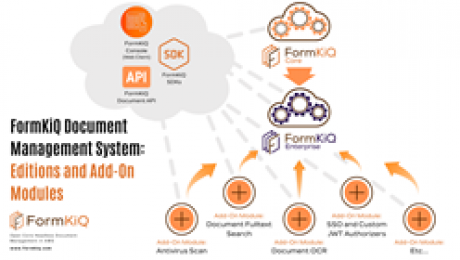
Enterprises looking for a highly flexible and customizable software solution to meet their document storage and management needs now have an innovative new product to consider. FormKiQ has announced the launch of FormKiQ Enterprise, its advanced open-source document management system with robust functionality, professional onboarding, and operational support to provide better scalability and customization for enterprise clients.
FormKiQ Enterprise builds off of FormKiQ’s foundational product FormKiQ Core, which delivers complete electronic document management system (EDMS) functionality, including document collection and storage, organization and classification, processing and transformation, and discovery, presentation, and integration. FormKiQ Enterprise offers an enhanced solution for more complex enterprise use cases, including deploying a customizable enterprise content management system (ECMS), adding EDMS features to existing applications, ensuring safety and compliance, and providing advanced functionality for document capture, processing, indexing, and more.
Beyond its powerful core capabilities, FormKiQ revolutionizes the entire philosophy of how EDMSs are built and powered. While other EDMSs offer a standalone product that doesn't integrate into the client's existing infrastructure, FormKiQ installs directly into the client’s existing structure, giving them complete control over the product’s code and data. The system is also built on Amazon Web Services' serverless model, eliminating any server configuration or maintenance since AWS manages these features.
This new cloud-based approach to EDMSs is something FormKiQ’s founders hope transforms how organizations think about, operate, and purchase EDMSs. FormKiQ’s leadership team sees incredible potential in their product to lead the charge in the next generation of EDMSs that can reduce the total cost of ownership and create better reliability and scalability for enterprises.
The concept is so new and revolutionary that the team believes it deserves its own name: Software-In-Your-Cloud.
"We're continually surprised by how many possibilities this new model for enterprise applications is opening up,” said Regan Wolfrom, co-founder of FormKiQ. “With our Software-In-Your-Cloud model, it's never been easier to customize software and integrate with services and vendors. While we initially aimed to improve web forms, we soon realized that the true potential for industry change lies in managing documents and other information. We’re now recognizing that FormKiQ provides the building blocks for a multitude of enterprise content management requirements."
To learn more about FormKiQ and its open-source document management system, visit https://www.formkiq.com/.
About FormKiQ
FormKiQ is a document management startup based in Winnipeg, Canada. Launched in 2016, FormKiQ has evolved from its original intent to give the leasing industry a better way to process multi-step forms to developing a full-scale electronic document management system to provide the most value to its clients. Today, FormKiQ is a complete and robust document management system integrated with the infrastructure and applications of both Core and Enterprise clients, using a headless design to allow for as much flexibility and customization as possible and built using AWS serverless computing for cost efficiency and scalability.
Share article on social media or email:
View article via:
Questions about a news article you’ve read?
Reach out to the author: contact and available social following information is listed in the top-right of all news releases.
Questions about your PRWeb account or interested in learning more about our news services?
Call PRWeb:1-866-640-6397
©Copyright 1997-2015, Vocus PRW Holdings, LLC. Vocus, PRWeb, and Publicity Wire are trademarks or registered trademarks of Vocus, Inc. or Vocus PRW Holdings, LLC.

By Johanna Blair
For as long as humans have been making groundbreaking discoveries and developing life altering technologies, we’ve needed ways to document, preserve, and share our hard work. A scientific breakthrough is only as good as its repeatability. A new way of doing things can only effect widescale change if it is documented accurately. And regulatory bodies will only let you get so far without a trail of due diligence.
Throughout modern history there have been major advances in the way we store and distribute knowledge. Hard-copy paper in filing cabinets was at one time kind of a big deal. However, it wasn’t without its setbacks. Scanning became part of the lexicon in the 1980s allowing for easier tracking and storage of documents. Adding to that, email sharing and document management software is a more recent development with more room to grow. These have ultimately led to the cloud-based document management storage of today’s advanced digital document management systems.
Continue reading to learn more about the history and purpose of a document management system and look into the future with cloud-based electronic document software.
Not yet a member of Med Device Online? Register today.
Sign up for the newsletter that brings you the industry’s latest news, technologies, trends and products.
You might also want to: