



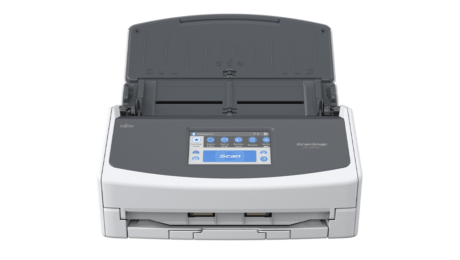
his is the most recent version of the Ricoh ScanSnap iX1600, which was sold under the Fujitsu brand when we reviewed it on Jan. 19, 2021. Our original review is below, updated only to reflect the current Ricoh branding.
The Ricoh ScanSnap iX1600 ($495) is simply a terrific desktop document scanner. It’s a replacement for the Fujitsu ScanSnap iX1500 we reviewed back in December 2018, and a direct competitor in both price and features to the Editors’ Choice–winning Brother ADS-2700W ($400). The iX1600 is relatively fast and highly accurate, and it comes with the well-regarded ScanSnap and ScanSnap Home software. This end of the field has many great products to choose from, but the iX1600 stands out with its excellent software bundle, performance, and ease of use, not to mention a very reasonable list price (though the ADS-2700W and other competitors are less expensive). That makes it our latest top pick among desktop document scanners for SOHO (small office, home office) users.
Compact, Friendly, and Powerful
Ricoh is launching two scanners together: the ScanSnap iX1600 and the iX1400. The latter is slightly slower than the iX1600 and lacks the intuitive color touchscreen and a few other features. Though the iX1600 costs $100 more, it’s a better value overall for the price.

Measuring 6.0 by 11.5 by 6.3 inches (HWD) with its trays closed and weighing 7.5 pounds, the iX1600 matches its iX1500 predecessor’s size and girth, and it’s not far off from several other entry-level models. These include the Brother ADS-2700W mentioned above, Epson’s WorkForce DS-575W Wireless Duplex Document Scanner ($400), and HP’s slightly bigger ScanJet Pro 3000 s3 Sheet-Feed Scanner ($400). Canon’s imageFormula DR-C230 Office Document Scanner ($495) weighs about 2 pounds less than the iX1600 but stands about 3.1 inches taller and 4 inches longer.

When you extend the trays to place them in service, all these machines increase in length by three times or more. Make sure your intended location for the scanner can accommodate it unfolded.

The iX1600 comes with a 50-sheet single-pass automatic document feeder (ADF). A 50-sheet ADF is the standard size for scanners in this price range; in fact, all the machines mentioned here so far have 50-page feeders, except Canon’s DR-C230, which holds 60 pages.

Most of these machines are designed to be configured and operated via bundled interface and document processing software, but they all come with onboard controls of varying complexity. Without question, the iX1600’s control panel is the largest, most elaborate, and most functional of them all. We’ll talk more about the ScanSnap interface and software a little later.

You can connect a single computer to the iX1600 via USB, or a computer, mobile device, or wireless network via Wi-Fi. The ScanSnap Connect app runs on most smartphones and tablets and has many of the features of the ScanSnap desktop app.
According to Ricoh, the iX1600’s daily duty cycle is 6,000 scans. That’s a higher rating than the DS-575W (4,000 scans), the DR-C230 and ScanJet 3000 (3,500 scans), or the ADS-2700W (3,000 scans). Considering that to scan 6,000 pages you’d have to load a 50-sheet ADF 120 times over the course of a day, it’s unlikely you’ll push the machine to anywhere near its formidable capacity.
When the data science team at Johnson & Johnson in India faced the daunting challenge of extracting text from nearly 4 million documents, they had two choices. They could either rely on third-party Optical Character Recognition (OCR) services at a significant cost or develop an in-house solution tailored to their needs.
Venkata Karthik T, senior manager of data science at Johnson & Johnson, revealed his journey at MLDS 2025 and offered an insightful look into how necessity, innovation, and cost constraints led them to build a powerful, scalable OCR tool.
“At the end of the day, cost is a very critical factor for any project. So taking care of that is very important,” Karthik explained. Additionally, using third-party solutions raised privacy concerns.
The project, spanning over a year with multiple iterations, demonstrated the power of in-house innovation. “It’s more like we picked up what was really important and started implementing them. 95% of the problem gets solved with these things,” Karthik noted.
Handling sensitive internal documents required greater control over the data. Moreover, building an internal tool offered the advantage of customisation, enabling them to tailor the OCR engine to various use cases beyond document scanning.
The Thought Process Behind Building the Tool In-House
Karthik said that his team evaluated multiple OCR frameworks, prioritising activity metrics, capabilities, and usability. They created datasets for testing, categorising documents into digital, noisy, and handwritten types.
Digital documents were generated using SynthTIGER, noisy documents sourced from the FunSD dataset, and handwritten text taken from the IAM dataset. After rigorous testing, they narrowed their focus to four key OCR models: PaddleOCR, Tesseract, EasyOCR, and HDR Pipeline.
Each framework had its strengths and weaknesses. PaddleOCR excelled at table extraction but struggled with dense text. Tesseract worked well on dense text but had issues with tables. HDR Pipeline performed best for handwritten text.
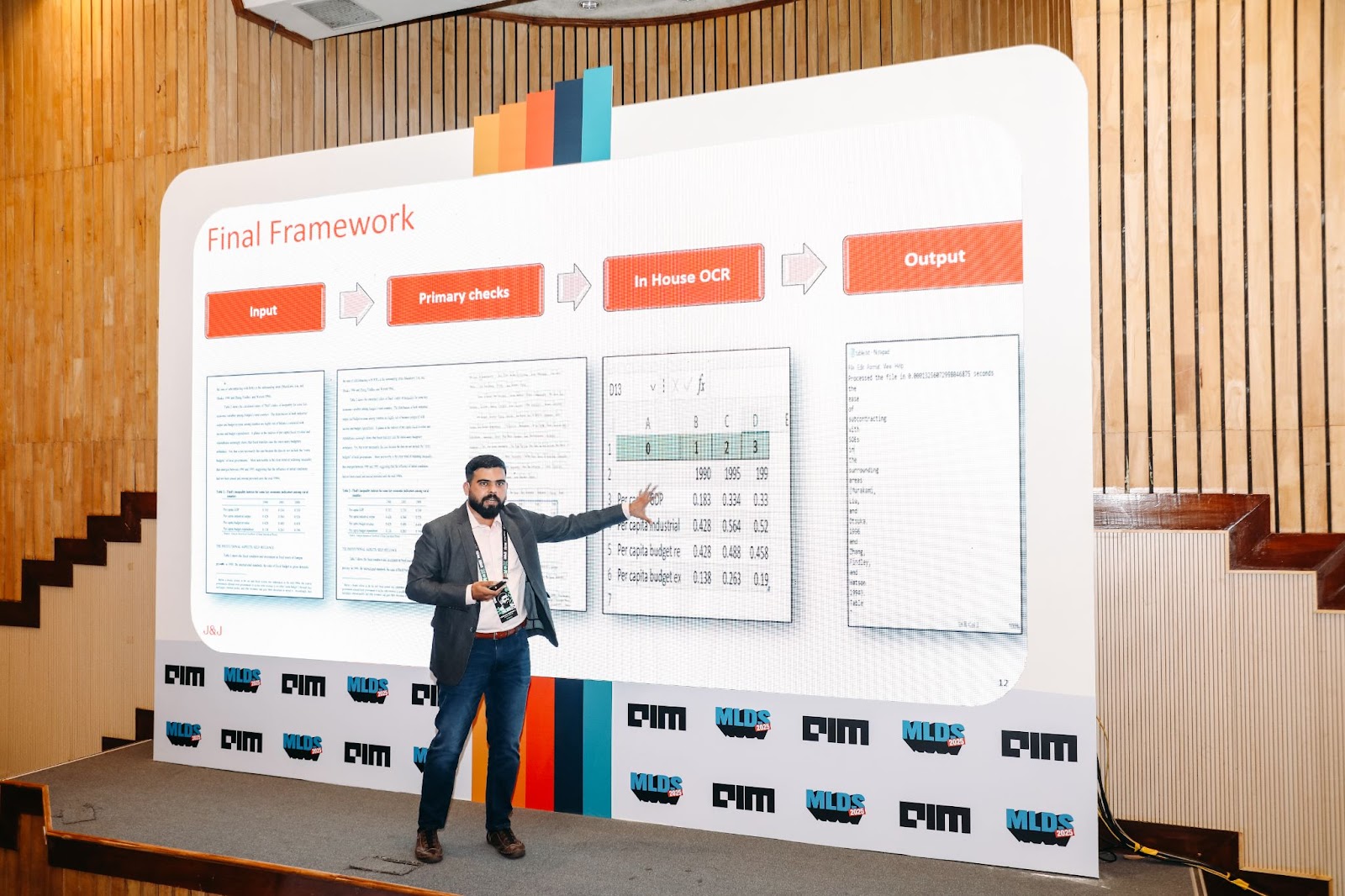
“So instead of choosing one, we combined PaddleOCR and Tesseract. We took both outputs and saw which one had the highest confidence score. If one model identified text and another missed it, we merged results, improving overall accuracy,” Karthik said.
The existing process was straightforward: send PDFs or images to a third-party service, extract text, and use it for downstream applications. However, the team sought to replicate and improve this with their own OCR pipeline.
The tool was evaluated using word error rate (WER), character error rate (CER), and accuracy. While third-party APIs achieved nearly 98-99% accuracy on digital and noisy documents, the hybrid model significantly improved internal performance. HDR Pipeline was particularly effective for handwritten text, achieving 85% accuracy.
How AI Helped with Cost – the Biggest Factor
Cost efficiency was undoubtedly another key consideration. “We don’t want the API up and running all day. It’s an unnecessary cost,” Karthik said. Instead of a costly front-end UI, the team deployed a backend API on Kubernetes. They optimised infrastructure using batch processing, streaming mode, and event-based triggering to ensure the system ran only when needed.
To further refine text extraction, the team introduced AI-powered error correction. Using ChatGPT for low-confidence words improved accuracy by 3%. They also experimented with fine-tuned BERT models to correct OCR mistakes without relying on expensive third-party APIs.
Additionally, they developed six pre-built extraction templates to streamline data retrieval. These templates allowed users to specify areas of interest, such as key-value pairs, structured tables, or spatial relationships within documents. This reduced the need for manual adjustments and sped up adoption within the organisation.
Since many documents contained tabular data, the team leveraged Microsoft’s Table Transformer. This model identified tables and their components, including rows, columns, and headers, before feeding them into PaddleOCR for text extraction.
For barcodes, they used a combination of YOLOv5 for detection and multiple open-source decoders. If these failed, they applied super-resolution techniques to enhance barcode clarity, boosting decoding accuracy to 84%.
Despite significant progress, Karthik said that challenges remain with handwritten text, where even humans struggle to decipher poor handwriting. However, the team is optimistic about integrating vision-language models (VLMs) like OCR-free RAG models to bypass traditional OCR altogether.
With the right scanning app, your iPhone or iPad can scan documents with vivid clarity. There’s no need for a printer-size scanner — you just need your Apple gear. A great example of such an app, iScanner is now on sale for only $24.99 with code SCAN (regularly $199.90).
iScanner scanning app for iPhone or iPad
This iOS- and iPadOS-friendly document-scanning app utilizes AI-powered tools. It lets users scan documents as vividly and professionally as possible.
iScanner can automatically detect document borders and adjust its scan accordingly. It can even perform the following:Advertisements

iScanner offers color correction and noise removal, while also allowing for easy signature and watermark additions. It makes it simple to mark up texts and otherwise annotate documents.
You can export any scan as a PDF, JPG, DOС, XLS, PPT or TXT file. Plus, you can protect your confidential scans by locking folders and files with a PIN.
Scan QR codes, IDs and more
With iScanner, you aren’t limited to just scanning work or school documents. Users can scan QR codes, IDs, passports and much more.
iScanner is rated better than any other scanning app on the App Store, boasting an average rating of 4.8 out of 5 stars after more than 100 million downloads. It’s also been featured and recommended by various industry-leading publications. For example, Gizmodo wrote, “The iScanner App is yet another example of cleverly leveraging an always-connected camera to do more than just intelligently make photos look prettier.”
Get a highly rated scanner app for less
For a limited time, you can get a lifetime subscription to the iScanner app for just $24.99 with code SCAN. This deal ends at 11:59 p.m. Pacific on February 23, 2025.
Buy from: Cult of Mac Deals
Prices subject to change. All sales handled by StackSocial, our partner who runs Cult of Mac Deals. For customer support, please email StackSocial directly. We originally published this deals post about the iScanner scanning app on November 3, 2023. We updated the pricing info.