



February 09, 2022 09:00 ET | Source: Raven Raven
Houston, UNITED STATES
HOUSTON, Feb. 09, 2022 (GLOBE NEWSWIRE) — Raven, the leader in document scanning technologies, announced a direct integration with The Neat Company, a leader in bookkeeping automation and financial document management for small businesses. Raven and Neat bring together the industry’s most highly rated document scanners with Neat’s cloud-based bookkeeping and document management software.
The Raven Scanner integration with Neat allows small-business owners to scan directly into NeatFiles or NeatBooks. The large 8″ touchscreen display built into Raven Original and Raven Pro Scanner models provides an updated experience with additional capabilities for Neat users. “We’re excited to provide a new scanning solution for Neat’s small-business owners. This partnership strengthens our paperless mission by providing small businesses a complete financial document management and bookkeeping solution,” said Raven CEO Stefan Diasti.
Powered by Raven Cloud, users can now log into and connect their scanner directly to their Neat account. Users will see Neat as a scanning destination on their Raven Scanners and with a simple touch of the screen will scan and send documents directly to the Neat platform. As they are scanning, users can specify the document type and select the folder in their Neat file cabinet where they want to store the document.
Using Neat and Raven together provides users additional opportunities to organize their scanned files in a more streamlined and efficient manner. Small business owners can scan documents in color or black and white and choose between single and double-sided scanning.
The Neat integration works with all Raven Scanners and Raven Desktop for Windows and Mac. Users can choose to enable NeatVerify for scanned documents (with eligible Neat plans). All Raven Scanners are also certified to work with the Neat Scan Utility.
President and CEO of The Neat Company Garrett Baird shared how the Raven Scanner integration solves a need for Neat customers. “We are excited about the partnership with Raven and the opportunity to pair our bookkeeping and document management expertise with the robust, user-friendly scanning solutions from Raven. This partnership provides our customers with a powerful way to digitize paper-based documents for safe and searchable digital use,” Baird commented.
Raven Scanners are available on Raven.com and Amazon.
About The Neat Company: For more than 20 years, The Neat Company has changed the way small businesses and solopreneurs manage painstaking and paper-intensive bookkeeping, customer payments, and financial record organization. Neat provides cloud-based solutions that hundreds of thousands rely upon to bring financial order to their small businesses. Neat is helping businesses track, manage, and centralize their financial data to be prepared for tax time and stay informed about the health of their business. To learn more, please visit http://www.neat.com.
About Raven: Raven provides a complete paperless solution that simplifies workflows in a seamless, user-friendly manner. Raven Scanners automate digital filing with direct scanning into leading cloud storage destinations, such as Raven Cloud, Neat, DropBox, Evernote, Google Drive, OneDrive, OneNote, QuickBooks Online, SharePoint and more. Raven Cloud provides scalable document management with free unlimited storage, document editing, role-based security, AI-powered text recognition, robust search capabilities, encryption and more.
Contact Information:
Raven
Stefan Diasti, CEO
stefan@raven.com
11150 S Wilcrest Drive Ste 200
Houston, TX 77099
1-800-713-9009
The Neat Company
Mark Tordik, PR
mtordik@broadpathpr.com
267-608-1200 x503
Related Images
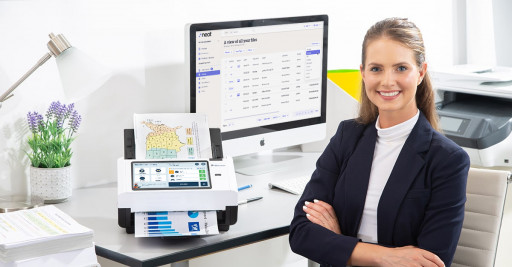
Image 1: Raven Scanner Is Directly Integrated to NeatFiles and NeatBooks
Raven Scanner provides a modern updated experience with additional capabilities for Neat users to scan their documents into NeatFiles and NeatBooks.
This content was issued through the press release distribution service at Newswire.com.
Attachment

Official website of the Cybersecurity and Infrastructure Security Agency
Here’s how you know
Official websites use .gov
A .gov website belongs to an official government organization in the United States.
Secure .gov websites use HTTPS
A lock (  ) or https:// means you’ve safely connected to the .gov website. Share sensitive information only on official, secure websites.
The NICCS website is intended to serve public and private sector cybersecurity communities. The language on the NICCS website complements other lexicons such as the NISTIR 7298 Glossary of Key Information Security Terms.
Click one of the letters above to advance the page to terms beginning with that letter.
National Initiative for Cybersecurity Careers and Studies
A Cybersecurity & Infrastructure Security Agency program
©2013-2022

Enter your email address to instantly generate a PDF of this article.
Keeping track of paperwork can be a challenge. It’s easy to misplace a file or even spill coffee on a document on your desk. If you don’t have that document backed up in an electronic format, you may have just lost important company or employee data. If your desk is still cluttered with paper files or documents, it’s probably time to consider switching to electronic records management (ERM).
Using electronic record-keeping software to organize and store records in an electronic format can help you better organize your documents and stay compliant with recordkeeping best practices. Here’s what you need to know about making the switch and finding the right electronic record-keeping software tool.
Electronic record-keeping helps businesses cut down on clutter and more easily navigate their employee files and tax paperwork. It also ensures that any information necessary is easily retrievable. You may need to pull employment records to defend yourself against a wrongful termination lawsuit, verify compliance during a government audit, or simply review an employee’s history when considering them for a promotion.
The key benefits of electronic record-keeping include:
Easier file sharing. If someone within the organization needs access to a file you can easily share it within the software system rather than having to take the physical file to them or needing to scan and email it. Software systems also tend to be more secure for sharing sensitive information including employee forms with SSNs and other private data.
Preventing lost data. It’s pretty easy to misplace a piece of paper. In addition, floods, fires, or other unexpected disasters can result in a huge loss of data if your business is only retaining paper records.
Access from remote work locations. Using an electronic records management system allows remote employees to access any documents or files that they need from home. This also helps if you have multiple work locations such as different office branches.
Better file retention compliance. Having proper document retention practices is a key part of compliance. There are certain documents that need to be retained for a set number of years. However, it is best to avoid keeping unnecessary documents on file if they have private information. With a paper filing system, it can be hard to keep track of when it’s time to dispose of old files. With digital documents, it is easier to track when the required retention period has ended. Some electronic record-keeping software also allows users to set up alerts for when the retention period has ended.
Saving time. Storing files electronically makes it easier and more efficient to find the exact document that you need. No more sorting through file cabinets and having to search through paper files for the right document.
Process automation. Some electronic record-keeping tools can even help you automate your common document processes, including HR and onboarding documentation.
These benefits can save your business a lot of time and keep your documents more secure. Many small businesses put off adopting electronic document management practices. However, making the switch to electronic record-keeping often isn’t as expensive or cumbersome as small business owners think.
Employers have a few different options when it comes to electronic record-keeping software. Here are the software categories that are most popular for creating and managing electronic personnel files and managing HR document storage:
Small businesses often opt for more general file storage options like Google Drive, Dropbox, or Microsoft Sharepoint to store their business and HR files. These software services can be a budget-friendly option for easy file storage and document sharing, but they do also come with some limitations:
Pros:
Most of the top cloud-based file storage and sharing tools are fairly user-friendly and offer a minimal learning curve.
These solutions are typically affordable. Very small businesses may even be able to make do with free versions such as the standard Google Drive account without extra storage or a business subscription.
Cons:
They lack to specialized features that dedicated HR or document management solutions offer such as process and workflow automation, records retention tracking, or audit trail features.
An Electronic Document Management System (EDMS) is a category of software designed to manage electronic records. EDMS tools allow organizations to create, store, and share electronic records. They also often have workflow management tools to automate business processes. Many EDMS tools have HR-specific features for electronic employee record keeping.
You may also hear the term enterprise content management system (ECM). These systems are also document management systems though they also handle unstructured data. They have the same features as EDMS when it comes to storing, sharing, and editing documents but also extend those features to unstructured documents such as HTML files.
Pros:
Secure method of securing documents like I-9s with sensitive personal information.
Easy to navigate and find documents quickly.
Allow employees to access documents from remote worksites.
Cons:
Many EDMS lack HR functionality or features.
More expensive than basic file storage options.
Another option is to go with a full HR software platform such as an HCM system. These tools typically include onboarding, payroll, benefits, timekeeping, and performance management functionality. They’re technically not designated as document management software, but many of them act as electronic employee records and facilitate the collection and storage of all necessary new hire paperwork and documentation. Here is what to consider when evaluating HCMs as an electronic recordkeeping option:
Pros:
Simplifies all HR processes including documentation.
Automates workflows including onboarding document collection.
Helpful for small businesses that don’t have a dedicated HR team but want to have good HR practices and processes.
Often feature compliance tools.
Cons:
Can be cost-prohibitive for smaller businesses.
Often offered as unified systems so you can’t always choose to only pay for the document management program.
There are a number of different electronic record-keeping software options across a number of software categories. Here are some of the most popular electronic record-keeping software options for small businesses:
If your business already subscribes to Microsoft 365 or has the Microsoft Office suite on your work computer, then you probably already have access to Microsoft Sharepoint for no additional cost. This makes it an appealing choice for small businesses on a budget. Microsoft Sharepoint is a content management and team collaboration tool. You can set up worksites for individual teams, such as HR, and share files, notes, and data in this cloud-based software. It’s not inherently an HR document management tool, but it does get the job done if you just want a basic, secure option for storing employee files and tax documents electronically for remote access and sharing.
eFileCabinet is a document management software that is popular with HR, finance, IT, and legal teams due to its security features. Its security features are compliant with most government and corporate regulations including HIPAA. The service offers audit tracking and role-based user permissions, so that businesses can restrict who may view documents and view detailed document history reports.
Their HR document management solution offers process automation tools to automate common HR processes and documentation such as onboarding, FMLA requests, and benefits enrollment.
Zoho Docs is a document management tool from Zoho, a workplace software provider of email, CRM, and other software services. Zoho Docs is an online document management system that allows users to upload, store, create, edit, share, and view any type of file in a centralized location that can be accessed from anywhere. It also offers collaboration tools such as task setting, groups, shared files, and collaborative document editing.
One major benefit of Zoho Docs is that it’s a secure and affordable option. There is a limited free plan that may work for very small businesses with one or two person HR departments. The paid plans start at $4 per user per month.
ServiceNow Employee Document Management is a paperless HR file management system that is part of ServiceNow’s HR platform.
It has built-in compliance and document retention features including:
Custom retention policies: Administrators can specify how long each document type should be retained based on compliance requirements or company policy.
Legal hold: Apply a legal hold to automatically suspend a retention policy and prevent document updates or purging if you believe documents will be needed for upcoming legal processes or audits.
Access restriction: Restrict who has access to specific files or folders.
Audit trail: View a complete history for each employee document including changes and who has accessed it.
It also offers an employee self-service option, so that employees can view and download their own documents.
PeopleDoc offers employee file management and document services tools designed to allow users to create, sign, store, access, share, and delete employee files in one secure place. The software features a document generation tool to help automate the creation of common employee documents such as employment verification letters. PeopleDoc also integrates with Docusign for e-signature collection on documents such as offer letters or company policy acknowledgments.
The service also includes helpful security and compliance features. Their proactive compliance tool allows HR team members to view what documents are missing so that you can collect them promptly. It also shows documents that are about to expire and allows users to request updates from employees within the system. PeopleDoc also has legal hold, and retention scheduling so that documents are retained properly and compliantly.
Document Locator is a Windows-based document management system. It has features designed for a variety of organizational functions including HR, business process management, and accounting. Document Locator’s employee file management software can automate HR processes and compliance. The tool offers records retention alerts, certification and license tracking for employees in regulated fields, HR form templates, and reporting. They also have tools designed to manage policy and employee handbook updates and to distribute new releases or updates to your employees.
You can also scan your paper records into the system and Document Locator will convert them into fully searchable records within the system. This is a great feature for small businesses looking to digitalize their records management system for the first time.
Eddy is an all-inclusive HR software platform that allows users to create, sign, and store documents in a secure digital format. Businesses can create electronic records for each employee with all documentation stored in a centralized location. It also includes time tracking, benefits administration, onboarding, and other HR features.
Using a unified platform can simplify the process for employees and HR staff as everything is in one place rather than spread out across a document management system, time and attendance system, performance management system, and benefits system. Though of course, it is more costly. This type of system is ideal for growing businesses that need to take more of their processes digital.
Employers have a ton of options when it comes to adopting electronic records management practices. There are different electronic record-keeping software options suited with different features and functionalities for a variety of budgets and business needs. If you’re still not sure what the right option is for you, here are a few things to consider.
The first thing to ask yourself is what data you want to manage electronically. If it is primarily HR or employee data, you’ll probably want to look for a solution designed specifically for HR. That could be an HR EDMS or an HR software solution. If you will be storing documents with highly sensitive information or advanced compliance requirements, you may want to spend a bit more to invest in a software tool with better security and compliance tools.
It can also help to look at what software services your business is currently using. Many of the listed systems including Microsoft Sharepoint and Zoho Docs are offered by companies that also provide other business software tools. When possible, choosing software that your employees are already familiar with is helpful. You may also want to consider what other software tools you might need. If you need an overall HR platform, CRM tools, or other new software programs shopping for them together may net you a better deal and a more integrated experience.
Lastly, look into the key features and balance the utility of any advanced features against your budget. Growing businesses will often find that automated workflows and onboarding documentation features can save time and provide a better employee experience. However, there are plenty of free or low-cost options available if you simply want a service to store your documents electronically without all of the extra bells and whistles.
Instantly access free expert advice, management strategies and real-life examples of workplace success.
Gannett announced a strategic reorganization Wednesday, dialing back on top executive effort devoted to publishing while elevating its smaller but growing digital marketing services business to one of two operating units.
Maribel Perez Wadsworth, already in charge of USA Today and the regional USA Today network of 250 newspapers and sites, becomes president of Gannett Media, the publishing division.
As USA Today reported, two other publishing executives — Kevin Gentzel, the top advertising and revenue officer for the last seven years, and Bernie Szachara, who had been president of U.S. publishing operations — are leaving the company.
The move puts fresh focus on digital marketing, which currently generates only about a seventh of the total revenue of the company, but is growing and profitable, with further good prospects looking forward.
I spoke with Kris Barton, promoted in the new structure from chief product officer to president of the new unit. “It is smaller,” Barton said, ”but it already is a large business ($450 million-plus in annual revenue).”
“Also it fits with our ties to local communities by helping local businesses” with various digital marketing solutions. Those include lead generation, tech support and a flow of information on performance — and also placing advertising on Google and Facebook, a potent force now in local marketing.
The unit’s business model also fits Gannett’s current emphasis on digital subscriptions on the publishing side, he said, since customers pay for a package of services delivered monthly rather than buying them piecemeal.
Gannett bought a digital marketing business, ReachLocal, in 2016. Barton, whose previous experience included product work at Microsoft, came along with the deal. ReachLocal was based in the Los Angeles area, and Barton will continue to work primarily from there, even though the company’s headquarters is in Northern Virginia.
The reorganization, he said, will help “legitimize” the big role the unit plays at Gannett and streamline reporting relationships.
Digital marketing began popping up in the newspaper business a decade ago, typically as an offering to advertising clients, who lacked the resources to ramp up such programs on their own.
That’s still part of the customer base, Barton said, but only a part. The service is not confined to Gannett’s markets, he said. And it is being sold internationally, including Canada, Australia, New Zealand and the United Kingdom, where Gannett owns the large regional Newsquest group.
Barton said that he was proud that the digital marketing group has shown double-digit percentage revenue growth over the last year, “and our level of investment is high, growing the business at the expense of some profit.”
Gannett now describes itself (as in its most recent earnings report) as “a subscription-led and digitally-focused media and marketing solutions company that is committed to empowering communities to thrive.”
That and the reorganization do not mean that publishing is being pushed aside. One of the company’s biggest announced goals is to quickly build paid digital subscriptions to USA Today and its regional publications, with a target of growing from 1.75 million now to six million by 2025.
For print, the ambition is more modest — stabilizing the legacy business where subscription numbers and advertising revenues have been declining precipitously.
As I have noted before, Gannett — along with other newspaper and magazine groups — seems to really mean it now when CEO Mike Reed talks about digital transformation. That’s a juggling act of sorts, though, when print circulation and advertising revenues still loom large even as they contract.
Count this week’s reorganization as one more indicator that Gannett is betting on what’s growing and digital as opposed to what is simply big.
Twitter long resisted the idea of an edit button, but now appears to be giving in to the wishes of its users.
Fox News didn’t contend it had no legal obligation to be truthful, nor did a court uphold that.
As an incarcerated writer, I too often encounter publications demanding sensational content with shock value about events inside the prison walls.
Instead of the tedious undertaking of fact-checking every single false claim, proponents of prebunking advocate for mass inoculation.
This group of 31 leaders will convene at Poynter in St. Petersburg, Florida, the week of Sept. 18.
Get the Poynter newsletter that’s right for you.
Support responsible news and fact-based information today!