



Enter your email address to instantly generate a PDF of this article.
Before 2020, employee monitoring in a traditional office environment was pretty straightforward. Managers and supervisors kept track of employee performance and productivity by directly monitoring them throughout the workday. Yet, the COVID-19 pandemic of 2020 threw a wrench into this tried and true system for most companies.
In a few short months, nearly every business had to incorporate a remote workforce of some capacity to continue functioning. Before the pandemic, only 6% of employees were remote workers. As early as May 2020, one-third of all employees began working from home.
This fed the need for new ways to track employee activity, as managers could no longer directly monitor their teams in person. Beyond that, droves of companies that were inexperienced with remote work were creating monitoring policies for the first time. That led to the creation of numerous employee monitoring solutions, including computer monitoring through cloud-based software, GPS tracking, keylogging, and other methods.
Yet, the advent of more rigorous ways to monitor remote employees has led to some backlash and privacy concerns, such as watching employees through their webcams. Despite the concerns, it’s clear that remote work is here to stay. When polled, a mere 6% of workers said they wanted to go back to working entirely on-site. Instead, it seems that a hybrid of remote work and on-site work is the way going forward, with 74% of U.S. companies either already using a hybrid approach or planning to incorporate one in the future.
Since employee monitoring is such a big issue today, I’ve put together this guide on properly implementing employee monitoring without violating anyone’s privacy. Read on to discover the most successful types of workplace monitoring for both remote workers and office workers.
While the pandemic skyrocketed employee monitoring into the mainstream, it’s not a new concept. Not only that, but certain businesses have used employee monitoring software for many years before 2020. An example would be call centers, where employee phone calls and voicemails were recorded and closely monitored to ensure their quality and efficiency.
Customer support is another industry where employee monitoring tools have long been the norm. If you’ve ever called a customer support line, you’ve likely heard the classic automated phrase, “This call may be recorded for quality assurance or training purposes.”
Well, that’s a classic form of employee monitoring right there. Companies would record customer support calls to ensure customer satisfaction and use them for future employee training.
For example, suppose they found an exemplary customer support call where the employee was courteous and knowledgeable. In that case, they’ll likely include the recording in training for new employees so they’ll know what a successful call sounds like. Conversely, they could also pick a poor customer support call to use in future training as an example of what NOT to do.
Post-COVID-19, many employee tracking software programs started popping up, allowing companies to track employee productivity, computer activity, emails, and even individual keystrokes.
Let’s look at the most common methods for employee monitoring for remote, mobile, and on-site workers.
Has your workforce gone almost entirely remote since 2020? Have you been scrambling to find a way to track key performance metrics without invading employee privacy? If so, there are plenty of employee monitoring systems that allow you to discretely keep track of tasks, work hours, quality of work, and more.
That can help you salvage your productivity and regain control over your workforce without coming off as a tyrannical micromanager. That said, there’s a fine line between healthy employee monitoring and invasive workplace surveillance, so you must be careful. Here are some of the most popular methods for measuring the productivity of your remote workforce.
When working from home, sometimes the temptation to surf the internet for personal reasons can become too great. In small doses, this isn’t too big of an issue. However, if left unchecked, internet surfing and app usage can dramatically affect employee productivity.
For example, say you notice that an employee is frequently late getting back to clients, misses deadlines, and not communicating. In this case, being able to track their URLs and app usage can come in handy. That way, you can discover if they’ve been wasting time on YouTube or Instagram excessively during work hours. The usefulness of these tracking features doesn’t end there, though.
On the other side of the spectrum, say that you notice an employee is falling behind — but it’s not due to wasting time. After checking their internet history and app usage, you discover that they’re struggling to use a new piece of software properly. From there, you can hook them up with the proper training to increase their productivity.
To take things a step further, you could also incorporate web-filtering and URL-blocking features. For instance, if you don’t want employees checking their social media during the workday, you can choose to restrict sites like Facebook and Instagram (you can also block sites containing inappropriate content).
Certain types of employee monitoring software allow you to enable ‘time-wasting’ sites like Facebook and YouTube, but only for a
limited period. Others have special tracking features for social media sites, where you can view specific employee actions.
These features come in handy for tracking positions like social media managers, where the job requires them to use apps like Facebook. However, the special tracking features will let you know if they’re doing their job on social media or are checking their personal feeds.
A significant concern most companies have with remote work is they can’t monitor employees in real-time like they could in the office. They feel that there’ll be a steep dropoff in employee productivity, which doesn’t have to be the case.
That’s a big reason why many employee monitoring programs began to offer screenshots, screen sharing, and video monitoring as part of their features. Screen sharing of an employee’s computer will update managers on an employee’s progress on tasks, emails, and other workflows.
This type of employee monitoring is excellent for project management, as it makes tracking progress on individual tasks a breeze. That can also save money, as a supervisor can quickly see if an employee is on the right track with a project or not.
Without a form of monitoring in place, the employee may embark down the wrong path, which can derail progress on the project and cost valuable resources to fix.
The most effective form of screen sharing is only interested in tracking the work getting done on the device through tracking timesheets, user activity (levels of engagement during the day), performance metrics, and other non-invasive ways to measure productivity.
Legal issues and concerns over webcam surveillance
Video surveillance is an area that gives many remote workers privacy concerns. For one, many remote workers worry that their employers are spying on them through their webcams.
So is Big Brother keeping an eye on everything you do and say at work?
Let’s look at what the law says to find out.
The Electronic Communications Privacy Act (ECPA) of 1986 is the guiding piece of federal legislation in this regard. It states that employers have the legal right to monitor employees’ verbal and written communications for any business purpose. That’s especially true if the communications are made via company equipment (laptops, phone systems, etc.).
The key takeaway here is that employers are allowed to keep track of your business-related activities, not personal ones. That means it’s illegal for them to record your personal calls made on your smartphone.
Besides monitoring verbal and written communications, employers can integrate further monitoring methods — but here’s the caveat — with employee consent. That means if a company doesn’t have a written policy stating that they’ll watch employees on webcam, they likely aren’t doing it secretly. In fact, it would be illegal to do so.
Also, the ECPA is a federal law, and some states have additional laws that value employee privacy even more. You should check the regulations for your state to find out if you’re protected from certain forms of monitoring or surveillance.
Another way to monitor remote employees is to use time tracking or file tracking software. Software with time tracking features allows employees to control when they clock in and clock out. As such, they’re free to clock out to take a break whenever they need it (with managers having the ability to track work hours and breaks, of course).
This type of employee monitoring is both effective and empowering, as it places the onus on the employees to keep track of their own time. That’s a great way to track employee progress without worrying about violating their privacy.
Besides clocking in and out each day, time tracking features also allow employees to track hours spent working on specific projects and tasks. As a manager, that makes it effortless to find out how much work got done on any given day. You’ll be able to see when everyone started work, what they worked on, and how long they spent working on it.
That eliminates a lot of the guesswork involved with monitoring remote workers, which is a definite plus. Not only that, but time tracking data is also invaluable for making more accurate time estimates and budgets for future projects and tasks.
File tracking uses and benefits
A deeper version of time tracking is file tracking, where employers receive detailed reports on which files were worked on, by whom, and for how long. That comes in handy when most of the work done at your organization is completed through files, such as Word documents or spreadsheets on a shared drive.
File tracking has other benefits as well.
For instance, with file tracking software in place, you won’t have to spend hours looking for lost or misplaced files. You’ll be able to follow a detailed trail of where the file has been and who scanned it/edited it last.
Another area where file tracking comes in handy is with audits. As an organization, it’s crucial for employees to follow your policies for document handling and retention. Otherwise, you’ll wind up with documents and files scattered all over the place, which spells disaster for an audit.
With file tracking in place, any gaps in the audit trail will surface immediately, as you’ll instantly know if a file has been misplaced, lost, or handled incorrectly. That can help save time and reduce costs due to the boosted efficiency.
Last but not least, file tracking will tack on additional security for all your files and documents. Certain industry regulations require highly specific document handling procedures. For instance, some legal or business files containing sensitive information can only be accessed by authorized parties — the violation of which is a crime.
With file tracking, you can automate security alerts to trigger when an unauthorized user attempts to access one of these documents. You can also set up automatic alerts when someone tries to move sensitive documents from their secure location.
Another form of employee activity tracking is keystroke logging.
What’s that?
Keylogging programs record each individual keystroke of an employee during their work hours. Keystrokes are how you communicate with your computer, and more goes into monitoring them than you might think.
For instance, did you know that the velocity of your keystroke is a measurable metric? Or that keyloggers also track the length and time of the keypress? Time, length, velocity, and the name of the key are all metrics that a keylogging program will track.
Why is this valuable information?
It is because you can decipher quite a bit from interpreting a user’s keystrokes. Employers can use keylogging to keep track of individual tasks, workplace communications, and more. Yet, keylogging has a notable dark side, and some view it as an outright violation of employee privacy in all its forms. The primary concern is that keylogging will reveal quite a bit of sensitive employee information.
For instance, if you’re keystroke logging an employee, it’s not uncommon for them to type their:
Personal address
Social security number
Credit card/debit card number (if making a business purchase to be reimbursed for later)
Company passwords
Private messages
As you can imagine, all this private information would be disastrous in the wrong hands. That’s why lots of keylogging programs are used for nefarious reasons, such as identity theft. For these reasons, many employers have stopped using keylogging programs entirely, as they believe the security risks outweigh the benefits.
Not every employee is going to work from home — but employee monitoring is still a necessity. Also, some positions don’t involve working from home OR at an office.
Delivery drivers are an example of this, as their vehicles are technically their offices. As you can imagine, this type of work requires a particular kind of monitoring. Most companies like Uber and DoorDash use GPS tracking to monitor productivity, efficiency, and timeliness of delivery.
There are also types of employee monitoring that take place in the office but don’t involve the physical presence of managers or supervisors. Let’s take a look at the most common types of employee monitoring for office employees and mobile employees.
Over 50% of all companies monitor employee emails, which is an effective way to prevent potential issues before they occur.
How is that?
Let’s say a particularly disgruntled employee has had enough and is ready to quit. However, before leaving they decide to leak a ton of company trade secrets to a competitor out of spite. With an email tracker in place, you could intercept this damaging email and delete it before it gets the chance to do any harm.
That’s an extreme example, but it conveys the power of monitoring employee emails.
Remember, the Electronic Communications Privacy Act states that it’s legal for companies to track all verbal and written communications, and email definitely falls within that umbrella. So you shouldn’t be surprised if you discover that an employer is tracking company emails, as it’s well within their federal rights.
Another use for tracking employee emails is that it can help settle disputes. An example would be examining employee emails to determine whether a case of sexual harassment took place or not.
Proponents of this monitoring technique state that it’s invaluable for protecting sensitive information from leaving the company and falling into the wrong hands.
Email monitoring isn’t without its critics, though.
Detractors of this method state that email monitoring builds feelings of distrust and resentment among employees. They may feel that you don’t trust them by reading their emails, which can hurt workplace morale. There is evidence to back this up, too.
A study by Gallup found that employees that felt disengaged were more likely to leave the organization. A high turnover can destroy your productivity, so it’s best to be transparent with employees about email monitoring. In particular, let them know that it’s to ensure consistency in your messaging, not because you don’t trust their abilities.
You may also wish to share the frequency of such monitoring. For example, employee emails may be tracked but only pulled in the case of a specific incident. In that situation, it may raise good will for employees to know that you’re not regularly looking over their communication.
If you’re in charge of delivery drivers, you likely already have some form of GPS tracking in place at your company. In today’s age, employers can use GPS trackers on more than just company vehicles, too. Location trackers also exist for work phones and tablets, which are primarily used to track the work of sales representatives.
This technology enables managers to always know where their employees are when they’re on the clock.
Besides monitoring employee locations in real-time, location trackers also allow managers to view historical data, such as the routes chosen for customer deliveries. That will make it easy to identify the quickest and most reliable routes for drivers to use in the future.
Another advantage of implementing GPS trackers is you can quickly confirm if a package was delivered or not. If the customer reports no delivery, you can consult the location tracker data to see if a driver made it to their property with the package.
Then there’s the additional safety that GPS trackers provide to mobile employees. Should a driver go missing or get into an accident, the location tracker can quickly triangulate their location to send help.
Other uses for location tracking software
Construction contractors and companies with field service teams (plumbing, locksmiths, HVAC, landscaping, etc.) also use location tracking software, albeit in a different way than delivery driver managers.
Contractors use GPS software to confirm that their crew arrives on-site when they’re scheduled. They can also analyze the data to estimate arrival times for clients better.
For instance, if they notice that their crew has a more challenging time getting to a particular part of town (either due to heavy traffic or another issue), they can quote customers a later arrival time to accommodate the delay.
That will help you avoid disappointing customers due to your crew arriving late, which will improve your customer satisfaction rates.
Call centers and customer support teams have long had these forms of employee monitoring in place. Yet, they aren’t the only ones incorporating recorded phone calls to keep track of business communications.
Procurement managers may also choose to record employee phone calls with suppliers.
Why is that?
Healthy supplier relationships are integral to the success of the procurement process, which is why managers may choose to monitor their calls to ensure employees are being cordial, helpful, and polite with suppliers.
Sales teams may also choose to record client calls to monitor the quality of their selling techniques and phone etiquette. After combing through the data, sales managers can identify the types of calls that are the most effective at converting prospects to use in future training.
Monitoring voicemails has become far less common, as the practice of leaving voicemails has become antiquated. If clients or suppliers don’t answer their phones, it’s far more common for employees to send an email or instant message instead of recording a voicemail.
Speaking of instant messages, it’s common for employers to monitor messages that get sent through apps like Slack.
For the most part, IMs have replaced voicemails (and even emails in some cases) due to how quick and efficient they are to use. If you need to quickly notify a coworker of an upcoming meeting or task that’s due — nothing beats sending them a quick message via instant chat.
Tracking employee IMs is primarily effective at resolving in-house disputes and issues.
For instance, if an employee claims a coworker is bullying them in the office, checking the IMs of the associate in question is a reliable way to uncover evidence.
Employee monitoring software often has features that enable managers to view employee IMs both in real-time and for future use.
Lastly, some businesses choose to use closed-circuit TV cameras to monitor their property and the performance of their employees. It’s common for establishments to place cameras in areas where employees aren’t supposed to be (such as food storage or money vaults).
Some businesses set up CCTV cameras around the office to encourage better performance from their employees, but this can lead to trust and privacy issues, so it’s not recommended.
CCTV cameras are also valuable for protecting properties at night and acting as a deterrent for thieves.
By now, you should be more familiar with the different types of employee monitoring, both for remote work, mobile work, and for on-site workers.
While any form of monitoring is bound to raise privacy concerns eventually, employee monitoring can be a useful tool when implemented properly. Over monitoring could harm employee morale. However, the right amount of monitoring can ensure productivity and provide valuable data.
The pandemic in 2020 catapulted remote work monitoring into the mainstream, with many companies now adopting different types of employee monitoring software.
It’s best to focus only on monitoring work hours, task completion, and employee communications to avoid privacy concerns. Not only are these the most effective metrics to monitor, but they’re also well within your rights, as stated by the ECPA.
Instantly access free expert advice, management strategies and real-life examples of workplace success.

DataDrivenInvestor
Jun 1
Save
The use of paper forms of documentation is rapidly dwindling. Increasing numbers of governments are realizing that going paperless saves both time and money. If a document is legally binding, it doesn’t need to be physically signed by the parties involved.
It was the COVID-19 epidemic that spurred the majority of companies to adopt paperless. Electronic document signing software has been embraced by businesses at an astronomical rate. The use of electronic document signing software makes it possible to digitally sign key documents such as contracts and invoices.
The use of best document signing software will only grow in the future. A snag in this adoption, however, is the need to select the appropriate electronic document signing software free.
There are a number of programs that allow you to type, draw, and digitally add to the papers, making this procedure difficult.
With so many options for the best electronic document signing software, it’s no wonder that the workplace is becoming digital. As part of the workplace’s digitalization, it encompasses technologies like corporate mobility, digital information management, and more.
As soon as you’ve landed on this page, we’ll walk you through the process of selecting the best document signing software for business.
The best document signing software for small businesses may be found in the list provided below.
➤ CEO — Borya Shakhnovich
➤ Mobile App: iOS | Android
➤ Location — Brookline, Massachusetts
To sign and submit papers electronically, there is no better program than this one. Automating and optimising operations, gaining access to payments, and keeping track of paperwork are all made easier with its support.
Reusable templates in this program make mailing papers a breeze and a time saver. SignNow’s workflows let you bundle documents and transmit them to specific people depending on their roles. After signing a document, SignNow allows you to choose from a variety of options for how the document will be handled.
➤ CEO — Ryan Pegram
➤ Mobile App: None, web-based only
➤ Location — Thornton, Colorado
WeSignature is a current example of best document signing software for business that allows users to digitally sign papers. This app has been used by a large number of professionals for both personal and professional reasons.
Individuals and businesses may sign a wide range of online documents using this easy, fast, and painless program. The WeSignature software allows you to sign documents, fill out paperwork, and follow up with the recipients on a regular basis once you’ve adopted the program.
For years, it’s been the greatest tool for electronically document signing in the industry. Once you start utilizing WeSignature, you’ll be amazed at how quickly your documents will be delivered. With the use of this technology, enterprises may send out a large number of papers simultaneously.
➤ CEO — Will Cannon
➤ Mobile App: None, web-based only
➤ Location —340 S Lemon Ave Ste 1760 Walnut, CA 91789
Signaturely is another popular best document signing software. Many individuals choose it when they want a quick and easy approach to get their documents officially signed. The ease with which it may be used makes Signaturely a standout. Online document signing is made simple with our user-friendly and speedy platform.
Signaturely is unique in that it focuses on removing features rather than adding new ones. It focuses on streamlining the signing process by eliminating any stages that aren’t absolutely essential.
➤ CEO —Dan Springer
➤ Mobile App: iOS | Android
➤ Location — San Francisco, CA
DocuSign, with its electronic document signing capabilities, is also a preferred platform. One of the key reasons why the firm has been able to maintain its position as a market leader is because of its simplicity of use.
DocuSign makes it simple to upload documents, add a signature box, and email signed documents to recipients. Teams may easily sustain momentum when sending and receiving critical papers as a result of this.
If you use Google Docs or any other spreadsheet for business, you can easily create electronic signatures using DocuSign and your Google Drive account.
You may use DocuSign to electronically sign papers that can be readily integrated with a wide range of products since it is simple to use and straightforward to understand.
➤ CEO — Joseph Walla
➤ Mobile App: None, web-based only
➤ Location — San Francisco, CA
Document signing software like HelloSign is highly regarded for the unique capabilities it offers. It excels in the areas of personalization, client service, and pricing flexibility. Embedding and branding the signature alternatives in the papers is also made possible by the API.
It also offers a wide range of extensions and integrations that are compatible with all major online signing rules. It is the greatest electronic document signing software owned by Dropbox, and it has excellent connectivity with many other products, like Google Suite, Gmail, and more.
➤ CEO — Shantanu Narayen
➤ Mobile App: iOS | Android
➤ Location —San Jose, CA
With Adobe Sign, you can manage your processes from any place and on any device because of its feature-rich software. Using this program to sign papers is a common practice because of the ease with which it creates an electronic signature in word format.
In addition to its focus on worldwide compliance, Adobe Sign is noted for its extensive interaction with third-party applications. For both electronic and digital signatures, it has a wide range of options.
➤ CEO — Mikita Mikado
➤ Mobile App: iOS | Android
➤ Location — San Francisco, California
Electronic document signing software like this one is well-known for its user-friendliness and simplicity of use. A free document signing software for business that aids in document management is provided by this service. There is also an automatic workflow, audit history, as well as a drag and drop connection included.
Additional interfaces include CRM, file storage, and payment options for PandaDoc users. The contract management software PandaDoc is worth a try for those searching for an efficient solution.
➤ CEO — Martin Holmstrom
➤ Mobile App: None, web-based only
➤ Location — Portland, Oregon
Electronic document signing software free that is utilised by a large number of companies. Many hours may be saved by using this service, which is also consistent with e-signature requirements.
In addition to document monitoring, configurable workflows, and automated reminders, this tool offers a free plan.
➤ CEO — Sunil Patro
➤ Mobile App: iOS | Android
➤ Location —Brookline, Massachusetts
This is another excellent electronically best document signing software for business. It’s one of the greatest apps for personal usage of electronic signatures. You may begin uploading papers, preparing them for signatures, and submitting them immediately after signing up for a free trial.
SignEasy is compatible with a broad range of third-party apps and can be easily integrated into your existing workflows. You don’t have to worry about opening, signing, and sending documents using Gmail. Finally, you may take use of a variety of features, like automated reminders, tracking, and signature sequences, among others.
➤ CEO — Julian Zehetmayr
➤ Mobile App: None, web-based only
➤ Location — Wien, Wien
If you need legally enforceable electronic signatures but don’t want to spend a lot of money, Eversign is a perfect option for you. For a low monthly subscription, you can send a large number of documents without incurring additional charges.
Audit trails, contract management, and app connections are all included in Eversign’s basic features. If a company is trying to expand its user base, or if it wants additional incentives like in-person signing, there is no additional cost.
➤ CEO — Daryl Bernstein, Cary Dunn, and Jonathan Siegel
➤ Mobile App: None, web-based only
➤ Location — Fort Lauderdale, FL
Electronic signatures are quick, simple, and secure using RightSignature. It’s one of the greatest solutions for mobile electronic signature software since no apps need to be downloaded or installed. With RightSignature, you can drag and drop form fields into PDFs, much like other document electronic signature providers.
Multiple papers may be submitted simultaneously, as well as templates created and shared with others. Documents may be sent out and signatures requested in a certain order.
Custom branding, team stats, and the option to request signer attachments are included in the higher-level plan. While RightSignature’s connectors and partner options are attractive, the company falls short of interacting with a more diverse technology stack.
➤ CEO — Mahender Bist
➤ Mobile App: None, web-based only
➤ Location — Cupertino, California
Even if the price of eSign Genie appears to be a bargain, it’s actually a high-quality digital signature service. eSign Genie, despite its modest price, is packed with features that make the e-signing process easier and more convenient for both signers and corporations. Connecting to eSign Genie is as simple as establishing a network connection and using the form signing tools.
As opposed to alternatives like PandaDoc or GetAccept, eSign Genie can help you collect electronic signatures at a fraction of the expense. The pay-as-you-go option for infrequent clients is one of the most interesting parts of the business. Additionally, the Professional plan allows for the signing of documents in person and assigning signers, both of which are generally reserved for more expensive e-signature programs.
➤ CEO — Geert-Jan Persoon
➤ Mobile App: None, web-based only
➤ Location — Amsterdam, Noord-Holland
For senders that need to distribute several documents each month, SignRequest looks to provide a lot of functionality and customization choices.
A post-signature landing page and the option to change the document signing sequence are all included in the Professional plan when generating documents for multiple signers. For small business owners that don’t need to send a lot of paperwork each month, this platform has everything you’ll need to get your docs out there.
SignRequest’s document management features make it easy to keep track of what paperwork is still pending and what paperwork has been completed.
With the ability to create templates, collect signer attachments, and even select the authentication mechanism your signatures may utilise to authenticate themselves, SignRequest is a best document signing software for business or anybody looking for a quick and easy way to sign.
➤ CEO — Ron Cogburn
➤ Mobile App: None, web-based only
➤ Location — 2701 E. Grauwyler Road Irving, TX 75061, USA
You may use it with a wide variety of business apps thanks to its cloud-based best document signing software for business, it may help speed up internal and external sign offs, decrease the need for paper procedures and boost team efficiency.
DrySign is compatible with Google Drive, Dropbox, OneDrive, and Salesforce. At the same time, it may be used on desktops, laptops, and mobile devices.
This approach conforms with a number of electronic signing requirements, including the ESIGN Act and the UETA. Smart tracking, audit trails, and multi-factor authentication are provided in DrySign in order to help enterprises lower the risk associated with their transactions.
Thanks to the platform’s dashboard, all documents and activities may be viewed at once. It is possible to request multiple signatures, establish automated notifications, view changes in real time, alter document fields and upload bulk files, and many more options are available.
➤ CEO —Vasiliy Ivanov
➤ Mobile App: None, web-based only
➤ Location — Bronx, New York
Using KeepSolid Sign, users may electronically sign a variety of documents, including contracts, transactions, and other types of agreements. This product may be set up in the cloud or on-premises.
It is possible to sync documents across several devices, such as PCs, tablets, and smartphones, using KeepSolid Sign. AES-256 encryption is used to safeguard the data in the system. The firm also offers mobile apps for iOS and Android devices.
It is possible for users to sign and annotate files even while they are not connected to the internet, and the edits are then kept. An activity dashboard supplied by the service allows users to keep tabs on the progress of a particular document.
➤ CEO — Samir Smajic
➤ Mobile App: iOS | Android
➤ Location — 2261 Market St #4358, San Francisco, CA 94114, USA
When it comes to sales teams of all kinds, GetAccept’s cloud-based document signing software. Papers like as contracts, agreements, personnel files, and personal documents may all be signed electronically using this system. Sales professionals can give personalized support to their customers thanks to GetAccept, which automates the sales documentation process.
With GetAccept, sales proposals may be accompanied by video presentations. A document analytics tool lets users see when a document is accessed and keeps track of how many times it has been viewed. For those who are interested, they may also observe which parts of the document were the most popular with the receiver.
Customer relationship management and marketing automation systems are compatible with GetAccept’s integrations. Contracts and other papers can be saved for future reference. Signatures may be renewed at any moment, and they can be imported at any time. GetAccept includes a live chat option as well.
➤ CEO — Matthew Moynahan
➤ Mobile App: None, web-based only
➤ Location — 121 W Wacker Drive, Suite 2050, Chicago, IL, 60601, United States
Onespan Sign is another best document signing software that are legally binding. Your bank account or insurance policy application may have been signed via OneSpan Sign without your knowledge. OneSpan’s customers can completely white-label the e-signature process so that their brand is always in the limelight, from beginning to end, resulting in high completion rates.
While OneSpan’s e-signature technology has been employed by some of the world’s most security-conscious enterprises (such as IBM and NASA), the company is recognized for its focus on security and compliance.
According to Gartner, OneSpan Sign is also a leading provider of electronic documents signature software for businesses of all sizes.
Fair pricing and willingness to go the additional mile for clients of all sizes are hallmarks of OneSpan’s business model.
➤ CEO — Stephen Curry
➤ Mobile App: None, web-based only
➤ Location — Singapore
Over the past few years, CocoSign has emerged as an extremely renowned online electronic document signature software. It is one of best document signing software for business for sending, signing, saving, and accessing documents online.
It is capable of automating business processes by closing deals quickly, safely, and legally.
CocoSign enables users to choose a free trial for understanding how the platform should work and how useful it can be. It is easily the best place for online signatures as it improves businesses by automating significant parts of business deals. It is empowered with multiple applications, integrations, APIs, and industry-specific solutions.
CocoSign allows you to get signatures digitally without facing problems in managing paperwork. It provides a user-friendly, digital, and integrated experience for creating e-signatures.
In addition, it also offers cross-platform functionality and can be accessed anywhere. People use it because it is safe, legally compliant, and efficient.
➤ CEO — Jessica Kelly
➤ Mobile App: None, web-based only
➤ Location — 700 N Valley St Suite B Anaheim, CA 92801
DigiSigner is a cloud-based electronic document signing software and one of the best PandaDoc alternative that focuses on speed, affordability, and convenience of use.
Using the service, businesses and people can sign contracts and agreements from any location in the world, regardless of their location.
DigiSigner is compatible with a wide range of devices, including laptops, tablets, smartphones, and more.
All main e-signature laws, such as ESIGN, UETA, and European eIDAS, are met by DigiSigner.
DigiSigner’s signatures are legally binding and can be used in a court of law.
➤ CEO — Jay Jumper
➤ Mobile App: None, web-based only
➤ Location —Chattanooga, TN
A next best document signing software is SIGNiX, which makes it easy for partners in highly regulated industries like real estate, wealth management, and healthcare to use digital signature and online notarization software together.
There are no costs or risks to using the patented SIGNiX FLEX API.
It allows partners to offer military-grade cryptography, enhanced privacy, and permanent legal evidence of a true digital signature without having to deal with paper-based processes.
Using the best document signing software for business to electronically sign papers in the future will save both time and money, making it a need in the near future. Using online document signing software, businesses may keep track of their activities and even set reminders.
Using online best document signing software makes it possible to enhance your journey and provide a helpful signing experience. Take your time, learn more about the applications we’ve already listed, and make an informed selection before committing to one of them.
Subscribe to DDIntel Here.
Join our network here: https://datadriveninvestor.com/collaborate
—
—
empowerment through data, knowledge, and expertise. subscribe to DDIntel at https://ddintel.datadriveninvestor.com
Marc Kenneth Lomio & Melrose Mejidana
cloudworm
Girls in Crypto
Kevin Kononenko
in
Mission.org
Will Velida
OCE blogger
in
Oracle Developers
Logic20/20
Gustavo de Paula
in
Having Fun
AboutHelpTermsPrivacy
I’m interested by human creativity and technology. Nature enthusiast, self-motivator, visionary, and energetic communicator. Email me: tobykiernan1984@gmail.com
Help
Status
Writers
Blog
Careers
Privacy
Terms
About
Knowable
Subscribe and get breaking news, commentary, and opinions on law firms, lawyers, law schools, lawsuits, judges, and more.
When was the last time you went to work (or anywhere, really) without some kind of mobile device with you? Since the adoption of mobile devices, the answer is probably never. When was the last time you felt you could adequately handle all your work on that mobile device? If you’re like most lawyers, the answer is, again, probably never.
The legal profession today is a mobile one, with attorneys practicing anywhere and everywhere with the help of smartphones and tablets. As ubiquitous as they are, though, most lawyers would say they can’t handle all the meaningful work they need to handle on those devices, due to poor document workflows, security concerns, and usability.
What if I told you that you really could handle all your work in one app on your mobile device? It might sound too good to be true, but it’s possible with the LINK app from Mobile Helix.
LINK is finally making it possible to handle documents in a meaningful way on all your devices. LINK combines convenient workflows, document management, search, review, annotation, comparison, editing capabilities, and email management in one app that you can actually use from your phone or tablet.
Do Everything, Everywhere With LINK
When you think about the tools you use most in your day-to-day work, your document management system (DMS) and Outlook are probably at the top of the list. Working in both on your mobile device, though, has historically been a huge struggle, if not impossible. LINK brings them together in a single, secure, easy-to-use app.
LINK is designed to support the workflows attorneys use all day, every day. The app works with today’s most popular mobile devices – iPhones, iPads, and Android phones and tablets – and supports the three leading document management systems, iManage Work®, NetDocuments, and eDocs by OpenText.
LINK is solving the pervasive problem of lawyers being unable to adequately work on their mobile devices. With LINK, lawyers can fully access their documents, compare them, mark them up, edit them, email them, and more, as easily and securely as they can on a computer.
LINK’s Top Features for Simpler Workflows
Lawyers have long asked for a way to be able to work with their critical documents on their mobile devices, only to be disappointed – until now. LINK is a game-changer when it comes to on-the-go document workflows.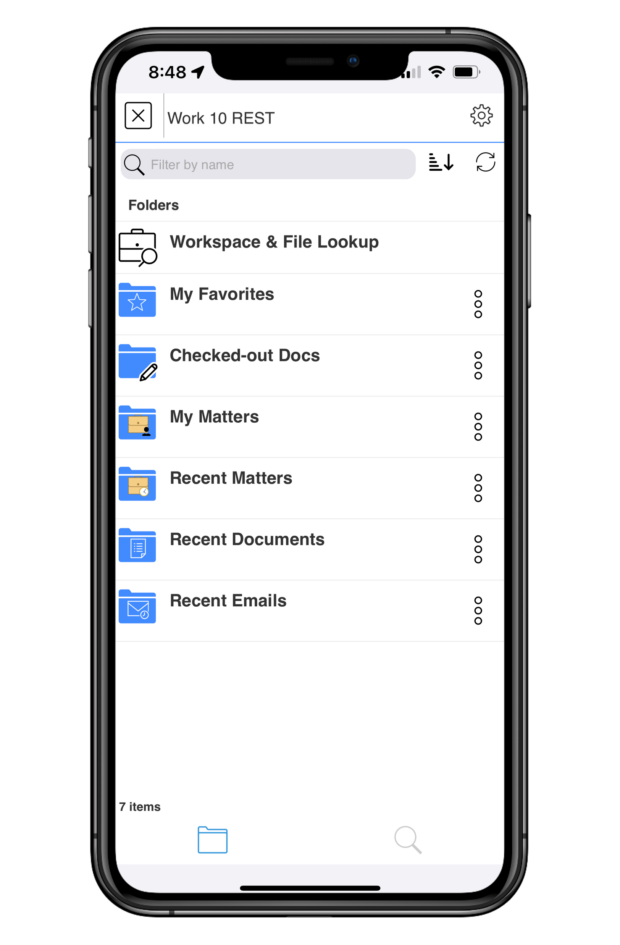
Through LINK, lawyers can not only securely access all documents in their DMS, but also do all the work they need to do directly in those documents, even if they’re on a mobile device far from the office.
Access Full DMS Functionality
When you launch your DMS from within the LINK app, you’ll see everything you’re used to seeing – documents, folders, matters, and more. LINK makes it possible to navigate your DMS from the palm of your hand, just as you always have.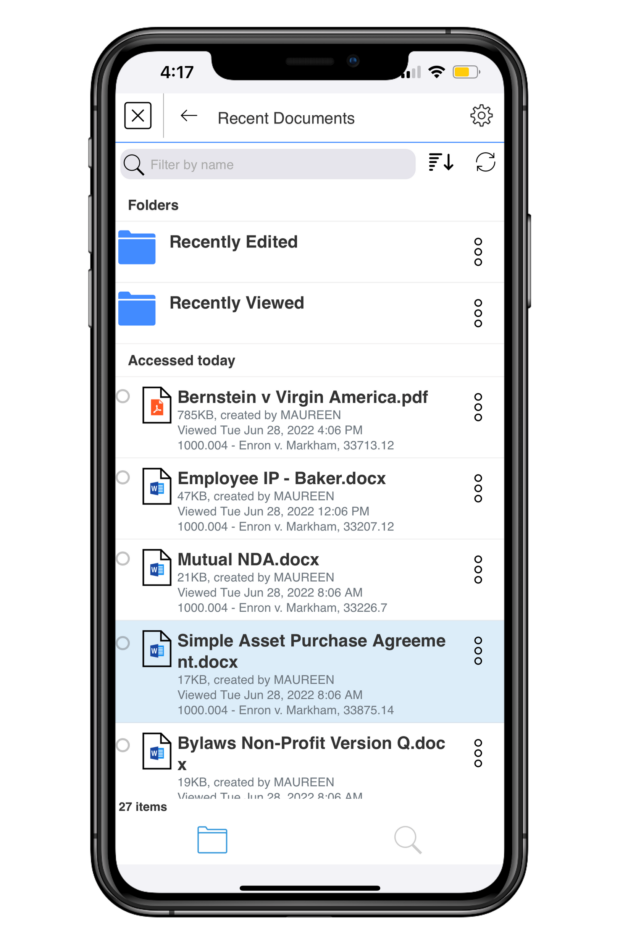
Locate the document you want to work on by finding it in your organized folders or search for it using LINK’s simple yet robust search functionality or Quick Lookup feature.
Once you’re in the document, LINK gives you the tools you need to meaningfully work on it from your mobile device. On tablets, LINK offers a useful split-screen mode, so you can have multiple documents or applications open on your screen at the same time, with multiple live tabs on each screen.
You can choose to open a document in the Microsoft Word app with LINK and edit your documents directly. Just check them out of your DMS with LINK, edit with Word, and then check them back in when you’re done. Any editing you do via LINK will automatically be saved and will be there when you access the document again in your DMS on your computer or via LINK on your mobile device.
When you’re done working on a document and want to share it with others, you can email it directly from your open document. You can also choose to AirPrint the document directly from the app.
LINK prepares the email for you, and you simply click send. Documents are sent in either their original file formats, as PDFs, or as proprietary links from your DMS that keep them secure. These links can’t be accessed via ordinary email systems, which has long been a limitation on mobile document work. LINK decodes those links, giving you full, secure access to your documents.
Finally, LINK offers encrypted document storage through My Files. You can find your latest work in your Recently Viewed folder and even access those documents when you’re offline. LINK automatically saves your work for you, so you never lose anything important when you’re on the go.
Document Annotation
LINK allows you to annotate documents directly in the app, without having to switch apps in order to mark up your document. Just tap the paper and pencil icon to get started.
LINK offers several annotation features. You can write on your document with an Apple Pencil, highlight portions (in the color and opacity of your choice), outline specific text, strike through text, bookmark your page, add text notations on the document, sign a document, and add stamps for time or date. When viewing the document, you can adjust its appearance, including a dark mode option, how large your margins are, how you want the pages to scroll, and more.
Once again, when you’re done annotating, you can AirPrint your document, upload it to your DMS, or email your markup. LINK gives you the full ability to annotate your document right from your mobile device, wherever you may be.
Document Comparison
Having the ability to compare two documents or two versions of the same document is critical, but it has long caused headaches and required jumping between different apps. With LINK, it’s simple. Right in the app, you can compare two versions of the same Doc ID or any two documents in your DMS. LINK takes its document comparison capabilities even further by letting you compare documents attached to emails to any documents in your DMS or Outlook.
Email Management
LINK not only helps with document workflows, but with email management as well. Directly through the LINK app, you can search for emails in Outlook and file your emails to your DMS.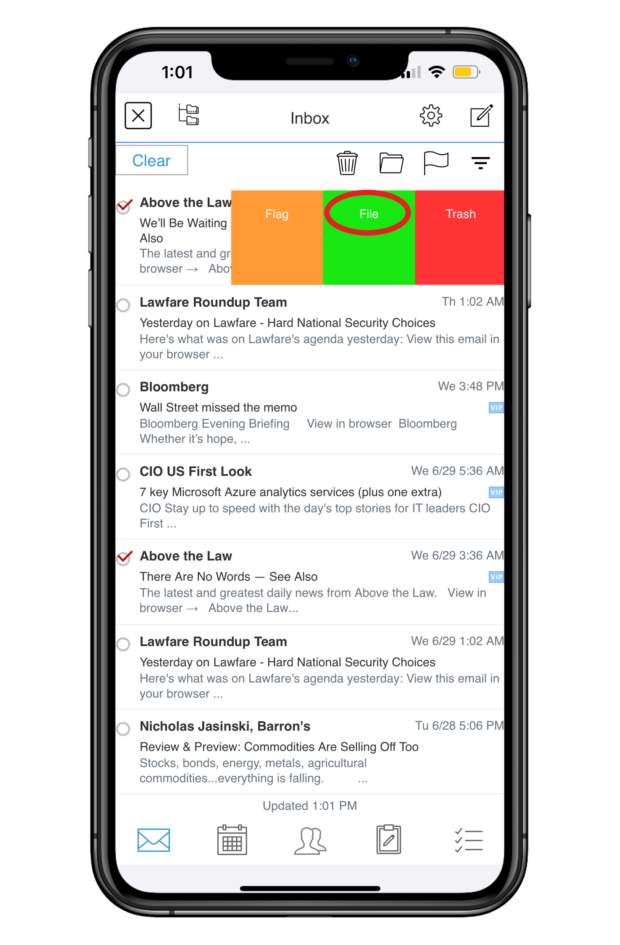
You can file multiple emails at once, and LINK offers predictive filing by recommending folders. Filing attachments to your DMS is just as easy. LINK syncs with your Outlook email, calendars, contacts, notes, and tasks, making for seamless workflows.
Security
On top of everything else, LINK incorporates all the security features you need for the peace of mind that you’re working with and sending your documents safely. Its robust security features include Face ID authentication, a secure container app, and encryption, to name just a few.
Put simply, LINK’s security has been vetted by Am Law 100 firms and has been penetration-tested by an outside consulting firm, so you can use it without worrying that you’re compromising any sensitive or confidential information.
LINK: The Future of Better Work
Your mobile devices go everywhere you go, and they should work the way you work. With LINK, they do.
Gone are the days when documents threw a wrench in your ability to work on the go. LINK offers the single-app workflows you need to fully work on your documents and manage your email from your mobile devices, anytime and anywhere.
If you want document workflows that really work on your phone or tablet, you need LINK.
Apps in Law, Legal Services, Legal Technology, LINK, Software, Sponsored Content, Stephanie Wilkins, Technology
We will never sell or share your information without your consent. See our privacy policy.
Our Sites
© 2022 Breaking Media, Inc. All rights reserved. Registration or use of this site constitutes acceptance of our Terms of Service and Privacy Policy.
Privacy Center | Do not sell my information


business.com receives compensation from some of the companies listed on this page. Advertising Disclosure
Most modern businesses recognize the value of data, and for small businesses, this often means relying on reports generated within the individual software platforms they use for daily operations. However, there comes a time when unifying this data in a central, standardized source is desirable. To effectively organize and secure this data requires a process known as data management.
Data management is the process by which businesses gather, store, access and secure data from various business software solutions. Employing data management enables more efficient access to data analytics that offer insights that are needed to improve business operations and identify opportunities for improvement. By establishing a better framework to access the wide swaths of data that every business generates, companies can make more informed decisions and improve their ability to deliver valuable products and services to their customers.
“Data management involves multiple disparate functions and systems working together to move, organize, and secure data such that it is accurate, precise, accessible and protected,” said Christopher Risher, senior program manager of application management services at Onepath.
In a modern business environment, virtually every piece of software collects data. These include accounting software, customer relationship management (CRM) software, point of sale software, credit card processing software and more. These systems feed a wide variety of data into the business, including customer data, financial data and more.
“Nowadays every company has data, from the multinational giants of IT to the small local breweries. Some data are sensitive, some are history, some can be used for future predictions, some for auditing, and so on,” said Rosaria Silipo, principal data scientist at KNIME. “With so much data and so many different properties and usages, a different set of rules and competences is required to handle each subset of data. You can see then that data management can quickly become a quite complex and tricky task, which can bring further prosperity or further problems to the company.”
As the number of business software platforms proliferate, so too does a business’s ability to gather data and employ data analytics to derive key insights from it. However, organizing that data in a centralized system can sometimes be challenging. Developing a data management strategy is a must for businesses that want to maintain a competitive advantage and improve both customer-facing and internal elements of business operations.
To begin implementing a data management policy, businesses need to understand the tools available to them to do so.
“Managing data typically begins with a project that’ll get started in one of the knowledge areas and iterate through the other knowledge areas,” Risher said. “Utilizing cloud-enabled tools can assist in the rapid development of a data management platform. These cloud tools can empower an organization regardless of the location of their data.”
In addition, data management should serve to standardized data in a way that makes it effective for business purposes. Not every software platform will collect data in the same way, or even collect the same types of data. Data management serves to unify these data silos so they become useful when combined.
“Organizations are dealing with more data from more sources than ever before (known as big data). They have come to realize that all this data can provide a wealth of new insights into customer buying behavior and the dynamics of their industry – but only if this data is managed and trusted,” said Todd Wright, head of data management solutions at SAS.
How data is managed directly relates to data quality, which must be unassailable if any data analytics efforts are to bear fruit. Decisions made based on faulty data will in turn be faulty decisions, so data quality should be of the utmost importance to any business relying on this information.
Data management systems make the process of data management more manageable, automating some of the most arduous aspects of unifying and reviewing key data. These systems incorporate databases and analytics tools that allow businesses to not only store and organize important data but also query the system as needed. The best systems consolidate data into useful reports that include visualizations that provide the ability to contextualize data at a glance. Some even incorporate automated decision-making recommendations empowered by machine learning, helping key stakeholders make more informed, effective choices about how to govern the business’s operations.
Some examples of data management systems include:
“The goal of data management is to give an organization reliable and quickly accessible data through which decisive action can be taken in a secure manner,” Risher said.
These data management systems are crucial tools to achieve that goal, especially as the amount of data collected by businesses becomes too vast for any human to contextualize manually. Data management systems are required to make sense of the overwhelming amount of data most businesses generate.
When developing a data management strategy, you should start by understanding your key business objectives. Make a list of these objectives and then identify what data you are already collecting that is relevant to each objective, noting any overlap between objectives or gaps in the data you already maintain. Once you have established a comprehensive list, ask yourself what is the best way in which to organize and secure this data for later retrieval.
“From a strategy perspective, data management and its underlying knowledge areas provide a construct to give analytical data models what is needed to receive reliable insights,” Risher said. “Without proper implementation of data management controls, some level of the pipeline that feeds an analytical data model can be rendered unreliable. If we are basing strategic, forward-thinking decisions off poorly gathered data, then we are likely impacting the business by making incorrect decisions.”
To better structure the vast troves of data generated by a company on any given day, it is important to tie that data to your specific business objectives. Not only will these objectives guide the collection and organization of data, it also makes clear who should be able to access that data, and when and why.
“When we take ownership of the data in the company, we need to make sure we understand their position in the bigger strategy. Based on their role and features, we need to define a sub-strategy for protection, storage, and usage,” Silipo said. “A successful data management strategy allocates a place, a task, and a policy to each subset of the data, in terms of privacy, storage, and usage.”
A data management strategy must incorporate multiple goals, including the ability to audit business operations, monitor progress toward organizational goals, and gain insight into what is working and what is not. Each of these goals requires a different approach to data management, meaning your systems and policies must be flexible enough to address each while being standardized enough to offer suitable levels of security and restrict access to key stakeholders who need to access the data most.
“Depending on the goal, you need a different tool to manage a different subset of data: from classic databases to highly secure data repositories, from data visualization tools to more advanced data analysis tools,” Silipo said.
These data management best practices can improve your organization’s relationship with the data it collects and stores, making it easily accessible for use in improving business processes, as well as ensuring collection and usage comply with laws and regulations and up to current security standards.
Data management is a vast and complex area of business operations. That means it requires a knowledgeable and dedicated team of data management professionals to manage it correctly. Few small business owners are capable of giving data management processes the time and attention they deserve, even if they have a background in data themselves. Hiring a data management professional team with the depth and breadth of knowledge to do so is an absolute must.
“First of all, you need to have a global vision of the data strategy in your company, to make sure that all pieces of information are recorded and all are exploited to generate more insights into the company process and business,” Silipo said.
An experienced and skilled team with advanced data management skills is crucial to developing and refining a global approach to data management. Rely on your team, whether in-house or outsourced, to act not just as managers but consultants when it comes to connecting your business’s data to its wider operations.
This team should be equipped with user-friendly tools to monitor, access, and organize data, both while it is stored and as it is collected. Employing some of the data management systems mentioned above should be a top priority alongside hiring the right team.
As data privacy laws become increasingly common – such as the EU’s GDPR or California’s CCPA – data privacy compliance is critical. Not only should your data management plan be useful for your business operations, it must also be auditable in a way that easily demonstrates compliance to regulators and business partners.
“You need to know how each subset of data must be protected, stored, and analyzed depending on its nature and on its strategic importance,” Silipo said. “Here a number of skills are joined together: legal skills to design the rules, IT skills to see the implementation of the rules, programming skills to retrieve the data, and some statistics and data analysis to understand how these data can become useful.”
As any cybersecurity professional will tell you, the threat landscape is constantly changing, and malicious actors are becoming more sophisticated in the way they infiltrate systems. Small businesses are prime targets, because hackers know they are typically less protected than large enterprises. As a result, small business owners must regularly revisit their security policies and revise them to meet the threats of the day. This includes giving your IT team the ability to monitor for and respond to new threats as they emerge, taking a proactive approach to the protection of your centralized data.
“Security is always top of mind. So, having access to a security professional, such as a CISO to validate the security parameters is extremely valuable,” Risher said.
megaflopp / Getty Images