


Lawyers have a disparate array of technology tools and systems at their disposal – for email, documents, billing, invoicing, CRM, and much more.
The problem, however, is exactly that – that they are disparate. If a client emails the lawyer in Outlook asking for a copy of its invoice, the lawyer has to stop and think about where to find that, then go to that application, get it, and return to Outlook, or get an assistant or someone else to do it.
It is a problem that hinders technology adoption in law firms and creates platform fatigue – or platform confusion – among lawyers and staff, not to mention the waste of time.
Imagine, then, if you could have a digital assistant that could do this all for you at your request – that would be the intelligent go-between that connects you and your workflow to all your firm’s technology systems, all from a familiar messaging platform.
That is the idea of Termi, an AI-enabled chatbot that aims to solve the problems of slow tech adoption and platform fatigue by allowing attorneys and staff to simply ask it natural-language questions or request tasks that they might otherwise have to send to a human assistant or the IT department.
It was developed by Helm360, a full-service IT company with offices in London and California that specializes in technology solutions for legal and professional services firms.
Read more about Termi on the LawNext Legal Technology Directory.
“The genius of Termi is that it actually relies on the ingrained law firm habit of sending an email or text to support staff to solve a problem or access records and data,” the company says. “Instead of doing that, users write an instant message to Termi, which leverages AI to respond to the request, either with information or by triggering an action.”
Termi’s no-code backend system features a drag-and-drop interface that firms can use to map out how the software responds to requests. If the system fails to understand a particular user request, the information is logged and IT staff can use it to enhance the list of trigger phrases Termi will recognize.
“There’s usually a pattern to poor tech adoption in firms,” said Bim Dave, Helm360’s executive vice president. “When a new tool is introduced, many lawyers feel they don’t have time to learn it, so they send off an email to their assistant or IT support to get what they need from the system.
“Then the process breaks down because assistants and tech support are overwhelmed, help is delayed, other crucial projects are ignored, and then the firm abandons the software because it’s causing problems.”
Recently, Dave and Kiran Gill, customer success manager at Helm360, provided me with a demonstration of Termi.
Interact with Any Third-Party System
“From our experience of working with so many law firms around the world, we find that there’s so much information across different parts of the organization that, from a lawyer’s perspective, it can just be so time consuming and frustrating to get the information they need so that they can actually do their job,” Gill said.
“So we wanted to introduce and build a tool that would try and give them back some of that time so that they can focus on what their actual profession is, because we know in this industry every minute counts.”
Termi works on desktop, mobile and tablet, and on both PCs and Macs.
Given that, she said, the idea of Termi is to deliver the answers to your questions, wherever you are, whenever you need them, whether on a mobile device, in Microsoft Teams, in Microsoft Office, or on the desktop.
“Termi is able to interact with any third-party system through its advanced plugin framework,” Dave said. “This means it has tremendous potential to transform technology usage and adoption within a firm and drive success.”
Among the products it works with are the Microsoft Business suite, a wide variety of document management systems, and many practice management systems such as ProLaw, Elite 3E and Aderant.
Termi can send alerts, such as regarding missing time entries.
Some of the ways in which law firms are already using Termi include:
“Our goal was to deliver a solution that would connect business systems to their users in a way that is so intuitive and easy to use that they actually want to use it,” Dave said.
There When You Need It
In law firms that deploy Termi, lawyers and other users see it pinned to the taskbar on their computers. In whatever system they are working, they can click on Termi to get the information they need.
It can also be embedded as an add-in within various applications, including Outlook, Teams and Slack.
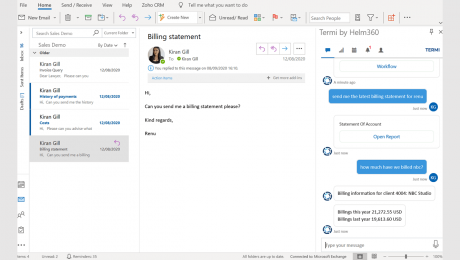
Say you are that lawyer who just got the email from a client asking for the latest billing statement. In the normal course, you might hunt around for it yourself, call your finance department, or ask your secretary to get it.
With Termi, simply type, “Send me the latest billing statement for Client X.” Termi goes into your billing system – say Elite 3E – and pulls the statement and delivers it to you.
But maybe you also want to know the total costs you have billed for a particular matter. Termi knows that there are multiple matters that include the name you provided in your query, so it presents a drop-down and lets you select the matter you want.
That may raise the question for the lawyer of whether the invoice has been paid. Simply ask Termi, “Has invoice 6688 been paid?” Termi answers, “Invoice 6688 has been paid in full, an amount of $500 by automatic check 30001.”
In all of these questions and responses, Termi is connecting directly to 3E through its API and generating a preview of an invoice or pulling information. But, in a nod to security, the actual information remains in 3E and is never stored in Termi.
Other examples of using Termi:
Search and Dashboard Functions
Termi also includes a search function that allows users to search for specific information, whether within a specific system or across systems. A user could, for example, search for someone in the firm directory directly from within Termi.
The search function can also be used to conduct research. Enter a query, for example, and Termi may take you to Westlaw or to a third-party source to which the firm subscribes such as The New York Times.
Forget your firm’s New York Times login? Termi can get you that, reducing the need for routine calls to the help desk.
Termi can be configured to deliver training videos in response to questions.
In fact, one firm is currently configuring Termi to be the first step in all support queries, hoping to cut down on the high numbers of requests that were bombarding their support desk.
While this article has focused on the chatbot, a second key component of Termi is its dashbard. This can be used to generate customized reports or drill into data from across applications.
Termi also can be used to deliver notifications. It could be set so that, on a certain day and time, a notification would go out. For example, it could deliver a daily briefing including the schedule for the day and a summary of the user’s dashboard.
It can also be used to consolidate all notifications across the firm, such as approvals or when there are new hires.
Preconfigured Out of the Box
The standard version of Termi comes preconfigured out of the box to handle a range of questions, but firm administrators can add questions of their own to the module and customize it in a number of ways. If a firm has preferred terminology it uses – such as “engagement” rather than “matter” – Termi can be pre-trained to the firm’s preferences.
“You don’t have to be a coder to be able to do that,” Gill said. “You can be an admin person who has had the relevant training and can go into the backend and use a simple step-by-step process to be able to add questions to the library.”
Termi can be delivered via the cloud or through an on-premises deployment. Most small or mid-sized firms use the cloud version while some large firms prefer the on-premises deployment.
Termi uses a variety of connectors – APIs, web services, custom DLLs – to enable it to connect to virtually any system within a law firm, whether SharePoint, CRM, document management, HR, or others.
For SharePoint or a DMS, for example, a lawyer may ask Termi, “Show me documents related to software agreements.” Termi retrieves them and lets the user toggle through documents or open any directly from there.
As of the time of my demonstration, Termi had been deployed or was being implement in 12 firms in the U.S., U.K., and Canada, including three Am Law 100 firms and the rest small to mid-sized firms.
It is sold on a per-user subscription basis.
The Bottom Line
While there are other chatbot providers in the legal market, Dave said that the problem he has seen with them is that they typically do just one specific thing, while firms have a series of best-of-breed systems. There was nothing that provided a unified experience that connects those systems.
“Ours is probably the only chatbot out there that you could plug into all of the best-of-breed systems, configure and get up and running pretty quickly, and allow you to have a one-stop shop,” said Dave.
“And that’s really what it’s designed to be – it’s designed to be a bridge between all of those systems and all of that knowledge that you have within the firm.”
While Termi indeed serves as a bridge connecting systems, my takeaway after seeing it demonstrated and reading more about its capabilities is that it is also something more.
My impression is that Termi could well be the missing link in driving greater technology adoption at law firms – particularly at mid-sized and larger law firms with multiple sophisticated but disparate systems.
By uniting those systems through an intuitive, chat-based interface, Termi makes interfacing with those systems a no-brainer for law firm professionals – as easy as asking a question.
Bob is a lawyer, veteran legal journalist, and award-winning blogger and podcaster. In 2011, he was named to the inaugural Fastcase 50, honoring “the law’s smartest, most courageous innovators, techies, visionaries and leaders.” Earlier in his career, he was editor-in-chief of several legal publications, including The National Law Journal, and editorial director of ALM’s Litigation Services Division.

Bob Ambrogi is a lawyer and journalist who has been writing and speaking about legal technology and innovation for more than two decades. He writes the award-winning blog LawSites, is a columnist for Above the Law, hosts the podcast about legal innovation, LawNext, and hosts the weekly legal tech journalists’ roundtable, Legaltech Week.


Receive a weekly digest of all new content.
You have successfully joined our subscriber list.
ABOUT LAW SITES
LawSites is a blog covering legal technology and innovation. It is written by Robert Ambrogi, a lawyer and journalist who has been writing and speaking about legal technology, legal practice and legal ethics for more than two decades.

The integration accelerates secure data interchange for faster decision making and enables project managers and CxO to create a unified digital environment, limiting the cost of errors arising in repetitive processes and disconnected systems
GHENT, Belgium – September 8, 2022 — Global provider of design and collaboration solutions, Bricsys, part of Hexagon, announced its partnership with web application platform Cooperlink CONNECT. Bricsys 24/7 users will be able to automatically upload, record and archive documents in real-time from Microsoft SharePoint to Bricsys 24/7, reducing the time spent manually saving files and re-encoding metadata.
This collaborative two-way integration provides a 100% digitised and automated coordination of information: from the classification and exchange of documents to the validation of technical sheets.
Ideal for users working on large construction projects from design to handover of the as-built files, the business-oriented platform enables better collaboration among contractors, owners, architects, and engineering teams thanks to uniform data accessible in one central place. This eliminates the risk of project fragmentation, miscommunication and errors that are costly and time-consuming to fix.
Real-time validation tracks changes made to work-in-progress data. Full transparency across teams allows users to catch any issues when manipulating data across disconnected systems in early development cycles from SharePoint to Bricsys 24/7. The integration also takes care of API updates, file synchronisation and guarantees predictive prices.
Rahul Kejriwal, CEO of Bricsys, says: “Both software complement each other perfectly. Cooperlink CONNECT enables a real-time 2-way integration between Bricsys® 24/7 and Microsoft SharePoint (and OneDrive) or a file server. Through synergies and a significant expansion of know-how, we can offer our customers a broader knowledge management solution and guide our users through their digital transformation journeys”.
Axel Palmaers, CEO of Cooperlink says: “The ability of our technologies to combine is extremely beneficial to construction projects, and we are excited to work with Bricsys in this partnership. Avoiding silos of information is increasingly important to our customers to enable better collaboration among departments, uniform data access in the whole organization and to reduce the costs of errors resulting from discrepancies between disconnected systems.”
Set up rapidly, Cooperlink CONNECT is available to a growing number of worldwide Bricsys 24/7 customers, no matter their role.
For more information on Bricsys 24/7 innovative solutions, visit our web pages.
ENDS
About Bricsys
Bricsys (www.bricsys.com), part of Hexagon, is the global technology company that creates the BricsCAD® family of computer aided design (CAD) products and the Bricsys® 24/7 project collaboration platform. We are relentlessly committed to the success of our customers by offering cost-effective, mission-critical CAD software with industry-leading product support.
Established in Belgium in 2002, Bricsys NV has approximately 300 employees around the world, partners in more than 80 countries and 1,200 registered application developers.
© 2022 Bricsys NV. All rights reserved.
About Cooperlink
Cooperlink (www.cooperlink.io), is the leading technology company enabling construction players to break data silos and automate their workflows without changing their habits. Thanks to its open platform and its connectors to third-party systems, Cooperlink creates a secure common data network for multi-disciplinary construction projects.
Established in Belgium in 2017, Cooperlink is a growing company currently active in Europe and North-America. Collaborators from 500+ efficient builders use Cooperlink on a daily basis.
Press Contacts
Rhena Bunwaree
Fight or Flight for Bricsys
+44 7940 003 337
rhena@fightflight.co.uk


Our editors have compiled a list highlighting some of the best ERP solutions for small distribution businesses to consider implementing into their company processes.
Enterprise Resource Planning systems combine financials, HR, inventory, supply chain management, sales, and customer relationship management (CRM) capabilities to help companies manage and streamline processes. These functionalities are essential to distribution companies, as they require smooth and reliable operations that can adapt to potential disruptions. For example, if a distributor runs out of stock, an ERP system can alert the distributor in real-time so they can address the issue before it becomes a more significant problem.
However, choosing the right vendor and solution can be complicated, especially for smaller distribution companies, where budget, functionalities, and scalability are crucial. These companies need a solution that can meet their immediate needs, keep operations running smoothly, and grow alongside them as they expand over time. There are plenty of leading ERP solutions to choose from, but not all are qualified to meet the needs of small-to-medium-sized businesses.
With that in mind, the team at Solutions Review compiled the following list to spotlight some of the best ERP solutions for small distribution businesses. Our editors selected these software solutions based on each provider’s Authority Score, a meta-analysis of user sentiment through the web’s most trusted business software review sites, and our proprietary five-point inclusion criteria. The list is organized alphabetically.
Description: Acumatica provides cloud and browser-based business management software solutions for small and mid-sized businesses. The Acumatica ERP solution offers clients a suite of integrated applications powered by a single cloud-based platform. With its wholesale distribution capabilities, Acumatica can help distributors automate quote-to-cash cycles, simplify item management, enhance sales and marketing with configurable CRM workflows, and manage their warehouses, requisitions, financials, orders, and more.

Description: ADS Solutions is a provider of intuitive cloud-based ERP solutions tailored to the needs of small and mid-sized businesses. Its primary product, Accolent ERP, is a solution for small and mid-sized distributors that combines sales, customer service, CRM, e-commerce, inventory control, purchasing, accounting, warehouse management, business intelligence, financial tracking, and other capabilities on a single platform. Accolent ERP is built on web architecture and runs in the AWS Public Cloud, so users can access the solution from any device that uses a standard web browser.

Description: Aquilon Software provides ERP software for small and medium-sized businesses (SMBs), focusing on helping manufacturers and distributors in North America improve cash flow, manage costs, optimize working capital, and maintain profitable growth. The company’s distribution solution is equipped with supplier relationship management, sales analysis, inventory management, electronic data interchange (EDI), sales order management, replenishment planning, built-in reporting, and purchase order management.

Description: Blue Link provides small to medium-sized wholesale and distribution businesses with an all-in-one inventory and accounting ERP software suite. It offers out-of-the-box functionalities for order entry, landed cost tracking, EDI integration, warehouse management, invoicing, purchase orders, batch tracking, inventory management, CRM, general ledger, warehouse management, and more. Companies can also customize the Blue Link platform to meet the needs of their industry and business.

Description: Brightpearl is a unique Retail Operations Platform built primarily for retail and wholesale businesses. Its products span various competencies, including sales order management, inventory management, retail accounting, and purchasing & supplier management. With its wholesale management functionalities, companies can scale their business as it grows, provide merchants with the proper infrastructure, and manage multiple suppliers, price lists, web stores, and more. Brightpearl offers various services, including implementation, training, support, and a customer success team.

Description: CPTech is an ERP solution provider for small and mid-sized distributors and wholesalers. With its DistributionPlus software, CPTech provides businesses with serial traceability, inventory management, purchasing, sales, document management, quoting, electronic data interchange (EDI), warehouse management, and other capabilities for managing operations. The platform is available in the cloud or on-premises and can also help companies with their accounting, purchase orders, e-commerce, shipping, and logistics processes.

Description: Epicor Prophet 21 is an end-to-end, cloud-based ERP solution tailored to the needs of growing distributors. Prophet 21 can be run from nearly any browser or device and comes equipped with configurable, extensible features that enable users to customize fields, personalize views, integrate with other business applications, and more. The software includes customer experience management, sales management, e-commerce, business intelligence, accounting, supply chain management, value-added services, and warehouse management capabilities.

Description: Infor is a global provider of cloud software solutions for companies across the manufacturing, distribution, consumer products, public sectors, energy, healthcare, hospitality, and service industries. The company’s software can help users take advantage of data-driven insights, adapt to emerging trends and challenges, and accelerate its path to innovation. With its CloudSuite Distribution product, Infor provides distributors with the end-to-end functionalities they need to modernize end-to-end automation strategies, enhance customer experience, manage inventory, determine supply and demand, and more.

Description: My Office Apps offers a cloud-based, scalable, and configurable ERP system for growing companies. Kechie, the company’s ERP platform, is built to grow alongside a company and improve processes with AI-powered reporting tools, automation, and more. Its features can automate and synchronize inventory management and help streamline finance, manufacturing, supply chain management, procurement, sales order management, CRM, warehouse management, logistics, and other processes.

Description: NetSuite is a global provider of cloud-based ERP, accounting, commerce, CRM, and PSA services for organizations in over 20 industries that need help growing, scaling, and adapting to changes in their industry of choice. The company’s wholesale distribution ERP solution can help small businesses streamline critical businesses, reduce IT costs, manage inventory levels, supply chains, customer relationships, financials, warehouses, sales experiences, fulfillment processes, e-commerce strategies, and more.

Description: Sage is a technology provider offering cloud business management solutions for worldwide small and medium-sized businesses in professional services, wholesale distribution, construction, manufacturing, nonprofit, and food and beverage. With Sage Business Cloud X3 or Sage 300cloud, distributors can improve visibility across their supply chains, understand the ins and outs of their warehouse operations, manage supplier performance, make informed business decisions, empower their sales teams, and more.


