


Global Medical Document Management Market Report to 2029 – Players Include 3M, McKesson, GE Healthcare and Kofax – ResearchAndMarkets.com – Business Wire

DUBLIN–(BUSINESS WIRE)–The “Medical Document Management Market Analysis by Product (Services, Solutions), by Application (Image Management, Patient Medical Records Management), by Mode of Delivery (Cloud-Based, Web-Based, On-Premise Model), by End User, and by Region – Forecast to 2029” report has been added to ResearchAndMarkets.com’s offering.
The global medical document management market size is estimated to be USD 445.86 million in 2021 and is expected to witness a CAGR of 14.67% during the forecast period.
Companies Mentioned
Medical records retaining requests and healthcare reforms is a key driver for the growth of the global medical document management market. Additionally, increasing implementation of health information management systems and growing need to limit healthcare costs are some of the other drivers propelling the market growth. Nevertheless, unwillingness of nurses, and other medical staff to change their customary methods and high cost of implementation are expected to restrain the global market growth.
By Product
Based on product, the market is segmented into services and solutions market. In 2021, the services segment accounted for the substantial revenue share with lucrative CAGR during the forecast period. This is attributed to ever-increasing demand for paperless data management along with reducing labour-intensive errors worldwide.
Solutions segment projected to grow at a profitable CAGR during the forecast period. This is attributed to the various advantages such as integrated software, data integration and facility of a one-stop solution, for data management, makes it prevalent among hospitals.
By Application
Based on application, the market is categorized into image management, patient medical records management, patient billing documents management, and admission & registration documents management. In 2021 , the patient medical records management segment accounted for the substantial revenue share with lucrative CAGR during the forecast period.
This is due to technical developments in the healthcare industry along with the increasing number of multi-specialty hospitals and polyclinics are creating demand for patient medical records database worldwide. The admission & registration documents management segment is anticipated to grow at a profitable CAGR during the forecast period, due to the automation in the healthcare industry in agreement with regulations and laws.
By Mode of Delivery
Based on mode of delivery, the market is categorized into cloud-based model, web-based solutions, and on-premise model. In 2021, the on-premise segment accounted for the substantial revenue share with lucrative CAGR during the forecast period. This is due to the availability of features such as data security, easy retrieval, and ease of access of this data within the premises worldwide. The cloud-based segment is anticipated to grow at a profitable CAGR during the forecast period, due to the real-time trailing, incorporation of changes in accordance with the guidelines set by various medical associations.
By End User
Based on end user, the market is categorized into insurance providers, hospitals & clinics, nursing homes/ assisted living facilities/ long term care centres, and other healthcare institutions. In 2021, the hospitals & clinics segment accounted for the substantial revenue share with lucrative CAGR during the forecast period.
This is due to the major hospitals having a greater bed capacity and can adopt medical document management system more effortlessly in comparison to smaller hospitals and clinics worldwide. The insurance providers segment is anticipated to grow at a profitable CAGR during the forecast period, due to the increase in insurance coverage being provided by government in various developing regions is driving the market.
Regional Insights
In 2021, North America accounted for the highest revenue share in the global market and is expected to maintain its dominance during the forecast period. This is attributed to the favourable repayment scenarios, monitoring requirements related to the health records and medical insurance, accessibility of technological advanced products in the region. Asia Pacific market is projected to exhibit the fastest CAGR over the forecast period owing to the growing government and corporate investment in the healthcare sector, increase in insurance coverage in various developing countries, and developing IT sector, are the major factors in this region.
For more information about this report visit https://www.researchandmarkets.com/r/70efac
ResearchAndMarkets.com
Laura Wood, Senior Press Manager
press@researchandmarkets.com
For E.S.T Office Hours Call 1-917-300-0470
For U.S./ CAN Toll Free Call 1-800-526-8630
For GMT Office Hours Call +353-1-416-8900
ResearchAndMarkets.com
Laura Wood, Senior Press Manager
press@researchandmarkets.com
For E.S.T Office Hours Call 1-917-300-0470
For U.S./ CAN Toll Free Call 1-800-526-8630
For GMT Office Hours Call +353-1-416-8900
- Published in Uncategorized
Best Task Management Software in 2022 [List & Organization Apps] – Cloudwards

Completing task lists can be stressful. That’s why it’s good practice to log tasks and organize them to create structure, rather than having them swirling around your mind. To help with that, we’ve created this roundup of the best task management software.
In the modern era, we always have things we need to do, both personally and professionally. As organized as we like to think we are, all of us can benefit from a little help when it comes to getting tasks in order and ensuring we don’t forget them. In the digital world, we can access plenty of support tools, and in this article, we look at the best task management software.
Much of what you read in this article is geared toward the basic user, either for personal use or small teams that don’t require a ton of features to be able to keep on top of new and recurring tasks. This article will also be useful for those transferring from paper-based task management to a visual online task management tool, as all options are super easy to use.
If you’re a project manager and came to this article looking for the best Gantt charts, Agile software tools and other advanced tools, you probably won’t find what you’re looking for. The good news is that we have an article that focuses on the best project management software, which will no doubt help you find what you need.
For those who just want to get on top of their to-do lists and find a piece of software to help organize individual tasks, continue reading. You’re exactly where you need to be.
A task management tool is a simple piece of software that allows you to log, visualize and prioritize your short-term and long-term tasks. Most tools provide a basic list view of all your tasks, making them easy to digest, manage and complete.
We’ve reviewed many and our top five are: monday.com, Asana, nTask, Wrike and Jira.
Atracker is an excellent time tracking app that allows you to monitor any type of activity you do, and pings when you’re taking too long to complete a task.
We have tested and reviewed each of the online task management tools listed below. Our testing focuses on features, ease of use, security and customer support. While we have reviewed many task management software solutions, the five below are the cream of the crop and scored well on each of our criteria.
Airtable is our top choice of the best task management software. For a basic task management tool, it’s certainly not lacking in features, and it’s easy to use. However, if you want task management and project management wrapped in one easy-to-use package, monday.com is the top choice.
Todoist was next, and some may prefer the design of the user interface. Any.do makes the list because of its excellent security and privacy, while TickTick and Asana are appealing because of the well-functioning task management software each company has created.
If you’ve read our article on best project management tools, you may be thinking this is a rerun of something you’ve seen before, but it’s not. While there’s a certain degree of crossover between task management and project management services, there are also many differences.
Project management tools are best suited for large-scale, complex projects, often for multiple users who work on different pieces of a project. A good task management tool is more streamlined, offering a basic way to organize tasks, track task progress and help reduce the overwhelming that tends to occur when you have multiple pieces of work to complete.
For a deeper understanding of the differences, check out our task management vs project management article.
Moving on from that comparison, let’s get into this roundup of the best task management tools, starting with Airtable, our number one choice.
More details about Airtable:
Pros:
Cons:
Airtable is a super simple tool that still has enough features for us to label it versatile. While it doesn’t have a traditional list view, it has what it refers to as a “grid” view. This view is essentially built to resemble a spreadsheet, and it’s here you’ll likely view and manage tasks.
To help with managing tasks, you can track progress by labeling each task by status, either as “to do,” “in progress” or “done.” If you want to switch up your views, there’s also a basic kanban board. When we say basic, we mean a very bare board that doesn’t have as much substance as a tool such as Asana (which you’ll learn about farther down).
If you prefer a calendar view of your tasks, Airtable has a native calendar that we really like. Each part of the calendar is spaced out perfectly, and viewing it doesn’t give us a headache or overload our brains with information. Some may find the gray design a little dull, which we get, but it’s one of the best task management tools as far as functionality goes.
With Airtable, project managers can assign tasks and set task dependencies so the team can prioritize and complete them in order of importance. This feature is a great way of “eating the frog,” which is the process of completing the most difficult tasks first in order to move forward with your work as quickly as possible.
For those on a budget, Airtable’s free plan may suffice. You get most of the core task management views, including the grid, kanban and calendar. The only thing missing are views such as Gantt charts, which you can access through the Pro plan. Chances are, those looking for basic task management software will likely not miss having access to Gantt charts.
If you feel like spending your money, there’s no need to go past the Plus plan (which lets you enter more tasks and is good for larger teams). Overall, Airtable does what it needs to do and that’s why it’s a great task management software service. You can learn more about it by reading our Airtable review.
More details about monday.com:
Pros:
Cons:
monday.com is an easy-to-use project management tool that targets a range of users. Depending on what plan you subscribe to, you can use it as a fully fledged project management solution, or a space to log and track basic tasks. Keeping in theme with this article, we’ll zone in on monday.com’s free and Basic plans, both of which offer a list view.
After signing up for the service, you’re automatically greeted with the list view when you first enter your account. Here you can input whatever tasks you need to do, and also add details that clearly outline what the task entails.
All the traditional functionality comes with monday.com’s list view. You can assign tasks to other users (the free plan limits you to five users per account,) set due dates and log progress with the “working on it,” “stuck” and “done” labels, all of which are color coded in green, amber and red.
If part of your task management involves creating documents, monday.com offers a native document creator which you can use for personal use or to collaborate with others. It’s not as advanced as Google Docs or MS Word, but it should suffice when creating a basic document.
If you feel you want to bump up your user experience, monday.com has more expensive plans which provide Gantt charts and calendar views, as well as a host of third party software integrations for you to choose from. The software itself is easy to use, which is why monday.com is the best all rounder. To learn more, check out our monday.com review.
More details about Todoist:
Pros:
Cons:
Todoist epitomizes everything good task management software needs to be. It’s not fancy and full of frills, nor does it overload you with more features than your mind can handle. Instead, it sticks to the basics and offers strong task management features that help bring some organization to your life.
Unlike Airtable, Todoist’s strength lies in its list view of tasks. The list view is what you would expect it to be: a linear view that lets you schedule tasks by adding due dates and priorities, as well as leave comments. It’s also possible to embed the exact location of where your task needs to be completed, both in the list view and the reminder section.
Todoist offers a basic kanban board view, which, although it won’t make it on our roundup of the best kanban boards, functions well enough to make task management simple and free of complications. Users can customize the board, however it’s only possible on the Pro plan.
Although only available on the paid plans (which are super affordable), Todoist offers an unlimited task archive. This means that no matter how far in the past you completed a task, if you need a reminder of the work you did, you can simply search for it in the archive and it will be there. Todoist’s free plan does offer an archive; however, it’s limited to only one week.
Although it gets the basics right, Todoist isn’t without its flaws, which mainly pertain to privacy. While Todoist won’t sell customer data, it will share it with a list of vendors that’s far too long for our liking. It also holds your data for six years, unless you remember to opt out.
If that’s no concern for you and you just want the best tool for the job, Todoist is an excellent piece of task management software and we’re certain it will help you bring all your tasks together, so you can complete them. To learn more about the platform, check out our Todoist review.
More details about Any.do:
Pros:
Cons:
Aside from being an enjoyable name to say (try it and see), Any.do is a beautifully designed task management app that helps with both your personal and professional life. As soon as you enter the web app, you’re greeted by a very clear layout that helps you get going in no time at all.
Simply click “create task” and a new box will appear with very clear details of the type of data you can enter into your tasks.
You can set reminders, create recurring tasks (paid plan only), leave notes and add tags. There’s no native calendar built into the app; however, Google users can integrate their Google Calendar if they wish to have a calendar view of the tasks they need to complete.
One slight niggle is that regardless of whether you’re in your work or personal list, a new task will automatically go into the personal queue by default, unless you manually change it yourself. That’s our only real concern in terms of functionality; aside from that Any.do works exceptionally well.
For those who use WhatsApp (ahem, everyone), you can integrate Any.do with your account. Once integrated, you can convert your WhatsApp messages into tasks or reminders and they will sync with your Any.do account.
While Any.do offers a mobile app, this feature is great for those who don’t want lots of apps on their phones but still want to do some task management inside the apps they do have.
Although best used for personal task planning, Any.do does have a plan that targets team use. As with the Premium plan, Any.do allows you to prioritize tasks and assign them to the users you add to your account. It’s still very basic, but if you and your team only require a space to track tasks and complete basic work, there’s likely no need to look for an alternative software.
Because it’s so easy to use, we especially recommend Any.do to the novice user of visual task management software solutions. Advanced users may need more substance, although if you don’t, Any.do will suit your needs as well. To learn more, read our full Any.do review.
More details about TickTick:
Pros:
Cons:
Because of its range of features and straightforward design, TickTick is a popular task manager app among project managers. In addition to the traditional way of organizing tasks and to-do lists, TickTick also allows you to sort tasks into folders, providing you with a cleaner overview of all your projects and tasks.
To add more depth to your tasks, you can also log how much time you expect a particular task will take to complete. That’s slightly different from setting start and due dates, as this allows you to program the length of the task in minutes and hours. For example, you may say it takes two hours to write an article.
TickTick also ranks highly with regard to security and privacy. It doesn’t sell your data, and if you decide to delete your account, all your data will be deleted from its systems within 90 days.
On a security front, TickTick promises to let you know if there’s been a data breach within 72 hours. There hasn’t been a breach to date, which is evidence that the platform is doing everything right in terms of keeping your data safe.
TickTick is one of the few task management tools that allows you to add tasks through speech to text. This takes away the sometimes cumbersome task of typing out multiple tasks, either on your computer or mobile device. When testing the performance of TickTick’s voice input feature, we found it to be very accurate, even with the not-quite-dulcet tones of a Northern English accent.
While TickTick’s free plan helps you log and prioritize tasks, the Premium plan takes things to the next level. You can create almost 300 more lists, add more members and attach more files to your tasks. There are also some reporting features that let you track the progress of your personal and assigned tasks.
In the world of task management apps, TickTick is right up there with the best of them. It could offer more detailed customer support, but for quality task management software like this, it’s unlikely you’ll ever be at a loss as to what to do with it. To find out if this is the task manager for you, check our TickTick review.
More details about Asana:
Pros:
Cons:
Like monday.com, Asana isn’t solely a piece of task management software. Asana comes with more advanced features like Gantt charts, time tracking tools and the ability to seamlessly manage multiple projects at once. It’s one of the best project management tools for multiple projects.
The list view allows you to segregate tasks into different sections, allowing you to see start and due dates, as well as task priorities. Those on the paid subscription can create customer tabs, giving you ultimate control over how you manage and create tasks.
As far as this roundup goes, Asana has the best kanban board you can use. It’s great for assigning tasks, tracking task progress and navigating through multiple projects with ease. It’s not the head honcho of kanban boards — that title belongs to Trello, which you can learn more about through our Trello review.
Asana has a long list of third-party app integrations. Being a popular online task management software service, it has been able to partner with the likes of Slack, Venmo and Microsoft, plus several more. Users can also integrate with Google apps, making Asana a great collaborative task management tool.
Compared to other task management software tools, Asana is expensive. That’s mainly because it’s offering a lot more than the competition. The good news is that it’s one of the best free task management software solutions, and for those who don’t need the extra features, it will surely suffice. To learn more about the product, check out our full Asana review.
Now that you know the best tools to manage tasks, all you need to do is select the right task management platform for your needs. Airtable remains the best task management tool, which should appeal to a range of project managers and solo professionals. Its user-friendly interface and generous free plan are why it’s our best task management tool.
The other options are not far behind, and all of them do what we would expect from a quality task management software provider. For more advanced task management, such as handling complex tasks and implementing strong team collaboration, monday.com is the stand-alone choice. If that’s not what you need, any of the other four services will serve you well.
Which is your favorite option in this roundup? Is there another task management solution you would like us to test and review? What’s the biggest hurdle you face when trying to manage projects and tasks? Let us know in the comments. Thanks for reading.
I use kanbantool to manage my tasks. Have you tried it, I think the tool is amazing!
document.getElementById( “ak_js_1” ).setAttribute( “value”, ( new Date() ).getTime() );
Also interesting
Most popular on Cloudwards
© 2007-2022 Cloudwards.net – We are a professional review site that receives compensation from the companies whose products we review. We test each product thoroughly and give high marks to only the very best. We are independently owned and the opinions expressed here are our own.
Because the Cloudwards.net team is committed to delivering accurate content, we implemented an additional fact-checking step to our editorial process. Each article that we fact check is analyzed for inaccuracies so that the published content is as accurate as possible.
You can tell that an article is fact checked with the Facts checked by symbol, and you can also see which Cloudwards.net team member personally verified the facts within the article. However, providers frequently change aspects of their services, so if you see an inaccuracy in a fact-checked article, please email us at feedback[at]cloudwards[dot]net. We strive to eventually have every article on the site fact checked. Thank you.
- Published in Uncategorized
Music School Software Market Giants Spending Is Going To Boom | Music School Manager, Optimo Software, SimplyS – openPR

- Published in Uncategorized
Fujitsu Computer Products of America is Redefining Document Imaging with Introduction of Fujitsu fi-8000 Series – Business Wire

High-quality Fujitsu fi-8000 Series supports digitization efforts with unparalleled image quality, reliability and integration with leading document management systems
Fujitsu Computer Products of America is Redefining Document Imaging with Introduction of Fujitsu fi-8000 Series (Photo: Business Wire)
Fujitsu Computer Products of America is Redefining Document Imaging with Introduction of Fujitsu fi-8000 Series (Photo: Business Wire)
SUNNYVALE, Calif.–(BUSINESS WIRE)–Fujitsu Computer Products of America, the leader in imaging solutions, today announced the Fujitsu fi-8000 series of enterprise scanners. With more than 13 million scanners sold worldwide, Fujitsu continues its two-decade history of delivering innovative, reliable and high-quality products with its new fi-8000 series. Set to revolutionize the document imaging category with technology backed by 32 new patents (pending), this new series of scanners include innovative and industry-first features to help companies achieve their digital transformation, sustainability, and efficiency goals, enabling organizations to digitize workflows and leverage data that previously only existed on paper.
With Fujitsu’s unique and proprietary Clear Image Capture technology, the fi-8000 series ensures exceptional image quality, far surpassing the capabilities in existing optical technologies. Clear Image Capture delivers precise, crisp images and industry-leading Optical Character Recognition accuracy rates while also removing unwanted document watermarks and artifacts.
Equally as important, the fi-8000 series was designed with a broad array of flexible connectivity options, from USB to PC-less scanning straight to your application – on-premise, private or public cloud. With NX Manager 2.0, an on-premise server-based software that supports up to 1000 scanners, businesses can eliminate the need for a PC at every scanner location, resulting in flexible distribution and manageable security. The new series also supports integration with most leading document management systems to keep workflows organized in the cloud.
“The fi-8000 series is the proud result of really listening to and addressing the needs of our most valued customers and partners,” said Daisuke Kutsuwada, President & CEO, Fujitsu Computer Products of America. “This new family of scanners offers quality solutions for real-world pain points that organizations face every day. By truly understanding the needs of the marketplace, the fi-8000 series was developed with groundbreaking technology that will revolutionize organizational scanning productivity.”
The Fujitsu fi-8000 series supports a wide range of documents, including passports and booklets up to 7mm, making it ideal for every scanning need in public sector agencies, finance, healthcare, legal, higher education, manufacturing and retail. The fi-8000 series empowers users to accurately capture and digitize customer and employee data, enrollment applications, invoices, receipts and more. The series enables unprecedented scanning at scale in an easy-to-use, compact form factor ideal for front or back-office operations.
Fujitsu fi-8000 series features:
The first commercially-available model from the fi-8000 series, the Fujitsu fi-8170, will be available for purchase starting on March 25, 2022, and is priced at $1,195. For more information about the Fujitsu fi-8000 series or to purchase, please visit: https://scanners.us.fujitsu.com/fi-8000.
About Fujitsu Computer Products of America, Inc.
Fujitsu Computer Products of America, Inc. has been delivering industry-leading imaging solutions and unsurpassed customer experiences for more than half a century. Our portfolio unlocks the full potential of document scanning with scalable software that captures the data from every document in the highest quality possible, and saves it in the cloud or using it as an on-premise solution. Together with our partner network, we help organizations work more efficiently, make their workflows more reliable and make data processing faster, so our customers can leverage their full digital potential. Learn more at https://scanners.us.fujitsu.com.
Copyright ©2022 Fujitsu Computer Products of America, Inc. Fujitsu and the Fujitsu logo are registered trademarks of Fujitsu Limited. All text, graphics, trademarks, logos contained herein related to Fujitsu, PFU Limited, or Fujitsu Computer Products of America, Inc. (“FCPA”) are owned, controlled or licensed by or to FCPA with all rights reserved. All other text, graphics, trademarks, service marks and logos used herein are the copyrights, trademarks, service marks or logos of their respective owners.
Our Commitment to the Sustainable Development Goals (SDGs)
The Sustainable Development Goals (SDGs) adopted by the United Nations in 2015 represent a set of common goals to be achieved worldwide by 2030. Fujitsu’s purpose – “to make the world more sustainable by building trust in society through innovation” –is a promise to contribute to the vision of a better future empowered by the SDGs
Heath Meyer
pr@zmcommunications.com
Fujitsu Computer Products of America is Redefining Document Imaging with Introduction of Fujitsu fi-8000 Series
Heath Meyer
pr@zmcommunications.com
- Published in Uncategorized
Class-action lawsuit filed against Microsoft's GitHub Copilot for software piracy – Neowin

29 minutes ago
2 hours ago
3 hours ago
9 hours ago
12 hours ago
19 hours ago
Nov 5, 2022
Nov 5, 2022
Nov 5, 2022
Nov 3, 2022
Nov 2, 2022
Nov 2, 2022
15 hours ago
Nov 5, 2022
Nov 2, 2022
Oct 31, 2022
11 hours ago
13 hours ago
Nov 4, 2022
Nov 4, 2022
Sep 3, 2022
Aug 28, 2022
Aug 14, 2022
Jun 11, 2022
Sep 11, 2022
Aug 15, 2022
Jul 31, 2022
May 8, 2022
11 hours ago
Nov 5, 2022
Nov 1, 2022
Oct 31, 2022
Oct 19, 2022
Oct 12, 2022
Oct 12, 2022
Oct 12, 2022
13 hours ago
Nov 5, 2022
Nov 5, 2022
13 hours ago
Oct 23, 2022
Oct 16, 2022
Oct 9, 2022
15 hours ago
Nov 5, 2022
Nov 4, 2022
Nov 3, 2022
Nov 3, 2022 23:08 EDT
GitHub Copilot sounds like a fascinating tool on paper. Launched in preview by Microsoft over a year ago, it’s basically an AI-powered extension that uses the code present in all public repositories on GitHub and then write code on your behalf based on simple prompts. For example, you could just write “Take an average of the numbers in this list” and GitHub Copilot will autonomously write the code to do this based on its training on GitHub codebases.
Microsoft announced GitHub Copilot’s general availability a few months ago at $10/month, but pretty much since its inception, the product has been criticized for its legal status in the sense that it uses the code written by other people without their permission and that Microsoft profits off of these practices. Today, a class-action lawsuit has been filed against the AI-powered pair programming tool.
The lawsuit has been initiated by Matthew Butterick, who is a programmer, author, and lawyer. He is being represented by the Joseph Saveri Law Firm from California. Together, they are claiming that Microsoft is engaging in open-source software piracy by using billions of lines of code written by millions of programmers under various licenses including MIT, GPL, and Apache. The defendants named in the lawsuit are GitHub, Microsoft, and its technology partner OpenAI.
Butterick claims that Microsoft has violated a number of requirements for using this code including attribution, GitHub’s own policies, the California Consumer Privacy Act, and DMCA 1202 – which “forbids the removal of copyright-management information”. Butterick goes on to say that:
This is the first step in what will be a long journey. As far as we know, this is the first class-action case in the US challenging the training and output of AI systems. It will not be the last. AI systems are not exempt from the law. Those who create and operate these systems must remain accountable. If companies like Microsoft, GitHub, and OpenAI choose to disregard the law, they should not expect that we the public will sit still. AI needs to be fair & ethical for everyone. If it’s not, then it can never achieve its vaunted aims of elevating humanity. It will just become another way for the privileged few to profit from the work of the many.
Meanwhile, Joseph Saveri of the Joseph Saveri Law Firm noted that:
I am grateful to the programmers and users who came forward to bring this case to fruition and ensure that corporations like Microsoft, GitHub, and OpenAI cannot unfairly profit from the work of open-source creators. This case represents the first major step in the battle against intellectual-property violations in the tech industry arising from artificial-intelligence systems. In this case, the work of open-source programmers is being exploited. But this will not be the last community of creators who are affected by AI systems. Our firm is committed to standing up for these creators and ensuring that companies developing AI products are held accountable under the law.
You can view the 56-page class-action lawsuit document here.
12 hours ago with 22 comments
Nov 5, 2022 with 2 comments
Nov 5, 2022 with 14 comments
Sep 27, 2022
Jun 24, 2022
Jun 22, 2022
Jun 29, 2021
Please enter your reason for reporting this comment.
microsoft weekly
windows update thinking
windows 10 2022 update
windows 11
windows 11 promo
windows 11 insider preview
windows 11 insider preview
windows 11 2022 update
windows 11
windows update
twirl 90
© Since 2000 Neowin LLC. All trademarks mentioned are the property of their respective owners.
- Published in Uncategorized
Best Task Management Software (November 2022) – Forbes Advisor – Forbes

- Published in Uncategorized
Enterprise Document Management Systems Market 2022 Regional Developments, SWOT Analysis, Growth Status, Upcoming Trends, Business Prospects, and Forecast till 2026 – Digital Journal
Hi, what are you looking for?
By
Published
[Report Pages No 100] In 2022, What is “Enterprise Document Management Systems Market” Insights?
In 2022, the growth of Enterprise Document Management Systems Market is projected to reach Multi-million USD by 2026, In comparison to 2021, Over the next Seven years the Enterprise Document Management Systems Market will register a magnificent spike in CAGR in terms of revenue, In this study, 2021 has been considered as the base year and 2022 to 2026 as the forecast period to estimate the market size for Enterprise Document Management Systems.
Enterprise Document Management Systems Market Insights 2022 With “The Enterprise Document Management Systems market revenue was Million USD in 2016, grew to Million USD in 2020, and will reach Million USD in 2026, with a CAGR of % over the forecast period.” Including Types (Content Lifecycle Management, Document Imaging and Management, Web Content Management, Digital Asset Management, Mobile Content Management, eDiscovery, eSignature), Applications (Accounting and Legal, HR Operations, Sales and Marketing, Procurement and Supply Chain Management), Regions and Forecast to 2026. The Enterprise Document Management Systems Market Report Contains Full TOC, Tables and Figures, and Chart with In-depth Analysis Pre and Post COVID-19 Market Outbreak Impact Analysis and Situation by Region. Enterprise Document Management Systems Market research report is an analysis report that gives you an insight into the future and the future of business. The factual information and data contained in this report will allow you to identify the key features of the Enterprise Document Management Systems Market that drive, revenue and growth potential.
During the COVID-19 period, the global economy may be affected in three different ways: directly as it relates to production and demand, indirectly as it relates to supply chains and markets, and as a result of its financial consequences on firms and financial markets. Analysts monitoring the situation around the world explain that producers will be rewarded after the COVID-19 crisis. In this report, we provide an additional illustration of the latest economic slowdown, COVID-19 impact on the industry, and the latest scenario.
Final Report will add the analysis of the impact of COVID-19 on this industry.
TO KNOW HOW COVID-19 PANDEMIC AND RUSSIA UKRAINE WAR WILL IMPACT THIS MARKET – REQUEST SAMPLE
Technological innovation and advancement will further optimize the performance of the product, enabling it to acquire a wider range of applications in the downstream market. Moreover, customer preference analysis, market dynamics (drivers, restraints, opportunities), new product release, impact of COVID-19, regional conflicts and carbon neutrality provide crucial information for us to take a deep dive into the Enterprise Document Management Systems Market.
Get a Sample PDF of report – https://www.marketgrowthreports.com/enquiry/request-sample/18747065
The research covers the current Rectifiers market size of the market and its growth rates based on 6-year records with a company outline of Key Players/Manufacturers:
Enterprise Document Management Systems Market Analysis and Insights:
The Global Enterprise Document Management Systems Market is anticipated to rise at a considerable rate during the forecast period, between 2022 and 2026. In 2021, the market is growing at a steady rate and with the rising adoption of strategies by key players, the market is expected to rise over the projected horizon.
The Enterprise Document Management Systems market revenue was Million USD in 2016, grew to Million USD in 2020, and will reach Million USD in 2026, with a CAGR of % during 2020-2026.
Global Enterprise Document Management Systems Market Development Strategy Pre and Post COVID-19, by Corporate Strategy Analysis, Landscape, Type, Application, and Leading 20 Countries covers and analyzes the potential of the global Enterprise Document Management Systems industry, providing statistical information about market dynamics, growth factors, major challenges, PEST analysis and market entry strategy Analysis, opportunities and forecasts. The biggest highlight of the report is to provide companies in the industry with a strategic analysis of the impact of COVID-19. At the same time, this report analyzed the market of leading 20 countries and introduce the market potential of these countries.
Get a Sample Copy of the Enterprise Document Management Systems Market Report 2022
The report further studies the market development status and future Enterprise Document Management Systems Market trend across the world. Also, it splits Enterprise Document Management Systems Market Segmentation by Type and by Application to fully and deeply research and reveal market profile and prospects.
On the basis of product type this report displays the production, revenue, price, market share and growth rate of each type, primarily split into:
On the basis of the end users/applications, this report focuses on the status and outlook for major applications/end users, consumption (sales), market share and growth rate for each application, including:
Chapters 7-26 focus on the regional market. We have selected the most representative 20 countries from 197 countries in the world and conducted a detailed analysis and overview of the market development of these countries.
SOME OF THE KEY QUESTIONS ANSWERED IN THIS REPORT:
Inquire more and share questions if any before the purchase on this report at – https://www.marketgrowthreports.com/enquiry/pre-order-enquiry/18747065
Major Points from Table of Contents –
Global Enterprise Document Management Systems Market Research Report 2022-2026, by Manufacturers, Regions, Types and Applications
1 Introduction
1.1 Objective of the Study
1.2 Definition of the Market
1.3 Market Scope
1.3.1 Market Segment by Type, Application and Marketing Channel
1.3.2 Major Regions Covered (North America, Europe, Asia Pacific, Mid East and Africa)
1.4 Years Considered for the Study (2017-2026)
1.5 Currency Considered (U.S. Dollar)
1.6 Stakeholders
2 Key Findings of the Study
3 Market Dynamics
3.1 Driving Factors for this Market
3.2 Factors Challenging the Market
3.3 Opportunities of the Global Enterprise Document Management Systems Market (Regions, Growing/Emerging Downstream Market Analysis)
3.4 Technological and Market Developments in the Enterprise Document Management Systems Market
3.5 Industry News by Region
3.6 Regulatory Scenario by Region/Country
3.7 Market Investment Scenario Strategic Recommendations Analysis
4 Value Chain of the Enterprise Document Management Systems Market
4.1 Value Chain Status
4.2 Upstream Raw Material Analysis
4.3 Midstream Major Company Analysis (by Manufacturing Base, by Product Type)
4.4 Distributors/Traders
4.5 Downstream Major Customer Analysis (by Region)
Get a Sample Copy of the Enterprise Document Management Systems Market Report 2022
5 Global Enterprise Document Management Systems Market-Segmentation by Type
6 Global Enterprise Document Management Systems Market-Segmentation by Application
7 Global Enterprise Document Management Systems Market-Segmentation by Marketing Channel
7.1 Traditional Marketing Channel (Offline)
7.2 Online Channel
8 Competitive Intelligence Company Profiles
9 Global Enterprise Document Management Systems Market-Segmentation by Geography
9.1 North America
9.2 Europe
9.3 Asia-Pacific
9.4 Latin America
9.5 Middle East and Africa
10 Future Forecast of the Global Enterprise Document Management Systems Market from 2022-2026
10.1 Future Forecast of the Global Enterprise Document Management Systems Market from (2022-2026) Segment by Region
10.2 Global Enterprise Document Management Systems Production and Growth Rate Forecast by Type (2022-2026)
10.3 Global Enterprise Document Management Systems Consumption and Growth Rate Forecast by Application (2022-2026)
11 Appendix
11.1 Methodology
12.2 Research Data Source
Continued….
Browse complete table of contents at –
https://www.marketgrowthreports.com/TOC/18747065#Tables
Reasons to buy this report:
Purchase this report (Price 4000 USD for a single-user license) – https://www.marketgrowthreports.com/purchase/18747065
About Us:
Market is changing rapidly with the ongoing expansion of the industry. Advancement in the technology has provided today’s businesses with multifaceted advantages resulting in daily economic shifts. Thus, it is very important for a company to comprehend the patterns of the market movements in order to strategize better. An efficient strategy offers the companies with a head start in planning and an edge over the competitors. Market Growth Reports is the credible source for gaining the market reports that will provide you with the lead your business needs.
Contact Us:
Market Growth Reports
Email : [email protected]
Web: www.marketgrowthreports.com
Phone : US +(1) 424 253 0946 / UK +(44) 203 239 8187
Press Release Distributed by The Express Wire
To view the original version on The Express Wire visit Enterprise Document Management Systems Market 2022 Regional Developments, SWOT Analysis, Growth Status, Upcoming Trends, Business Prospects, and Forecast till 2026
“I own the responsibility for why everyone is in this situation: I grew the company size too quickly. I apologize for that,” said Jack…
For Twitter users, the question is whether Twitter is about to become just another FOX News, yes or no?
The whirlwind week that Elon Musk took over Twitter began with sleepless nights for company engineers.
Since some microorganisms can survive on spacecraft and within the spaceship environment, there exists a very real possibility of Earth microbes contaminating specific landing…
COPYRIGHT © 1998 – 2022 DIGITAL JOURNAL INC. Sitemaps: XML / News . Digital Journal is not responsible for the content of external sites. Read more about our external linking.
- Published in Uncategorized
2020 Reviews of Document Storage and Document Management Systems – CPAPracticeAdvisor.com

Hello. It looks like you’re using an ad blocker that may prevent our website from working properly. To receive the best experience possible, please make sure any blockers are switched off and refresh the page.
If you have any questions or need help you can email us
Firm Management
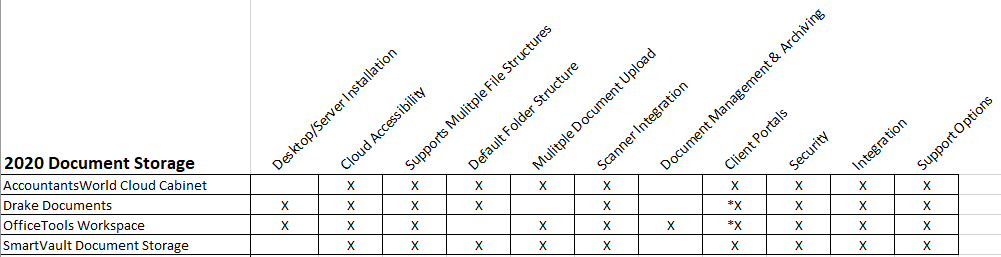
In this issue of CPA Practice Advisor, we reviewed both document storage and document management systems, with a features chart included with the review.
Mary Girsch-Bock
Sep. 21, 2020
Paper takes over the world. It sounds like a bad science fiction movie, but in some offices, it isn’t much of an exaggeration. In paper driven industries like accounting and banking, paper is still in charge.
That is changing. As more offices discover the benefits of a paperless office, more are making the switch to paperless. After all, will anyone really miss the lost hours spent searching for a document, only to find it buried in a stack of papers in the copy room? Or the numerous papercuts received from pulling paper files out of an overstuffed file cabinet?
Then there’s the matter of time. Or more accurately, time wasted. You likely hired your assistant to actually assist you, but how much time does your assistant spend making copies, filing copies, or searching for missing copies? And what about you? Have you found yourself wasting a day’s worth of productivity because you misplaced a document or a file? Have you made the dreaded phone call to a client, asking to have a document resent that you know you had, but today, have no idea where it is? Again, who hasn’t?
The task of accounting is important, to you and to your clients. They entrust you with their livelihood in many ways, and the image you want to present to them is not one of disorganization. If paper is threatening to take over your life, you’re not alone. Millions of dollars are spent annually in operating costs just looking for lost documents. 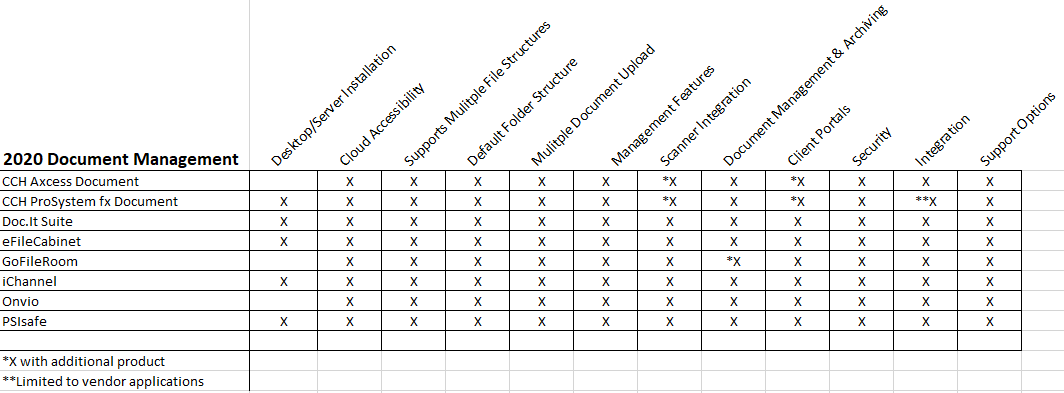
 [Click image to enlarge.]Though the early document management systems were designed with larger businesses in mind, there is such a variety of applications available now at all price points that document management software is within the reach of any firm that is ready to make the move to paperless.
 If you’re ready to demolish that stack of papers once and for all, be aware that there are two types of document management systems available: Document Storage, which is designed for electronic storage of all documents, including document organization and easy retrieval, and Document Management, which also includes nifty features like version control, that ensures that the document you’re accessing is the latest, greatest version of the document. Document management systems also typically include document archiving and annotation ability, with both coming in handy for CPA firms.
In this issue of CPA Practice Advisor, we reviewed both document storage and document management systems, with a features chart included with the review. The products we reviewed include:
Document Storage
Document Management
We also looked at a couple of document management systems that are included as part of a broader software system:
Many of these applications also offer a free demo so check a few of them out and see which ones feel right.
If you’re tired of spending your days searching for the elusive missing document, why not start managing documents smarter with a document management system? Your staff and your clients will thank you.
How often do we start and end our days in the same fashion? Our personal groundhog days see us rising at a particular time, checking on the weather either electronically or by peeking out the window, cleaning, dressing, and …
Next
Firm Management
Randy Johnston
Firm Management
Lyle Solomon, Esq.
Firm Management
Firm Management
Subscribe for free and get unlimited access to all CPA Practice Advisor content
Subscribe
CPAPA is registered with the National Association of State Boards of Accountancy (NASBA) as a sponsor of continuing professional education on the National Registry of CPE Sponsors.
© 2022 Firmworks, LLC. All rights reserved
- Published in Uncategorized
The 6 Best Contract Management Software for 2022 – Investopedia
- Published in Uncategorized
File Sharing and Document Management Software Market Future Growth Opportunities 2022-2029 by Key Players | Synology ,Dropbox ,Droplr ,Templafy – Digital Journal

Hi, what are you looking for?
By
Published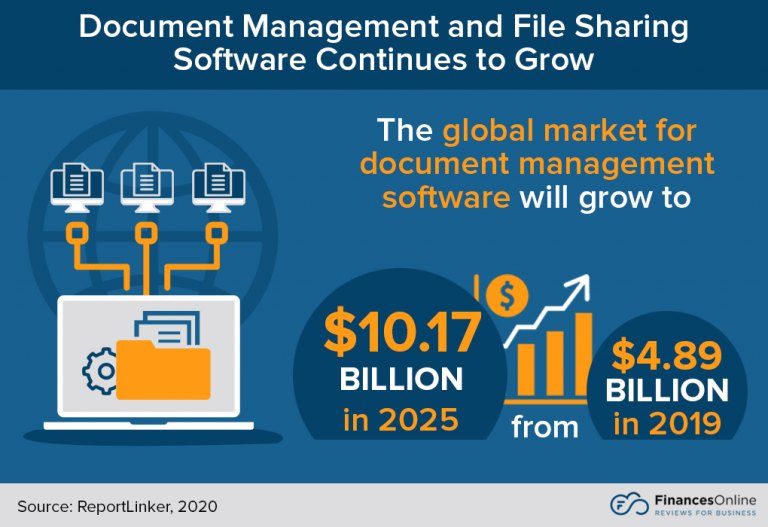
The File Sharing and Document Management Software Market Research focuses on the key trends prevailing in the global business sector. The existing Industry scenario has been studied and future projections with respect to the sector have also been investigated. Market study report comprises evaluation of numerous influential factors including industry overview in terms of recent developments in both historical and current situations, key companies, product/service application and types, key regions and marketplaces, forecast estimation for global market share, revenue and CAGR. File Sharing and Document Management Software Market Report is highly -intensive driven by high R&D investment and has strong product analysis to maintain growth and ensure long-term monetization with a forecast period of 2022-2029.
The size of the global “File Sharing and Document Management Software” market is anticipated to increase during the Forecast period at a CAGR of 26.9% (2029).
DOWNLOAD FREE SAMPLE REPORT:
https://www.marketintelligencedata.com/reports/4440316/2022-2029-global-file-sharing-and-document-management-software-professional-market-research-report-analysis-from-perspective-of-segmentation-competitor-landscape-type-application-and-geography/inquiry?Mode=S230
The record is an in-depth evaluation of a wealthy supply of essential elements that are accountable for the development of the global File Sharing and Document Management Software market. The report splits the market length, through amount and value, based on application, type, and geography. The report profiles the important members in the enterprise, along with an itemized analysis in their positions against the global landscape.
Key players in the File Sharing and Document Management Software market include:
Synology,Dropbox,Droplr,Templafy,Backlog,Wrike,FileInvite,BizPortals 365,Hightail,Citrix Systems,Microsoft,PandaDoc,Google,Samepage,PDFelement,WeTransfer,Zoho,Bitrix,EFileCabinet
Recent Developments:
Dropbox has acquired 20 companies, including 3 in the last 5 years. Dropbox’s largest acquisition to date was in 2019, when it acquired JN Projects for $230M. Dropbox has acquired in 6 different US states. The Company’s most targeted sectors include internet software and services (100%).
Microsoft has acquired 210 companies, including 45 in the last 5 years. A total of 13 acquisitions came from private equity firms. It has also divested 18 assets. Microsoft’s largest acquisition to date was in 2022, when it acquired Activision Blizzard for $68.7B. It’s largest disclosed sale occurred in 2009, when it sold Razorfish to Publicis Groupe SA for $530M. Microsoft has acquired in 26 different US states, and 21 countries. The Company’s most targeted sectors include software (55%) and internet software and services (28%).
The File Sharing and Document Management Software market is primarily split into:
Cloud Based
On-Premise
The File Sharing and Document Management Software market applications cover:
Large Enterprise
SMEs
Geographical segmentation:
ACCESS FULL REPORT:
https://www.marketintelligencedata.com/reports/4440316/2022-2029-global-file-sharing-and-document-management-software-professional-market-research-report-analysis-from-perspective-of-segmentation-competitor-landscape-type-application-and-geography?Mode=S230
What To Expect From This Report On File Sharing and Document Management Software Market
Key Opportunities:
The report analyses the File Sharing and Document Management Software Market’s key opportunities and identifies the factors that are driving and will continue to drive the industry’s growth. It considers past development designs, drivers of development, as well as flow and future patterns.
The Study Objectives of the File Sharing and Document Management Software Market are:
We offer customization on the File Sharing and Document Management Software market report based on specific client requirements:
Thank you for your interest in the File Sharing and Document Management Software Market research publications; you can also get individual chapters or regional/country report versions such as Germany, France, China, Latin America, GCC, North America, Europe or Asia.
Contact us:
Irfan Tamboli (Head of Sales) – Market Intelligence Data
Phone: +1 (704) 266-3234 | +91-750-707-8687
Mail to: [email protected]
This Press Release has been written with the intention of providing accurate market information which will enable our readers to make informed strategic investment decisions. If you notice any problem with this content, please feel free to reach us on [email protected]
Xherald is passionate about offering extensive coverage of global business news. Dedicated to creating every participant’s notification, it reaches its own reader. Daily our experts offer fresh relevant information regarding what is actually occurring in Markets as well as Business. Our headlines are actually swiftly paced and extensive. Our distributor directory connects you with brand new products or services and its market situation from the most effective companies around the planet. Xherald is driven by its 500+ contributors coming from around the world. Xherald provides local as well as global market intelligence information coverage in sectors ranging from healthcare, IOT, chemicals and 17 more sectors. Our updates are quickly paced and detailed. The news we present is actually a mix of authentic content, community contributions and curated headlines announcements. All of the updates our company supplies must pass a strict criterion of genuineness, relevance and significance to our readers.
By increasing the adoption of zero trust practices, businesses can ensure the validation of all users.
The lawsuit accusses the company of violating federal and state laws that govern notice of employment termination.
This might well be the first glimpse of a whole new principle of immunology.
US job gains topped expectations in October, official data showed Friday, as hiring remained resilient and wages moved ever higher.
COPYRIGHT © 1998 – 2022 DIGITAL JOURNAL INC. Sitemaps: XML / News . Digital Journal is not responsible for the content of external sites. Read more about our external linking.
- Published in Uncategorized