IT Zone Pakistan
IT Zone Pakistan
QUESTIONS? CALL: 0314 4166 777

IT Zone Pakistan

IT Zone Pakistan

IT ZONE PAKISTAN – Secure Document Scanning, DMS Retrieval, Shredding Services & IT Recycling

+92 314 4166 777
Email: sales@itzonepakistan.com

IT Zone Pakistan
II Chundriger Road Uni Plaza Karachi-Pakistan

Open in Google Maps
  • Home – IT Zone
  • About Us
  • Our Services
    • Office Paper Shredding – Free*
    • Document Scanning Services
    • Document Management Software
    • Office Computer Scrap Buying
  • BLOG & STORIES
  • Contact Us
FREEQUOTE
  • Home
  • BLOG & STORIES
  • Uncategorized
  • Use your iPhone’s scanner to scan without having to download any apps
October 30, 2026

Use your iPhone’s scanner to scan without having to download any apps

Use your iPhone’s scanner to scan without having to download any apps

by admin / Monday, 10 February 2025 / Published in Uncategorized
Use your iPhone's scanner to scan without having to download any apps

source

All those who are working away from the office and lack a scanner to scan any document, usually have to ask for help from third parties, or have to download an application to perform this action.

But, before this is done, it should be known that Apple has worked to integrate this option into your iPhone long ago, Telegrafi reports.

With iOS 11 launched in 2017, Apple has also integrated the scanner, which can be found in Notes, while it is very useful nowadays when most are working away from the office as a result of the pandemic.
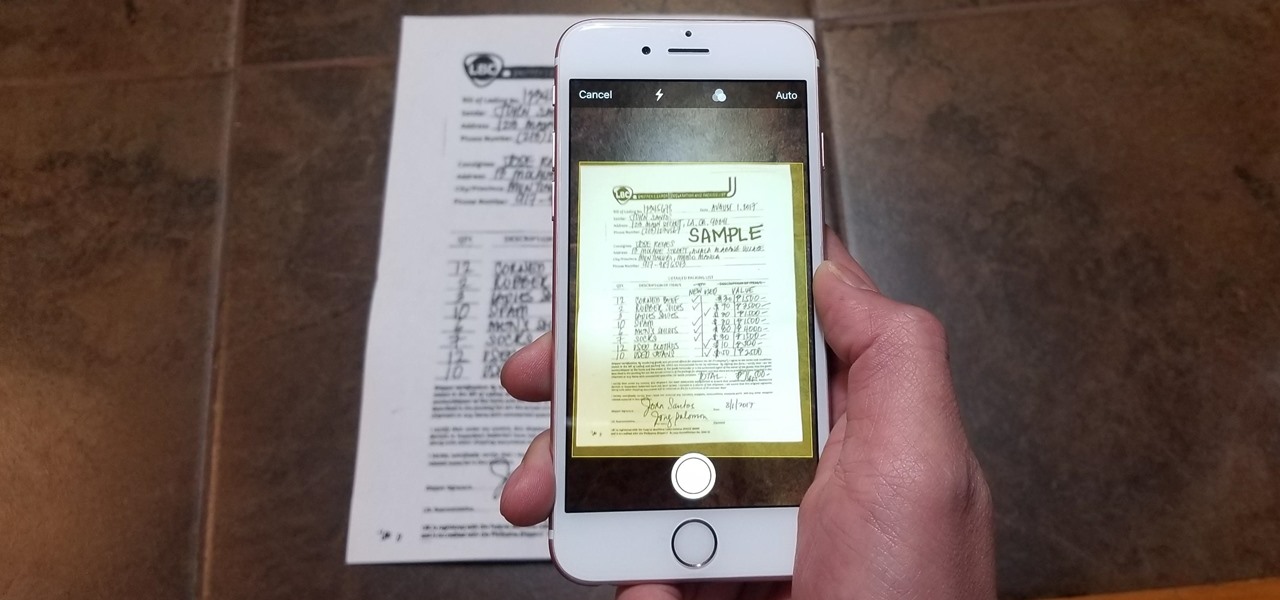
For those who didn’t know they had the scanning app on their iPhone, some tips are given, showing where it is and how it can be used.

Go to your iPhone’s Notes app and open a page, or click the little icon on the outside of the bottom.

Click on the camera icon when it appears in the menu and then select “Scan Documents” while holding the phone until it scans the entire document.

Be careful, if the scanner is in the automatic system, then it completes the process itself, while if it is in the manual format, then you need to take care to complete the scan yourself.

If you have to do it manually, then make sure that you have inserted all the corners of the document so that none are left unscanned.

Continue scanning if you have more pages, while selecting “Retake” if you want to erase everything and do a new scan from the beginning.

Press “Save” when everything is finished and you will have a PDF document, as if it was scanned in the office.

  • Tweet

About admin

What you can read next

How will Microsoft Loop affect the Microsoft 365 service – TechTarget
Automotive Logistics Market to Reach $433.6 Billion, Globally, by 2031 at 6.1% CAGR: Allied Market Research – PR Newswire
21 Examples of Robotic Process Automation – Built In

Recent Posts

  • The Best Scanners We've Tested (July 2026) – PCMag

    source...
  • IRIScan Book 7 Review: In a Steady Hand, This Wand Can Scan Anything – PCMag

    source...
  • Alaris S2070 Scanner by Kodak Alaris Review – PCMag

    source Have a large backlog of paper files? Ins...
  • Regional expansion of ScanSnap Cloud – the service enabling PC-less scanning for increased efficiency at work and in the house. – Fujitsu Malaysia – fujitsu.com

    source...
  • Epson WorkForce ES-400 II Duplex Document Scanner Review – pcmag.com

    source...

Recent Comments

    Featured Posts

    • The Best Scanners We've Tested (July 2026) – PCMag

      0 comments
    • IRIScan Book 7 Review: In a Steady Hand, This Wand Can Scan Anything – PCMag

      0 comments
    • Alaris S2070 Scanner by Kodak Alaris Review – PCMag

      0 comments
    • Regional expansion of ScanSnap Cloud – the service enabling PC-less scanning for increased efficiency at work and in the house. – Fujitsu Malaysia – fujitsu.com

      0 comments
    • Epson WorkForce ES-400 II Duplex Document Scanner Review – pcmag.com

      0 comments

    Archives

    • July 2026
    • May 2026
    • April 2026
    • March 2026
    • February 2026
    • January 2026
    • December 2025
    • October 2025
    • July 2025
    • June 2025
    • April 2025
    • February 2025
    • November 2024
    • October 2024
    • September 2024
    • January 2023
    • December 2022
    • November 2022
    • October 2022
    • September 2022
    • August 2022
    • July 2021
    • February 2021
    • December 2020
    • November 2020
    • April 2019

    Categories

    • Business
    • DMS
    • Networking
    • Technology
    • Tips
    • Uncategorized

    Meta

    • Log in
    • Entries feed
    • Comments feed
    • WordPress.org

    GET A FREE QUOTE

    Please fill this for and we'll get back to you as soon as possible!

    FACEBOOK

    2,175
    LIKES

    TWITTER

    1,050
    Followers

    PINTEREST

    101
    follower

    FOOTER MENU

    • Terms and Conditions
    • Privacy Policy
    • F.A.Q.
    • Our Services
    • BLOG & STORIES

    NEWSLETTER SIGNUP

    By subscribing to our mailing list you will always be update with the latest news from us.

    We never spam!

    GET IN TOUCH

    II Chundriger Road Uni Plaza Karachi-Pakistan
    Email: Info@Itzonepakistan.com
    Phone:
    Direct+92-314-4166-777
    Sales+92-313-8854-133

    Social Platform

    • Pin It
    • GET SOCIAL
    IT Zone Pakistan

    © 2026 IT Zone Pakistan. All rights reserved.

    TOP
    WhatsApp
    Assalam o Alaikum 👋
    Document scanning, DMS ya shredding ke baare me sawal hai? WhatsApp par baat karein.
    Open Chat
    Powered by Joinchat