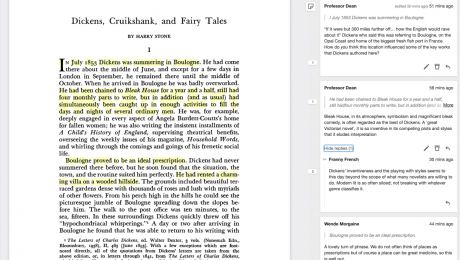
Students who use collaborative annotation tools learn and build community, according to a new study. Many faculty members are enthusiastic proponents of the tools, even while acknowledging their limitations.
Matthew Luskey, assistant director of the University of Minnesota’s writing across the curriculum program, wants undergraduates in his classes to talk with each other when they first encounter an essay such as Vershawn Ashanti Young’s “Should Writers Use Their Own English?” But several of his classes are blended, which means that some of the “talking” needs to happen online.
Luskey could direct students to a discussion board in the learning management system, but “talking” there tends to be linear; one student may comment, followed by one or two replies, followed by another student comment and so on. Also, when a student wants to refer to a section of the text on a discussion board, they must import the quote, where it sits apart from the rest of the essay, cutting short conversations that might have naturally emerged from the context.
For these reasons, Luskey is a proponent of online tools that facilitate social annotation—collaborative reading, thinking and marking up of an article, webpage, podcast, collection of images or video. Now, a new study offers evidence supporting what Luskey has long observed: online social annotation helps students understand and construct knowledge around scholarly content, while at the same time building community.
Social annotation tools may be the natural evolution of collaborative learning and reading in online spaces. Instead of students engaging in discussions about a text in a corner of a learning management platform, they congregate over the source itself. Many faculty members are enthusiastic proponents of social annotation tools, even while acknowledging their limitations.
“It’s bringing that collaborative energy right to the thing, with zero distance between it and our peers,” said Dan Whaley, CEO and founder of Hypothesis, a company that creates open-source software and pushes for standards in online social annotation.
Students have long marked up texts to make sense of reading. When they collaborate online, they not only have access to a wider range of annotation tools for text but also may annotate a wider range of content, including audio and visual sources.
To start, students go online and open an article, book, graph, photo, webpage or other object of study. Then, working asynchronously, they highlight passages and add digital comments, questions, links, images or audio or video clips. When the object of study is an audio file or video, the annotations are anchored with a time stamp. Students can also tag and aggregate notes with hashtags. The social part happens when they read and respond to each other’s annotations.
No fancy tools are needed. Students may, for example, work together on a shared Google document. But for PDFs, webpages or other artifacts, they may need a tool such as Hypothesis, a free browser extension that allows users to make private, semiprivate or public annotations. (Update: The browser extension is free for users on the web; schools that integrate the service into their learning management systems pay a fee.)
“Social annotation became hot in the pandemic,” Luskey said. “People were looking—sometimes desperately—for ways to maintain community in online spaces that weren’t initially designed to be an online space.”
When students use social annotation tools to study a shared piece of writing or other object, their peer-to-peer interaction makes their thinking visible and invites discussion.
“The text shapes the form of the conversation that is happening,” said Esteban Morales, a doctoral student in the University of British Columbia language and literacy education program. The marked-up version that results serves as a “heat map” for the interaction.
When social annotation happens online, students construct knowledge by way of elaborating, clarifying and asking questions, according to a study Morales and his team published this year based on 2,121 annotations written by 59 students in three undergraduate courses at a Canadian university. Students might, for example, list assumptions in a reading, connect ideas with examples or ask questions that prompt further discussion.
At the same time, students who engage in online social annotation also build consensus, support each other and debate—though to a lesser degree than they elaborate or clarify, and ask questions—according to the study. For example, they might negotiate a definition or interpretation, empathize with each other, or offer a different point of view in a direct reply.
Social annotation activities may also redress instances of inequity. Unlike in-person class discussions, students who prefer to reflect before responding have equal opportunity (within the bounds of the assignment deadline) as those who are quick to reply. Likewise, marginalized students who may be less inclined to speak in class may be more at ease adding their voices to the digital notes.
Despite the benefits of social annotation, instructors interested in incorporating the practice into their teaching can get started in less-than-perfect ways, according to proponents.
As with other technology, instructors should first ensure that they know how to use the tool. Then they should allocate class time to instruct students on its use. Even when all are versed in the mechanics, students may need guidance on how to engage.
“Something similar happens with peer response, right?” Luskey said. “The research shows it’s a good practice, but we’ve all had crappy experiences doing peer response—oftentimes when we don’t know what we’re supposed to be doing, when there’s no protocol, procedure or clarity about the process.”
Guidance for annotators often involves two steps.
“Highlight something that is confusing and ask a question about it,” Derek Bruff, visiting associate director at the University of Mississippi’s Center for Excellence in Teaching and Learning, suggested as an example. “Highlight something that you find surprising and then write why you find it surprising. Highlight something that reminds you of something else we studied, and make that connection explicit.”
Social annotation may help students grapple with, for example, a first pass on a reading, though it may be less effective when they are asked to summarize or respond to an argument about a whole document, according to Bruff. Also, faculty members who adopt the tools specifically for autograding features may be disappointed.
“They’re not just there because they must make seven annotations and respond to two of their peers’ comments,” Bruff said. “That’s going to bring a lot of artificiality to it.”
Ithaka, a nonprofit focused on improving access to knowledge and education, recently made a $2.5 million investment in Anno, the public benefit corporation that is home to Hypothesis. The two organizations are also working together on a pilot project that will enable instructors and students at select colleges to use Hypothesis to annotate articles available in JSTOR within their learning management systems. In time, they plan to provide the service to all JSTOR users.
“We’re hopeful that connecting Hypothesis and JSTOR will accelerate the beneficial use of annotation by faculty and students all over the world,” Kevin Guthrie, president of Ithaka, said of the digital library that houses more than 12 million journal articles, books, images and primary sources spanning 75 disciplines.
Social annotation advocates in academe and beyond, including a (now-closed) working group of the World Wide Web Consortium that develops internet standards, envision a world in which the practice of layering conversation over original sources is interoperable and ubiquitous.
“I don’t know ultimately whether it will be Hypothesis that brings [open interoperable annotation] to the world—we certainly hope so—but it’s coming,” Whaley said. “This is a core new capability that will be embedded everywhere … in the same way that the web and [learning management systems] are ubiquitous. Students will take for granted that somebody is there to help on that sentence … that help is on tap whenever and wherever they might need it.”
Resources for faculty and staff from our partners at Times Higher Education.

Many universities and companies funnel their students and employees into various software suites. If you’re taking a course, pursuing a degree, or participating in professional training, you might be asked to use software that you simply want to avoid, for a range of different reasons. For those looking to get away from Microsoft Office, many free programs will fully replace the usual office suite. Besides, almost all of them are compatible with Windows. Read on for a selection of free office suites that are downloadable on your PC and browser.
Microsoft’s famous Office suite has been considered the benchmark among office and institutional applications for more than fifteen years. Unfortunately, each year, the pricing policy does not always favor users. Others might find their signature applications like Word and PowerPoint clunky and look for better alternatives.
This free office suite works for Windows, Linux, and Android.
· Supports Microsoft file formats
· Cross-platform
WPS Office Free is a smaller version of the premium office suite, but its impact on most hard drives is negligible. Each of the three programs of the package is as intuitive as the latest versions of Word, Excel, and PowerPoint, and is equipped with the same number of functions.
It supports a vast number of file formats, including those developed by Microsoft. The package does not have database software, but there is a great free PDF reader. The minus of the package is it displays a certain number of advertisements. They do not interfere with work and are a small fee for a completely free office software package. There are versions of WPS Office Free for Windows and Linux systems, as well as applications for Android devices.
This application is a cross-platform office suite that stores your files in the cloud.
· Available for desktops and mobile devices
· Includes 1 GB of cloud storage
To start working with the package programs, you need to log in using Facebook or Google or create an account. This is necessary because the Polaris Office is a cloud service. Your free Polaris account comes with 60 MB of monthly data transfer, 1 GB of cloud storage and can be used on up to three devices (one desktop PC and two mobile devices).
If you use a smartphone, you may be familiar with the mobile version of Polaris Office. This cross-platform free office software is available for Windows, macOS, Android, and iOS and comes with some smartphones. It is compatible with all Microsoft document formats and offers a simple interface with some basic settings. Recently, this application acquired a reputation for being one of the best word alternative programs among users. If this is not enough, you can connect Polaris Office to Google Drive, Dropbox, Box, Microsoft OneDrive and Amazon Cloud Drive, or save the work locally on your device.
The free version contains almost all the tools of the premium version.
· Supports Microsoft formats
· Includes PDF reader
Like WPS Office Free, SoftMaker FreeOffice provides analogs for Microsoft Word, Excel, and PowerPoint (TextMaker, PlanMaker, and Presentations, respectively). The package includes support for Microsoft formats, and also offers an easy conversion to PDF and Epub. FreeOffice has a somewhat old-fashioned navigation mode, significantly different from the already simple navigation of the latest Microsoft packages.
This well-made application is more than just an online office suite. Read and discover more useful information about applications on RocketFiles.com if you like various software.
· Complete open-source solution
Open365 is a fully-featured cloud desktop package. It includes the critical components of the LibreOffice suite (Writer, Calc, and Impress), as well as the Photoshop-esque GIMP image editor, Kontact Linux email package, and Seafile cloud storage. This suite is one of the applications that allow users to work with documents efficiently.
While you work with a file transfer and create a cloud storage mirror, there is a local client on your hard drive, although you still need to run the software itself in a browser. Being a full featured software, the package is quite heavy both in terms of download time and the load it exerts on your PC system.
Featured Image: Christian Wiediger, Unsplash.
Sorry. No data so far.
Twitter
LinkedIn
YouTube
ElearningInside News brings vetted, well-sourced and investigated news stories to the e-Learning community. We aspire to produce relevant, timely and insightful news stories, profiles and solutions to help educate our readers.
© 2022 eLearningInside.com All Rights Reserved.