


OneDrive and SharePoint are popular Microsoft products that have some crossover features. With that, it’s not always clear what their differences are or how you should use them. To clean up any confusion, we’ve assembled this SharePoint vs OneDrive guide.
This SharePoint vs OneDrive article isn’t so much a head-to-head, but rather a guide that clearly outlines the difference between these Microsoft products. Because the two services are often linked, it’s easy to get confused about what each of them does, and which one (if not both) you should be using.
SharePoint Online and OneDrive are predominantly cloud-based products. They both come with storage space and they both can be a home for documents, images and videos. Despite their similarities, both SharePoint and OneDrive target different audiences. In this piece, we’ll break both services down and give you a clear idea of their features.
While we’ll give you a good chunk of information about both services, it’s worth checking out our individual reviews to really grasp what they’re about. Both our OneDrive review and our SharePoint review will help you decide if either or both services suit your needs.
Microsoft Teams is a communication tool built for instant messaging with team members. SharePoint is a place to build internal communication sites and effectively manage documents. OneDrive is a cloud-based storage solution to back up files online and is suitable for personal, family and business use.
No. The SharePoint platform is designed for advanced document management, whereas OneDrive better serves as a place to upload, share and sync files to the cloud.
Both SharePoint and OneDrive are excellent online tools and excel at what they do. We would only consider SharePoint better for business users looking for advanced document management and communication tools.
While OneDrive and SharePoint both provide an online space to access files, their broader use is what separates them. SharePoint is predominantly an online document management system and communication site. OneDrive is a cloud storage solution that people mainly use to create an online backup of their files.
You may be thinking, but you can create documents in both OneDrive and SharePoint. Yes, this is true. However, the intention of those documents is different.
SharePoint, for example, lets you create what is called a “SharePoint site,” and its features primarily target business use and teams. OneDrive, on the other hand, can serve as personal storage for your Uncle Steve who wants to back up his biking photos and poetry.
That’s not to dumb down what OneDrive is capable of (we’ll go into advanced use shortly), but it should give you a clearer idea of each product’s target audience and how their features cater to each of them.
Microsoft 365 is the main hub that contains a range of Microsoft products, including both OneDrive and SharePoint. You’ll also find software like Word and Excel, plus communication tools such as Microsoft Teams.
You can purchase SharePoint and sign up to OneDrive plans without having to pay for other products. Alternatively, you can subscribe to the range of 365 plans and incorporate all of Microsoft’s productivity and communication tools, plus its project management tool.
Microsoft OneDrive is a mainstream cloud-based service. It can play home for your personal files like photographs, family videos and documents that you wish to create. It’s also an excellent collaboration tool, as it lets multiple users with remote access work on files either simultaneously or at different times.
OneDrive is also useful for anyone who wishes to share files and folders. Take a photographer, for example. If they need to send multiple images to a publisher, they can upload them to OneDrive, send a link to the publisher and grant them access to the images.
Not only is OneDrive a place to store files, it’s also a space to create them. Microsoft integrates the online versions of its Office tools, allowing users to create documents, spreadsheets, presentations and more — directly on the web. Because OneDrive instantly syncs your files, you can access them on multiple devices, including mobile devices.
Beyond storing files, a SharePoint site has several features that make it easier to circulate company updates across your business, as well as being a home for developing business-related documents.
A SharePoint site has two functions. The first is for team collaboration and is known as a SharePoint team site; the other is a communication site, which allows you to ping both short- and long-form updates to your team or whole business.
For documents, think of SharePoint as an online folder system. Remember the days when all your paper files were stored in large filing cabinets? This is the same theory, only the practice is done digitally. Online document storage makes it far easier to be efficient with your sorting of documents, and it’s also more secure and disaster-proof.
If you’re looking to take all your files from your computer and upload them to online file storage, OneDrive is the way to go. It’s also good for freelancers who create documents (writers, for example) and need to share them with clients while also backing them up to the cloud.
OneDrive is also a good option for those looking for personal cloud storage to back up their files from their smartphones. It’s not the only option, however, and those looking for cloud storage for their mobile device should check out our best cloud storage for Android and the best cloud storage iPhone articles.
For those who need an enterprise-level product to manage documents and create intranet pages, SharePoint is the path to take. It’s useful for adding signatures to important business contracts and for building a broader collaborative workspace. On that note, we’ll break down even further what SharePoint has to offer.
As you’ll see below, SharePoint has plenty of features that go beyond what OneDrive can do. We’ll go over the main features to be aware of and provide you with an overview of what each of them can do for you.
Enterprise-grade security is somewhat of a buzz term. It essentially means a company is applying the highest level of security measures to protect your data.
SharePoint uses industry-standard encryption to protect your data both in transit and at rest. It also employs round-the-clock oversight for when security patches are required or customer data may be under threat.
A SharePoint library allows you to create different categories for your documents. This helps you separate financial, legal, training documents, etc. to create a better online filing system.
You can access your document library in your communication and team sites. It’s also possible to manage access for other users, so they can only work within the library you authorize.
Microsoft integrates all the tools needed to create documents directly in SharePoint. Whether it’s a Word document or an Excel spreadsheet, you and your team can be productive without leaving the SharePoint software.
Newly created documents automatically sync to the cloud and they’ll also exist as OneDrive files, allowing you to access them either on SharePoint or the OneDrive platform.
Just like cloud-based storage, SharePoint allows you to share your files with a single user or with groups you have created inside the platform. You’re able to grant permissions for users to edit, view or review the document. If you’re authorized, you can also share files with users outside your organization.
SharePoint is a collaboration tool, and because it’s an online solution, it makes it easy for two or more people to work on the same document simultaneously. This is what SharePoint calls co-authoring, and because it works in real time, you can have one person writing a document and another person editing, for example.
It also includes version history, which is on by default and allows users to view previous versions of documents. It’s a great way to restore documents and remind yourself what changes have been made.
A news post is essentially a blog post that you publish within your company. It’s a good way to craft short- or long-form articles that keep your business teams updated on what’s going on in your company. Making a news post is easy and is done so in blocks, allowing you to blend images, text and videos.
Managing documents comes with many tedious tasks. Thankfully, SharePoint allows you to create many useful automations that remove the need to manually perform certain actions.
For example, you can program SharePoint to send emails for approval when a new document is created or edited. If you’re working with contracts, you can also send automated digital signature requests.
Microsoft has integrated lists inside SharePoint. With lists, you can develop easily digestible content that clearly outlines anything from issue tracking to content scheduling. Microsoft provides you with the option to create a fresh list, or you can use one of the several templates available for a quicker workflow. Read our Microsoft SharePoint tutorial to learn more tips.
If you want to make quick notes for ideas or objectives, you can do so with OneNote. It’s labeled as a NoteBook inside SharePoint. It’s best used for paragraph-sized concepts that you want to make note of for later or to discuss with other members of your team.
If you don’t wish to use the online version of SharePoint, it’s also available as locally installed software. This is referred to as “on-premise software.” This means your IT team has full control over the software and is responsible for things like responding to security breaches, working on updates and patches and performing backups.
You should now have a better understanding of the core differences between OneDrive and SharePoint. They’re both great for file storage and file sharing, but as outlined above, the way you use and implement each software is vastly different.
Those who need more than just a space to store files and work with important documents should of course consider using SharePoint. For those who need a simple space for their range of files and may want some productivity tools, OneDrive will be more than enough.
Did you find this guide helpful? Are there similar comparisons you would like us to write? What’s your favorite document management software? Let us know in the comments. Thanks for reading.
Article states the obvious. Missing details
document.getElementById( “ak_js_1” ).setAttribute( “value”, ( new Date() ).getTime() );
Also interesting
Most popular on Cloudwards
© 2007-2023 Cloudwards.net – We are a professional review site that receives compensation from the companies whose products we review. We test each product thoroughly and give high marks to only the very best. We are independently owned and the opinions expressed here are our own.
Because the Cloudwards.net team is committed to delivering accurate content, we implemented an additional fact-checking step to our editorial process. Each article that we fact check is analyzed for inaccuracies so that the published content is as accurate as possible.
You can tell that an article is fact checked with the Facts checked by symbol, and you can also see which Cloudwards.net team member personally verified the facts within the article. However, providers frequently change aspects of their services, so if you see an inaccuracy in a fact-checked article, please email us at feedback[at]cloudwards[dot]net. We strive to eventually have every article on the site fact checked. Thank you.


January 13, 2023 10:00 ET | Source: FMW Media Works Corp FMW Media Works Corp
New York City, New York, UNITED STATES
NEW YORK, Jan. 13, 2023 (GLOBE NEWSWIRE) — New to The Street / Newsmax TV announces the air of its national syndicated show this Saturday, January 14, 2023, at 3:30 PM ET.
New to The Street’s 426th TV episode line-up, features the following six (6) Corporate interviews:
1). Cybersecurity – Zerify, Inc’s. (OTCQB: ZRFY) ($ZRFY) interviews Mr. Mark Kay, CEO, and Mr. George Waller, Executive Vice-President.
2). Private Equity – Frank Song’s, Private Equity Investor, interview.
3). Neuroacoustic Software –NuCalm’s® interview with Jim Poole, President/CEO.
4). Email/Messenger Privacy Solutions – Sekur Private Data, Ltd.’s (OTCQX: SWISF) (CSE: SKUR) (FRA: GDT0) interview with Alain Ghiai, CEO.
5). Ecology Solutions – The Sustainable Green Team’s (OTCQX: SGTM) ($SGTM) interview with Tony Raynor, Founder, President, and CEO.
6). “Sekur Privacy & Sekur Security Segment” interview with internet privacy expert Mr. Alain Ghiai, CEO, Sekur Private Data Ltd. (OTCQX: SWISF) (CSE: SKUR) (FRA: GDT0) (Sekur®).
Mark Kay, CEO, and George Waller, Executive Vice-President of Zerify, Inc. (OTCQB: ZRFY) ($ZRFY), join New to The Street’s TV Host Jane King from the Nasdaq MarketSite studio to talk about the Company. Zerify, Inc. is a cybersecurity solutions provider with products to protect against cyber theft and cybersecurity breaches for individuals, businesses, and governmental agencies. George talks about the Company’s press releases introducing new clients in the music, aerospace, and health/wellness industries, each with their unique business model and a must-needed solution for cybersecurity threats. Governmental mandates require its aerospace and health/wellness clients to have compliant cybersecurity platforms to meet or exceed governmental requirements. The music recording label client is using Zerify’s “Zero-Trust” product to enhance the content offering to its 1/2 million fan base and secure themselves from being hacked to steal data. Mark informs viewers that ZRFY expects 2023 to be a great year for business operations, anticipating closing more large and small clients. Management is actively looking for more investors, and on January 20, 2023, Zerify, Inc. will stream a virtual shareholder meeting using the “Zero-Trust” video conferencing platform. Throughout 2023, viewers will hear more from Zerify and its operational status. The on-screen QR code is available during the show; download or visit Zerify, Inc. – https://www.zerify.com/.
From the Nasdaq MarketSite studio, TV Host Jane King from New to The Street talks with Frank Song, Private Equity Investor. With a successful story from homelessness to an eight-figure net worth, Frank passionately tells his life story. Forbes Magazine published an article: “From Walmart to Wall Street: Frank Song’s Eight-Figure Business Journey” (Published: April 15, 2021) which foretold his struggles, ambitions, and success. A book about Frank’s career and life story is forthcoming, and perhaps a movie in the future. When you have absolutely nothing, Frank explains to his positivity to viewers that when you have no fear in failing, you have nothing else but to go upwardly. Yes, David tells viewers that his story is somewhat like another successful Wall Street professional’s story, Chris Gardner, who was homeless and impoverished. The movie, “The Pursuit of Happyness,” based on Gardner’s book, inspired Frank on his journey to success. Frank’s investment successes are a focus on fundamentals with a traditional mindset, looking at investment ideas that make sense to him. He used a cliché, “Prince for life is better than a King for a Month,” meaning he works methodically with the expectation for the best possible long-term investment outcomes. Frank wants to help as many people as possible overcome their limitations; if he can, they can. The on-screen QR code is available during the show; download or visit Frank Song’s website – https://franksong.com/.
New to The Street’s TV Jane King interviews Jim Poole, President/CEO at NuCalm®. From the Nasdaq MarketSite studio, Jim talks about the Company’s patented, clinically proven neuroscience technology that addresses brain circuitry. The neuroacoustic software technology platforms reduce stress, improve sleep, and increase performance. Jim explains the science behind NuCalm, and how Dr. Blake Holloway discovered and developed the neuroacoustical sound wave technology after many years of research. Using alpha and theta transmissions, played through music on a headset, end-users enjoy improvements in sleep and reduce stress. Until now, the cost was too high for most to enjoy the platforms. The Company worked diligently to change its FDA designation from a medical device to a consumer product, a successful change that now makes the application available to many. From 2009 to 2015, the Company had about 9,000 clients. But now, with the new designation, the Company has over 91,000 clients and growing. Military personnel, sports stars, doctors, and others enjoy the NuCalm, which is simple and affordable. For a non-drug related solution to stress, sleep, and other performance issues, clinical studies prove NuCalm works to change the brain waves frequencies for positive outcomes. The on-screen QR code is available during the show; download or visit NuCalm® – https://nucalm.com/.
Mr. Alain Ghiai’s, CEO at Sekur Private Data, Ltd. (OTCQX: SWISF) (CSE: SKUR) (FRA: GDT0), is on a video conference interview with New to The Street’s TV Host Jane King to talk about Company’s secure and private e-communication platforms. Jane talks about the recent spike in email phishing campaigns, and Alain states that these email attacks are not going away anytime soon. The phishing attacks are up about 61% in 2022 and expect these attacks to continue upwardly. A harmful email is sent to a recipient using a hacked email account or an email that looks similar, the recipient opens the email, and malware and other viruses are now on the computer system. Recently, 500 million hacked WhatsApp users’ information looks to be available for sale on the “Dark Web.” There is no change, the Big Tech open platforms are vulnerable, and hacked data is sold and resold. Using Sekur’s subscription-based solutions can ensure individuals, businesses, and governmental agencies that e-communications transmission remain private and secure. SekurMail/SekurMessenger with SekurSend/SekurReply and “Chat-by-Invite” features available on iOS and Android can give end-users a secure, encrypted communication platform with self-destruct timers. Sekur.com offers a one-week free trial; if an end-user would like to subscribe, rates are very reasonable. Alain offers PROMO CODE: SEKUR25, which gives 25% off monthly and yearly subscription rates. End-users who choose a 1-year subscription get an additional two months free. Sekur uses no 3rd party technology providers, never asks for phone numbers, does no data mining, never sells data, and controls/owns its servers in Switzerland, a country with the strictest privacy laws in the world. The on-screen QR code is available during the show to download more info or visit Sekur Private Data, Ltd. – https://www.sekurprivatedata.com/ and http://www.Sekur.com.
From the Nasdaq MarketSite studio, New to The Street airs TV Host Jane King’s interviews with The Sustainable Green Team’s (OTCQX: SGTM) ($SGTM) Tony Raynor, CEO. As a holding Company with many wholly owned subsidiaries, SGTM deploys and develops innovative solutions to mitigate tree waste and other byproducts. Tony talks to viewers about the Company listing its shares on the higher-tier platform on OTC Markets. The OTCQX is the highest possible trading tier available and provides the investment community with more transparencies to make investment decisions. Recently, the Company held in Orlando, Florida its first ever “Global Mission” symposium in December 2022. A clip shows a room-full of like-minded professional individuals determined to make an ecological difference on Earth, utilizing current and new technologies to improve soils, agricultural initiatives, and water conservations. Several attendees spoke about what they plan on doing to assist SGTM in their corporate goal to create more green reusable products and help the planet as whole idea. In 2022, the Company entered a collaboration with an Australian company, VRM BioLogik Group, which developed a product that creates water from organics. SGTM’s management will continue aggressively seeking partnerships with like-minded individuals and entities to find more environmentally sustainable solutions and products. The on-screen QR code is available during the show; download or visit The Sustainable Green Team – https://www.thesustainablegreenteam.com/.
New to the Street TV airs its “Weekly Sekur Privacy & Sekur Security Segment” with internationally acclaimed internet privacy expert Mr. Alain Ghiai, CEO at Sekur Private Data, Ltd. (OTCQX: SWISF) (CSE: SKUR) (FRA: GDT0) and TV Host / Multi-media Journalist Ana Berry. Ana talks to Alain about her recent experience check-in at the CES Trade show in Las Vegas, NV. The CES Show is one of the largest tech trade shows, and they wanted her to use WhatsApp to send them a copy of her driver’s license. WhatsApp has had problems with hack issues, with about 500 million of its users’ data hacked and stolen. Ana told Alain that she used her SekurMail account to send the necessary credentials to the show’s administrators, bypassing the Big Tech open-source platform. Alain told viewers that anyone who use open-source platforms to send private and sensitive data could become a hacker’s target. Many hacked and stolen data is often found on the “Dark Web” for sale. If you are sending private and secure information, the best idea is to subscriber to one of Sekur’s encrypted platforms; available for individuals, businesses, and governmental agencies. Alain recommends viewers learn more about Sekur products by going to the video tutorials on the Company’s website – https://sekur.com/en/tutorials. The Company offers a 1-week free trial, and a PROMO CODE: SEKUR25 for 25% off monthly and yearly subscriptions. Users who decided to go for a full-year subscription get additional savings because they enjoy two months free when signing-up. Sekur Private Data doesn’t use any Big Tech open-source platforms and never data mine or use 3rd party providers. The Company owns, controls, and operates its servers in Switzerland, a country with the most stringent privacy laws in the world. The on-screen QR code is available during the show to download more info or visit Sekur Private Data, Ltd.- https://www.sekurprivatedata.com/ and http://www.Sekur.com.
About Zerify, Inc. (OTCQB: ZRFY) ($ZRFY):
Zerify, Inc. (OTCQB: ZRFY) ($ ZRFY), formerly StrikeForce Technologies, is an Edison, New Jersey-based company with over two decades of experience in cybersecurity solutions. The Company helps to prevent cyber theft and data security breaches for consumers, corporations, and government agencies through powerful multi-factor “out-of-band” authentication and keystroke encryption along with mobile solutions. Zerify offers a video conferencing solution that uses no desktop and is entirely web-based, offering a five-level meeting security control approach designed to protect valuable information. Features include keystroke protection, anti-screen capture, and push and biometric authentication to keep businesses secure. The technology also protects cameras, microphones, and speakers, keeping computers and confidential data secure even offline and not on a video conference. No other video conferencing service on the market, such as Zoom, Webex, LogMeIn, MS Teams or BlueJeans, offers these protections – https://www.zerify.com/.
About Frank Song, Private Equity Investor:
Frank Song is currently managing $100 million in committed capital to pursue buyouts of, partnerships with, and/or building highly profitable businesses in unsexy markets. Frank increases enterprise value by implementing a significant, sustainable competitive advantage in businesses. Frank looks to increase operating sophistication, pursuing strategic acquisitions or partnerships to create a national oligopoly or local/regional monopoly dynamic, implementing technology advantages, and improving performance marketing returns. Additionally, Frank currently works as a confidential advisor to businesses with at least $10 million in revenue and advises politicians in implementing an art of war campaign in their markets or campaigns to defeat competitors who are larger or better resourced. Previously, Frank worked at Accel-KKR, one of the top private equity funds (based on returns), where he helped manage the $4.0 billion fund by completing buyouts and growth equity investments for $100 million – $1 billion technology companies – https://franksong.com/.
About Nucalm®:
NuCalm® is the world’s only patented neuroscience technology with clinical results to resolve stress – without drugs. NuCalm induces parasympathetic nervous system dominance and suspends the body in a state of restoration and recovery. It consists of a simple-to-use three-part system, NuCalm biosignal processing disc, NuCalm’s patented neuroacoustic software and NuCalm eye mask. NuCalm has been a leader in health technology by providing access to an all-natural, safe, reliable, and easy to use platform that allows users to change their mental state on demand, from the deepest moments of sleep to the highest feelings of focused intensity. The NuCalm neuroacoustic software presents varying frequencies, embedded within instrumental music and soundscapes, in a nonlinear and binaural fashion to the brain to create auditory evoked potentials in the alpha (~8-12Hz) or theta (~4-8Hz) brain wave range and sustain them over a long period. NuCalm’s patented software oscillates brain wave function between deep relaxation and recovery and guides the brain to alpha and theta zones, the point of deep relaxation and recovery – https://nucalm.com/.
About Sekur Private Data Ltd. (OTCQX: SWISF) (CSE: SKUR) (FRA: GDT0):
Sekur Private Data, Ltd. (OTCQX: SWISF) (CSE: SKUR) (FRA: GDT0) is a cybersecurity and internet privacy provider of Swiss-hosted solutions for secure communications and secure data management. The Company distributes a suite of secure cloud-based storage, disaster recovery, document management, encrypted emails, and secure communication tools. Sekur Private Data, Ltd. sells its products through its websites www.sekur.com, and approved distributors, and telecommunication companies worldwide. Sekur Private Data, Ltd. serves consumers, businesses, and governments worldwide – https://www.sekurprivatedata.com and https://www.sekur.com; Twitter: @sekurprivate.
About The Sustainable Green Team, Ltd. (OTCQX: SGTM) ($SGTM)
The Sustainable Green Team, Ltd. (OTCQX: SGTM) ($SGTM) is an emerging provider of environmentally beneficial solutions for preserving natural resources and the municipal waste and recycling industries. The Company is a wholesale manufacturer and supplier of wood-based mulch and lumber products, primarily in the Midwest, Southeast, and Ohio Valley regions. The Company also provides arbor care and storm recovery services to municipalities, corporations, and consumers, primarily in the southeastern United States. The Company plans to expand its operations through organic growth and strategic acquisitions that are both accretive to earnings and positioned for rapid growth from the resulting synergistic opportunities identified. The Company’s customers include governmental, residential, and commercial clients – https://www.thesustainablegreenteam.com/.
About New to The Street:
New to the Street is an FMW Media production that operates one of the longest-running US and International sponsored and syndicated Nielsen Rated programming television brands, “New to The Street,” and its blockchain show, “Exploring The Block.” Since 2009, these brands have run biographical interview segment shows across major U.S. television networks. The paid-for-television programming platforms can potentially reach over 540 million homes in the US and international markets. FMW’s New to The Street / Newsmax televised broadcasting platform airs its syndication on Saturdays at 3:30 – 4:00 PM ET. FMW is also one of the nation’s largest buyers of linear television, long and short-form paid programming – https://www.newsmaxtv.com/Shows/New-to-the-Street & https://www.newtothestreet.com/.
Forward-Looking Statements Disclaimer:
This press release contains forward-looking statements within Section 27A of the Securities Act of 1933, as amended, and Section 21E of the Securities Exchange Act of 1934. In some cases, you can identify forward-looking statements by the following words: “anticipate,” “believe,” “continue,” “could,” “estimate,” “expect,” “intend,” “may,” “ongoing,” “plan,” “potential,” “predict,” “project,” “should,” “will,” “would,” or the negative of these terms or other comparable terminology. However, not all forward-looking statements contain these words. Forward-looking statements are not a guarantee of future performance or results and will not necessarily be accurate indications of the times at which such performance or results are achieved. This press release should be considered in all filings of the Companies contained in the Edgar Archives of the Securities and Exchange Commission at www.sec.gov.
CONTACT:
FMW Media Contacts:
+1 (631) 766-7462
Bryan@NewToTheStreet.com
“New to The Street” Business Development Office
1-516-696-5900
Support@NewToTheStreet.com
A photo accompanying this announcement is available at https://www.globenewswire.com/NewsRoom/AttachmentNg/9dd69ed8-7bf3-4a7e-86cb-d74a442bd8f2

The best onboarding software for new employees in 2023
Your email has been sent
Looking for an employee onboarding solution? Check out our list of the best onboarding software for small to large businesses.
-
Gusto: Best for small businesses
-
Freshteam: Best for a centralized HR system
-
GoCo: Best for organizations with over 100 employees
-
BambooHR: Best for combined recruiting and onboarding efforts
-
Eddy: Best for remote worker onboarding
Hiring new talent is an ongoing necessity for growing companies. However, bringing a new hire on board can be a challenging and sometimes-overwhelming process as you manage different types of paperwork, grant access to various company systems, manage employee benefits, set up credentials and ensure the new hire feels welcome, prepared and comfortable with information overload.
SEE: Checklist: Onboarding and offboarding IT staff (TechRepublic Premium)
Onboarding software can make this process easier for HR, management and the new hire by streamlining and automating onboarding processes. This guide will provide information about the best onboarding software, the top features and benefits of working with this kind of technology, and how to choose the right onboarding solution for your own business.
Jump to:
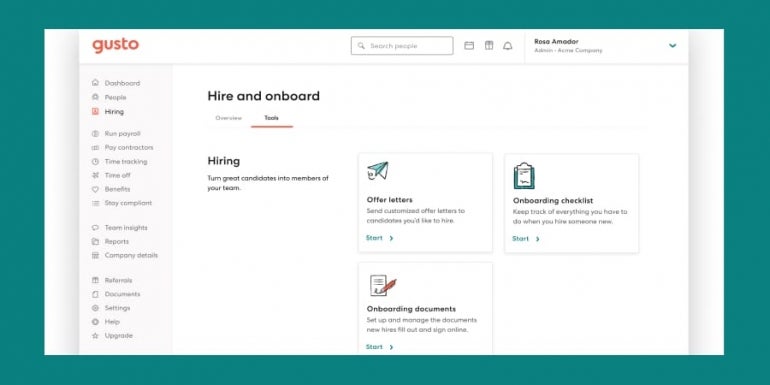
Gusto is a complete HR software solution that offers payroll, onboarding and insurance features. Specifically for onboarding needs, Gusto simplifies the process with custom onboarding checklists and software provisioning support. Its simplicity and ease of use make it ideal for small businesses.
There are three pricing models for Gusto: Simple, Plus and Premium. Pricing starts at a fixed price of $40 per month with $6 per month per person added on.
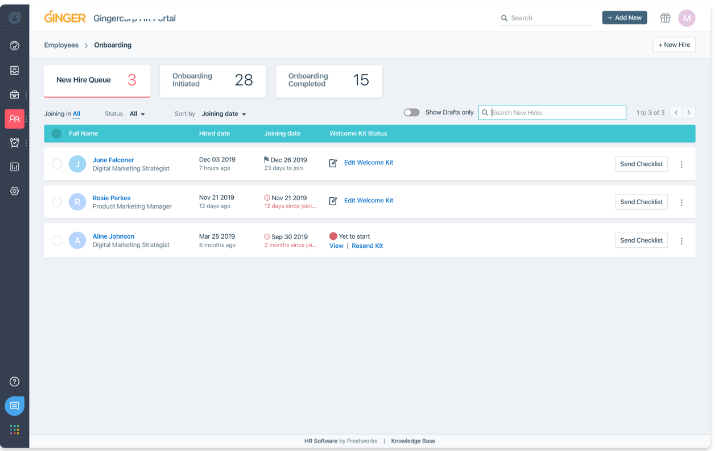
Freshteam by Freshworks is one of the best-centralized HR platforms that can handle a variety of HR functions, including job posting, onboarding and securing all employee information in a centralized database. It also has an excellent mobile app, ideal for on-the-go HR professionals. The mobile app can be used to schedule interviews, view candidate profiles and foster collaboration for HR teams.
Freshteam pricing depends on which of their four plans — Free, Growth, Pro or Enterprise — you choose. The free plan has a maximum limit of 50 employees. The paid plans start at $1 per employee per month with a $59 platform fee per month if you choose to subscribe to their annual plan. Monthly plans start at $1.20 per employee per month with a $71 platform fee per month.
GoCo is highly customizable onboarding software that starts with a blank slate. Users have several options to create workflows and automate their processes, creating a hands-free onboarding experience that is tailored to the requirements of their business. From hiring to managing benefits, this is an all-in-one onboarding solution. The pricing model of GoCo is $5 per employee per month.

If you are looking for HR software that handles all recruiting and onboarding functions, then BambooHR is one of the best options on the market. From job posting to onboarding, it can manage all HR functions.
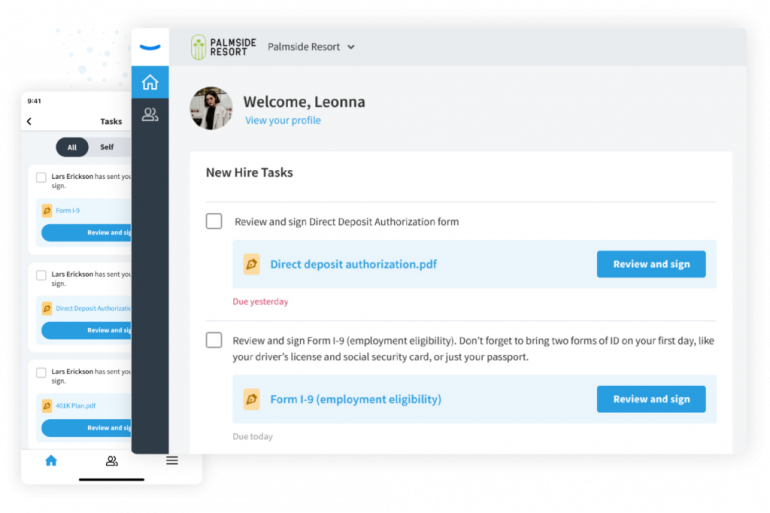
Beyond the most basic of onboarding features, BambooHR differentiates itself with self-service onboarding for new employees, electronic signature functionality and offboarding support resources for HR administrators. The pricing model for BambooHR is customized based on business needs, so you’ll need to contact BambooHR to get a quote based on your requirements.


Eddy is a top choice for a streamlined onboarding process that eliminates the need for tedious HR paperwork. Not only can it be used for all onboarding processes, but it also has inbuilt functionality for payroll, paid time off, hiring and more. In addition, with features such as the Eddy welcome package, remote workers will have a more immersive experience during onboarding.
The Eddy HR suite includes four modules: Eddy Hire, Eddy People, Eddy Train and Eddy Payroll. Onboarding features are mostly included in the Eddy People module. Different pricing models are offered at Eddy, with the most basic version starting at $8 per month per employee.

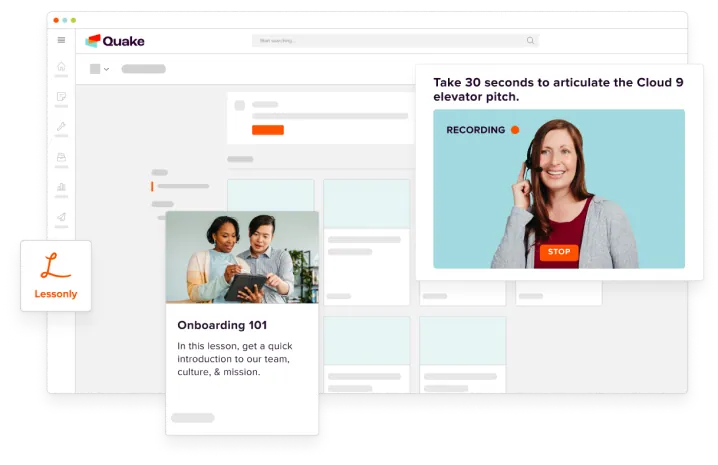
Lessonly, acquired by Seismic in 2021, is learning management software that offers a complete onboarding tool set for administrators. It is best for organizations that require extensive training for new hires, such as customer service companies and organizations that require specific compliance or safety training.
Lessonly by Seismic comes with a customized pricing model. Prospective customers will need to contact the Seismic team directly for more information.
The user interface for onboarding software needs to be easy to use and have some customization so you set it up according to your preferences. The interface can influence the learning curve of the software and how effectively your HR team and new hires move through the onboarding lifecycle. Ideally, your HR team should be able to get familiar with the solution as quickly as possible, either with self-service features or built-in training support.
If you plan on using third-party software for onboarding and hiring, it’s a good idea to ensure the onboarding software you choose integrates with these other tools. For example, if two different solutions exist for onboarding and payroll, you want the information to flow seamlessly between the two applications.
Each organization can and likely does have a unique workflow for onboarding. The onboarding software you choose should allow users to set up workflows and automate repetitive tasks. It also helps to have pre-built templates to guide users on how workflows should work.
A documentation management tool and e-signature features are essential in onboarding software to digitize the onboarding process, especially with companies that hire distributed and remote workforces. The software should have document validation and approval features to help expedite the hiring process.
The reporting features of onboarding software help to provide visibility into the overall process. Reporting also gives HR access to analytics to help monitor and improve the onboarding experience over time.
Most traditional onboarding methods, whether manual processes or legacy systems, are inefficient. Taking time to complete the onboarding process is tedious for HR, and the new hire can also feel frustrated.
SEE: Onboarding/offboarding checklist (TechRepublic Premium)
Onboarding software can drastically improve onboarding efficiency by automating specific processes, using prebuilt templates and encouraging better collaboration.
Some companies might be concerned about the learning curve of onboarding software; however, the best products are designed to have a user-friendly interface and offer basic training and support to get HR teams familiar with the tools.
One of the HR teams’ goals is to have a consistent and repeatable process for hiring and onboarding. This ensures that any change in HR personnel does not disrupt the hiring or onboarding process. It also helps HR team members follow the right procedures and protocols for onboarding.
Onboarding software can help these teams develop a single source of truth for important hiring documentation, training and other resources that are needed throughout the onboarding process.
Another key benefit of onboarding software is its compatibility with compliance efforts. The best onboarding software ensures all employee documentation is organized and stored according to company policies and industry standards.
SEE: Data governance checklist for your organization (TechRepublic Premium)
The tracking features of onboarding software provide visibility on the documentation. The software eliminates the need for manual paperwork; all documentation can be saved digitally on company services or the cloud. Any missing fields or documentation are flagged, so HR knows there are pending tasks to complete the onboarding process.
The subscription fees for onboarding software provide an excellent return on investment, as companies get to lower their personnel costs of hiring and onboarding. This is achieved by minimizing the need for HR positions dedicated to more monotonous onboarding tasks that software can handle.
Onboarding software also helps to free up the time of HR personnel so they can focus on aspects of their work that cannot be automated, such as interviewing candidates and resolving workplace conflicts.
The goal of onboarding software is to make life easier for HR teams and new hires. Onboarding software enables the new hire to start performing in their role as quickly as possible and allows HR to meet their compliance requirements and measure the effectiveness of their processes.
To choose the best onboarding software, you first need to determine your onboarding requirements and priorities. For example, are you looking for a solution with multiple HR functions, such as payroll and job posting? Do you want to use the application for post-hire training and managing benefits?
Some of the best onboarding software options are all-in-one solutions. Still, there are several excellent products that allow you to either choose individual modules that you want to purchase or others that only offer specialized HR functionality with the option of third-party application integration.
Once you have decided what software you need for your business, you can evaluate it based on several factors, including ease of use, technical support and integrations with your tech stack. Whichever software you choose, it is clear that onboarding can be a relaxed process with the right internal procedures and excellent software solutions in place.
Read next: The best applicant tracking systems (TechRepublic)
Discover the secrets to IT leadership success with these tips on project management, budgets, and dealing with day-to-day challenges.
The best onboarding software for new employees in 2023
Your email has been sent
Your message has been sent
TechRepublic Premium content helps you solve your toughest IT issues and jump-start your career or next project.
Looking for the best payroll software for your small business? Check out our top picks for 2022 and read our in-depth analysis.
Next year, cybercriminals will be as busy as ever. Are IT departments ready?
The company, which for several years has been on a buying spree for best-of-breed products, is integrating platforms to generate synergies for speed, insights and collaboration.
Organize a number of different applicants using an ATS to cut down on the amount of unnecessary time spent finding the right candidate.
Whether you are a Microsoft Excel beginner or an advanced user, you’ll benefit from these step-by-step tutorials.
This policy provides guidelines for reclaiming and reusing equipment from current or former employees. It outlines the steps that must be carried out by authorized individuals before this equipment can be considered safe to reassign. The following checklist will help ensure that all the appropriate steps are taken for equipment reassignment. From the policy: ASSET …
Choosing a vendor to provide cloud-based data warehouse services requires a certain level of due diligence on the part of the purchaser. This Cloud Data Warehouse Guide and the accompanying checklist from TechRepublic Premium will help businesses choose the vendor that best fits its data storage needs based on offered features and key elements. From …
Finding the right person to fill the role of robotics engineer can be tricky because of the combination of skills required. This kit includes a detailed job description, sample interview questions and a concise want advertisement to simplify the task. From the job description: INTRODUCTION For many industries and enterprises, manufacturing of any kind is …
Organizations, regardless of size, face ever-increasing information technology and data security threats. Everything from physical sites to data, applications, networks and systems are under attack. Worse, neither an organization nor its managers need to prove prominent or controversial to prove a target. Automated and programmatic robotic attacks seek weaknesses, then exploit vulnerabilities when detected. As …